

- Posts: 8
- Thank you received: 1
Tax is calculated from the total amount!
5 years 3 months ago #334024
by mckater
Tax is calculated from the total amount! was created by mckater
Hello,
I have a Problem in my card with the tax.
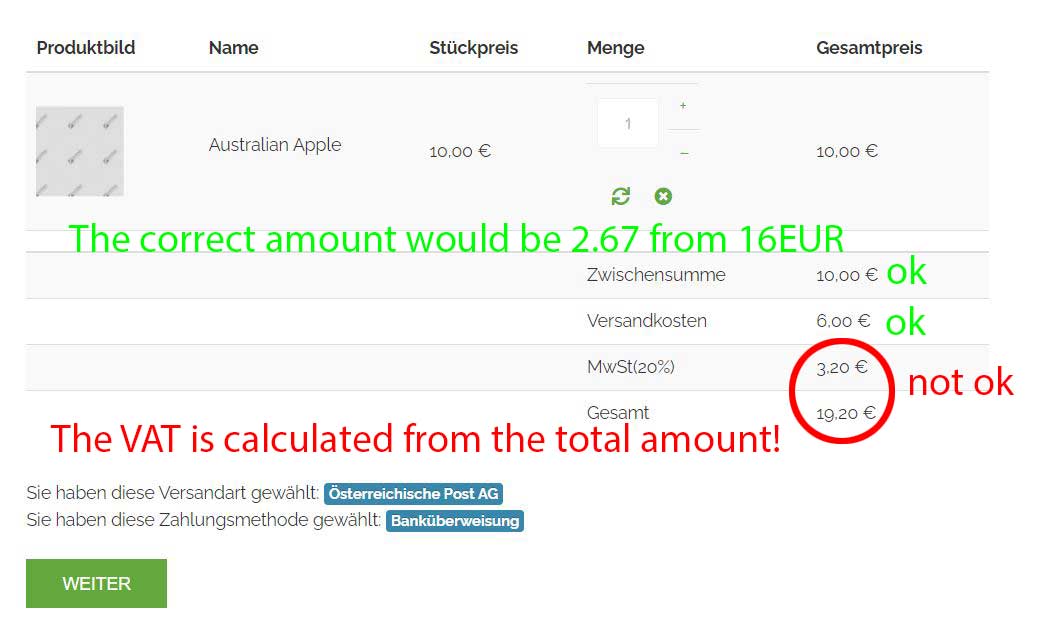
Product price is okay, shipping cost okay, but the tax is calculatet from the total amount!
(see picture attached)
Regards,
Reinhard
I have a Problem in my card with the tax.
Product price is okay, shipping cost okay, but the tax is calculatet from the total amount!
(see picture attached)
Regards,
Reinhard
Please Log in or Create an account to join the conversation.

5 years 3 months ago #334025
by nicolas
Replied by nicolas on topic Tax is calculated from the total amount!
Hi,
It's hard to say what it could be without more information.
Could you please provide :
- a screenshot of the "tax" section, under the main tab of the HikaShop configuration page
- a screenshot of the System>Taxes listing
- a screenshot of the settings of your Australian Apple product's prices area
- a screenshot of the settings of the shipping method settings
That way, we'll be able to understand the exact situation and tell you what you need to change to get the desired result
It's hard to say what it could be without more information.
Could you please provide :
- a screenshot of the "tax" section, under the main tab of the HikaShop configuration page
- a screenshot of the System>Taxes listing
- a screenshot of the settings of your Australian Apple product's prices area
- a screenshot of the settings of the shipping method settings
That way, we'll be able to understand the exact situation and tell you what you need to change to get the desired result
Please Log in or Create an account to join the conversation.
5 years 3 months ago #334035
by mckater
Replied by mckater on topic Tax is calculated from the total amount!
Hi Nicolas,
attached I send you the pictures of my configurations
Thanks,
Reinhard
attached I send you the pictures of my configurations
Thanks,
Reinhard
Please Log in or Create an account to join the conversation.
5 years 3 months ago #334049
by nicolas
Replied by nicolas on topic Tax is calculated from the total amount!
Hi,
Thanks for the screenshots.
20% of 10 is 2, and 20% of 6 is 1.2, right ? 2 + 1.2 is 3.2. So I'm not sure how you calculate 2.67 ?
Note that the tax amount is always calculated based on the untaxed price.
Could you please double check your calculations ?
Thanks for the screenshots.
20% of 10 is 2, and 20% of 6 is 1.2, right ? 2 + 1.2 is 3.2. So I'm not sure how you calculate 2.67 ?
Note that the tax amount is always calculated based on the untaxed price.
Could you please double check your calculations ?
Please Log in or Create an account to join the conversation.
5 years 3 months ago #334053
by mckater
Replied by mckater on topic Tax is calculated from the total amount!
Hello Nicolas,
I can explain it to you.
For me, the customer prices in the shop are the seller price with tax.
Of these prices, the tax should then be included in the invoice in the area MwSt excluded.
Why should I show for my customers net prices?
The shopper see in example 10 Eur and then in the Bill this price with additionally tax?
I always prices the products for sellers in price with tax. (For end users)
Have you any idea what my problem is with the German tax?
I tested in products and in the card, but the amount is equal the price of the product. The tax is created with 19% but only the Austria tax with 20% is okay in the Shop
Regards,
Reinhard
I can explain it to you.
For me, the customer prices in the shop are the seller price with tax.
Of these prices, the tax should then be included in the invoice in the area MwSt excluded.
Why should I show for my customers net prices?
The shopper see in example 10 Eur and then in the Bill this price with additionally tax?
I always prices the products for sellers in price with tax. (For end users)
Have you any idea what my problem is with the German tax?
I tested in products and in the card, but the amount is equal the price of the product. The tax is created with 19% but only the Austria tax with 20% is okay in the Shop
Regards,
Reinhard
Please Log in or Create an account to join the conversation.
5 years 3 months ago #334058
by nicolas
Replied by nicolas on topic Tax is calculated from the total amount!
Hi,
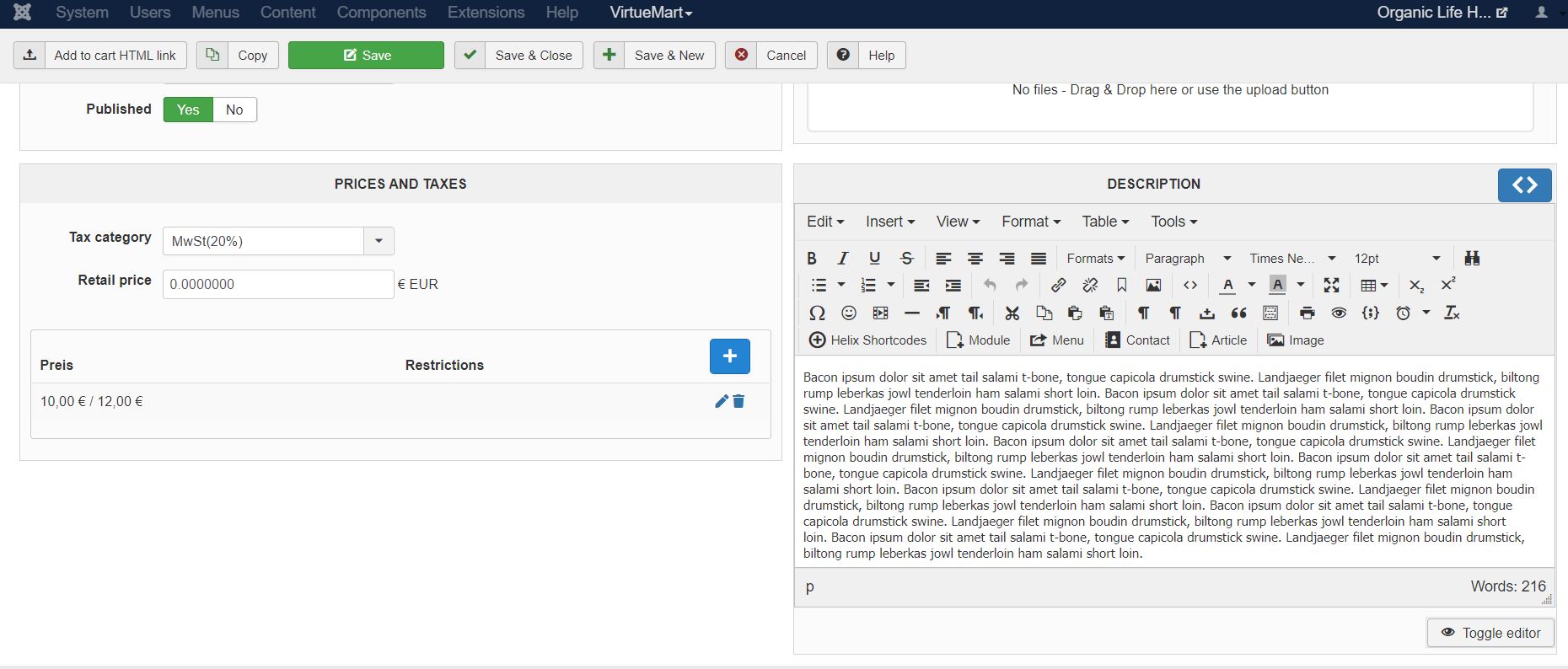
On your screenshot www.hikashop.com/media/kunena/attachments/61700/product_2.JPG I can see that you entered a price without taxes of 10 and a price with taxes of 12.
Now, you're telling me that you want the price with taxes to be 10. So you need to change that in the settings of your product.
Then, in the HikaShop configuration, you want to change the "show taxed prices" to yes so that you display the prices of the products with the taxes on your shop and not the prices without taxes.
Now, if you want the price with taxes displayed to the customer to be always 10, regardless of where they are based, and then that the tax is calculated dynamically off of it, then you want to activate the "floating tax prices" setting in the HikaShop configuration. And in that case, when you edit the price of a product, you'll see that instead of having both a "price with tax" and a "price without taxes" input there, you'll have only the "price with taxes" input where you'll be able to enter 10.
Also, I can see that you selected the tax category MWst 20% in your product. That means that only the tax rules with that tax category selected will be taken into account on the frontend. However, one of your tax rule, you've selected another tax category. This means that this tax rule will never be used for that product.
In your case, you want only one tax category, assign all your products to that tax category, and all your tax rules to that tax category.
Tax categories are useful when you sell things that needs to be taxed differently in the same area. For example, if you sell alcohol taxed at 30% and books taxed at 5% in the same shop in the same country, you want two different tax category for the different products.
On your screenshot www.hikashop.com/media/kunena/attachments/61700/product_2.JPG I can see that you entered a price without taxes of 10 and a price with taxes of 12.
Now, you're telling me that you want the price with taxes to be 10. So you need to change that in the settings of your product.
Then, in the HikaShop configuration, you want to change the "show taxed prices" to yes so that you display the prices of the products with the taxes on your shop and not the prices without taxes.
Now, if you want the price with taxes displayed to the customer to be always 10, regardless of where they are based, and then that the tax is calculated dynamically off of it, then you want to activate the "floating tax prices" setting in the HikaShop configuration. And in that case, when you edit the price of a product, you'll see that instead of having both a "price with tax" and a "price without taxes" input there, you'll have only the "price with taxes" input where you'll be able to enter 10.
Also, I can see that you selected the tax category MWst 20% in your product. That means that only the tax rules with that tax category selected will be taken into account on the frontend. However, one of your tax rule, you've selected another tax category. This means that this tax rule will never be used for that product.
In your case, you want only one tax category, assign all your products to that tax category, and all your tax rules to that tax category.
Tax categories are useful when you sell things that needs to be taxed differently in the same area. For example, if you sell alcohol taxed at 30% and books taxed at 5% in the same shop in the same country, you want two different tax category for the different products.
Please Log in or Create an account to join the conversation.
5 years 3 months ago #334085
by mckater
Replied by mckater on topic Tax is calculated from the total amount!
Hello Nicolas,
Thank you for the detailed help on my problem!
As I understand, I should advertise all products with just one tax rate in the products.
In addition to this tax rate, create others, which will be recognized anyway if the customer is from Germany.
What I didn't understand is the price of the product because I thought it was gross and not net price.
So when I buy from Amazon, I buy this price without VAT. Because then I have to advertise the products with excl. Tax?
Anyway, I'll just try to see if I can do it. It's a shame that at HakiShop you can't assign a VAT for every product, for example books or something like that.
Thanks again!
Regards, Reinhard
Thank you for the detailed help on my problem!
As I understand, I should advertise all products with just one tax rate in the products.
In addition to this tax rate, create others, which will be recognized anyway if the customer is from Germany.
What I didn't understand is the price of the product because I thought it was gross and not net price.
So when I buy from Amazon, I buy this price without VAT. Because then I have to advertise the products with excl. Tax?
Anyway, I'll just try to see if I can do it. It's a shame that at HakiShop you can't assign a VAT for every product, for example books or something like that.
Thanks again!
Regards, Reinhard
Please Log in or Create an account to join the conversation.
5 years 3 months ago #334090
by nicolas
Replied by nicolas on topic Tax is calculated from the total amount!
Hi,
When you edit a product in the backend, you have both inputs. One for the gross price and one for the net price:
i.imgur.com/e2sFbiZ.png
When you enter the price without taxes, it will calculate the price with taxes based on the selected tax category, and the tax rules you have setup and the "main tax zone" setting of your Hikashop configuration.
And when you enter the price with taxes, it will calculate similarly the price without taxes.
In fact, I can see on your screenshot www.hikashop.com/media/kunena/attachments/61700/product_2.JPG that you have the price without tax set to 10 and the price with taxes set to 12.
I'm not sure what you mean by "you can't assign a VAT for every product,". If we were to allow you to enter a tax amount for each product, then you wouldn't be able to have different tax rates for different countries, or different amounts for different prices of the same product, or different tax rates for different user groups.
That's why in the product you select a tax category.
And then, the tax rules allow you to link the tax categories with the tax rates based on the country, user group, user type, etc.
When you edit a product in the backend, you have both inputs. One for the gross price and one for the net price:
i.imgur.com/e2sFbiZ.png
When you enter the price without taxes, it will calculate the price with taxes based on the selected tax category, and the tax rules you have setup and the "main tax zone" setting of your Hikashop configuration.
And when you enter the price with taxes, it will calculate similarly the price without taxes.
In fact, I can see on your screenshot www.hikashop.com/media/kunena/attachments/61700/product_2.JPG that you have the price without tax set to 10 and the price with taxes set to 12.
I'm not sure what you mean by "you can't assign a VAT for every product,". If we were to allow you to enter a tax amount for each product, then you wouldn't be able to have different tax rates for different countries, or different amounts for different prices of the same product, or different tax rates for different user groups.
That's why in the product you select a tax category.
And then, the tax rules allow you to link the tax categories with the tax rates based on the country, user group, user type, etc.
Please Log in or Create an account to join the conversation.
Time to create page: 0.212 seconds