

- Posts: 72
- Thank you received: 5
Problem with taxes (Canada)
5 years 4 months ago - 5 years 4 months ago #334059
by mlehr
Problem with taxes (Canada) was created by mlehr
-- url of the page with the problem -- :
megiq.com/shop/
-- HikaShop version -- : 4.4.3
-- Joomla version -- : 3.9.27
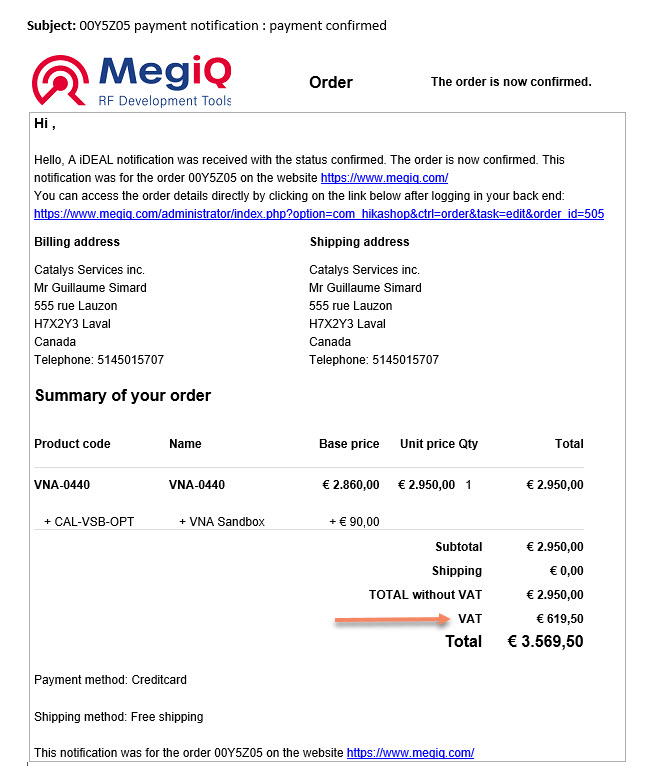
Tax only should be added to customers in the EU. But e.g. customers from Canada also get VAT. How to solve this problem?
-- HikaShop version -- : 4.4.3
-- Joomla version -- : 3.9.27
Tax only should be added to customers in the EU. But e.g. customers from Canada also get VAT. How to solve this problem?
Last edit: 5 years 4 months ago by mlehr. Reason: Can I make this question private?
Please Log in or Create an account to join the conversation.
5 years 4 months ago #334075
by mlehr
Replied by mlehr on topic Problem with taxes (Canada)
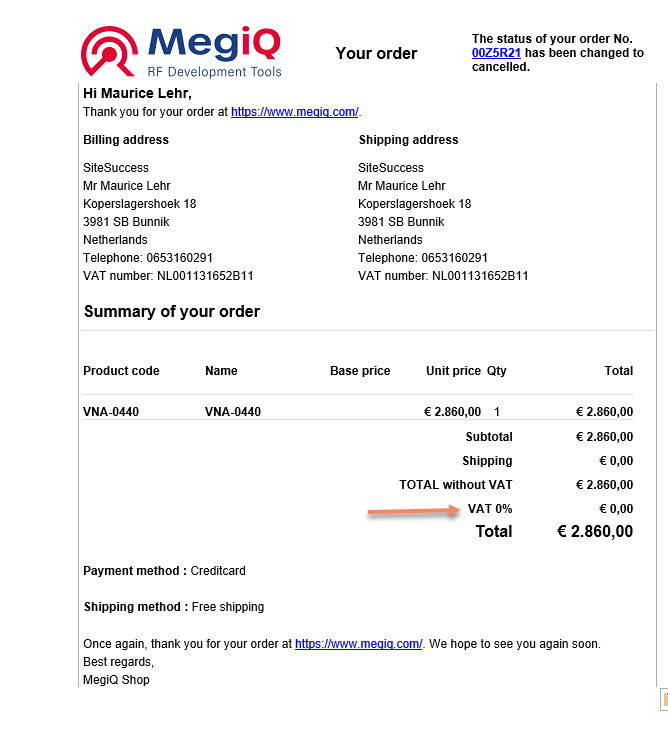
Additional info for client from The Netherlands. It should calculate VAT, but it does not. See printscreen. Please help.
Please Log in or Create an account to join the conversation.

5 years 4 months ago #334067
by nicolas
Replied by nicolas on topic Problem with taxes (Canada)
Hi,
Well, you need to check your tax rules in the menu System>Taxes.
Something must be wrong there.
Please provide a screenshot of that page and we should be able to tell you what's wrong.
Well, you need to check your tax rules in the menu System>Taxes.
Something must be wrong there.
Please provide a screenshot of that page and we should be able to tell you what's wrong.
Please Log in or Create an account to join the conversation.
5 years 4 months ago #334108
by mlehr
Replied by mlehr on topic Problem with taxes (Canada)
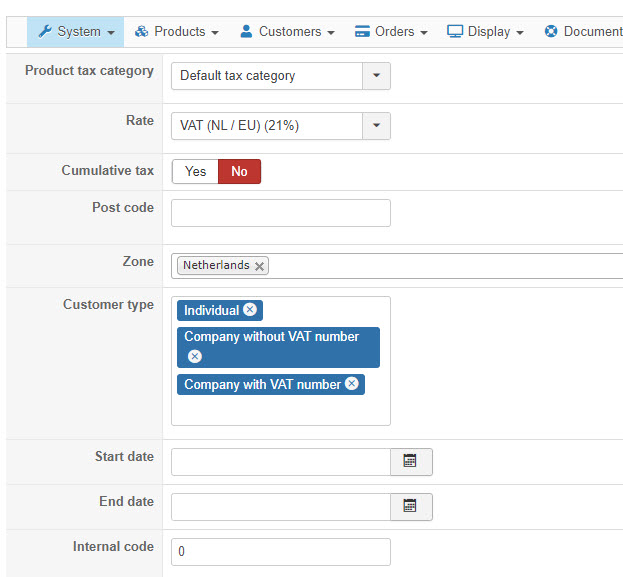
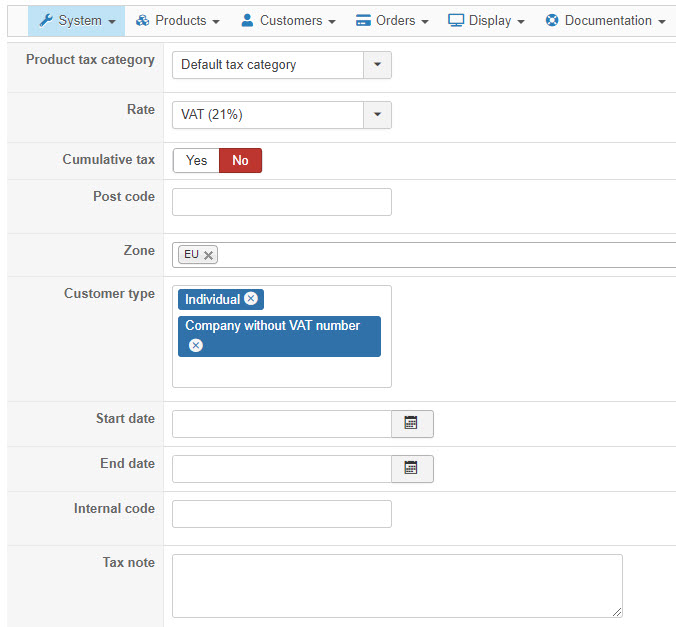
Here are all the screenshots.

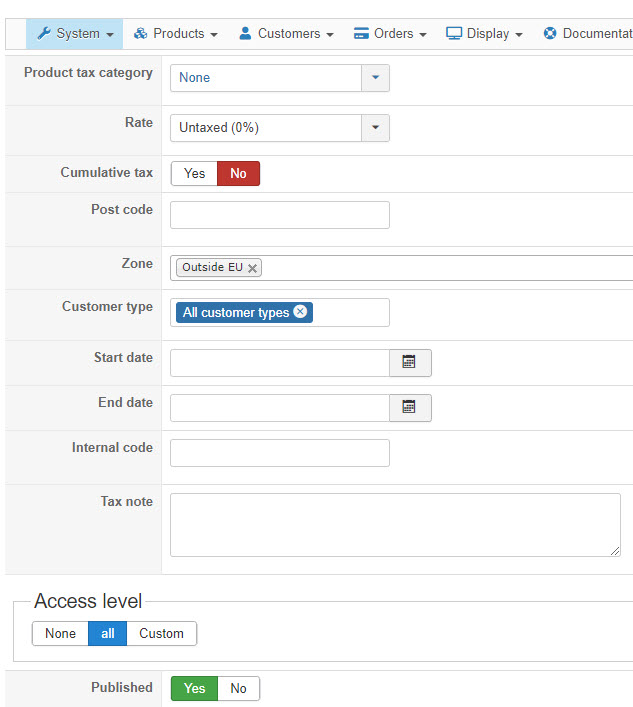
Please Log in or Create an account to join the conversation.
5 years 4 months ago #334119
by nicolas
Replied by nicolas on topic Problem with taxes (Canada)
Hi,
First, make sure that the product you're testing with has its "tax category" setting set to "default tax category".
Second, I would say that the issue might be with the "EU" and "Outside EU" zones.
The EU zone should be of the type "tax" and contain all the EU countries except the netherlands.
The "outside EU" zone should also be of the type "tax" and contain on the other countries, not in the EU.
Also, in your shipping methods, there is a setting "override tax zone". If you set this setting, it will use the zone selected here instead of the zone of the shipping address when the shipping method is selected. So it could potentially come from there too.
Please check all this.
First, make sure that the product you're testing with has its "tax category" setting set to "default tax category".
Second, I would say that the issue might be with the "EU" and "Outside EU" zones.
The EU zone should be of the type "tax" and contain all the EU countries except the netherlands.
The "outside EU" zone should also be of the type "tax" and contain on the other countries, not in the EU.
Also, in your shipping methods, there is a setting "override tax zone". If you set this setting, it will use the zone selected here instead of the zone of the shipping address when the shipping method is selected. So it could potentially come from there too.
Please check all this.
Please Log in or Create an account to join the conversation.
5 years 4 months ago #334167
by mlehr
Replied by mlehr on topic Problem with taxes (Canada)
The tax category is correctly set for the products.
The shipping methods are also correctly set in terms of tax.
About EU and outside the EU zones the following.
I already provided you screenshots with the settings, see my previous post. Are they not correct?
These settings used to work fine but not anymore since one of the last updates of hikashop.
You also write that the EU zone must be the "tax" type: do you mean the customer type? I don't see a field with just the name type.
Now is just set EU zone. Does each individual country still have to be selected? And why is it now and not before?
The shipping methods are also correctly set in terms of tax.
About EU and outside the EU zones the following.
I already provided you screenshots with the settings, see my previous post. Are they not correct?
These settings used to work fine but not anymore since one of the last updates of hikashop.
You also write that the EU zone must be the "tax" type: do you mean the customer type? I don't see a field with just the name type.
Now is just set EU zone. Does each individual country still have to be selected? And why is it now and not before?
Please Log in or Create an account to join the conversation.
5 years 4 months ago #334174
by nicolas
Replied by nicolas on topic Problem with taxes (Canada)
Hi,
You didn't provide any screenshot regarding your EU zone and outside EU zone.
These can be found in the menu System>Zones. When you edit them there, you'll see a "type" setting where you should have "tax" selected instead of "country" or "state".
I am not talking about the customer type setting of your tax rules.
While you can select each individual country in a tax rule, you can create a tax zone with all the countries you want as sub zones of that tax zone, and then select that tax zone in your tax rule. Either way is fine.
If you believe that everything is setup properly, please provide a backend access along with a link to this thread for reference via our contact form and we'll look into it:
www.hikashop.com/support/contact-us.html
You didn't provide any screenshot regarding your EU zone and outside EU zone.
These can be found in the menu System>Zones. When you edit them there, you'll see a "type" setting where you should have "tax" selected instead of "country" or "state".
I am not talking about the customer type setting of your tax rules.
While you can select each individual country in a tax rule, you can create a tax zone with all the countries you want as sub zones of that tax zone, and then select that tax zone in your tax rule. Either way is fine.
If you believe that everything is setup properly, please provide a backend access along with a link to this thread for reference via our contact form and we'll look into it:
www.hikashop.com/support/contact-us.html
Please Log in or Create an account to join the conversation.
5 years 4 months ago #334184
by mlehr
Replied by mlehr on topic Problem with taxes (Canada)
Everything looks correct. I have send you backend access.
Please Log in or Create an account to join the conversation.
5 years 4 months ago #334195
by nicolas
Replied by nicolas on topic Problem with taxes (Canada)
Hi,
I got your backend access.
I've made a mass action with an action "display the results" to check the data of your addresses in the database, and I can see that all the addresses end up with the "malta" state selected automatically when I edit / create an address on your website.
I don't see how that's possible.
I've even disabled the custom state field in HikaShop and it's still happening.
So I'm thinking you must have a custom plugin doing that for some reason. And that's why the system sees all the addresses as being in the EU because the address_state of the addresses is forced with "malta" which is in the EU.
Do you know what it could be on your end ? Because there is no such thing in HikaShop by default.
I got your backend access.
I've made a mass action with an action "display the results" to check the data of your addresses in the database, and I can see that all the addresses end up with the "malta" state selected automatically when I edit / create an address on your website.
I don't see how that's possible.
I've even disabled the custom state field in HikaShop and it's still happening.
So I'm thinking you must have a custom plugin doing that for some reason. And that's why the system sees all the addresses as being in the EU because the address_state of the addresses is forced with "malta" which is in the EU.
Do you know what it could be on your end ? Because there is no such thing in HikaShop by default.
Please Log in or Create an account to join the conversation.
5 years 3 months ago #334244
by mlehr
Replied by mlehr on topic Problem with taxes (Canada)
I checked everything, but there is no custom plug-in that can cause this problem.
Please advise further steps.
Please advise further steps.
Please Log in or Create an account to join the conversation.
5 years 3 months ago - 5 years 3 months ago #334256
by mlehr
Replied by mlehr on topic Problem with taxes (Canada)
Some addional information.
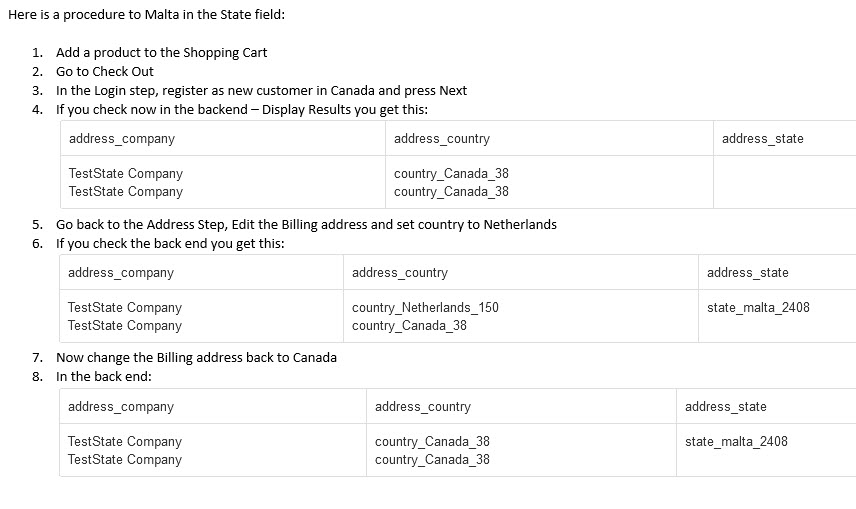
Here is a procedure to Malta in the State field:
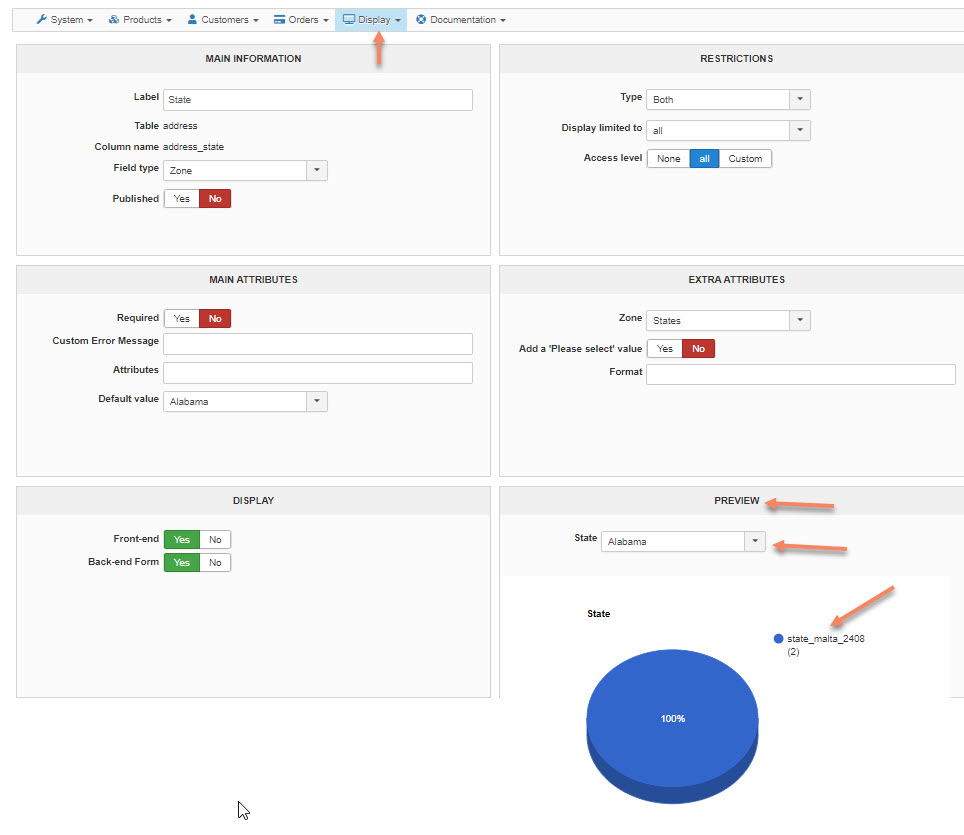
Custom address_state field, see screenshot. Look at the preview part.
First of all, Malta is not a state but a country!
In the pull down list Malta is not mentioned.
But still the graph mentions state_malta_2408.
All very strange...
Here is a procedure to Malta in the State field:
Custom address_state field, see screenshot. Look at the preview part.
First of all, Malta is not a state but a country!
In the pull down list Malta is not mentioned.
But still the graph mentions state_malta_2408.
All very strange...
Last edit: 5 years 3 months ago by mlehr.
Please Log in or Create an account to join the conversation.
5 years 3 months ago #334257
by nicolas
Replied by nicolas on topic Problem with taxes (Canada)
Hi,
Yes. I've done these tests already before my previous message.
And you can note that the custom field address_state is unpublished. I've unpublished and made that test, after fixing the address_state of all the addresses in your database to make sure that it was not HikaShop doing it since HikaShop won't take into account unpublished custom fields for the saving of the address.
Regarding Malta being a country, you're correct that Malta is a country.
But In HikaShop we have both Malta as a country and Malta as a state of that country, being the main island of Malta. There is another state named "gozo" for the two northen islands of the country.
Anyway, there is no reason why HikaShop would set that state in the address_state column, since that not even the default value of the state field.
Besides a custom plugin, I don't see what it could be.
Further steps will be painful if you don't know where this comes from. It requires adding logging of data in the code.
The first step is to edit the file administrator/components/com_hikashop/classes/address.php and in the save function there, you can see the function triggerEvent being called 4 times.
Before and after each of these lines, you need to add something like that:
hikashop_writeToLog($addressData, 'xxx');
where "xxx"to be replaced by some text describing the location being logged (for example: 'before onBeforeAddressCreate' or 'after onBeforeAddressCreate').
Once that is done, the "payment log file" in the HikaShop configuration needs to be checked after the issue has been reproduced once.
What you'll see there should be that the address_state attribute is empty before a triggerEvent and then filled with state_malta_2408 after it, confirming that the issue comes from a plugin.
Then, to know which plugin does that, similar debug needs to be added to the function trigger of libraries/joomla/event/dispatcher.php
However, you want to do it only if the $event is equal to the name of the event for which you found the address_state being set to state_malta_2408.
Once you analyze the log data after reproducing the issue again, you should find the name of the plugin doing it and from there you can unpublish it or disable it to check that you don't have the issue without it.
We can do all that for you if you want. However, please understand that I've already spent 2 hours in your backend looking at your HikaShop and testing things and replying to you. We'll charge you for the time spent working on this if this is not a bug in HikaShop (which it won't be as there is no reason HikaShop would set that specific state in the addresses on your website while it doesn't for everyone else).
If you're interested, you can use our contact form to provide a FTP access and a link to this thread.
Yes. I've done these tests already before my previous message.
And you can note that the custom field address_state is unpublished. I've unpublished and made that test, after fixing the address_state of all the addresses in your database to make sure that it was not HikaShop doing it since HikaShop won't take into account unpublished custom fields for the saving of the address.
Regarding Malta being a country, you're correct that Malta is a country.
But In HikaShop we have both Malta as a country and Malta as a state of that country, being the main island of Malta. There is another state named "gozo" for the two northen islands of the country.
Anyway, there is no reason why HikaShop would set that state in the address_state column, since that not even the default value of the state field.
Besides a custom plugin, I don't see what it could be.
Further steps will be painful if you don't know where this comes from. It requires adding logging of data in the code.
The first step is to edit the file administrator/components/com_hikashop/classes/address.php and in the save function there, you can see the function triggerEvent being called 4 times.
Before and after each of these lines, you need to add something like that:
hikashop_writeToLog($addressData, 'xxx');
where "xxx"to be replaced by some text describing the location being logged (for example: 'before onBeforeAddressCreate' or 'after onBeforeAddressCreate').
Once that is done, the "payment log file" in the HikaShop configuration needs to be checked after the issue has been reproduced once.
What you'll see there should be that the address_state attribute is empty before a triggerEvent and then filled with state_malta_2408 after it, confirming that the issue comes from a plugin.
Then, to know which plugin does that, similar debug needs to be added to the function trigger of libraries/joomla/event/dispatcher.php
However, you want to do it only if the $event is equal to the name of the event for which you found the address_state being set to state_malta_2408.
Once you analyze the log data after reproducing the issue again, you should find the name of the plugin doing it and from there you can unpublish it or disable it to check that you don't have the issue without it.
We can do all that for you if you want. However, please understand that I've already spent 2 hours in your backend looking at your HikaShop and testing things and replying to you. We'll charge you for the time spent working on this if this is not a bug in HikaShop (which it won't be as there is no reason HikaShop would set that specific state in the addresses on your website while it doesn't for everyone else).
If you're interested, you can use our contact form to provide a FTP access and a link to this thread.
Please Log in or Create an account to join the conversation.
5 years 3 months ago #334277
by mlehr
Replied by mlehr on topic Problem with taxes (Canada)
Thank you for your extensive answer.
Regarding Malta: in hikashop (zones) I see the country Malta and also the state of Gozo, but not the state of Malta. Why is that?
If you do the research and it's not a bug, what will be the cost?
Regarding Malta: in hikashop (zones) I see the country Malta and also the state of Gozo, but not the state of Malta. Why is that?
If you do the research and it's not a bug, what will be the cost?
Please Log in or Create an account to join the conversation.
5 years 3 months ago #334282
by nicolas
Replied by nicolas on topic Problem with taxes (Canada)
Hi,
Maybe you deleted the state of malta at some point, thinking it would solve the problem ? That state_malta_2408 zone is there by default in HikaShop. you can go in the zones listing and search for "MLT" to find it normally, along with the Malta country zone as both have the same 3 letter code.
It will depend on the time I have to spend on it.
I'll charge 80€ per hour of work. I expect the time I will take to be between 1 and 3 hours. It depends what I find during the debugging.
Maybe you deleted the state of malta at some point, thinking it would solve the problem ? That state_malta_2408 zone is there by default in HikaShop. you can go in the zones listing and search for "MLT" to find it normally, along with the Malta country zone as both have the same 3 letter code.
It will depend on the time I have to spend on it.
I'll charge 80€ per hour of work. I expect the time I will take to be between 1 and 3 hours. It depends what I find during the debugging.
Please Log in or Create an account to join the conversation.
5 years 3 months ago #334318
by mlehr
Replied by mlehr on topic Problem with taxes (Canada)
I have added the logging in the ‘address’ ‘save’ function. Did the same sequence again, create a Canadian customer and then edit to set the country to NL:
However, the log file shows that the address_state field is not part of the dataset that is being saved, nor are the zone_ fields:
07.08.21 11:28:21 - after onAfterAddressUpdate
stdClass Object
(
[address_company] => Canada Company2
[address_title] => Mr
[address_firstname] => Canadian First
[address_lastname] => Canadian Last
[address_street] => Canadastreet2 123
[address_post_code] => 1122AB
[address_city] => Canada City
[address_telephone] => +31403690153
[address_country] => country_Netherlands_150
[address_vat] =>
[address_id] => 460
[address_published] => 1
[address_default] => 1
[address_user_id] => 1197
)
So I added a query to log the whole address table. In the DB table we see the address_state field change from empty to Malta when we change the country:
07.08.21 12:06:22 - before onAfterAddressUpdate
stdClass Object
(
[address_company] => Can3 Comp
[address_title] => Mr
[address_firstname] => Can3 First
[address_lastname] => Can3 Last
[address_street] => Can3 Street 3
[address_post_code] => 1122AB
[address_city] => Can3 City
[address_telephone] => +31403690153
[address_country] => country_Netherlands_150
[address_vat] =>
[address_id] => 462
[address_published] => 1
[address_default] => 1
[address_user_id] => 1198
)
07.08.21 12:06:22 - Address Table
stdClass Object
(
[address_id] => 462
[address_user_id] => 1198
[address_type] => billing
[address_title] => Mr
[address_firstname] => Can3 First
[address_middle_name] =>
[address_lastname] => Can3 Last
[address_company] => Can3 Comp
[address_street] => Can3 Street 3
[address_street2] =>
[address_post_code] => 1122AB
[address_city] => Can3 City
[address_telephone] => +31403690153
[address_telephone2] =>
[address_fax] =>
[address_state] =>
[address_country] => country_Netherlands_150
[address_published] => 1
[address_vat] =>
[address_default] => 1
[ctl_product_lead_status] =>
)
07.08.21 12:06:22 - after onAfterAddressUpdate
stdClass Object
(
[address_company] => Can3 Comp
[address_title] => Mr
[address_firstname] => Can3 First
[address_lastname] => Can3 Last
[address_street] => Can3 Street 3
[address_post_code] => 1122AB
[address_city] => Can3 City
[address_telephone] => +31403690153
[address_country] => country_Netherlands_150
[address_vat] =>
[address_id] => 462
[address_published] => 1
[address_default] => 1
[address_user_id] => 1198
)
07.08.21 12:06:22 - Address Table
stdClass Object
(
[address_id] => 462
[address_user_id] => 1198
[address_type] => billing
[address_title] => Mr
[address_firstname] => Can3 First
[address_middle_name] =>
[address_lastname] => Can3 Last
[address_company] => Can3 Comp
[address_street] => Can3 Street 3
[address_street2] =>
[address_post_code] => 1122AB
[address_city] => Can3 City
[address_telephone] => +31403690153
[address_telephone2] =>
[address_fax] =>
[address_state] => state_malta_2408
[address_country] => country_Netherlands_150
[address_published] => 1
[address_vat] =>
[address_default] => 1
[ctl_product_lead_status] =>
)
Can you suggest a log line to add to the Joomla dispatcher, to find the source of this change?
However, the log file shows that the address_state field is not part of the dataset that is being saved, nor are the zone_ fields:
07.08.21 11:28:21 - after onAfterAddressUpdate
stdClass Object
(
[address_company] => Canada Company2
[address_title] => Mr
[address_firstname] => Canadian First
[address_lastname] => Canadian Last
[address_street] => Canadastreet2 123
[address_post_code] => 1122AB
[address_city] => Canada City
[address_telephone] => +31403690153
[address_country] => country_Netherlands_150
[address_vat] =>
[address_id] => 460
[address_published] => 1
[address_default] => 1
[address_user_id] => 1197
)
So I added a query to log the whole address table. In the DB table we see the address_state field change from empty to Malta when we change the country:
07.08.21 12:06:22 - before onAfterAddressUpdate
stdClass Object
(
[address_company] => Can3 Comp
[address_title] => Mr
[address_firstname] => Can3 First
[address_lastname] => Can3 Last
[address_street] => Can3 Street 3
[address_post_code] => 1122AB
[address_city] => Can3 City
[address_telephone] => +31403690153
[address_country] => country_Netherlands_150
[address_vat] =>
[address_id] => 462
[address_published] => 1
[address_default] => 1
[address_user_id] => 1198
)
07.08.21 12:06:22 - Address Table
stdClass Object
(
[address_id] => 462
[address_user_id] => 1198
[address_type] => billing
[address_title] => Mr
[address_firstname] => Can3 First
[address_middle_name] =>
[address_lastname] => Can3 Last
[address_company] => Can3 Comp
[address_street] => Can3 Street 3
[address_street2] =>
[address_post_code] => 1122AB
[address_city] => Can3 City
[address_telephone] => +31403690153
[address_telephone2] =>
[address_fax] =>
[address_state] =>
[address_country] => country_Netherlands_150
[address_published] => 1
[address_vat] =>
[address_default] => 1
[ctl_product_lead_status] =>
)
07.08.21 12:06:22 - after onAfterAddressUpdate
stdClass Object
(
[address_company] => Can3 Comp
[address_title] => Mr
[address_firstname] => Can3 First
[address_lastname] => Can3 Last
[address_street] => Can3 Street 3
[address_post_code] => 1122AB
[address_city] => Can3 City
[address_telephone] => +31403690153
[address_country] => country_Netherlands_150
[address_vat] =>
[address_id] => 462
[address_published] => 1
[address_default] => 1
[address_user_id] => 1198
)
07.08.21 12:06:22 - Address Table
stdClass Object
(
[address_id] => 462
[address_user_id] => 1198
[address_type] => billing
[address_title] => Mr
[address_firstname] => Can3 First
[address_middle_name] =>
[address_lastname] => Can3 Last
[address_company] => Can3 Comp
[address_street] => Can3 Street 3
[address_street2] =>
[address_post_code] => 1122AB
[address_city] => Can3 City
[address_telephone] => +31403690153
[address_telephone2] =>
[address_fax] =>
[address_state] => state_malta_2408
[address_country] => country_Netherlands_150
[address_published] => 1
[address_vat] =>
[address_default] => 1
[ctl_product_lead_status] =>
)
Can you suggest a log line to add to the Joomla dispatcher, to find the source of this change?
Please Log in or Create an account to join the conversation.
5 years 3 months ago - 5 years 3 months ago #334321
by nicolas
Replied by nicolas on topic Problem with taxes (Canada)
Hi,
Since you don't have the state in the address object in "after onAfterAddressUpdate", it means that it's not HikaShop core doing this. It's highly likely that it is a plugin implementing the onAfterAddressUpdate trigger event running its own MySQL query to directly set that in the database.
in the trigger function of libraries/joomla/event/dispatcher.php you'll want to add several logging commands.
You'll want one after
to log the address object from the database (with a MySQL query), and another one there on
For example:
And the same thing after
That way, you'll for each plugin being triggered by the onAfterAddressUpdate event, you'll see if the address_state in the database has been set to malta by the plugin and you'll then be able to look into that plugin.
Since you don't have the state in the address object in "after onAfterAddressUpdate", it means that it's not HikaShop core doing this. It's highly likely that it is a plugin implementing the onAfterAddressUpdate trigger event running its own MySQL query to directly set that in the database.
in the trigger function of libraries/joomla/event/dispatcher.php you'll want to add several logging commands.
You'll want one after
Code:
$value = $this->_observers[$key]->update($args);
Code:
$this->_observers[$key]
Code:
if($event== 'onAfterAddressUpdate'){
$db = JFactory::getDBO();
$db->setQuery('SELECT * FROM #__hikashop_address WHERE address_id = '.$args[0]->address_id);
$address = $db->loadObject();
hikashop_writeToLog($address, 'xxx');
hikashop_writeToLog($this->_observers[$key], 'xxx');
}
Code:
$value = call_user_func_array($this->_observers[$key]['handler'], array_values($args));
That way, you'll for each plugin being triggered by the onAfterAddressUpdate event, you'll see if the address_state in the database has been set to malta by the plugin and you'll then be able to look into that plugin.
Last edit: 5 years 3 months ago by nicolas.
Please Log in or Create an account to join the conversation.
5 years 3 months ago #334338
by mlehr
Replied by mlehr on topic Problem with taxes (Canada)
Thanx again Nicolas!
Would we have to check Joomla core plug-ins as well?
Would we have to check Joomla core plug-ins as well?
Please Log in or Create an account to join the conversation.
5 years 3 months ago #334354
by nicolas
Replied by nicolas on topic Problem with taxes (Canada)
Hi,
It's almost certain it doesn't come from Joomla core plugins.
The most likely would have been the massaction address plugin, because of a mass action you configured wrong. But I didn't see such a mass action.
If you don't want / can't do the debug in the Joomla library files as I indicated in my previous message, you can also find which plugin is the culprit by disabling the plugins one by one and each time reproducing the issue. And I would start with the mass action address plugin, just in case. That way, you can identify which plugin is causing the issue, but it might take a while, especially if you have a lot of plugins.
It's almost certain it doesn't come from Joomla core plugins.
The most likely would have been the massaction address plugin, because of a mass action you configured wrong. But I didn't see such a mass action.
If you don't want / can't do the debug in the Joomla library files as I indicated in my previous message, you can also find which plugin is the culprit by disabling the plugins one by one and each time reproducing the issue. And I would start with the mass action address plugin, just in case. That way, you can identify which plugin is causing the issue, but it might take a while, especially if you have a lot of plugins.
Please Log in or Create an account to join the conversation.
5 years 3 months ago #334467
by mlehr
We would like to accept your offer to further investigate the problem. Can you do that?
Replied by mlehr on topic Problem with taxes (Canada)
It will depend on the time I have to spend on it.
I'll charge 80€ per hour of work. I expect the time I will take to be between 1 and 3 hours. It depends what I find during the debugging.
We would like to accept your offer to further investigate the problem. Can you do that?
Please Log in or Create an account to join the conversation.
5 years 3 months ago #334469
by nicolas
Replied by nicolas on topic Problem with taxes (Canada)
Hi,
Yes. We'll need a FTP access, on top of the backend access you already provided so that we can modify the files to add the debug ourselves
You can provide that via our contact form:
www.hikashop.com/support/contact-us.html
Yes. We'll need a FTP access, on top of the backend access you already provided so that we can modify the files to add the debug ourselves
You can provide that via our contact form:
www.hikashop.com/support/contact-us.html
Please Log in or Create an account to join the conversation.
Time to create page: 0.144 seconds