

- Posts: 13
- Thank you received: 2
Show Text regarding if Taxes are applied or not
3 years 10 months ago #346762
by joki1994
Show Text regarding if Taxes are applied or not was created by joki1994
-- HikaShop version -- : 4.6.2
-- Joomla version -- : 4.2.3
-- PHP version -- : 8.0.25
-- Browser(s) name and version -- : Firefox
Hi again,
I would like to display a text after the price. The text should not be fixed, but dynamic.
So if the price is displayed with tax, the text should be "inkl. Tax", else the Text should be "exkl. Tax".
I used 2 different tax categories, where I defined country zones. Now I would like to know which variable is associated to the category tax id.
I tried the following code in product / listing price.php but that can't work because my product_tax_id is the same, only the category changes.
How can I filter by tax category?
Thanks in advance
-- Joomla version -- : 4.2.3
-- PHP version -- : 8.0.25
-- Browser(s) name and version -- : Firefox
Hi again,
I would like to display a text after the price. The text should not be fixed, but dynamic.
So if the price is displayed with tax, the text should be "inkl. Tax", else the Text should be "exkl. Tax".
I used 2 different tax categories, where I defined country zones. Now I would like to know which variable is associated to the category tax id.
I tried the following code in product / listing price.php but that can't work because my product_tax_id is the same, only the category changes.
Code:
if($this->row->product_tax_id!=88) echo '<span class="MwSt_neu">inkl. Tax';
else echo '<span class="MwSt_neu2">exkl. Tax';
How can I filter by tax category?
Thanks in advance
Please Log in or Create an account to join the conversation.

3 years 10 months ago #346763
by nicolas
Replied by nicolas on topic Show Text regarding if Taxes are applied or not
Hi,
The id of the tax category of the current product is indeed in $this->row->product_tax_id
I would recommend you first do a var_dump($this->row->product_tax_id) to check the value of that variable for the different products of the listing.
The id of the tax category of the current product is indeed in $this->row->product_tax_id
I would recommend you first do a var_dump($this->row->product_tax_id) to check the value of that variable for the different products of the listing.
Please Log in or Create an account to join the conversation.
3 years 10 months ago #346778
by joki1994
Replied by joki1994 on topic Show Text regarding if Taxes are applied or not
Hi,
sorry I was wrong. I mean that I need the id from the taxes list. System -> Taxes.
How is the name of this id or how can I filter with this id. Attached a screenshot.
Kind Regards
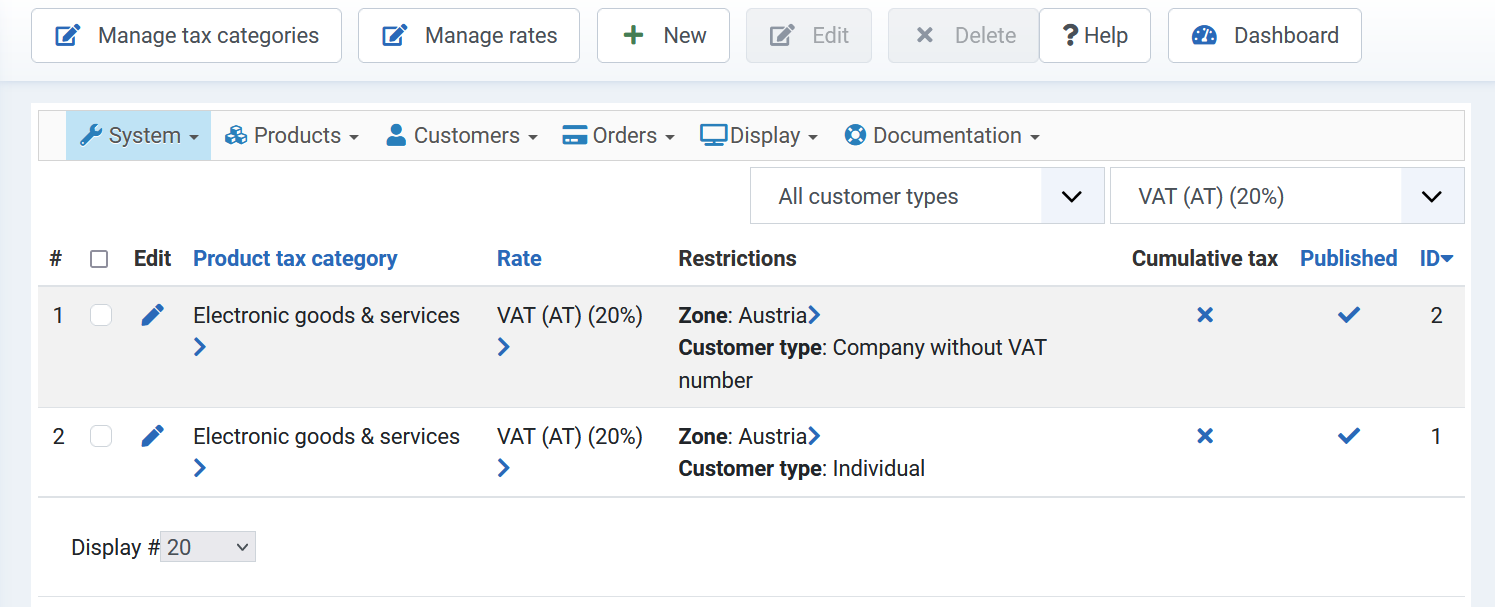
sorry I was wrong. I mean that I need the id from the taxes list. System -> Taxes.
How is the name of this id or how can I filter with this id. Attached a screenshot.
Kind Regards
Please Log in or Create an account to join the conversation.
3 years 10 months ago #346780
by nicolas
Replied by nicolas on topic Show Text regarding if Taxes are applied or not
Hi,
You should have that like this:
You should have that like this:
Code:
$mainPrice = reset($this->row->prices);
$mainTax = reset($mainPrice->taxes);
echo $mainTax->taxation_id;
The following user(s) said Thank You: joki1994
Please Log in or Create an account to join the conversation.
3 years 10 months ago #346801
by joki1994
Replied by joki1994 on topic Show Text regarding if Taxes are applied or not
Hi, thanks that worked nice.
I tried to use the same code in checkout -> show block cart.php but I got the following error:
Attempt to modify property "prices" on null.
this is my code I added in UNIT Price Section:
How can I get in this file the taxation_id?
Kind Regards
I tried to use the same code in checkout -> show block cart.php but I got the following error:
Attempt to modify property "prices" on null.
this is my code I added in UNIT Price Section:
Code:
<!-- UNIT PRICE -->
<?php
$mainPrice = reset($this->row->prices);
$mainTax = reset($mainPrice->taxes);
if(!empty($this->options['show_price'])) {
?>
<td data-title="<?php echo JText::_('CART_PRODUCT_UNIT_PRICE'); ?>" class="hikashop_cart_product_price_value"><?php
echo $this->getDisplayProductPrice($product, true);
if(HIKASHOP_RESPONSIVE) {
?><span class="visible-phone">
<?php if($mainTax->taxation_id==88){
echo '<span class="hikashop_product_price_per_unit MwSt_neu">'.JText::_('PER_UNIT').'</span>';
} else echo '<span class="hikashop_product_price_per_unit MwSt_neu_exkl">'.JText::_('PER_UNIT_MWST_EXCL').'</span>';
?></span><?php
}
?></td>
<?php
}
?>
<!-- EO UNIT PRICE -->
How can I get in this file the taxation_id?
Kind Regards
Please Log in or Create an account to join the conversation.
3 years 10 months ago #346804
by nicolas
Replied by nicolas on topic Show Text regarding if Taxes are applied or not
Hi,
If you look at the code in there, you can see that the data of the product is in $product not in $this->row in this view. That's because this view is for the whole cart while listing_price if for an individual product. So just change that in your code and it should work.
If you look at the code in there, you can see that the data of the product is in $product not in $this->row in this view. That's because this view is for the whole cart while listing_price if for an individual product. So just change that in your code and it should work.
The following user(s) said Thank You: joki1994
Please Log in or Create an account to join the conversation.
3 years 10 months ago #346834
by joki1994
Replied by joki1994 on topic Show Text regarding if Taxes are applied or not
Thank you, works perfect now
Please Log in or Create an account to join the conversation.
Time to create page: 0.126 seconds