

- Posts: 6
- Thank you received: 0
Taxes for companies and individuals
1 year 8 months ago #365903
by foreight
Taxes for companies and individuals was created by foreight
-- HikaShop version -- : 5.1.2
-- Joomla version -- : 5.2.2
-- PHP version -- : 8.2.27
Hi, I have a problem with setting taxes.
Shop from Poland. Sells to foreign markets, e.g. Germany.
- A company from Germany buys on a VAT invoice - here VAT should be 0%
- A person from Germany buys without an invoice for a company - VAT should be 23%
- A Polish company buys on a VAT invoice - here VAT should be 23%
- A person from Poland buys without an invoice - here VAT should also be 23%
It looks like it's set up correctly, but it doesn't work. It doesn't charge individuals VAT when they are outside of Poland.
-- Joomla version -- : 5.2.2
-- PHP version -- : 8.2.27
Hi, I have a problem with setting taxes.
Shop from Poland. Sells to foreign markets, e.g. Germany.
- A company from Germany buys on a VAT invoice - here VAT should be 0%
- A person from Germany buys without an invoice for a company - VAT should be 23%
- A Polish company buys on a VAT invoice - here VAT should be 23%
- A person from Poland buys without an invoice - here VAT should also be 23%
It looks like it's set up correctly, but it doesn't work. It doesn't charge individuals VAT when they are outside of Poland.
Please Log in or Create an account to join the conversation.

1 year 8 months ago #365905
by nicolas
Replied by nicolas on topic Taxes for companies and individuals
Hi,
In your products, you have a "tax category" setting in the "prices" area.
HikaShop will only take into account the tax rules for the tax category selected in the product.
I can see that you configured different tax categories for your tax rules.
Based on what you're saying, it seems that you selected "Default tax category" in the "tax category" setting of your products.
And thus, only the third tax rule, restricted to Poland, is taken into account.
You'll want to change the tax category for the other two tax rules to "Default tax category" so that they can be taken into account too.
In your products, you have a "tax category" setting in the "prices" area.
HikaShop will only take into account the tax rules for the tax category selected in the product.
I can see that you configured different tax categories for your tax rules.
Based on what you're saying, it seems that you selected "Default tax category" in the "tax category" setting of your products.
And thus, only the third tax rule, restricted to Poland, is taken into account.
You'll want to change the tax category for the other two tax rules to "Default tax category" so that they can be taken into account too.
Please Log in or Create an account to join the conversation.
1 year 8 months ago #365916
by foreight
Replied by foreight on topic Taxes for companies and individuals
I don't really understand what I have to change now to do it properly.
In the products, the Default tax category is set
In the Main tax zone configuration, it is set to Poland
In the products, the Default tax category is set
In the Main tax zone configuration, it is set to Poland
Please Log in or Create an account to join the conversation.
1 year 8 months ago #365918
by nicolas
Replied by nicolas on topic Taxes for companies and individuals
Hi,
Go in the System>Taxes menu.
There, edit each tax rule, and make sure that you select "Default tax category" in the tax category setting.
Go in the System>Taxes menu.
There, edit each tax rule, and make sure that you select "Default tax category" in the tax category setting.
Please Log in or Create an account to join the conversation.
1 year 8 months ago #365927
by foreight
Replied by foreight on topic Taxes for companies and individuals
I changed the tax settings. It's like on the screenshot. When choosing an address in Germany, VAT is not added for companies and individuals.
Please Log in or Create an account to join the conversation.
1 year 8 months ago #365929
by nicolas
Replied by nicolas on topic Taxes for companies and individuals
Hi,
This screenshot has nothing to do with what I said to do.
Go in the menu System>Taxes.
You should see this: www.hikashop.com/media/kunena/attachments/82931/hika.jpg
There, you have an edit icon for each tax rule, on the left side, next to the checkbox.
Click on the edit icon in order to edit the tax rule.
On the edit page, you have a tax category setting.
There, you want to select "Default tax rate", not "EUR".
Save and repeat for all three tax rules of www.hikashop.com/media/kunena/attachments/82931/hika.jpg
Then, it should work.
This screenshot has nothing to do with what I said to do.
Go in the menu System>Taxes.
You should see this: www.hikashop.com/media/kunena/attachments/82931/hika.jpg
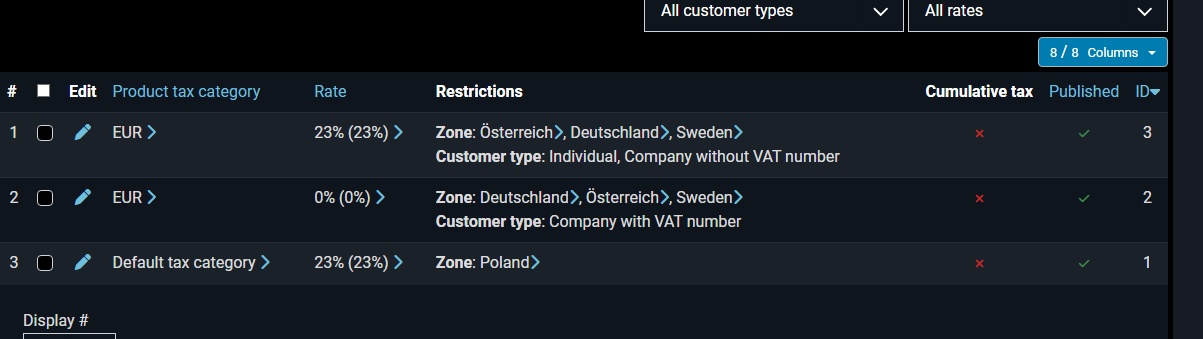
There, you have an edit icon for each tax rule, on the left side, next to the checkbox.
Click on the edit icon in order to edit the tax rule.
On the edit page, you have a tax category setting.
There, you want to select "Default tax rate", not "EUR".
Save and repeat for all three tax rules of www.hikashop.com/media/kunena/attachments/82931/hika.jpg
Then, it should work.
The following user(s) said Thank You: foreight
Please Log in or Create an account to join the conversation.
1 year 8 months ago #365939
by foreight
Replied by foreight on topic Taxes for companies and individuals
Ok, I changed the category in another place 
Thanks
Thanks
Please Log in or Create an account to join the conversation.
Time to create page: 0.091 seconds