
- Posts: 15
- Thank you received: 0
Botton "back" Wishlists
- masterarcomedia
-
 Topic Author
- Offline
Less
More
12 years 8 months ago #149116
by masterarcomedia
Botton "back" Wishlists was created by masterarcomedia
Hi,
Is it possible to change the link "back" button? Usually attached the page I want the person to go, when you click "back"
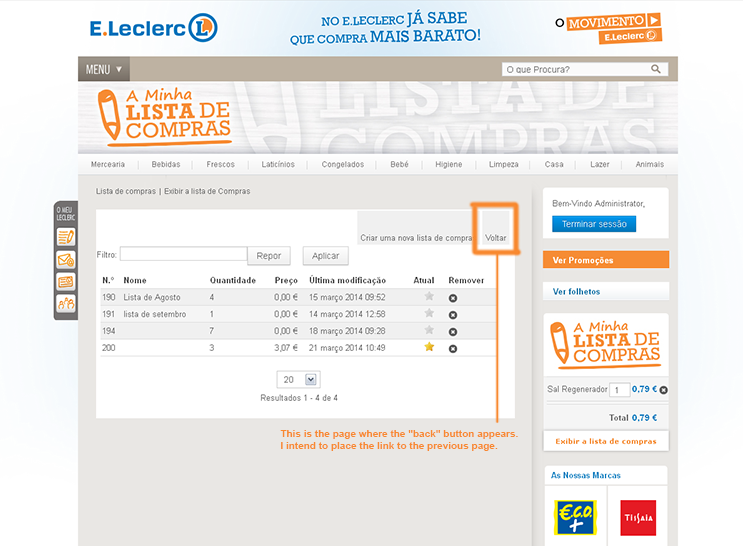
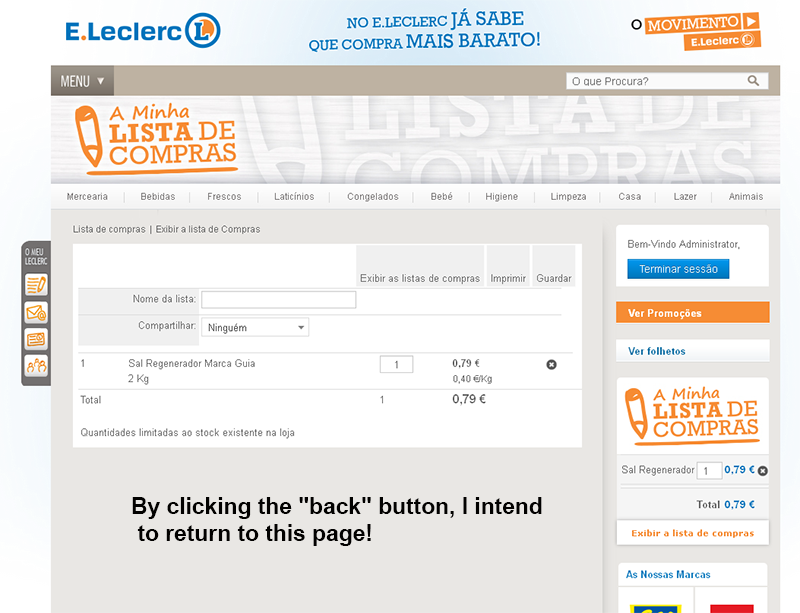
Is it possible to change the link "back" button? Usually attached the page I want the person to go, when you click "back"
Please Log in or Create an account to join the conversation.

12 years 8 months ago #149117
by Xavier
Replied by Xavier on topic Botton "back" Wishlists
Hi,
Yes you have to edit the view "product / showcarts" and replace the code:
By for example:
Yes you have to edit the view "product / showcarts" and replace the code:
Code:
<a href="<?php echo JRoute::_('index.php?option='.HIKASHOP_COMPONENT.'&view=user&layout=cpanel'.$Itemid); ?>" >
<span class="icon-32-back" title="<?php echo JText::_('HIKA_BACK'); ?>">
</span>
<?php echo JText::_('HIKA_BACK'); ?>
</a>
Code:
<a href="javascript:history.back()" >
<span class="icon-32-back" title="<?php echo JText::_('HIKA_BACK'); ?>">
</span>
<?php echo JText::_('HIKA_BACK'); ?>
</a>
Please Log in or Create an account to join the conversation.
- masterarcomedia
-
Topic Author
- Offline
Less
More
- Posts: 15
- Thank you received: 0
12 years 8 months ago #149400
by masterarcomedia
Replied by masterarcomedia on topic Botton "back" Wishlists
Hi Xavier,
No meeting Showcarts, within the category "Products". Only encounter within the category "cart"
Regards,
Nuno Mondego
No meeting Showcarts, within the category "Products". Only encounter within the category "cart"
Regards,
Nuno Mondego
Please Log in or Create an account to join the conversation.
- masterarcomedia
-
Topic Author
- Offline
Less
More
- Posts: 15
- Thank you received: 0
12 years 8 months ago #149401
by masterarcomedia
Replied by masterarcomedia on topic Botton "back" Wishlists
Xavier is already solved.
Thank you very much!
Regards
Nuno Mondego
Thank you very much!
Regards
Nuno Mondego
Please Log in or Create an account to join the conversation.
Time to create page: 0.079 seconds