

- Posts: 18
- Thank you received: 0
Wishlist quanitity not being added to shopping car
11 years 10 months ago #186564
by Geoffc
Wishlist quanitity not being added to shopping car was created by Geoffc
-- HikaShop version -- : Business: 2.3.5
When a customer views a wishlist and ticks the check box then adds it to cart. The quantity of each item added to the cart is 1 for every item and not the quantity for each product as listed in the wish list. How can that be changed so the quantity added to the cart is the same as listed in the wishlist.
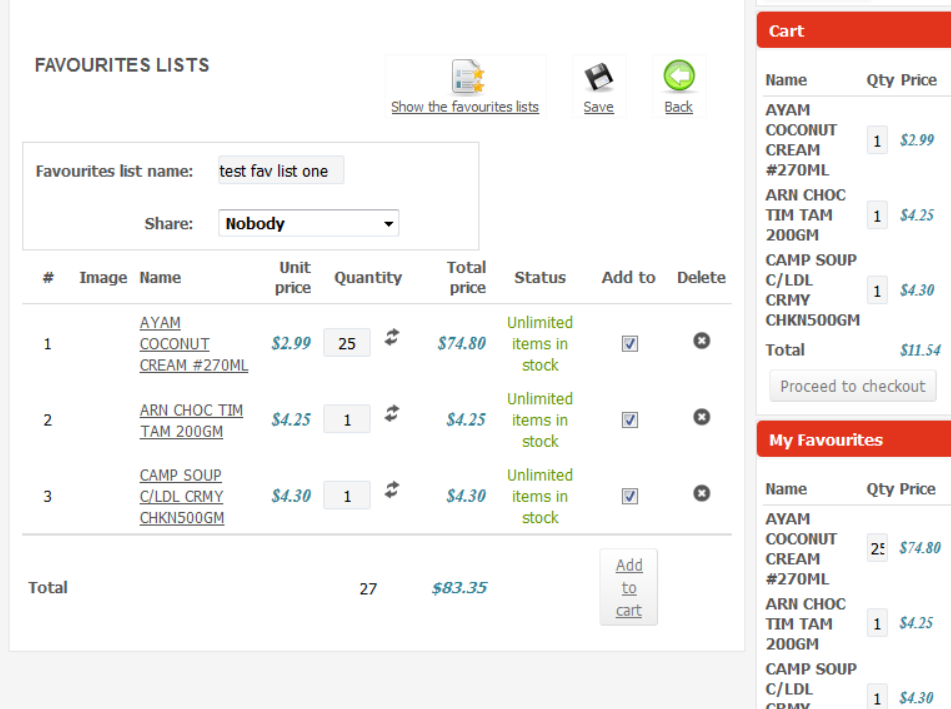
When a customer views a wishlist and ticks the check box then adds it to cart. The quantity of each item added to the cart is 1 for every item and not the quantity for each product as listed in the wish list. How can that be changed so the quantity added to the cart is the same as listed in the wishlist.
Please Log in or Create an account to join the conversation.

11 years 10 months ago #186612
by Xavier
Replied by Xavier on topic Wishlist quanitity not being added to shopping car
Hi,
I just tried on my end, and I have no issues.
Do you had edited the view "cart / showcart" ?
I just tried on my end, and I have no issues.
Do you had edited the view "cart / showcart" ?
Please Log in or Create an account to join the conversation.
11 years 10 months ago #186786
by Geoffc
Replied by Geoffc on topic Wishlist quanitity not being added to shopping car
Not I did not edit the view and get the same problem.The only thing edited for this view is language files.
What I actually want to do is replace the tick boxes with a button to add the quantity to cart for each item the same as when browsing categories. Can that be done? This would be a good admin option to switch between multiple product add to cart or single product add to cart in wishlist view.
What I actually want to do is replace the tick boxes with a button to add the quantity to cart for each item the same as when browsing categories. Can that be done? This would be a good admin option to switch between multiple product add to cart or single product add to cart in wishlist view.
Please Log in or Create an account to join the conversation.
11 years 10 months ago #186803
by Xavier
Replied by Xavier on topic Wishlist quanitity not being added to shopping car
Bonjour,
Cela peut être possible, mais il faudra alors changer le nommage du champ de quantité, et modifier des variables dans le controlleur sinon d'autres fonctionnalités ne fonctionneront pas.
Mais je prend note de cette idée
Pour votre soucis, le plus simple serait de me fournir un accès backend et FTP afin que je puisse voir à quel endroit l'erreur se situe.
Please Log in or Create an account to join the conversation.
11 years 10 months ago - 11 years 10 months ago #186929
by Geoffc
Replied by Geoffc on topic Wishlist quanitity not being added to shopping car
Ok I have sent you a message by the contact form.
Last edit: 11 years 10 months ago by Geoffc.
Please Log in or Create an account to join the conversation.

11 years 10 months ago #186933
by Jerome
Jerome - Obsidev.com
HikaMarket & HikaSerial developer / HikaShop core dev team.
Replied by Jerome on topic Wishlist quanitity not being added to shopping car
Hi,
Sorry, I guess that Xavier has switch too much between French and English
Here his message (in English).
Regards,
Sorry, I guess that Xavier has switch too much between French and English
Here his message (in English).
It could be possible yes, but you would have to change the way that the quantity field is named and also changed some variables in the controller ; otherwise some other feature won't work anymore.
But I took good note of your idea
For your issue, the easier would be to send us some credentials, for your Joomla backend and also a FTP access. So we will be able to see where the error is coming from (using some debug traces).
Regards,
Jerome - Obsidev.com
HikaMarket & HikaSerial developer / HikaShop core dev team.
Please Log in or Create an account to join the conversation.
11 years 10 months ago #186981
by Xavier
Replied by Xavier on topic Wishlist quanitity not being added to shopping car
Hi,
Please provide an url to the wishlist page and a test account with created wishlists.
Actually I am not able to reach the page illustrated on the screenshot of the first post.
Please provide an url to the wishlist page and a test account with created wishlists.
Actually I am not able to reach the page illustrated on the screenshot of the first post.
Please Log in or Create an account to join the conversation.
11 years 10 months ago #187275
by Xavier
Replied by Xavier on topic Wishlist quanitity not being added to shopping car
Hi,
There was indeed missing changes in the view "cart / showcart" due to the view override, so I edited the code in your override directly
There was indeed missing changes in the view "cart / showcart" due to the view override, so I edited the code in your override directly
The following user(s) said Thank You: Geoffc
Please Log in or Create an account to join the conversation.
11 years 10 months ago #187293
by Geoffc
Replied by Geoffc on topic Wishlist quanitity not being added to shopping car
Thank you! I think the word in French is merci
Please Log in or Create an account to join the conversation.
11 years 10 months ago #187315
by Xavier
Replied by Xavier on topic Wishlist quanitity not being added to shopping car
Exact
Please Log in or Create an account to join the conversation.
11 years 7 months ago - 11 years 7 months ago #197140
by JennyCo
Replied by JennyCo on topic Wishlist quanitity not being added to shopping car
Hello,
My hikashop and joomla are the latest versions of today.
Dev site and wishlist:
andersmartin.com/index.php/component/hik...-wishlist?Itemid=729
We are currently setting the site live, without the wishlist active. So if it propagated and the above link does not work, please go to
jennyandcompany.com/index.php/component/...-wishlist?Itemid=729
I have the same issue where the wishlist only adds 1 item at a time to cart.
On the demo it appears that you can update quanitity that you want to add to cart.
For example, the user is not able to choose 2 or 10 of coffee pot?. See attached.
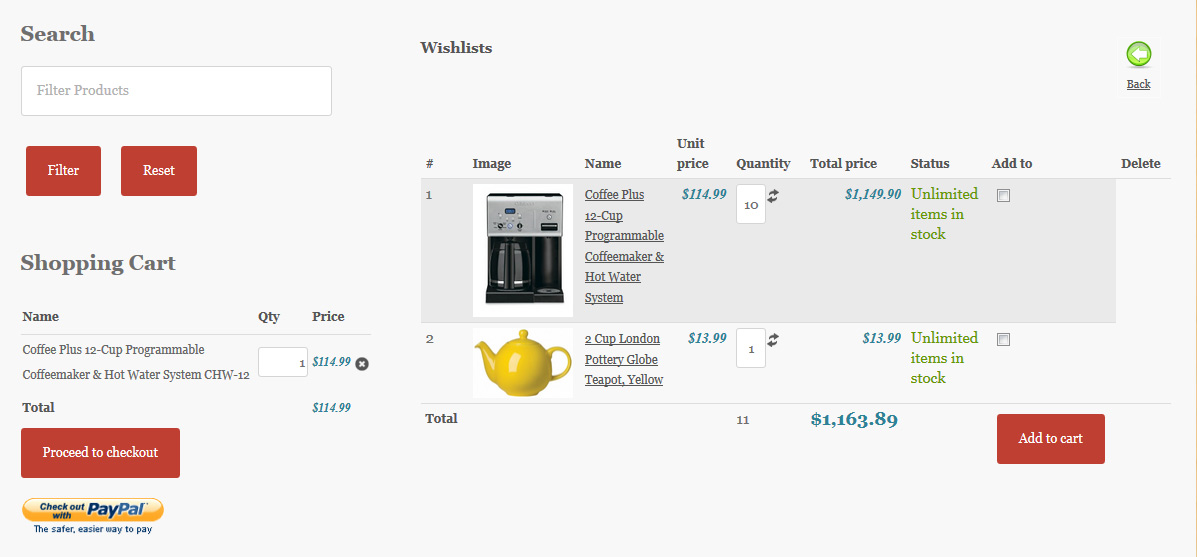
I posted here because I noticed you fixed code for someone who had an over-ride on "cart / showcart". So, before I posted I deleted my over-ride and re-installed hikashop. That did not change anything.
Thank you for your time
My hikashop and joomla are the latest versions of today.
Dev site and wishlist:
andersmartin.com/index.php/component/hik...-wishlist?Itemid=729
We are currently setting the site live, without the wishlist active. So if it propagated and the above link does not work, please go to
jennyandcompany.com/index.php/component/...-wishlist?Itemid=729
I have the same issue where the wishlist only adds 1 item at a time to cart.
On the demo it appears that you can update quanitity that you want to add to cart.
For example, the user is not able to choose 2 or 10 of coffee pot?. See attached.
I posted here because I noticed you fixed code for someone who had an over-ride on "cart / showcart". So, before I posted I deleted my over-ride and re-installed hikashop. That did not change anything.
Thank you for your time
Last edit: 11 years 7 months ago by JennyCo. Reason: Propagating domain from dev site to live site
Please Log in or Create an account to join the conversation.
11 years 7 months ago #197197
by Xavier
Replied by Xavier on topic Wishlist quanitity not being added to shopping car
Hi,
Thanks for the report it seems indeed that we missed to add the modification in our latest package.
Please edit the view "cart / showcart" and replace:
By:
Thanks for the report it seems indeed that we missed to add the modification in our latest package.
Please edit the view "cart / showcart" and replace:
Code:
<input id="hikashop_product_quantity_field_<?php echo $cart->product_id;?>" type="hidden" name="item[<?php echo $cart->cart_product_id;?>]" class="hikashop_show_cart_quantity" value="<?php echo $cart->cart_product_quantity; ?>" />
<?php
} else {
?>
<input id="hikashop_product_quantity_field_<?php echo $cart->product_id;?>" type="text" name="item[<?php echo $cart->cart_product_id;?>]" class="hikashop_show_cart_quantity" value="<?php echo $cart->cart_product_quantity; ?>" />
Code:
<input id="hikashop_product_quantity_field_<?php echo $cart->product_id;?>" type="hidden" name="data[products][<?php echo $cart->product_id;?>][quantity]" class="hikashop_show_cart_quantity" value="<?php echo $cart->cart_product_quantity; ?>" />
<?php
} else {
?>
<input id="hikashop_product_quantity_field_<?php echo $cart->product_id;?>" type="text" name="data[products][<?php echo $cart->product_id;?>][quantity]" class="hikashop_show_cart_quantity" value="<?php echo $cart->cart_product_quantity; ?>" />
Please Log in or Create an account to join the conversation.
Time to create page: 0.078 seconds