

- Posts: 251
- Thank you received: 2
Wishlist product quantity update
11 years 2 months ago #214998
by Nello
Wishlist product quantity update was created by Nello
-- HikaShop version -- : 2.5.0
Hi,
1) I noted that the quantity of products in the wishlist is updated, after a purchase, when the order status is set to "shipped".
It is possible to change this status with the "confirmed"?
2) I see that there is the possibility for the user to share his wishlist: "Everyone, Registered User, and Email". It is possible for who receive the link, to purchase from the wishlist without registration?
Thank you!
Please Log in or Create an account to join the conversation.

11 years 2 months ago #215059
by Xavier
Replied by Xavier on topic Wishlist product quantity update
Hi,
1) In Configuration > Main > Order please add the "confirmed" status in the field "Invoice order statuses".
2) Yes, it is indeed possible. Once on the wishlist the customers can add a product to their cart and have a common checkout.
So based on your settings, he can purchase without registration.
1) In Configuration > Main > Order please add the "confirmed" status in the field "Invoice order statuses".
2) Yes, it is indeed possible. Once on the wishlist the customers can add a product to their cart and have a common checkout.
So based on your settings, he can purchase without registration.
Please Log in or Create an account to join the conversation.
11 years 2 months ago #215122
by Nello
Replied by Nello on topic Wishlist product quantity update
Hi Xavier,
1) I need to set only the "shipped" status for invoices, because I have to issue a new invoice when the goods are shipped. Is there a way to set the this behaviour differently? Maybe directly in the code?
2) I set a new wishlist and share it through email. This is the link to access the wishlist
ams20.siteground.eu/~hidesign/index.php?...11cj3pj2kaawnm45rttf
As you can see It asks to login, but on my website is already possible to purchase without registration.
Thank you.
Please Log in or Create an account to join the conversation.
11 years 2 months ago #215126
by Xavier
Replied by Xavier on topic Wishlist product quantity update
Hi,
1) In the file "components/com_hikashop/views/cart/view.html.php" please replace the line:
By:
2) I just tried on my local website and this is possible. I can display the wishlist of another user even if I am not registered.
So it is maybe an issue because you potentially don't have the latest version of HikaShop 2.5.0, so please wait until the latest release, the 2.6.0 which should be released very soon.
1) In the file "components/com_hikashop/views/cart/view.html.php" please replace the line:
Code:
$confirmedStatus = $config->get('invoice_order_statuses','confirmed,shipped');
Code:
$confirmedStatus = 'confirmed,shipped';
2) I just tried on my local website and this is possible. I can display the wishlist of another user even if I am not registered.
So it is maybe an issue because you potentially don't have the latest version of HikaShop 2.5.0, so please wait until the latest release, the 2.6.0 which should be released very soon.
Please Log in or Create an account to join the conversation.
11 years 2 months ago #215193
by Nello
Replied by Nello on topic Wishlist product quantity update
Thank you so much Xavier.
I already have the HikaShop 2.5.0 Business release of september, but I see also that in "my subscription" I can already get the release 2.6.0. So I will install it and let you know if the problem is solved.

I already have the HikaShop 2.5.0 Business release of september, but I see also that in "my subscription" I can already get the release 2.6.0. So I will install it and let you know if the problem is solved.
Please Log in or Create an account to join the conversation.
11 years 2 months ago #215313
by Nello
Replied by Nello on topic Wishlist product quantity update
Hi,
I still have the problem on the wishlist, also after the hikashop update.
I still have the problem on the wishlist, also after the hikashop update.
Please Log in or Create an account to join the conversation.

11 years 2 months ago #215342
by Jerome
Jerome - Obsidev.com
HikaMarket & HikaSerial developer / HikaShop core dev team.
Replied by Jerome on topic Wishlist product quantity update
Hi,
Your issue is related to your link which use "wrong" itemId ; the parameter is also twice in the URL and the first one is empty.
If you use that link :
instead of
It will work better.
Here the clickable verison : ams20.siteground.eu/~hidesign/en/?option...11cj3pj2kaawnm45rttf
So I think that your issue is related to the configuratino of the menu "201"
Regards,
Your issue is related to your link which use "wrong" itemId ; the parameter is also twice in the URL and the first one is empty.
If you use that link :
Code:
http://ams20.siteground.eu/~hidesign/en/?option=com_hikashop&ctrl=cart&task=showcart&cart_id=125&cart_type=wishlist&link=11cj3pj2kaawnm45rttf
Code:
http://ams20.siteground.eu/~hidesign/index.php?option=com_hikashop&ctrl=cart&task=showcart&cart_id=125&cart_type=wishlist&Itemid=&Itemid=201&link=11cj3pj2kaawnm45rttf
Here the clickable verison : ams20.siteground.eu/~hidesign/en/?option...11cj3pj2kaawnm45rttf
So I think that your issue is related to the configuratino of the menu "201"
Regards,
Jerome - Obsidev.com
HikaMarket & HikaSerial developer / HikaShop core dev team.
Please Log in or Create an account to join the conversation.
11 years 2 months ago #215390
by Nello
Replied by Nello on topic Wishlist product quantity update
1) In the file "components/com_hikashop/views/cart/view.html.php" I replaced the line 130:
$confirmedStatus = $config->get('invoice_order_statuses','confirmed,shipped');
By:
$confirmedStatus = 'confirmed,shipped';
But it still update the product quantity only on the shipped status. I also tryed to set $confirmedStatus = 'confirmed'; and it still update only on the shipped status...
2) Thank you so much Jerome.
I'm sorry, it was my mistake. I had restricted that voice of menu only for register user.
Please Log in or Create an account to join the conversation.
11 years 1 month ago #215509
by Xavier
Replied by Xavier on topic Wishlist product quantity update
Hi,
1. This is strange, I just try on my local and it is working as expected.
If I force the value to: $confirmedStatus = 'confirmed'; so the stock is decremented when the order status is "confirmed".
Please provide a backend and ftp access to your website and give us informations about the wishlist id and the order id used to change the status and the stock. You can send these informations via our contact form, please give the link to that topic in the message.
Please Log in or Create an account to join the conversation.
11 years 1 month ago #215555
by Xavier
Replied by Xavier on topic Wishlist product quantity update
Hi,
Sorry but the backend access is not correct. I am not able to reach the backend.
Sorry but the backend access is not correct. I am not able to reach the backend.
Please Log in or Create an account to join the conversation.
11 years 1 month ago #215591
by Nello
Replied by Nello on topic Wishlist product quantity update
Sorry. I sent you the right password.
Please Log in or Create an account to join the conversation.
11 years 1 month ago #215618
by Xavier
Replied by Xavier on topic Wishlist product quantity update
Hi,
Just one thing, where are you checking the wishlist quantities ?
Actually, the correct stock is displayed on frontend when the wishlist owner look at his wishlist.
This information is not visible in backend.
If you log in on frontend with the "Martina" account and look at his wishlist is the correct stock displayed ?
Please Log in or Create an account to join the conversation.
11 years 1 month ago - 11 years 1 month ago #215667
by Nello
Replied by Nello on topic Wishlist product quantity update
This is the change I made in /html/com_hikashop/cart/view.html.php on line 130:
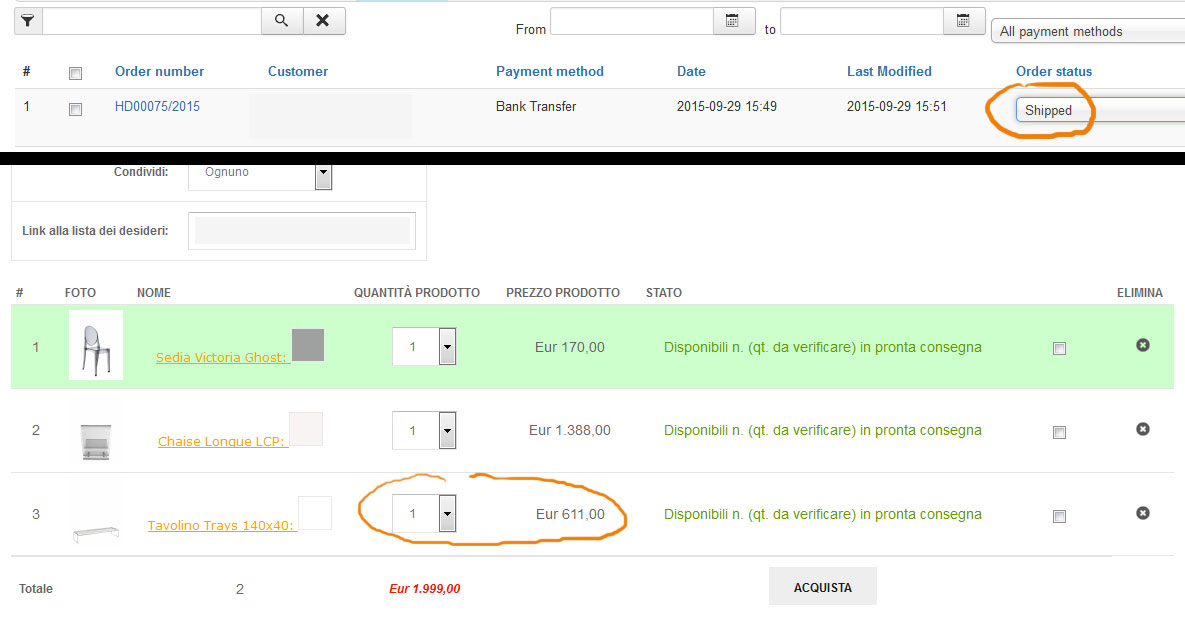
In the images below I show you the frontend of "Martina" account after purchase a product from her wishlist.
As you can see on confirmed status nothing chages.
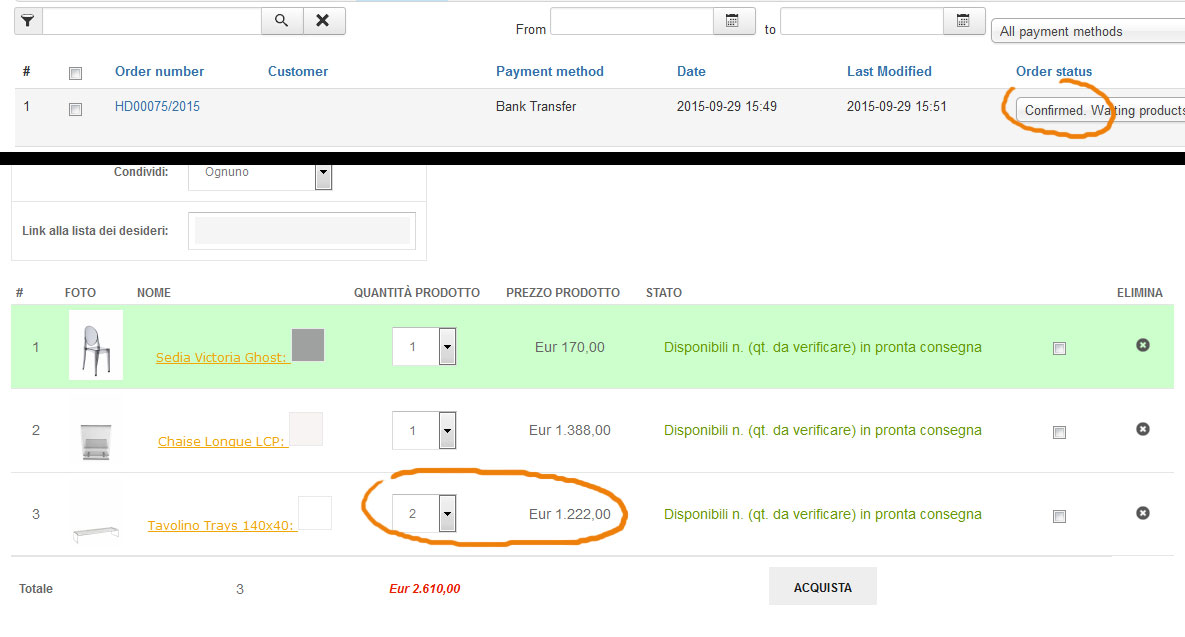
Instead on shipped status the quantity was updated.
Code:
$confirmedStatus = 'confirmed,shipped';
if(empty($confirmedStatus)) $confirmedStatus = 'confirmed,shipped';
$confirmedStatus = explode(',', trim($confirmedStatus, ','));
In the images below I show you the frontend of "Martina" account after purchase a product from her wishlist.
As you can see on confirmed status nothing chages.
Instead on shipped status the quantity was updated.
Last edit: 11 years 1 month ago by Nello.
Please Log in or Create an account to join the conversation.
11 years 1 month ago #215678
by Xavier
Replied by Xavier on topic Wishlist product quantity update
Hi,
I think that the issue is coming from the order status name.
Could you give us more details about how you edited the name ?
If you change it back to only "confirmed" and not "Confirmed. Waiting products from the supplier." does that work as expected ?
The login informations for the "Martina" account could help us to debug your issue.
Please Log in or Create an account to join the conversation.
11 years 1 month ago #215730
by Nello
Replied by Nello on topic Wishlist product quantity update
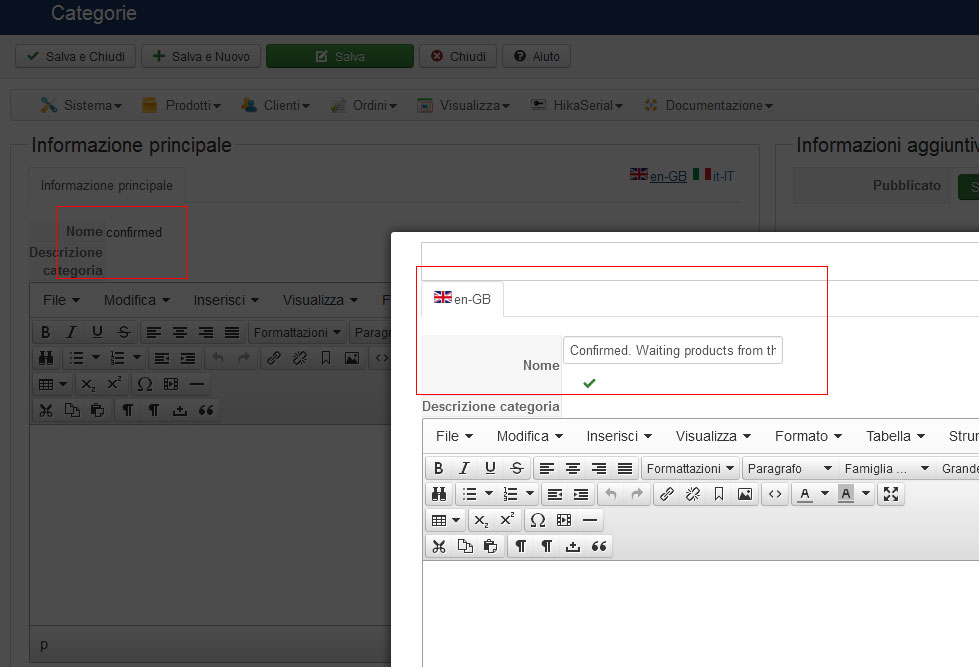
The name of order status is already "confirmed".
As you can see in the image below "Confirmed. Waiting products from the supplier." is only the translation
As you can see in the image below "Confirmed. Waiting products from the supplier." is only the translation
Please Log in or Create an account to join the conversation.
11 years 1 month ago #215784
by Xavier
Replied by Xavier on topic Wishlist product quantity update
Hi,
Problem solved, I just added the indicated code in "components/com_hikashop/views/cart/view.html.php" in the "showcart()" function as I said before. You can find the modifications after the code "// Added by HikaShop support".
So I think that you made a little mistake when you tried to add this modification
Please Log in or Create an account to join the conversation.
11 years 1 month ago #215810
by Nello
Replied by Nello on topic Wishlist product quantity update
Hi,
Thank you so much for your help. I test it and works fine, but I want say that I had made the changes, overriding the file view.html and I don't know why it doesn't works. Infact If I remove the hack in the original file it doesn't works again. For some reason the override it's ignored. This is strange. And I have to keep it in mind every time i will make an update?
Thank you so much for your help. I test it and works fine, but I want say that I had made the changes, overriding the file view.html and I don't know why it doesn't works. Infact If I remove the hack in the original file it doesn't works again. For some reason the override it's ignored. This is strange. And I have to keep it in mind every time i will make an update?
Please Log in or Create an account to join the conversation.
11 years 1 month ago #215813
by Xavier
Replied by Xavier on topic Wishlist product quantity update
Hi,
In that case yes. How were you creating the override ?
In that case yes. How were you creating the override ?
Please Log in or Create an account to join the conversation.
11 years 1 month ago #215883
by Nello
Replied by Nello on topic Wishlist product quantity update
I created it directly from the hikashop panel view. Anyway the path of the file is "mytemplate/html/com_hikashop/cart/view.html.php"
Please Log in or Create an account to join the conversation.
11 years 1 month ago #215904
by Xavier
Replied by Xavier on topic Wishlist product quantity update
Hi,
It is not possible to override the view.html.php files
It is not possible to override the view.html.php files
Please Log in or Create an account to join the conversation.
Time to create page: 0.110 seconds