

- Posts: 6
- Thank you received: 0
Disable "Add to Cart Button"
11 years 3 weeks ago #215668
by webtech
Disable "Add to Cart Button" was created by webtech
-- HikaShop version -- : 2.5.0
-- Joomla version -- : 3.4.3
Hello,
I am running Hikashop Business in Catalogue mode and have configured the system so that only wishlists are used for registered users.
There still remains an "Add to Cart" button in the wishlists that I don't want to be displayed.
Can you please indicate how to remove it? via CSS? via PHP file?
See attachment
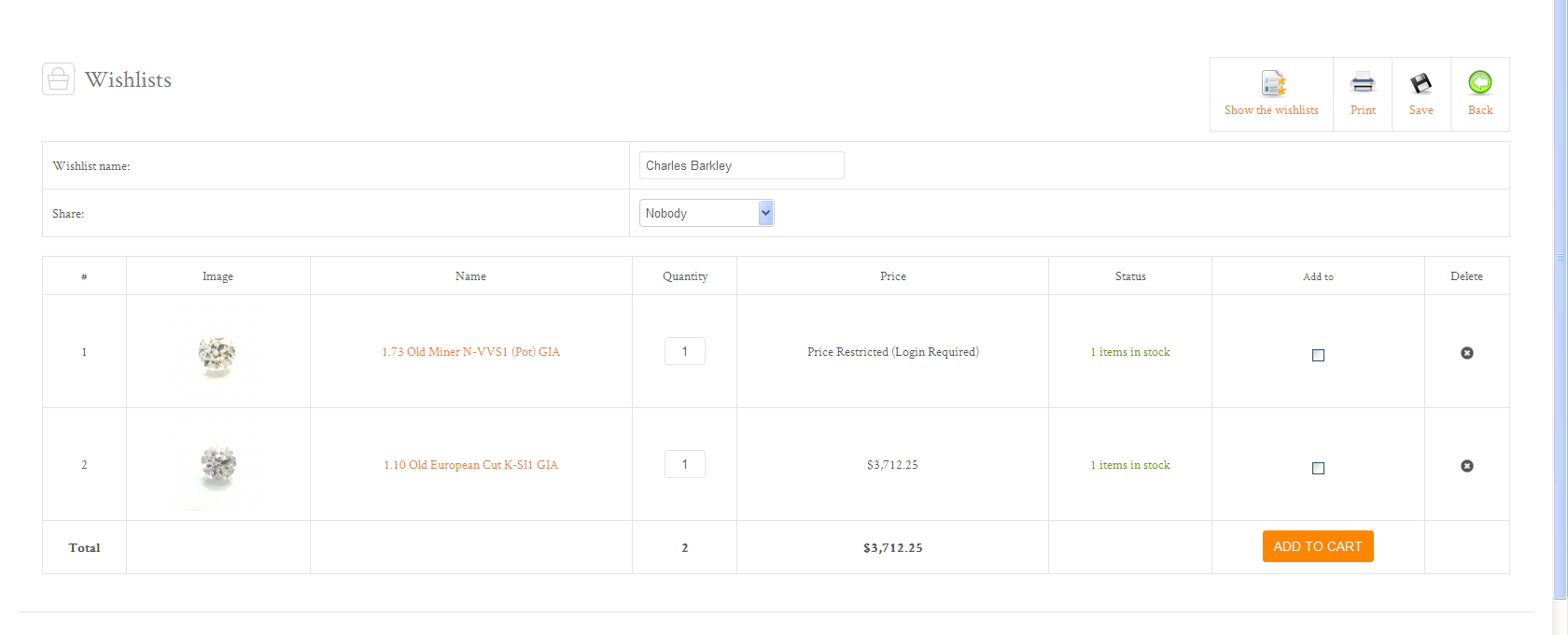
and link to site for your use.
-- Joomla version -- : 3.4.3
Hello,
I am running Hikashop Business in Catalogue mode and have configured the system so that only wishlists are used for registered users.
There still remains an "Add to Cart" button in the wishlists that I don't want to be displayed.
Can you please indicate how to remove it? via CSS? via PHP file?
See attachment
and link to site for your use.
Please Log in or Create an account to join the conversation.

11 years 3 weeks ago #215679
by Xavier
Replied by Xavier on topic Disable "Add to Cart Button"
Hi,
You can edit the view "cart / showcart" and remove the line:
in that view.
You can edit the view "cart / showcart" and remove the line:
Code:
echo $this->cart->displayButton($addText, 'wishlist', $this->params,hikashop_completeLink('cart&task=convert&cart_type=cart&cart_id='.$cart_id.$url_itemid), 'document.getElementById(\'task\').value = \'addtocart\'; document.forms[\'hikashop_show_cart_form\'].submit(); return false;');
Please Log in or Create an account to join the conversation.
11 years 3 weeks ago #215955
by webtech
Replied by webtech on topic Disable "Add to Cart Button"
Hi,
I have removed the line as instructed, but there is no change. The button still shows up.
Any further modifications?
I have removed the line as instructed, but there is no change. The button still shows up.
Any further modifications?
Please Log in or Create an account to join the conversation.

11 years 3 weeks ago #215956
by Jerome
Jerome - Obsidev.com
HikaMarket & HikaSerial developer / HikaShop core dev team.
Replied by Jerome on topic Disable "Add to Cart Button"
Hi,
Are you sure that you are editing the view for the right template ?
www.hikashop.com/support/support/documen...ize-the-display.html
Regards,
Are you sure that you are editing the view for the right template ?
www.hikashop.com/support/support/documen...ize-the-display.html
Regards,
Jerome - Obsidev.com
HikaMarket & HikaSerial developer / HikaShop core dev team.
Please Log in or Create an account to join the conversation.
11 years 3 weeks ago #216072
by webtech
Replied by webtech on topic Disable "Add to Cart Button"
Thank you for your guidance. I was editing the right showcart.php but the wrong template.
Many thanks. Issue solved!
Many thanks. Issue solved!
Please Log in or Create an account to join the conversation.
Time to create page: 0.227 seconds