

- Posts: 17
- Thank you received: 0
Wishlist Icons Displaying Incorrectly
8 years 6 months ago #291987
by jess116
Wishlist Icons Displaying Incorrectly was created by jess116
-- url of the page with the problem -- :
www.daisuki.com.au
-- HikaShop version -- : 3.4.0 [1804261416]
-- Joomla version -- : 3.8.2
-- PHP version -- : 5.6.30
-- Browser(s) name and version -- : Firefox & chrome
Hi hi!
I've just upgraded from Starter to Essential and am trying to get the wishlist etc functioning correctly now. I think it is mostly working but the icons along the top of the wishlist page are all squished up.
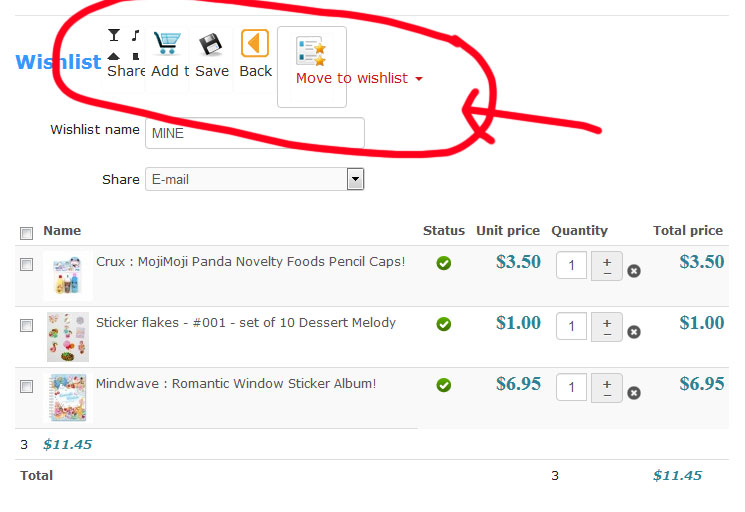
I temporarily changed my template to the default joomla one to see if it was related to my template but it doesn't seem to be. I'm not good at coding or anything like that so I haven't got a clue where to start trying to fix this!
Any advice would be appreciated, thank you!
Jess
-- HikaShop version -- : 3.4.0 [1804261416]
-- Joomla version -- : 3.8.2
-- PHP version -- : 5.6.30
-- Browser(s) name and version -- : Firefox & chrome
Hi hi!
I've just upgraded from Starter to Essential and am trying to get the wishlist etc functioning correctly now. I think it is mostly working but the icons along the top of the wishlist page are all squished up.
I temporarily changed my template to the default joomla one to see if it was related to my template but it doesn't seem to be. I'm not good at coding or anything like that so I haven't got a clue where to start trying to fix this!
Any advice would be appreciated, thank you!
Jess
Please Log in or Create an account to join the conversation.

8 years 6 months ago #291991
by Jerome
Jerome - Obsidev.com
HikaMarket & HikaSerial developer / HikaShop core dev team.
Replied by Jerome on topic Wishlist Icons Displaying Incorrectly
Hello,
That display issue is coming from the fact you have a customized front-end CSS.
So you do not have the new "share" icon in the toolbar and your customization do not change how the dropdown button is displayed in the toolbar.
www.hikashop.com/support/documentation/1...ize-the-display.html
Regards,
That display issue is coming from the fact you have a customized front-end CSS.
So you do not have the new "share" icon in the toolbar and your customization do not change how the dropdown button is displayed in the toolbar.
www.hikashop.com/support/documentation/1...ize-the-display.html
Regards,
Jerome - Obsidev.com
HikaMarket & HikaSerial developer / HikaShop core dev team.
Please Log in or Create an account to join the conversation.
Time to create page: 0.049 seconds