

- Posts: 2
- Thank you received: 0
No proceed button in the wishlist
6 years 2 weeks ago #324291
by andrea_r
No proceed button in the wishlist was created by andrea_r
-- HikaShop version -- : 4.4.0
-- Joomla version -- : 3.9.21
-- PHP version -- : 7.4.3
Unfortunately the web site is still on a local server and I cannot show you the problem.
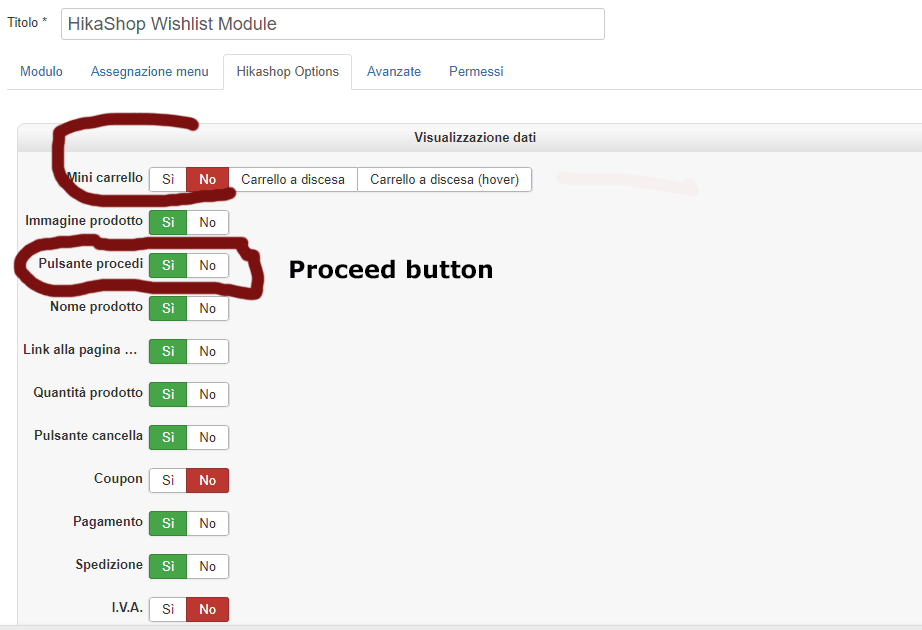
Using the module: HikaShop Wishlist it doesn't display the PROCEED BUTTON on the front end.
MINI CART is set on NO and Proceed Button on YES.
There is a way to resove the problem?
Do you need more informations?
BTW (and not last) my compliments for the HikaShop comonent ... sach a work!
-- Joomla version -- : 3.9.21
-- PHP version -- : 7.4.3
Unfortunately the web site is still on a local server and I cannot show you the problem.
Using the module: HikaShop Wishlist it doesn't display the PROCEED BUTTON on the front end.
MINI CART is set on NO and Proceed Button on YES.
There is a way to resove the problem?
Do you need more informations?
BTW (and not last) my compliments for the HikaShop comonent ... sach a work!
Please Log in or Create an account to join the conversation.

6 years 2 weeks ago #324308
by nicolas
Replied by nicolas on topic No proceed button in the wishlist
Hi,
Thanks and thank you for your feedback.
The issue is actually not that the "proceed to checkout" button is not displayed on the wishlist module, but that the option to display it or not should not appear for the wishlist module, only for the cart module.
Now if you need to display it for the wishlist module, you can edit the view file product / cart.php via the menu Display>views and change the line:
if($this->element->cart_type == 'cart' && $this->params->get('show_cart_proceed', 1)) {
to:
if($this->params->get('show_cart_proceed', 1)) {
but that button will direct to the checkout which doesn't make much sense for a wishlist module since the checkout won't use the wishlist, it will use the current cart.
Thanks and thank you for your feedback.
The issue is actually not that the "proceed to checkout" button is not displayed on the wishlist module, but that the option to display it or not should not appear for the wishlist module, only for the cart module.
Now if you need to display it for the wishlist module, you can edit the view file product / cart.php via the menu Display>views and change the line:
if($this->element->cart_type == 'cart' && $this->params->get('show_cart_proceed', 1)) {
to:
if($this->params->get('show_cart_proceed', 1)) {
but that button will direct to the checkout which doesn't make much sense for a wishlist module since the checkout won't use the wishlist, it will use the current cart.
Please Log in or Create an account to join the conversation.
6 years 2 weeks ago #324309
by andrea_r
Replied by andrea_r on topic No proceed button in the wishlist
Nicolas thank you for your reply. 
I have resolved in another way, maybe can be interesting for somebody.
I have create an hidden menu to USER CONTROL PANEL and copied the single links for:
- WISHLIST
- ACCOUNT DETAILS
- ORDERS
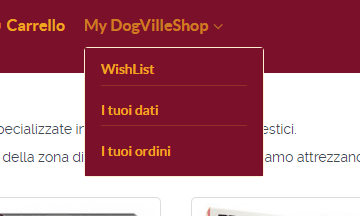
In the MAIN MENU I have created the single menus with the copied links just to get a menu in the way showed in the enclosed pic.
In that WISHLIST is possible, clicking on the name of the wishlist, to go to the cart fo finalize the order.
Again thank you for the reply.
I have resolved in another way, maybe can be interesting for somebody.
I have create an hidden menu to USER CONTROL PANEL and copied the single links for:
- WISHLIST
- ACCOUNT DETAILS
- ORDERS
In the MAIN MENU I have created the single menus with the copied links just to get a menu in the way showed in the enclosed pic.
In that WISHLIST is possible, clicking on the name of the wishlist, to go to the cart fo finalize the order.
Again thank you for the reply.
Please Log in or Create an account to join the conversation.
Time to create page: 0.140 seconds