
Comments & who bought this item

8 years 5 months ago #294075
by kyratn
Comments & who bought this item was created by kyratn
Hi,
I am trying to set up a message "This person has bought this item." but it doesn't work well.
Now if user has bought any of the products and leave comment on any product, "This person has bought this item." will be displayed for every comment.
Shouldn't this be displayed only if that user comments on the item he actually purchased??
I have looked into code and could find only this:
I am not sure how are you checking if user has bought this item but as for know it doesn't work well and could be confusing.
Please advise.
Thanks
I am trying to set up a message "This person has bought this item." but it doesn't work well.
Now if user has bought any of the products and leave comment on any product, "This person has bought this item." will be displayed for every comment.
Shouldn't this be displayed only if that user comments on the item he actually purchased??
I have looked into code and could find only this:
Code:
<?php if(!empty ($elt->purchased)) { ?>
<span class="hikashop_vote_listing_useful_bought"><?php echo JText::_('HIKASHOP_VOTE_BOUGHT_COMMENT'); ?></span>
<?php } ?>
I am not sure how are you checking if user has bought this item but as for know it doesn't work well and could be confusing.
Please advise.
Thanks
Please Log in or Create an account to join the conversation.

8 years 5 months ago #294105
by nicolas
Replied by nicolas on topic Comments & who bought this item
Hi,
I've looked at the code and there seems to be some missing bits.
I've added some patches so that it works better.
Please download again the install package from our website again to get the patch and it should be better.
I've looked at the code and there seems to be some missing bits.
I've added some patches so that it works better.
Please download again the install package from our website again to get the patch and it should be better.
Please Log in or Create an account to join the conversation.
8 years 5 months ago #294143
by kyratn
Replied by kyratn on topic Comments & who bought this item
Hi,
Sorry for late replay. I have updated hikashop and now message "This person has bought this item." isn't showing at all.
Before update, doing var_dump i could see that "$elt->purchased" would return "1" if anything was purchased by the user, now there is no such variable and it is returning "NULL". Screenshot attached...
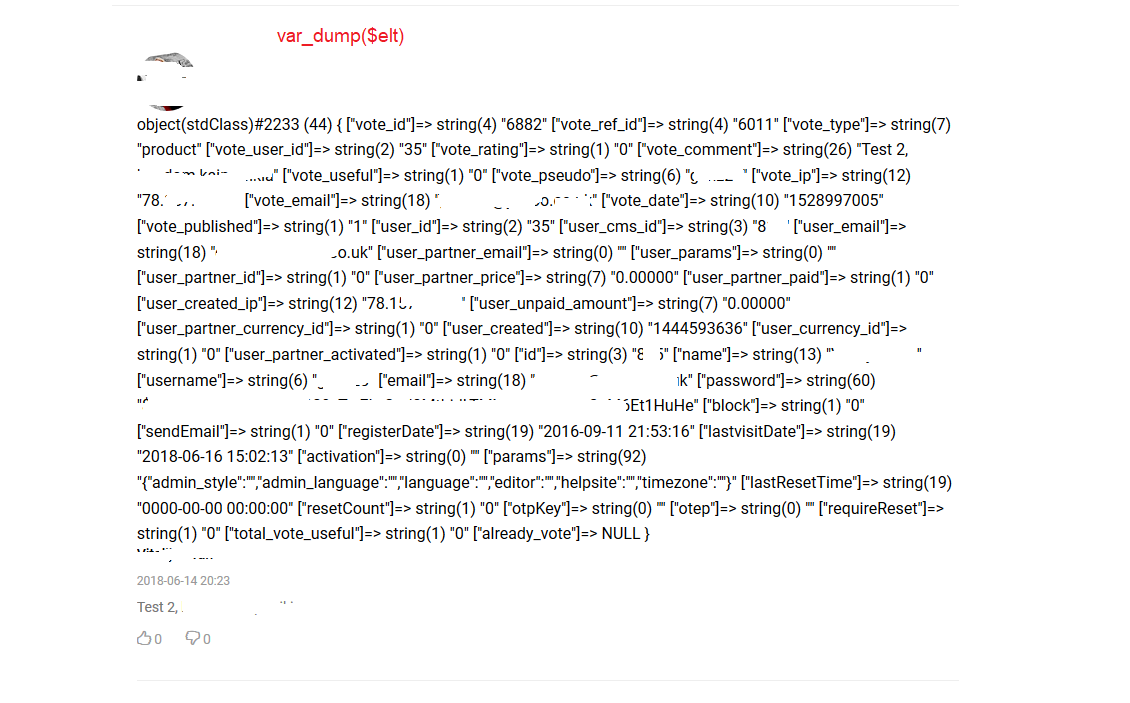
Could you please check again Nicolas?
Thanks
Sorry for late replay. I have updated hikashop and now message "This person has bought this item." isn't showing at all.
Before update, doing var_dump i could see that "$elt->purchased" would return "1" if anything was purchased by the user, now there is no such variable and it is returning "NULL". Screenshot attached...
Could you please check again Nicolas?
Thanks
Please Log in or Create an account to join the conversation.
8 years 5 months ago #294152
by nicolas
Replied by nicolas on topic Comments & who bought this item
Hi,
The $elt->purchased is only set to 1 when the product has been purchased by the person who posted the message.
It's not set when that's not the case.
Note that to know whether the product was purchased or not, the status of the order must be one of the statuses enabled under the "invoice" column of the System>Order statuses menu (which wasn't implemented before). So please make sure that the order of the product made by the user account of the comment has a the correct status.
Please Log in or Create an account to join the conversation.
8 years 5 months ago #294169
by kyratn
Replied by kyratn on topic Comments & who bought this item
Hi,
Indeed i had to set order status to confirmed or shipped and it started to show. Thanks for the clarification.
Have a great day
Indeed i had to set order status to confirmed or shipped and it started to show. Thanks for the clarification.
Have a great day
Please Log in or Create an account to join the conversation.
Time to create page: 0.052 seconds