

- Posts: 101
- Thank you received: 4
Vote addon
4 years 7 months ago #340642
by alainz
Vote addon was created by alainz
-- url of the page with the problem -- :
ayam.com/product-rating/product/oyster-210ml-wtb
-- HikaShop version -- : 4.5.0
-- Joomla version -- : 3.10.8
Hi,
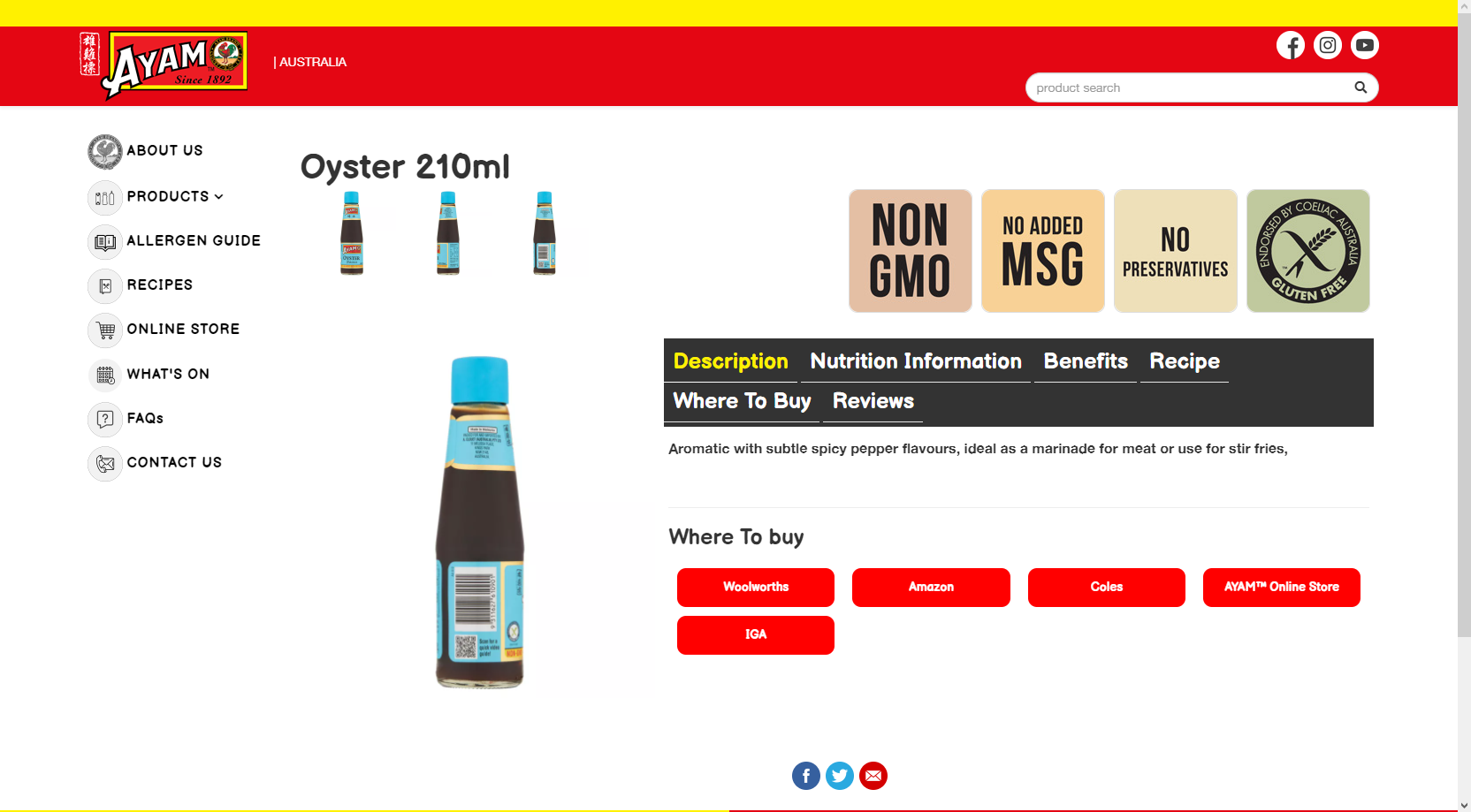
May i know how can i show the total vote rating from product listing as below
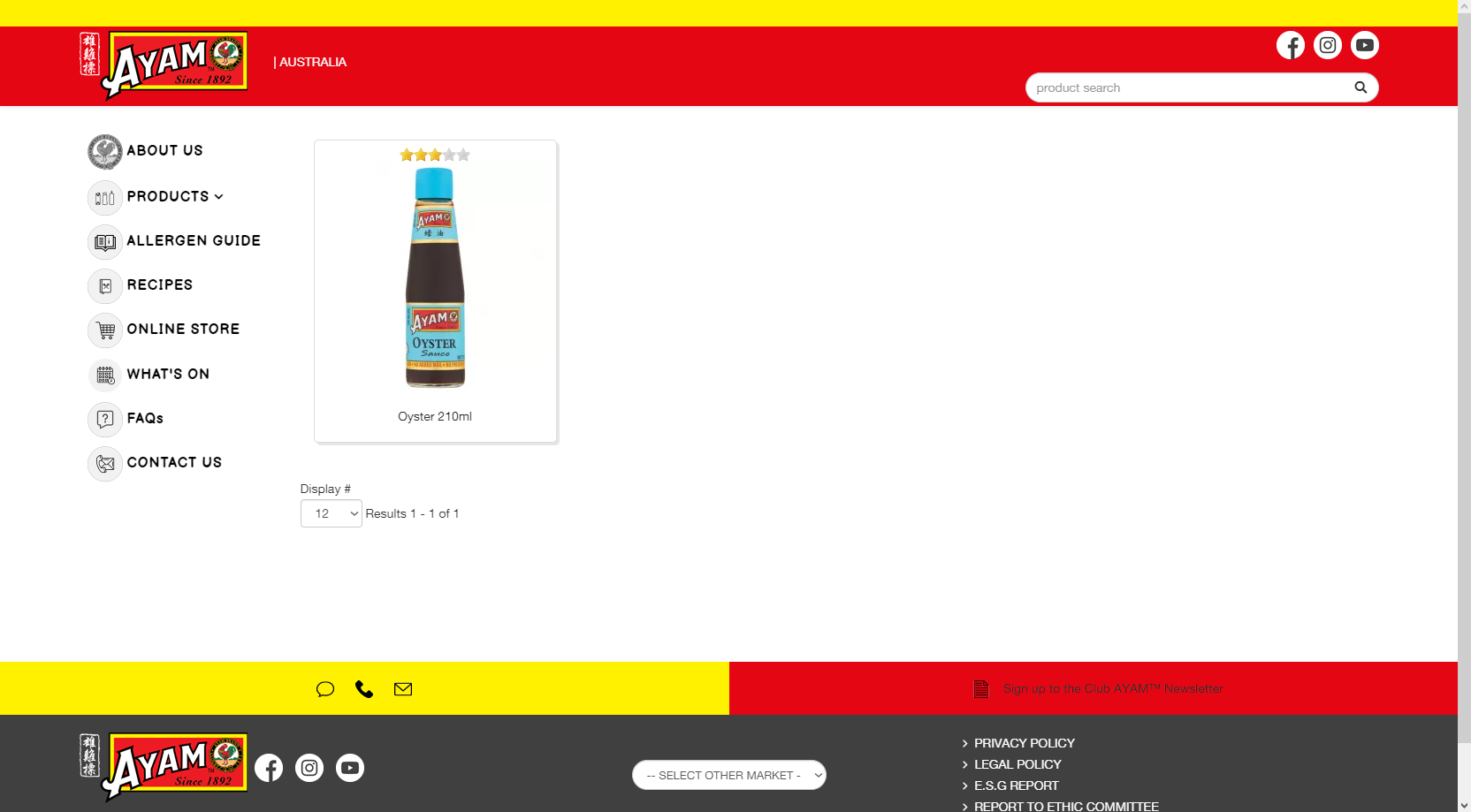
in the product detail page (we decide to place the total vote rating beside the product name.)
Thanks
-- HikaShop version -- : 4.5.0
-- Joomla version -- : 3.10.8
Hi,
May i know how can i show the total vote rating from product listing as below
in the product detail page (we decide to place the total vote rating beside the product name.)
Thanks
Please Log in or Create an account to join the conversation.

4 years 7 months ago #340653
by nicolas
Replied by nicolas on topic Vote addon
Hi,
In the HikaShop configuration, you have a setting "Display votes and/or comments on product pages" which you need to activate so that it displays on the product details page.
In the HikaShop configuration, you have a setting "Display votes and/or comments on product pages" which you need to activate so that it displays on the product details page.
Please Log in or Create an account to join the conversation.
4 years 7 months ago #340678
by alainz
Replied by alainz on topic Vote addon
Hi,
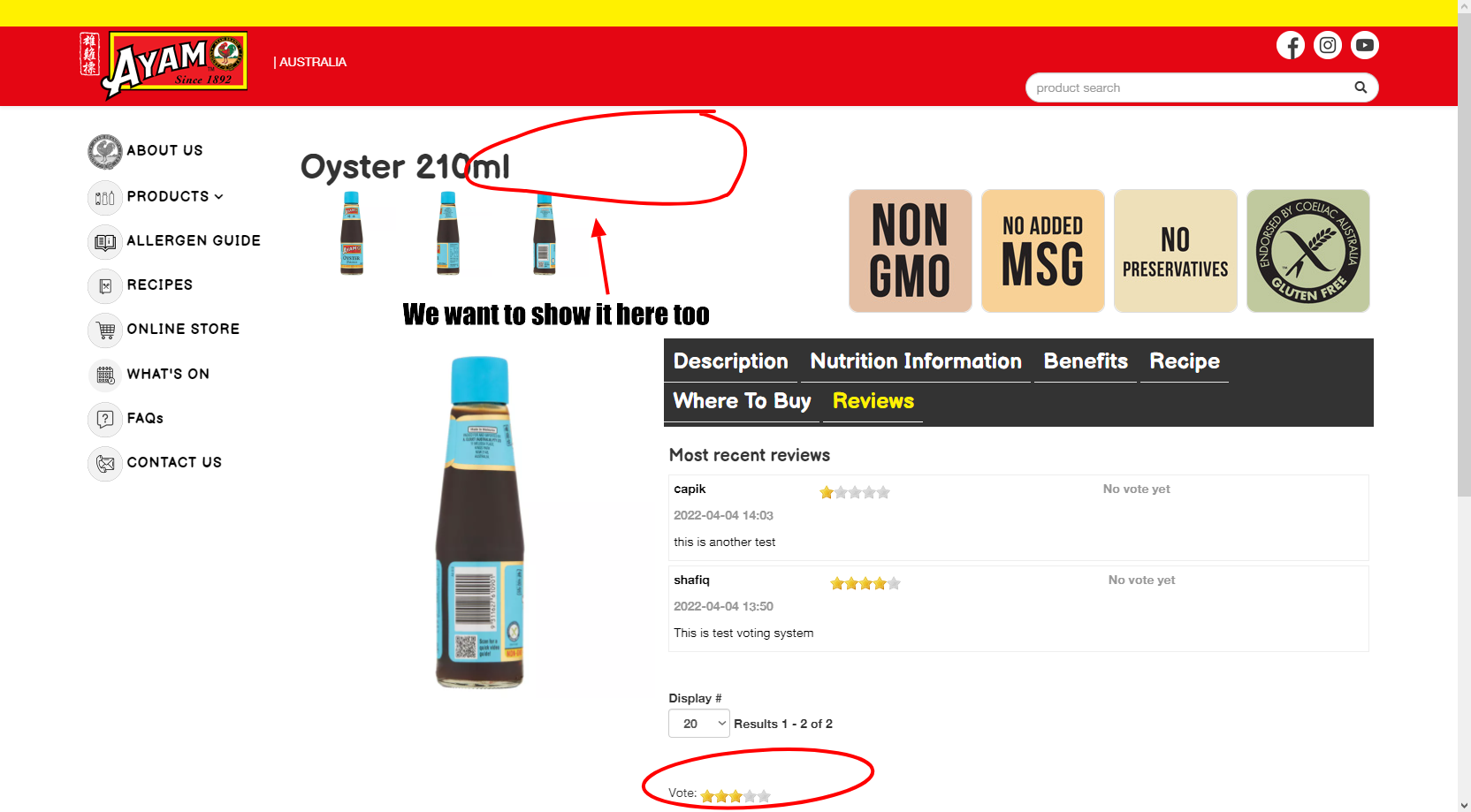
That configuration already enable.
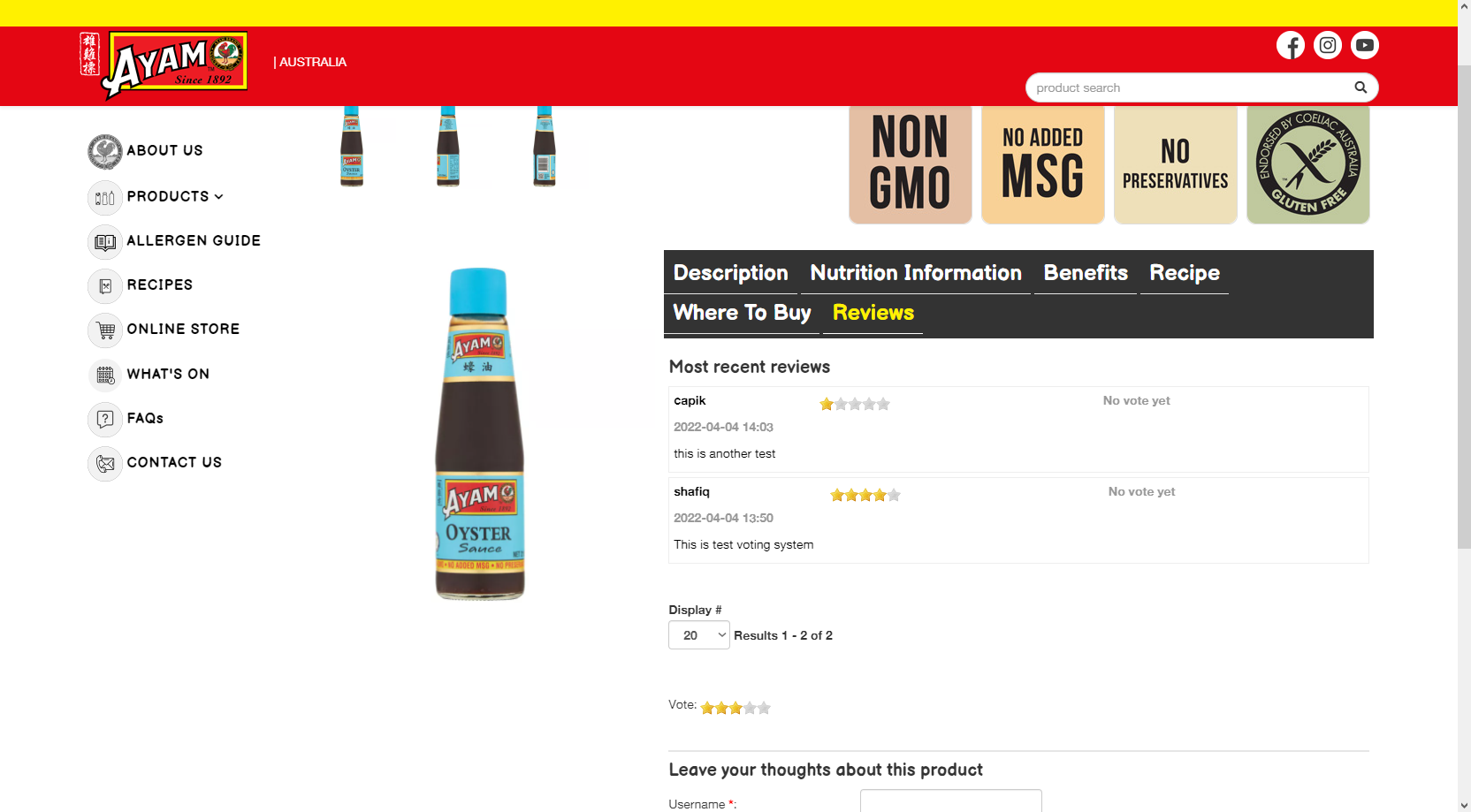
For the question i means we want to show the rating beside the product name too.
Thanks.
That configuration already enable.
For the question i means we want to show the rating beside the product name too.
Thanks.
Please Log in or Create an account to join the conversation.
4 years 7 months ago #340683
by nicolas
Replied by nicolas on topic Vote addon
Hi,
I suppose you're using the show_tabular layout and I can see it has been heavily modified.
Normally, if you edit show_tabular via the menu Display>Views, you have this code:
which displays what you want in between the price area and the characteristics area:
i.imgur.com/Iu78oRP.png
So normally, it's just a matter of moving that code right after the display of the product name.
In fact, normally, you just have to use the page builder to do that move, without touching the code:
i.imgur.com/ugpdCLC.png
Now, I don't know the situation on your website with that layout, so I wouldn't be able to say what to do exactly.
I suppose you're using the show_tabular layout and I can see it has been heavily modified.
Normally, if you edit show_tabular via the menu Display>Views, you have this code:
Code:
<div id="hikashop_product_vote_mini" class="hikashop_product_vote_mini">
<?php
if($this->params->get('show_vote_product') == '-1') {
$this->params->set('show_vote_product', $config->get('show_vote_product'));
}
if($this->params->get('show_vote_product')) {
echo $layout_vote_mini;
}
?>
</div>
i.imgur.com/Iu78oRP.png
So normally, it's just a matter of moving that code right after the display of the product name.
In fact, normally, you just have to use the page builder to do that move, without touching the code:
i.imgur.com/ugpdCLC.png
Now, I don't know the situation on your website with that layout, so I wouldn't be able to say what to do exactly.
The following user(s) said Thank You: alainz
Please Log in or Create an account to join the conversation.
4 years 6 months ago - 4 years 6 months ago #340736
by alainz
Replied by alainz on topic Vote addon
Hi,
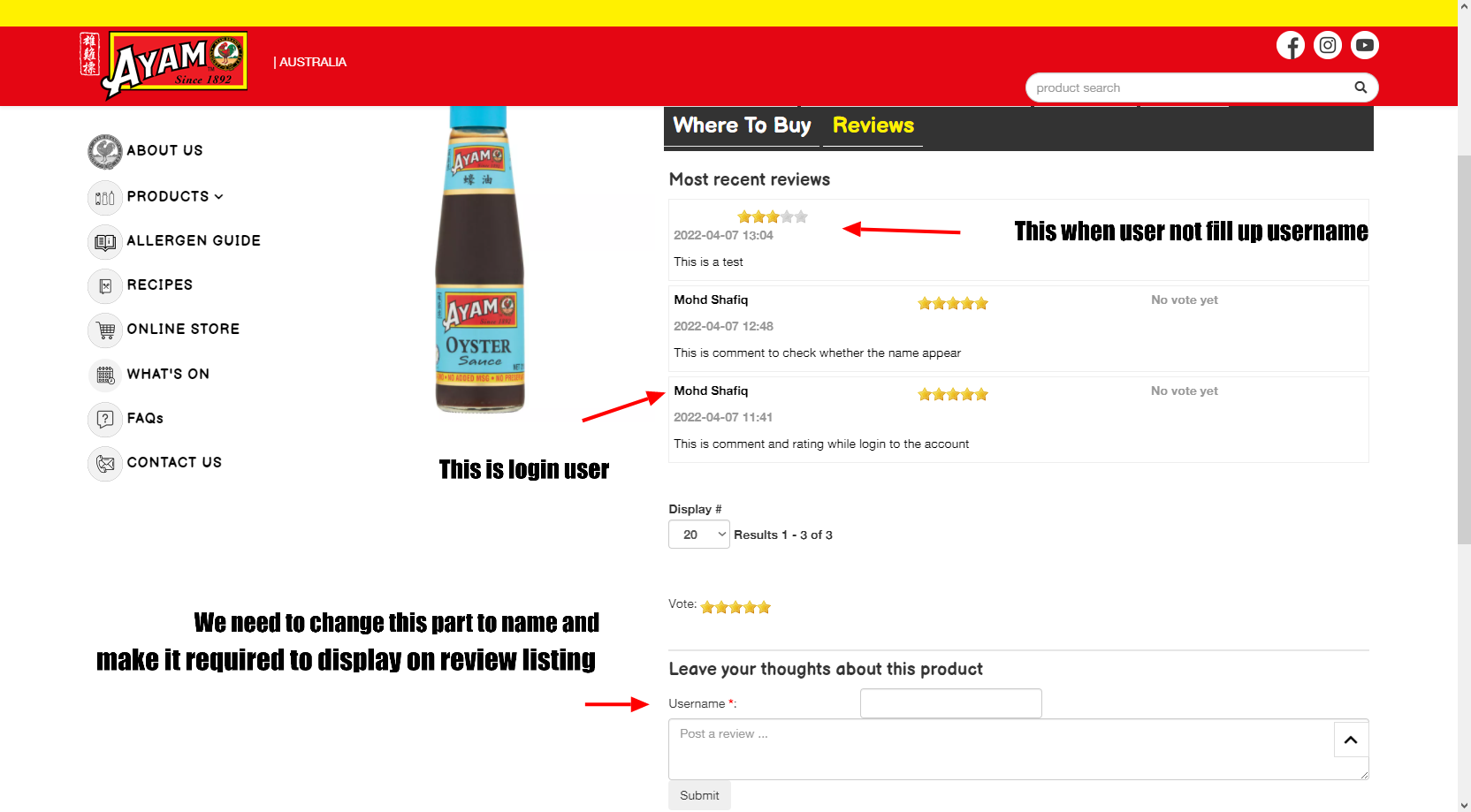
Another issue i need is any chance we can change the username to name and set it required to fill up when submitting the comment and rating?
Here is the configuration for vote and comment setting.
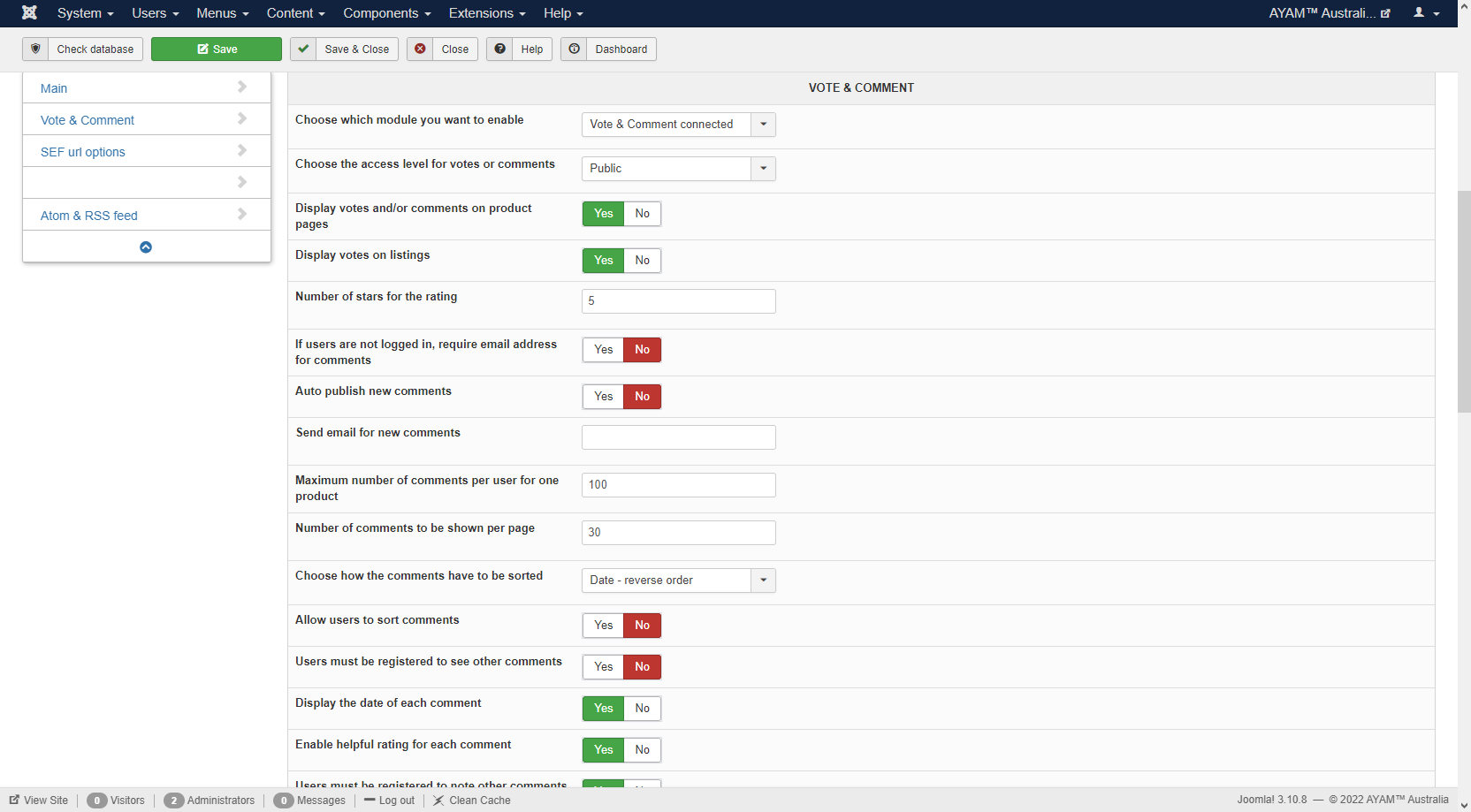
This vote and comment section are open to public to comment. Can we custom it to have name instead username since when testing i found out that when you not filled up username the user can still do comment and vote.
Thanks.
Another issue i need is any chance we can change the username to name and set it required to fill up when submitting the comment and rating?
Here is the configuration for vote and comment setting.
This vote and comment section are open to public to comment. Can we custom it to have name instead username since when testing i found out that when you not filled up username the user can still do comment and vote.
Thanks.
Last edit: 4 years 6 months ago by alainz.
Please Log in or Create an account to join the conversation.

4 years 6 months ago #340742
by Philip
Replied by Philip on topic Vote addon
Hello,
Your question is quite strange for us because in our mind the username is required, but your question seems to tell us that it's possible to post a message (and note) without username ?
We try to reproduce this issue on our side (from your screenshot configuration) and on our side it's not possible to leave a comment without username.
From this can you process a test a default template (ProtoStar) and make your returns to see if that change something or not to your issue.
We suspect that this situation come from your custom (override view), if the template switch test change nothing then, we will need to see by ourselves this display error because we haven't this issue on our side, and so, can you provide these elements :
- Url link to your backend access
- User backend references (with maximum Acl)
Use our Contact us form to provides these elements and don't forget to add an Url link to this topic in order to link.
Awaiting your returns to be able to progress on your subject.
Regards
Your question is quite strange for us because in our mind the username is required, but your question seems to tell us that it's possible to post a message (and note) without username ?
We try to reproduce this issue on our side (from your screenshot configuration) and on our side it's not possible to leave a comment without username.
From this can you process a test a default template (ProtoStar) and make your returns to see if that change something or not to your issue.
We suspect that this situation come from your custom (override view), if the template switch test change nothing then, we will need to see by ourselves this display error because we haven't this issue on our side, and so, can you provide these elements :
- Url link to your backend access
- User backend references (with maximum Acl)
Use our Contact us form to provides these elements and don't forget to add an Url link to this topic in order to link.
Awaiting your returns to be able to progress on your subject.
Regards
Please Log in or Create an account to join the conversation.
4 years 6 months ago #340805
by alainz
Replied by alainz on topic Vote addon
Hi Philip,
I have test it using Prostar template, unfortunately the voting and comment section still allow user to comment and vote without fill in their username.
Our colleague are requesting to us to change the system where they don't want user to enter their username but replaced with their name since we allowed public to post voting and comment on the products page. Is there a way to change from username to name?
I'll post the credential to your contact form.
Thanks.
I have test it using Prostar template, unfortunately the voting and comment section still allow user to comment and vote without fill in their username.
Our colleague are requesting to us to change the system where they don't want user to enter their username but replaced with their name since we allowed public to post voting and comment on the products page. Is there a way to change from username to name?
I'll post the credential to your contact form.
Thanks.
Please Log in or Create an account to join the conversation.
4 years 6 months ago #340811
by nicolas
Replied by nicolas on topic Vote addon
Hi,
In the file vote / form you can change that line below if you want to change the "username" text :
For example, you could replaced it by:
Regarding making the name required, there should already be a check for that with the code:
of the file administrator/components/com_hikashop/classes/vote.php
However, maybe that could be improved.
Try changing that code to:
In the file vote / form you can change that line below if you want to change the "username" text :
Code:
<?php echo JText::_('HIKA_USERNAME'); ?>:
Code:
<?php echo JText::_('HIKA_NAME'); ?>* :
Regarding making the name required, there should already be a check for that with the code:
Code:
if(!$element->vote_pseudo){
$this->error = array('code' => '505011', 'message' => JText::_('HIKA_VOTE_PSEUDO_REQUIRED'));
return false;
}
However, maybe that could be improved.
Try changing that code to:
Code:
if(empty($element->vote_pseudo)){
$this->error = array('code' => '505011', 'message' => JText::_('HIKA_VOTE_PSEUDO_REQUIRED'));
return false;
}
Please Log in or Create an account to join the conversation.
4 years 6 months ago #340838
by alainz
Replied by alainz on topic Vote addon
Hi Nicholas,
Thanks for the reply.
For the checking whether name is required, i don't think it working. Already follow your steps.
By the default one also is not working while i'm testing it with prostar template.
It getting posted without customer fill up their name.
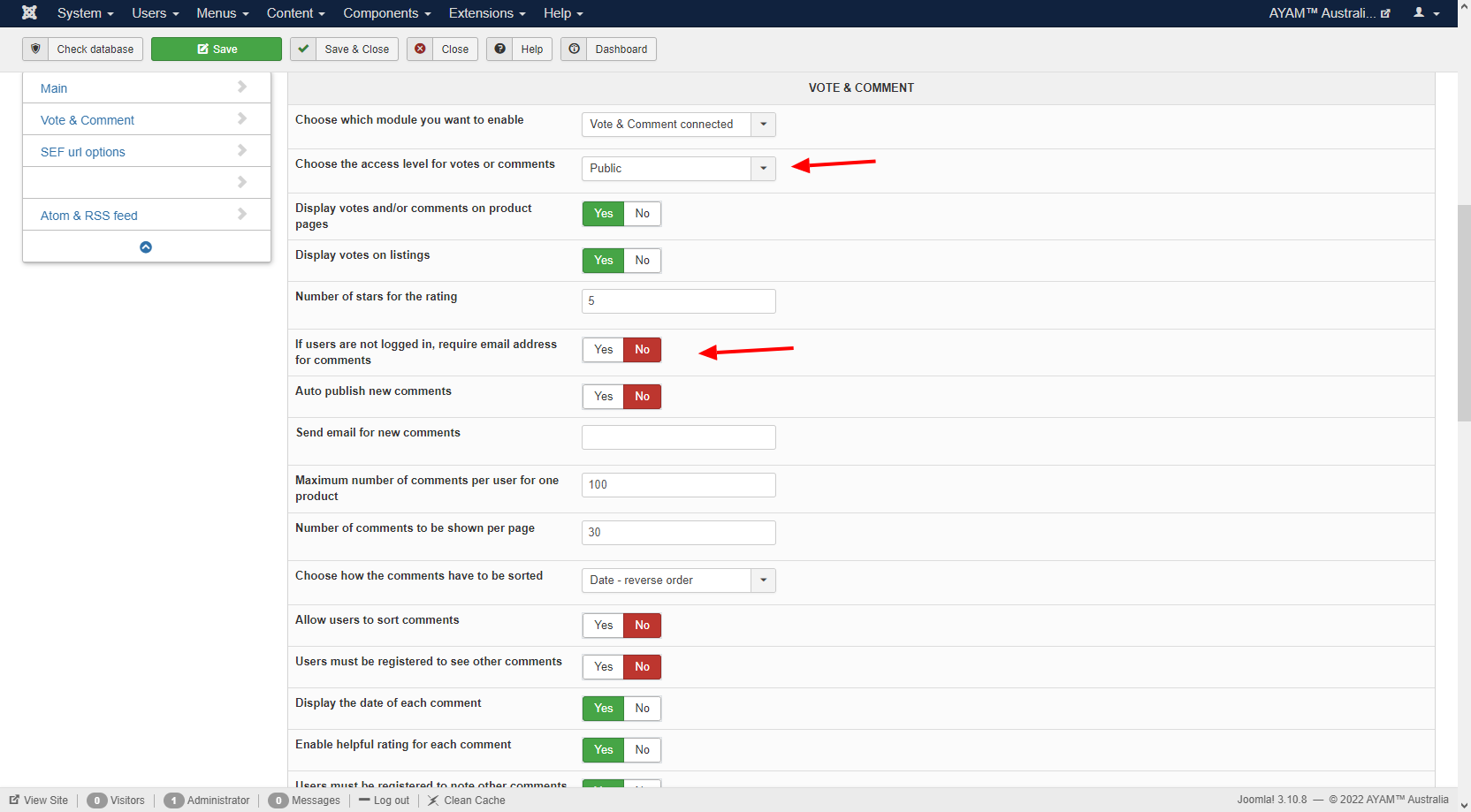
This vote & comment section is set to public for the access level. Please refer to the attachment.
Thanks for the reply.
For the checking whether name is required, i don't think it working. Already follow your steps.
By the default one also is not working while i'm testing it with prostar template.
It getting posted without customer fill up their name.
This vote & comment section is set to public for the access level. Please refer to the attachment.
Please Log in or Create an account to join the conversation.
4 years 6 months ago #340853
by nicolas
Replied by nicolas on topic Vote addon
Hi,
Thanks for the extra details. I was able to reproduce the issue in some cases due to the guest mode not handled properly by the vote system. I've made a patch for it but it's more complex than the previous one so I've added it directly to the HikaShop install package.
Download it on our website and install it on your website and you'll get the patch.
With that extra patch, I'm not able to reproduce the issue anymore on my end.
Thanks for the extra details. I was able to reproduce the issue in some cases due to the guest mode not handled properly by the vote system. I've made a patch for it but it's more complex than the previous one so I've added it directly to the HikaShop install package.
Download it on our website and install it on your website and you'll get the patch.
With that extra patch, I'm not able to reproduce the issue anymore on my end.
Please Log in or Create an account to join the conversation.
4 years 6 months ago - 4 years 6 months ago #340878
by alainz
Replied by alainz on topic Vote addon
Hi,
Thanks for the update, but the issue still happen here.
Already test on default template (prostar) without any overrides it still can get through. Same issue as the main template.
Here is the link to the page : ayam.com/rating-system/product/oyster-210ml-wtb
Can you try login to our backend and check? The credentials of the system already send by contact us form before this. You may use the same credential.
Thanks for the update, but the issue still happen here.
Already test on default template (prostar) without any overrides it still can get through. Same issue as the main template.
Here is the link to the page : ayam.com/rating-system/product/oyster-210ml-wtb
Can you try login to our backend and check? The credentials of the system already send by contact us form before this. You may use the same credential.
Last edit: 4 years 6 months ago by alainz.
Please Log in or Create an account to join the conversation.
4 years 6 months ago #340883
by nicolas
Replied by nicolas on topic Vote addon
Hi,
We must be talking about something else.
I tried to post a comment without providing the username and the system refused with an error message "Valid pseudo required" on that page:
i.imgur.com/8oXBj9E.png
Don't you have the same thing ? Or are we talking about something else ?
We must be talking about something else.
I tried to post a comment without providing the username and the system refused with an error message "Valid pseudo required" on that page:
i.imgur.com/8oXBj9E.png
Don't you have the same thing ? Or are we talking about something else ?
Please Log in or Create an account to join the conversation.
4 years 6 months ago #340916
by alainz
Replied by alainz on topic Vote addon
Hi,
I think we have misunderstanding here.
From our situation, i'm testing by give the rating and place the comment without key in the name or email the system capture that value.
But if doing like your screenshot, it will throw an error message.
By the Hikashop setting we already set that Vote & Comment connected as screenshot below.
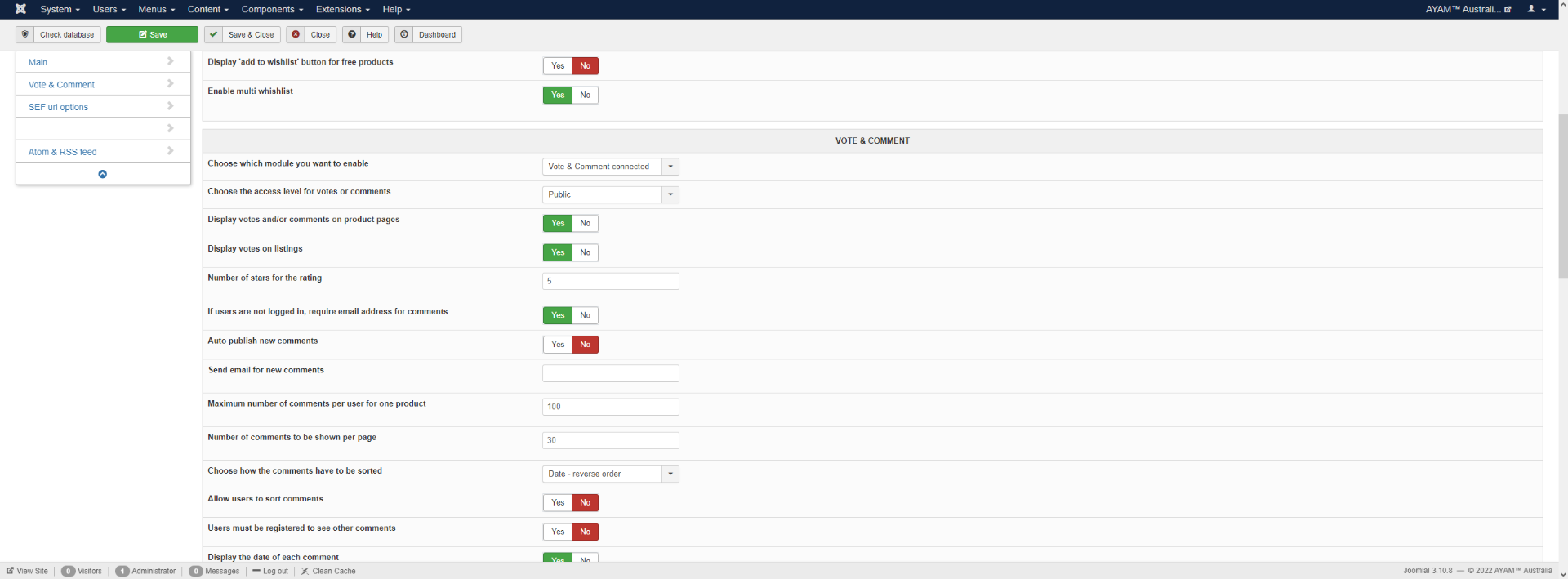
Should voting and comment be connected and required the name and email to be submitted together ?
I think we have misunderstanding here.
From our situation, i'm testing by give the rating and place the comment without key in the name or email the system capture that value.
But if doing like your screenshot, it will throw an error message.
By the Hikashop setting we already set that Vote & Comment connected as screenshot below.
Should voting and comment be connected and required the name and email to be submitted together ?
This attachment is hidden for guests.
Please log in or register to see it.
Please log in or register to see it.
Please Log in or Create an account to join the conversation.
4 years 6 months ago #340925
by nicolas
Replied by nicolas on topic Vote addon
Hi,
Well, you're talking about a new problem here. Thanks for the extra details.
I was able to reproduce the issue on my local test website and made a new patch for that problem too.
I've added it directly to the HikaShop install package.
Download it on our website and install it on your website and you'll get the patch.
Well, you're talking about a new problem here. Thanks for the extra details.
I was able to reproduce the issue on my local test website and made a new patch for that problem too.
I've added it directly to the HikaShop install package.
Download it on our website and install it on your website and you'll get the patch.
The following user(s) said Thank You: alainz
Please Log in or Create an account to join the conversation.
4 years 6 months ago #341020
by alainz
Replied by alainz on topic Vote addon
Thanks. Issue solve.
Please Log in or Create an account to join the conversation.
Time to create page: 0.151 seconds