

- Posts: 37
- Thank you received: 0
Carousel: Margin left on pane layouts
12 years 5 months ago - 12 years 5 months ago #155796
by blbeta
Carousel: Margin left on pane layouts was created by blbeta
-- HikaShop Business: 2.3.1
-- Joomla version -- : 3.2.3
First off I want to say I found my own solution. I did try searching the forums, but may not have searched properly. I still wanted to post my issue and give the solution for others. Also if there is a better solution I'd like to hear it.
I just upgraded to business from starter. I have spent this evening learning about the carousel functions. I ran into an issue anytime I used
"Type of item layout": anything with a pane (Fade, img_pane, slider_horizontal & slider vertical)
The Carousel would have a margin at the left. The orange background illustrates this. Even when the next slide moved it would not move the old slide all the way off.

Any layout without the pane was fine

I tested this on my custom template and proto star with the same results. I used Firebug to isolate the issue and it turned out to be bootstrap.min.css causing it.
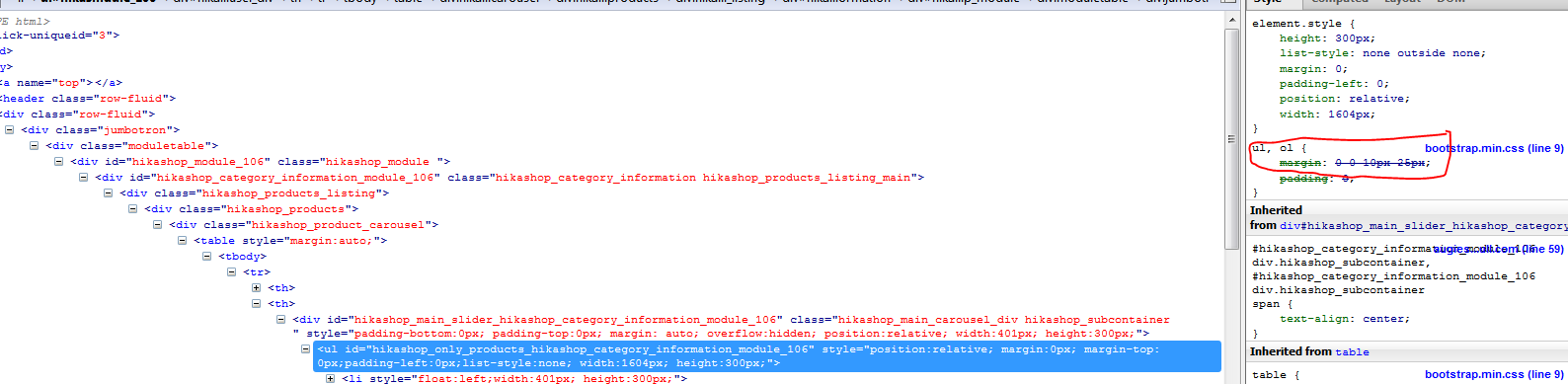
I just added a rule to my custom.css
I expect you could add it to the System, Configuration, Display, CSS, Front-end CSS File
for those who are not using custom templates?
I expect to get a lot more practice with the Carousel as I have a responsive website and have read that Carousel is not yet responsive. I look forward to that update.
-- Joomla version -- : 3.2.3
First off I want to say I found my own solution. I did try searching the forums, but may not have searched properly. I still wanted to post my issue and give the solution for others. Also if there is a better solution I'd like to hear it.
I just upgraded to business from starter. I have spent this evening learning about the carousel functions. I ran into an issue anytime I used
"Type of item layout": anything with a pane (Fade, img_pane, slider_horizontal & slider vertical)
The Carousel would have a margin at the left. The orange background illustrates this. Even when the next slide moved it would not move the old slide all the way off.
Any layout without the pane was fine
I tested this on my custom template and proto star with the same results. I used Firebug to isolate the issue and it turned out to be bootstrap.min.css causing it.
I just added a rule to my custom.css
Code:
/* Hikashop Custom CSS */
.hikashop_product_carousel ul {
margin: 0;
}
for those who are not using custom templates?
I expect to get a lot more practice with the Carousel as I have a responsive website and have read that Carousel is not yet responsive. I look forward to that update.
Last edit: 12 years 5 months ago by blbeta.
Please Log in or Create an account to join the conversation.

12 years 5 months ago #155826
by Xavier
Replied by Xavier on topic Carousel: Margin left on pane layouts
Hi,
We have indeed on our todo list to make again the carousel, but responsive.
In the carousel we will avoir the issues encountered in the current one.
We have indeed on our todo list to make again the carousel, but responsive.
In the carousel we will avoir the issues encountered in the current one.
Please Log in or Create an account to join the conversation.
Time to create page: 0.067 seconds