
colunm rows height[Solved]
- the heatkiller
-
 Topic Author
- Offline
Less
More
11 years 8 months ago - 11 years 7 months ago #191290
by the heatkiller
colunm rows height[Solved] was created by the heatkiller
-- HikaShop version -- : 2.3.5
-- Joomla version -- : 3.3.6
-- PHP version -- : 5.5.9
-- Browser(s) name and version -- : Firefox
Hi
Hello
I have a little trouble with my rows are not straight height because of some of the product has to text line an other only have one. when it stand advance of each other and it does not look good.
I can see that hikashop is set to auto parts rows in that the width but not in the height.
Is it possible to get it to it, so the products are on a straight line
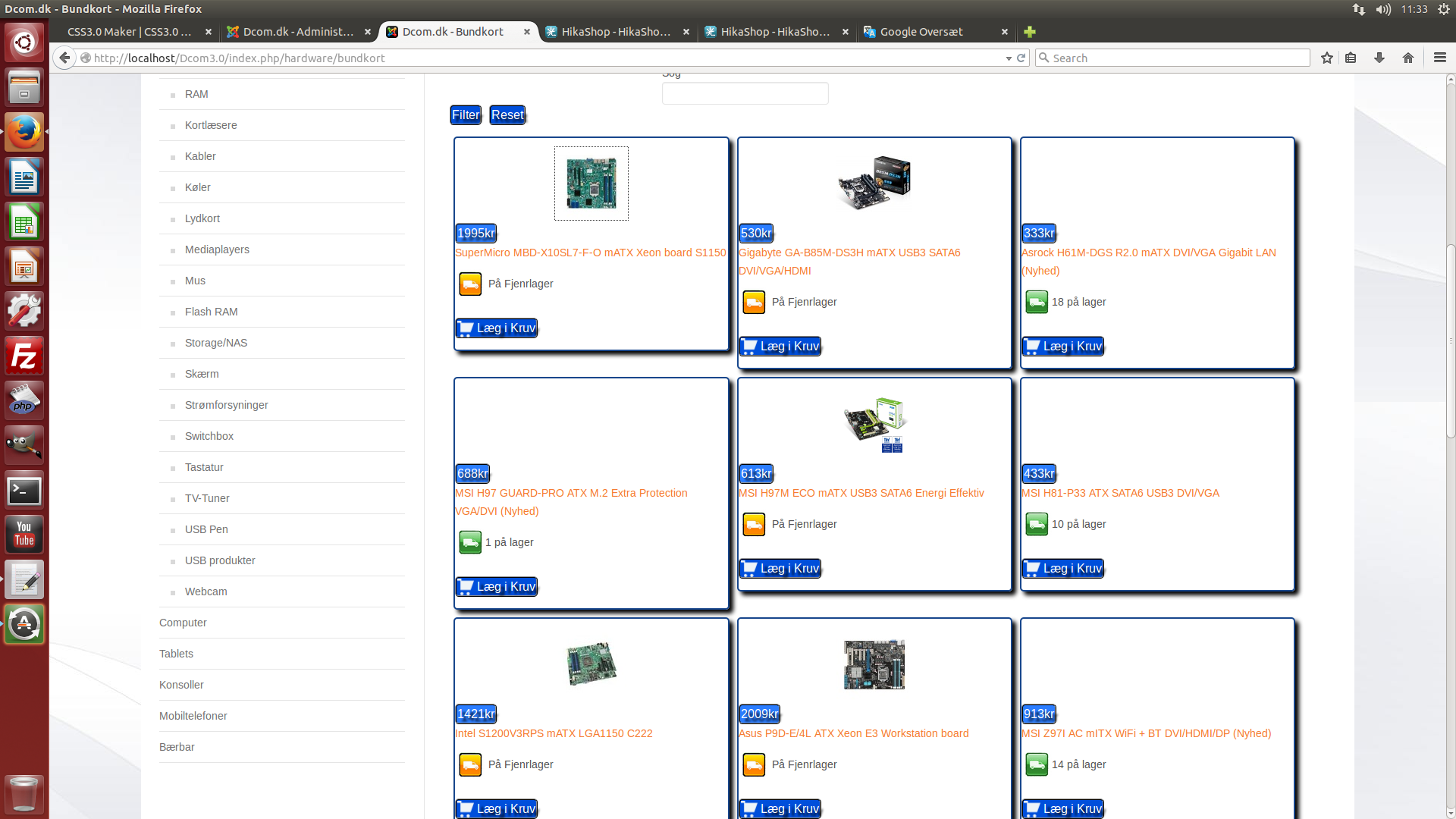
Tanks for our time
-- Joomla version -- : 3.3.6
-- PHP version -- : 5.5.9
-- Browser(s) name and version -- : Firefox
Hi
Hello
I have a little trouble with my rows are not straight height because of some of the product has to text line an other only have one. when it stand advance of each other and it does not look good.
I can see that hikashop is set to auto parts rows in that the width but not in the height.
Is it possible to get it to it, so the products are on a straight line
Tanks for our time
Last edit: 11 years 7 months ago by the heatkiller.
Please Log in or Create an account to join the conversation.

Less
More
- Posts: 12953
- Thank you received: 1778
11 years 8 months ago #191291
by Mohamed Thelji
Replied by Mohamed Thelji on topic colunm rows height
Hello,
To do it you'll have to use some CSS code to force the height of the products of your product listing : www.hikashop.com/support/documentation/1...the-display.html#css
To do it you'll have to use some CSS code to force the height of the products of your product listing : www.hikashop.com/support/documentation/1...the-display.html#css
Please Log in or Create an account to join the conversation.
- the heatkiller
-
Topic Author
- Offline
11 years 7 months ago #195339
by the heatkiller
Replied by the heatkiller on topic colunm rows height[Fixes]
I would like to share how I solve this problem with my rows jumping up and down. The reason that my number was not equal because the text feldte were not the same all products thereby also 40px per line
In the Cosstum CCS file into I put these lines.
In order to control the height of the weather box.
.hikashop_subcontainer {
height: 280px;
}
To control the text figures how much it must fill the product page
.hikashop_product_name {
font-size: 100%;
height: 35px;
}
Show you now want a different text layout can i write it in .hikashop_product_name or some text must have different color, etc.
Hope you can use or mail me and I will answer you as best as possible.
Theis
In the Cosstum CCS file into I put these lines.
In order to control the height of the weather box.
.hikashop_subcontainer {
height: 280px;
}
To control the text figures how much it must fill the product page
.hikashop_product_name {
font-size: 100%;
height: 35px;
}
Show you now want a different text layout can i write it in .hikashop_product_name or some text must have different color, etc.
Hope you can use or mail me and I will answer you as best as possible.
Theis
Please Log in or Create an account to join the conversation.
Time to create page: 0.070 seconds