

- Posts: 251
- Thank you received: 2
Carousel do not work correctly
10 years 10 months ago #224624
by Nello
Carousel do not work correctly was created by Nello
-- HikaShop version -- : 2.6.0
-- Joomla version -- : 3.4.4
Hello I've set a menu item to display products as carousel grouped by categories, but the slide does not move.
I set 4 columns and 1 row, and 12 product per slide as you can see in the image below.
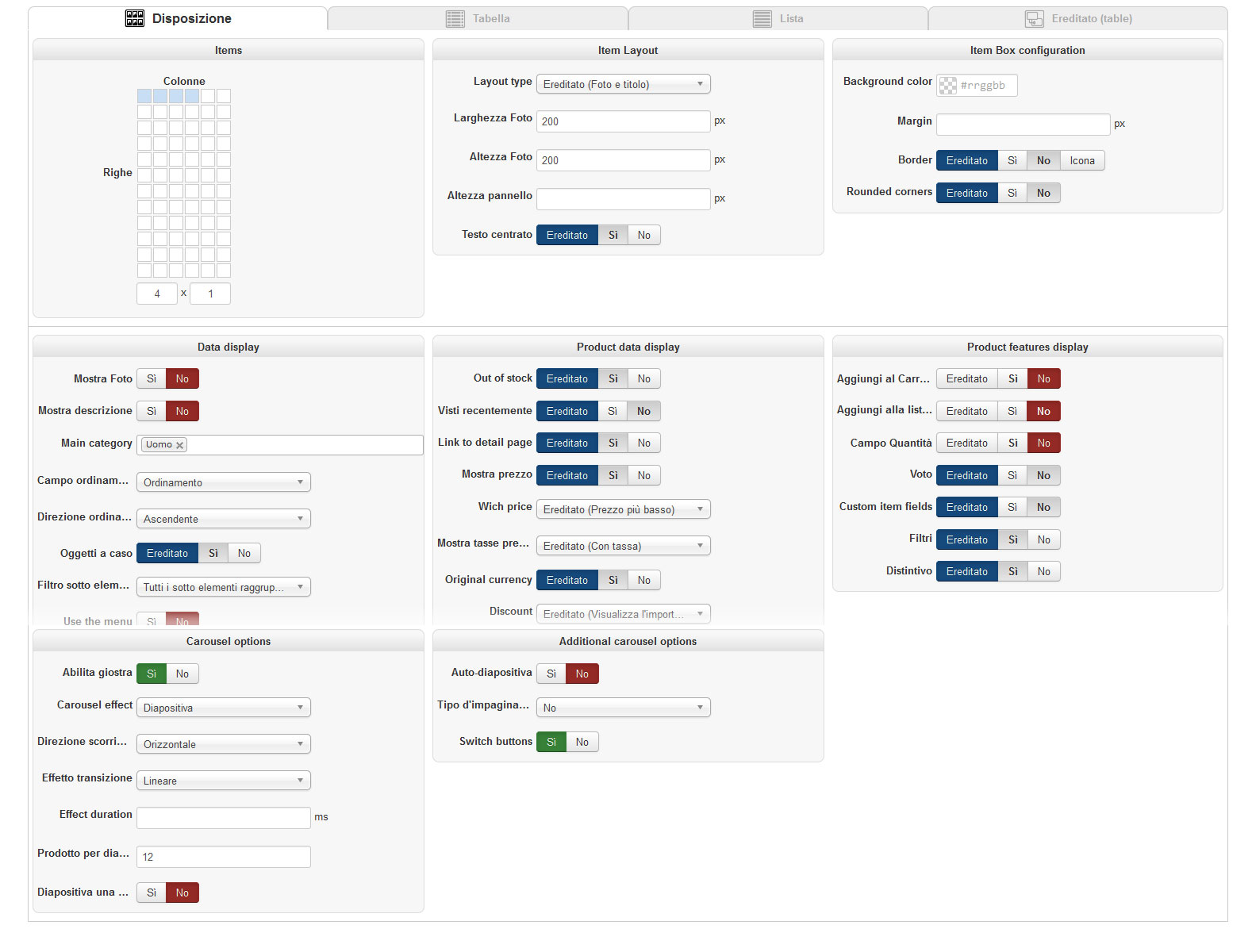
What could be the problem? Why it doesn't slide?
I also tryed to remove image size, or set more o less product per slide, or changing other setting but nothing.
Thank you.
-- Joomla version -- : 3.4.4
Hello I've set a menu item to display products as carousel grouped by categories, but the slide does not move.
I set 4 columns and 1 row, and 12 product per slide as you can see in the image below.
What could be the problem? Why it doesn't slide?
I also tryed to remove image size, or set more o less product per slide, or changing other setting but nothing.
Thank you.
Please Log in or Create an account to join the conversation.

10 years 10 months ago #224678
by nicolas
Replied by nicolas on topic Carousel do not work correctly
Hi,
It's the opposite you want.
You want to switch the 4 and the 12 in your settings on your screenshot.
It's the opposite you want.
You want to switch the 4 and the 12 in your settings on your screenshot.
Please Log in or Create an account to join the conversation.
10 years 10 months ago #224692
by Nello
Replied by Nello on topic Carousel do not work correctly
If I switch this settings, in the frontend I get 12 columns and the carousel width will be 2480px with only 4 products per slide.
This settings have no sense. I would have a carousel that fit the with of contents area and show me 4 products per slide random from the products of categories. Like in your demo on line.
But there's somethings that works bad.
This settings have no sense. I would have a carousel that fit the with of contents area and show me 4 products per slide random from the products of categories. Like in your demo on line.
But there's somethings that works bad.
Please Log in or Create an account to join the conversation.
10 years 10 months ago #224693
by Nello
Replied by Nello on topic Carousel do not work correctly
Maybe I fix it setting the height of panel.
I have another question:
Clicking on one of this item menu "Uomo" or "Donna" it displays me the products grouped by categories.
Uomo shows me the Uomo categorie and its subcategories, and Donna showes me the Donna categorie and its subcategories, correctly.
What I want to get is to have only the subcategories in the products listing without the carousel "Uomo" and the carousel "Donna", respectively.
Thank you so much.
I have another question:
Clicking on one of this item menu "Uomo" or "Donna" it displays me the products grouped by categories.
Uomo shows me the Uomo categorie and its subcategories, and Donna showes me the Donna categorie and its subcategories, correctly.
What I want to get is to have only the subcategories in the products listing without the carousel "Uomo" and the carousel "Donna", respectively.
Thank you so much.
Please Log in or Create an account to join the conversation.
10 years 10 months ago #224695
by nicolas
Replied by nicolas on topic Carousel do not work correctly
Hi,
1. Keep the number of columns to 4 but set the number of rows to 3.
That way, it will look like you want.
2. If you don't want the carousel on the products listings of your "Uomo" or "Donna" menu items, edit these menu items via the Joomla menu manager and in the "products options" tab, turn off the carousel setting.
1. Keep the number of columns to 4 but set the number of rows to 3.
That way, it will look like you want.
2. If you don't want the carousel on the products listings of your "Uomo" or "Donna" menu items, edit these menu items via the Joomla menu manager and in the "products options" tab, turn off the carousel setting.
Please Log in or Create an account to join the conversation.
10 years 10 months ago #224744
by Nello
Replied by Nello on topic Carousel do not work correctly
Sorry Nicolas, I try to explain better what I want to do.
I would click on the "Uomo" menu item and get all the carousels of Uomo subcategories, except the main category Uomo.
Below the settings of the Uomo menu item
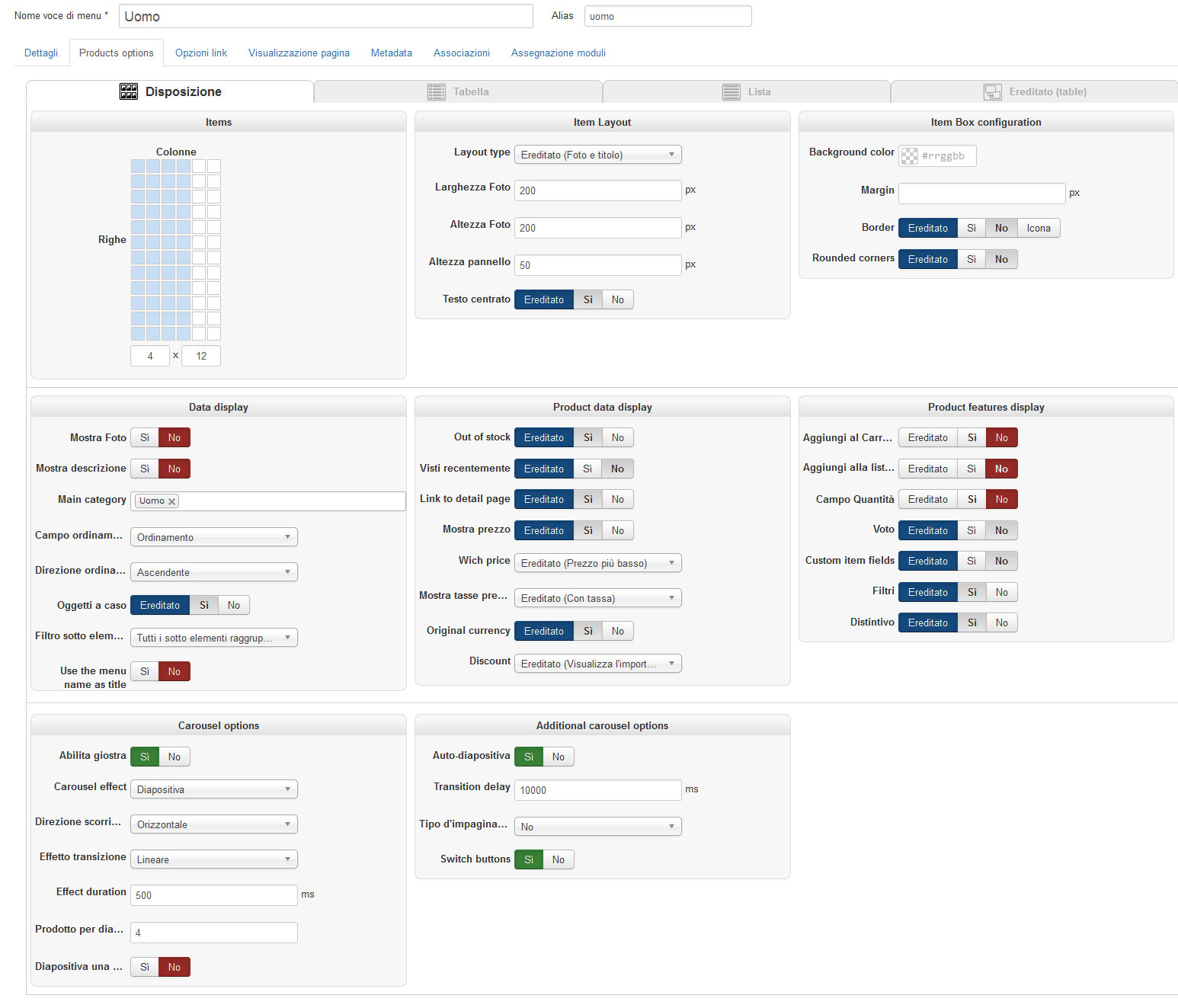
And below what I want to obtain
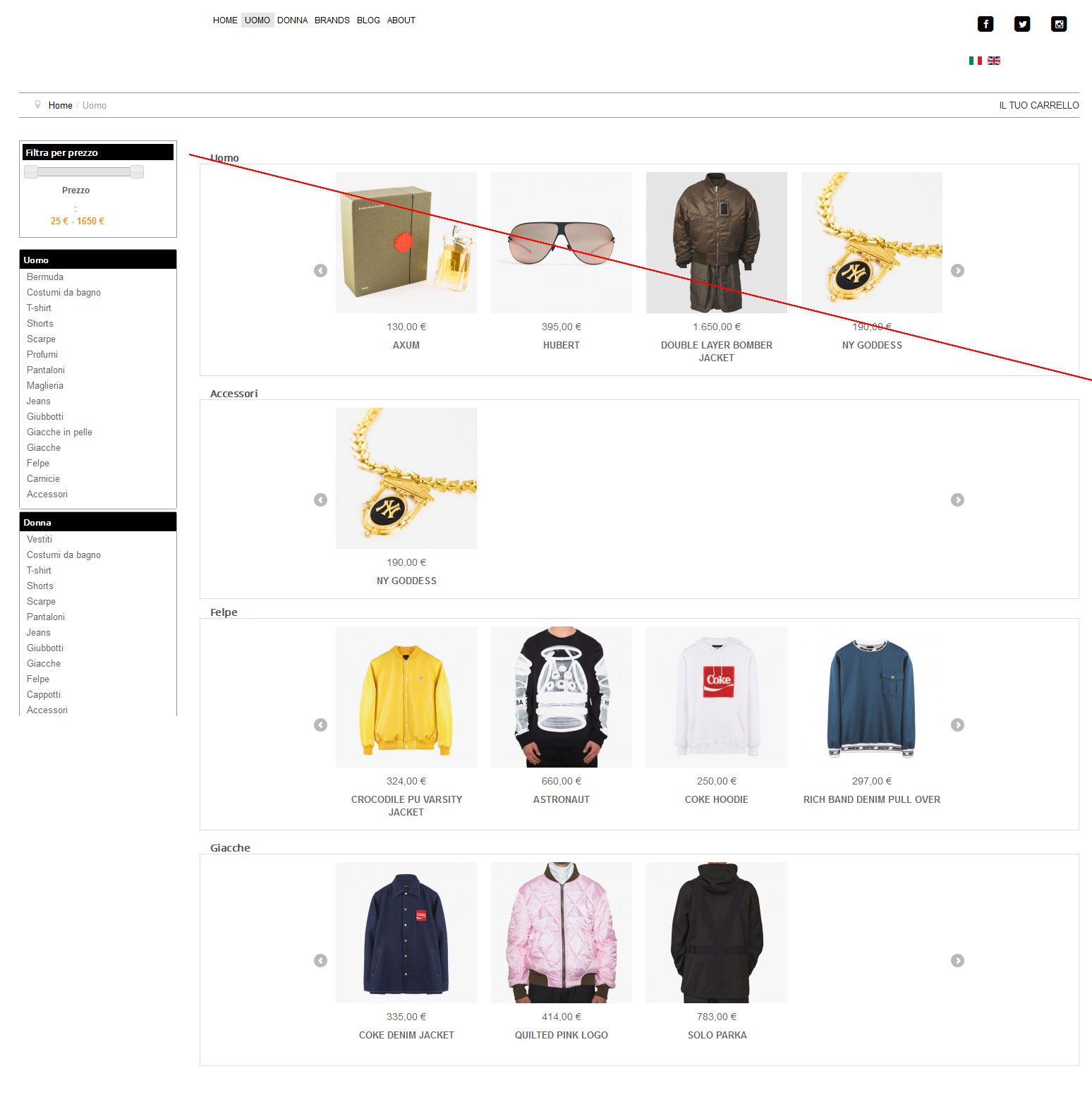
I would click on the "Uomo" menu item and get all the carousels of Uomo subcategories, except the main category Uomo.
Below the settings of the Uomo menu item
And below what I want to obtain
Please Log in or Create an account to join the conversation.
10 years 10 months ago #224750
by nicolas
Replied by nicolas on topic Carousel do not work correctly
Hi,
This carousel displays because you have these products in that category. Remove them from the uomo category and you won't see that carousel, only the other ones.
This carousel displays because you have these products in that category. Remove them from the uomo category and you won't see that carousel, only the other ones.
Please Log in or Create an account to join the conversation.
10 years 10 months ago #224845
by Nello
Replied by Nello on topic Carousel do not work correctly
I should have thought! ¦D
Thank you so much!
Thank you so much!
Please Log in or Create an account to join the conversation.
10 years 7 months ago #232946
by justme
Replied by justme on topic Carousel do not work correctly
I have the same problem. I had it working with 4 rows, 12 products and 4 products in each dia. Now I changed it to 5 products with smaller images, but the slides are not working anymore. Even when I put it back as it was, the slides are not moving. (see screenshots).
Also in the carousel the border is around all the products together. I want the border back around the products as it is on my productpage, so not around the carousel. Could you inform me on what css to use? Using the .thumbnail { border:0px } it removes the border around the carousel, but what css do I use to put the border around the products?
Also in the carousel the border is around all the products together. I want the border back around the products as it is on my productpage, so not around the carousel. Could you inform me on what css to use? Using the .thumbnail { border:0px } it removes the border around the carousel, but what css do I use to put the border around the products?
Please Log in or Create an account to join the conversation.
10 years 7 months ago #232954
by justme
Replied by justme on topic Carousel do not work correctly
Ok I figured out what the problem is. When I turn off the voting (in the Hikashop settings or in the carousel module) the carousel isnt sliding anymore. How to fix this?
Please Log in or Create an account to join the conversation.
10 years 7 months ago #232979
by nicolas
Replied by nicolas on topic Carousel do not work correctly
Hi,
Can you provide a link to a page with the problem ?
It probably comes from some javascript error on the page.
Can you provide a link to a page with the problem ?
It probably comes from some javascript error on the page.
Please Log in or Create an account to join the conversation.
10 years 7 months ago #232988
by justme
Replied by justme on topic Carousel do not work correctly
I have sent you a private message with the link, because I don't want to publish it here.
Thanks for looking.
Thanks for looking.
Please Log in or Create an account to join the conversation.
10 years 7 months ago #233004
by nicolas
Replied by nicolas on topic Carousel do not work correctly
Hi,
On that page, I see the javascript error:
take.ms/syKUf
With javascript code from the line 2101 in the HTML of the page.
And looking there, I see invalid javascript code:
take.ms/OOUJX
It apparently comes from an extension which prefixes its javascript variables and functions with ff, and looking around on the page, I see some references to FacilForms (the company making breezingform), so I'm guessing that this javascript code might be related to that extension.
If there is a javascript error on the page, the javascript initializing the carousel cannot run and thus the carousel won't work.
So the problem comes from that as far as I can see.
I would recommend to contact the developers of breezingform so that they can check that javascript code and tell you what to do because it shouldn't be like that normally.
On that page, I see the javascript error:
take.ms/syKUf
With javascript code from the line 2101 in the HTML of the page.
And looking there, I see invalid javascript code:
take.ms/OOUJX
It apparently comes from an extension which prefixes its javascript variables and functions with ff, and looking around on the page, I see some references to FacilForms (the company making breezingform), so I'm guessing that this javascript code might be related to that extension.
If there is a javascript error on the page, the javascript initializing the carousel cannot run and thus the carousel won't work.
So the problem comes from that as far as I can see.
I would recommend to contact the developers of breezingform so that they can check that javascript code and tell you what to do because it shouldn't be like that normally.
Please Log in or Create an account to join the conversation.
10 years 7 months ago #233024
by justme
Replied by justme on topic Carousel do not work correctly
Thanks for checking. I have a breezingforms contact form on that page. I will unpublish it and see if that makes a difference.
Thanks will report back later.
Thanks will report back later.
Please Log in or Create an account to join the conversation.
10 years 7 months ago #233025
by justme
Replied by justme on topic Carousel do not work correctly
I have tested it and indeed it was the Breezingforms Form that was the problem. I will contact Crosstec about this.
Thanks for your help!
Thanks for your help!
Please Log in or Create an account to join the conversation.
10 years 7 months ago #233101
by justme
Replied by justme on topic Carousel do not work correctly
For others that run into the same problem. I have contacted Crosstec and the problem is solved by placing the Breezingforms Forms in an iframe (option in the module). Hope that will help others.
Thanks for all your help.
Thanks for all your help.
Please Log in or Create an account to join the conversation.
Time to create page: 0.091 seconds