

- Posts: 16
- Thank you received: 1
Carousel for mobiles
7 years 5 months ago #306097
by emperor69
Carousel for mobiles was created by emperor69
-- url of the page with the problem -- : atalmataltoys.com
-- HikaShop version -- : 3.3.0
hi
is there any options to set the Carousel effect for mobile screen? i mean the user could pass through products by his finger (touch products)??
-- HikaShop version -- : 3.3.0
hi
is there any options to set the Carousel effect for mobile screen? i mean the user could pass through products by his finger (touch products)??
Please Log in or Create an account to join the conversation.

7 years 5 months ago #306100
by nicolas
Replied by nicolas on topic Carousel for mobiles
Hi,
If you have the "carousel legacy" setting turned off in the HikaShop configuration, you're using the owl carousel library of HikaShop 3.2+. This carousel library support the "swipe" feature of smartphones:
owlcarousel2.github.io/OwlCarousel2/
I actually just tested it on a local test website with the latest version of HikaShop and it works great.
Looking at your website, it seems that you have the old carousel system so I suppose that you have that "carousel legacy" setting turned on.
If you have the "carousel legacy" setting turned off in the HikaShop configuration, you're using the owl carousel library of HikaShop 3.2+. This carousel library support the "swipe" feature of smartphones:
owlcarousel2.github.io/OwlCarousel2/
I actually just tested it on a local test website with the latest version of HikaShop and it works great.
Looking at your website, it seems that you have the old carousel system so I suppose that you have that "carousel legacy" setting turned on.
Please Log in or Create an account to join the conversation.
7 years 5 months ago #306145
by emperor69
Replied by emperor69 on topic Carousel for mobiles
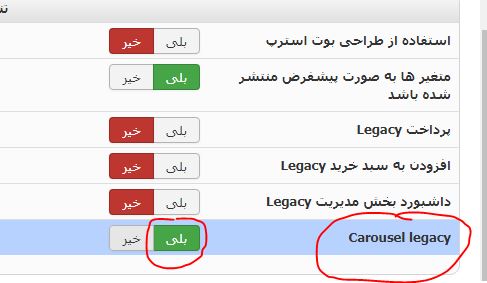
i turned on the "carousel legacy" setting and there is no change.
Please Log in or Create an account to join the conversation.
7 years 5 months ago #306147
by nicolas
Replied by nicolas on topic Carousel for mobiles
Hi,
Maybe I wasn't clear in my previous message but you need to turn off that setting, not on.
If it was already off, then you have a view override of the product / carousel.php view file that you want to delete via the menu Display>Views on top of having that carousel legacy setting turned off so that you can use the new carousel system.
Maybe I wasn't clear in my previous message but you need to turn off that setting, not on.
If it was already off, then you have a view override of the product / carousel.php view file that you want to delete via the menu Display>Views on top of having that carousel legacy setting turned off so that you can use the new carousel system.
Please Log in or Create an account to join the conversation.
7 years 5 months ago #306188
by emperor69
Replied by emperor69 on topic Carousel for mobiles
so nice!
thanks a lot for helping
thanks a lot for helping
Please Log in or Create an account to join the conversation.
7 years 5 months ago - 7 years 5 months ago #306191
by emperor69
Replied by emperor69 on topic Carousel for mobiles
one more question,
where is the carousel template file?
i want to change position of navigation buttons. (next-prev)
i cant see any related code in those files you mentioned.
where is the carousel template file?
i want to change position of navigation buttons. (next-prev)
i cant see any related code in those files you mentioned.
Last edit: 7 years 5 months ago by emperor69.
Please Log in or Create an account to join the conversation.
7 years 5 months ago #306193
by nicolas
Replied by nicolas on topic Carousel for mobiles
Hi,
The carousel display of HikaShop uses the owl carousel library to generate the carousel. So in the product / carousel.php view file, all you have is the parameters generated and then sent to that owl carousel library so that it can generate the carousel. And that includes the next/previous buttons.
If you can, I would recommend to use CSS only to change these buttons. If you want to change their HTML, you have two solutions:
- you can turn off the display of these buttons in the settings of the carousel, and instead modify the product / carousel.php file to add your own buttons instead. Here is a page which talks about doing that:
github.com/OwlCarousel2/OwlCarousel2/issues/2120
If you're a developer it should be no problem and that would be the best solution if CSS only is not enough.
- you can directly modify the media/com_hikashop/js/owl.carousel.min.js file where the next/previous buttons are generated. However I don't recommend that as the code there is minified and you would loose your changes after each update of HikaShop.
The carousel display of HikaShop uses the owl carousel library to generate the carousel. So in the product / carousel.php view file, all you have is the parameters generated and then sent to that owl carousel library so that it can generate the carousel. And that includes the next/previous buttons.
If you can, I would recommend to use CSS only to change these buttons. If you want to change their HTML, you have two solutions:
- you can turn off the display of these buttons in the settings of the carousel, and instead modify the product / carousel.php file to add your own buttons instead. Here is a page which talks about doing that:
github.com/OwlCarousel2/OwlCarousel2/issues/2120
If you're a developer it should be no problem and that would be the best solution if CSS only is not enough.
- you can directly modify the media/com_hikashop/js/owl.carousel.min.js file where the next/previous buttons are generated. However I don't recommend that as the code there is minified and you would loose your changes after each update of HikaShop.
Please Log in or Create an account to join the conversation.
Time to create page: 0.229 seconds