

- Posts: 79
- Thank you received: 0
Mass action export csv path and email not working
10 years 11 months ago #220751
by proo4509
Mass action export csv path and email not working was created by proo4509
-- HikaShop version -- : 2.6.0
-- Joomla version -- : 3.4.3
-- PHP version -- : 5.4
My mass action needs to do 2 things:
1) export all orders with certain status to csv on server and email to emailaddress
2) change status to something else
well, the second part is working, the first part not: there is no csv/xls file on the path on the server and I'm not receiving an email. I've tried just about everything.
So, how do I retrieve the correct path?
-- Joomla version -- : 3.4.3
-- PHP version -- : 5.4
My mass action needs to do 2 things:
1) export all orders with certain status to csv on server and email to emailaddress
2) change status to something else
well, the second part is working, the first part not: there is no csv/xls file on the path on the server and I'm not receiving an email. I've tried just about everything.
So, how do I retrieve the correct path?
Please Log in or Create an account to join the conversation.

10 years 11 months ago #220771
by Xavier
Replied by Xavier on topic Mass action export csv path and email not working
Hi,
You can set a relative path, for example: /tmp/myfile.csv
Be sure that the folder has the correct write permissions.
When do you have downloaded HikaShop 2.6.0 ? Because we added some hotfixes since the first release of this package.
You will maybe have to download the latest version from our website and install it over the current one.
You can set a relative path, for example: /tmp/myfile.csv
Be sure that the folder has the correct write permissions.
When do you have downloaded HikaShop 2.6.0 ? Because we added some hotfixes since the first release of this package.
You will maybe have to download the latest version from our website and install it over the current one.
Please Log in or Create an account to join the conversation.
10 years 11 months ago #220858
by proo4509
Replied by proo4509 on topic Mass action export csv path and email not working
Hi Xavier,
I've downloaded 2.6.0 on oktober 16th.
Were there changes after that date?
I'll try the tmp folder first, that 'll have the right permissions
I've downloaded 2.6.0 on oktober 16th.
Were there changes after that date?
I'll try the tmp folder first, that 'll have the right permissions
Please Log in or Create an account to join the conversation.
10 years 11 months ago #220859
by proo4509
Replied by proo4509 on topic Mass action export csv path and email not working
I've tried both the /log and /tmp folders and used the exact path as it is defined in the joomla global configuration screen *and* the filename "orders.csv" or "orders.xls".
These folders have correct permissions and are used by other software. I've tried them both.
But, stil no csv or excel.
and no email...
What else can be wrong? slash or backslash?
These folders have correct permissions and are used by other software. I've tried them both.
But, stil no csv or excel.
and no email...
What else can be wrong? slash or backslash?
Please Log in or Create an account to join the conversation.
10 years 11 months ago #220980
by proo4509
Replied by proo4509 on topic Mass action export csv path and email not working
Hi Xavier
I just tried the new mass action order plugin and now the following happens:
I just tried the new mass action order plugin and now the following happens:
- now i'm receving an empty email (no attachements) but still no csv or xls on the path. Permissions are ok because this is the normal log folder where other joomla components also place files. Must I not do something in the cron job area to get the export working?
- the mass action no stopped changing the order status (this did work before)
- it now also messes up the export. When there are more products in one order, it makes item1, item2, item3 columns in stead of pleasing them each in a row
- also, suddenly there is a second address, now I have shipping and billing. It used to be one address
Please Log in or Create an account to join the conversation.
10 years 11 months ago #220992
by Xavier
Replied by Xavier on topic Mass action export csv path and email not working
Hi,
1. Please give us a backend and a FTP access in order to debug that issue directly on your end.
These informations can be sent via our contact form (with a link to that topic):
hikashop.com/support/contact-us.html
2 & 3. Nothing has been changed about that, the export is done the same way than before and the order status should still be changed. Don't you had edited the mass action plugin, so the update erased your modifications ?
4. We made some improvements about that, generally the two addresses are needed in the export.
1. Please give us a backend and a FTP access in order to debug that issue directly on your end.
These informations can be sent via our contact form (with a link to that topic):
hikashop.com/support/contact-us.html
2 & 3. Nothing has been changed about that, the export is done the same way than before and the order status should still be changed. Don't you had edited the mass action plugin, so the update erased your modifications ?
4. We made some improvements about that, generally the two addresses are needed in the export.
The following user(s) said Thank You: proo4509
Please Log in or Create an account to join the conversation.
10 years 11 months ago #221272
by proo4509
Replied by proo4509 on topic Mass action export csv path and email not working
Hello Xavier,
please take a look at this export.
it messes up the export where there is more than one product bought. When there are more products in one order, it makes item1, item2, item3 columns in stead of pleasing them each in a row.
this happened after the massaction update...
before it showed a row for each product per order.
regards
Suzanne
please take a look at this export.
it messes up the export where there is more than one product bought. When there are more products in one order, it makes item1, item2, item3 columns in stead of pleasing them each in a row.
this happened after the massaction update...
before it showed a row for each product per order.
regards
Suzanne
Please Log in or Create an account to join the conversation.
10 years 10 months ago #221289
by Xavier
Replied by Xavier on topic Mass action export csv path and email not working
Hi,
As on your other topic, I am not able to connect to your FTP.
Regarding the export, I just installed again HikaShop 2.5.0 and it was working exactly the same way than in the 2.6.0 version.
The items were all on one same line, and this is exported this way since the first time this mass action has been implemented
As on your other topic, I am not able to connect to your FTP.
Regarding the export, I just installed again HikaShop 2.5.0 and it was working exactly the same way than in the 2.6.0 version.
The items were all on one same line, and this is exported this way since the first time this mass action has been implemented
Please Log in or Create an account to join the conversation.
10 years 10 months ago #221428
by proo4509
Replied by proo4509 on topic Mass action export csv path and email not working
I will send you the ftp info again.
you have send me a new mass action order plugin and since then I have the strange export result
So, probably it is caused by the new plugin.
you have send me a new mass action order plugin and since then I have the strange export result
So, probably it is caused by the new plugin.
Please Log in or Create an account to join the conversation.
10 years 10 months ago #221519
by proo4509
Replied by proo4509 on topic Mass action export csv path and email not working
Hello Xavier,
Were you able to access the ftp server by now (I reset the password, take caution to open my last mail with the ftp settings and not an older one).
regards
Suzanne
Were you able to access the ftp server by now (I reset the password, take caution to open my last mail with the ftp settings and not an older one).
regards
Suzanne
Please Log in or Create an account to join the conversation.
10 years 10 months ago - 10 years 10 months ago #221535
by Xavier
Replied by Xavier on topic Mass action export csv path and email not working
Hi,
No still not able to connect, here are my FileZilla settings:
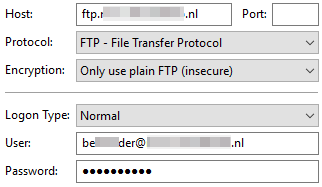
No still not able to connect, here are my FileZilla settings:
Last edit: 10 years 10 months ago by Xavier.
Please Log in or Create an account to join the conversation.
10 years 10 months ago - 10 years 10 months ago #221626
by proo4509
Replied by proo4509 on topic Mass action export csv path and email not working
that looks good, so, it must be the password.
Either you missed my last contactform or you typed the password wrong.
I'll send it again!
BTW ,I had/have exactly the same problems as "Extreme" says in:
www.hikashop.com/forum/import-export-csv...ter-that.html#204752
I used the tip that "Extreme" mentioned to solve the status change by first changing status and then export csv.
But, also for me, no csv is written.
Tried everything, it is just not doing it (permission is right, path is right). I gave up and because I already have 2 massactions on the order table, I think it is better to run this export massaction manually and disable the massaction after each export.
The only stupid problem is still encounter is that i get this (all next to eachother in one row):
item1_order_id item1_order_product_code item1_order_product_id item1_order_product_name item1_order_product_quantity item2_order_id item2_order_product_code item2_order_product_id item2_order_product_name item2_order_product_quantity item3_order_id item3_order_product_code item3_order_product_id item3_order_product_name item3_order_product_quantity
Hope you can find the cause...
regards
Suzanne
Either you missed my last contactform or you typed the password wrong.
I'll send it again!
BTW ,I had/have exactly the same problems as "Extreme" says in:
www.hikashop.com/forum/import-export-csv...ter-that.html#204752
I used the tip that "Extreme" mentioned to solve the status change by first changing status and then export csv.
But, also for me, no csv is written.
Tried everything, it is just not doing it (permission is right, path is right). I gave up and because I already have 2 massactions on the order table, I think it is better to run this export massaction manually and disable the massaction after each export.
The only stupid problem is still encounter is that i get this (all next to eachother in one row):
item1_order_id item1_order_product_code item1_order_product_id item1_order_product_name item1_order_product_quantity item2_order_id item2_order_product_code item2_order_product_id item2_order_product_name item2_order_product_quantity item3_order_id item3_order_product_code item3_order_product_id item3_order_product_name item3_order_product_quantity
Hope you can find the cause...
regards
Suzanne
Last edit: 10 years 10 months ago by proo4509.
Please Log in or Create an account to join the conversation.
10 years 10 months ago #221632
by Xavier
Replied by Xavier on topic Mass action export csv path and email not working
Hi,
The used password was the correct one, I done a copy/paste of it, but no luck.
So if you change the ordering of the actions it still doesn't work ? And what about having only one action, only the export one ? Does that work as expected ?
Regarding the products next to each other in one row in the export, this is not an issue, this is the way it is working and was working before
This can be changed thanks to custom code, the best solution would be to create a mass action plugin, add another export action and use the current code for the export and adapt it to your needs. This require PHP knowledges.
The used password was the correct one, I done a copy/paste of it, but no luck.
So if you change the ordering of the actions it still doesn't work ? And what about having only one action, only the export one ? Does that work as expected ?
Regarding the products next to each other in one row in the export, this is not an issue, this is the way it is working and was working before
This can be changed thanks to custom code, the best solution would be to create a mass action plugin, add another export action and use the current code for the export and adapt it to your needs. This require PHP knowledges.
Please Log in or Create an account to join the conversation.
10 years 10 months ago #221716
by proo4509
Replied by proo4509 on topic Mass action export csv path and email not working
Hello Xavier,
yes the changing of order of action worked,
but, the export (products nex to eachother) really is a bug and not working as it should work. This absolutely did work before. with products under eachother, like they are supposed to be.
An export like this - with products next to eachother is useless and this happened since the new massaction order plugin you send me earlier, so please take a look at that and please fix this.
When a customer buys 10 different products I would get 30 extra columns? Of course this is a bug!
yes the changing of order of action worked,
but, the export (products nex to eachother) really is a bug and not working as it should work. This absolutely did work before. with products under eachother, like they are supposed to be.
An export like this - with products next to eachother is useless and this happened since the new massaction order plugin you send me earlier, so please take a look at that and please fix this.
When a customer buys 10 different products I would get 30 extra columns? Of course this is a bug!
Please Log in or Create an account to join the conversation.
10 years 10 months ago #221718
by proo4509
Replied by proo4509 on topic Mass action export csv path and email not working
Hello Xavier
Can you show me an export of a order with several products in one order (thru massaction)?
This attachements is how it looks at my side.
regards
Suzanne
Can you show me an export of a order with several products in one order (thru massaction)?
This attachements is how it looks at my side.
regards
Suzanne
Please Log in or Create an account to join the conversation.
10 years 10 months ago - 10 years 10 months ago #221727
by Xavier
Replied by Xavier on topic Mass action export csv path and email not working
Hi,
Here are the exports from HikaShop 2.4.0 to 2.6.0, as you can see the column headers are the same ones, all the entries are in one line. So nothing has changed since the beginning of the mass actions. And this is not a but, it is the way it is handled generally in the ERP softwares.
Here are the exports from HikaShop 2.4.0 to 2.6.0, as you can see the column headers are the same ones, all the entries are in one line. So nothing has changed since the beginning of the mass actions. And this is not a but, it is the way it is handled generally in the ERP softwares.
This attachment is hidden for guests.
Please log in or register to see it.
Please log in or register to see it.
This attachment is hidden for guests.
Please log in or register to see it.
Please log in or register to see it.
This attachment is hidden for guests.
Please log in or register to see it.
Please log in or register to see it.
Last edit: 10 years 10 months ago by Xavier.
Please Log in or Create an account to join the conversation.
10 years 10 months ago #221844
by proo4509
Replied by proo4509 on topic Mass action export csv path and email not working
I've had one perfect export with hikashop, like:
order001 - item01
order001 - item02
order001 - item02
order002 - item01
order003 - item04
My previous webshops all exported the orders same way. CSVI exports the orders same way.
So, for me and my fulfilment company this design is really not working.
Can you at least make note of this for a feature request?
Meanwhile I will forget about the massaction for the order export and switch to csvimproved.
Suzanne
order001 - item01
order001 - item02
order001 - item02
order002 - item01
order003 - item04
My previous webshops all exported the orders same way. CSVI exports the orders same way.
So, for me and my fulfilment company this design is really not working.
Can you at least make note of this for a feature request?
Meanwhile I will forget about the massaction for the order export and switch to csvimproved.
Suzanne
Please Log in or Create an account to join the conversation.
10 years 10 months ago #221890
by Xavier
Replied by Xavier on topic Mass action export csv path and email not working
Hi,
I have added this feature on our Todo list.
ps: You can post a request in the commercial jobs section for this kind of features too
I have added this feature on our Todo list.
ps: You can post a request in the commercial jobs section for this kind of features too
Please Log in or Create an account to join the conversation.
10 years 9 months ago #226260
by mardhiah
Replied by mardhiah on topic Mass action export csv path and email not working
I used mass actions to export the products that are low in stock. I am trying to send the export file in excel to an email address. When i process the action, there is no file attached in the email. Am i doing somehting wrong?
Please Log in or Create an account to join the conversation.
10 years 9 months ago #226268
by Xavier
Replied by Xavier on topic Mass action export csv path and email not working
Hi,
We had issues with the attachment of csv files in the email, but it is solved since the version 2.6.1 which has just been released.
So please download the latest version from our website and give it a new try.
We had issues with the attachment of csv files in the email, but it is solved since the version 2.6.1 which has just been released.
So please download the latest version from our website and give it a new try.
Please Log in or Create an account to join the conversation.
Time to create page: 0.247 seconds