

- Posts: 20
- Thank you received: 0
Collect points by purchasing items
10 years 2 days ago #253245
by koryo
Collect points by purchasing items was created by koryo
Hello, I can do that automatically by a purchase (x) customer is given a number of points (x)?
Thank you
Thank you
Please Log in or Create an account to join the conversation.

10 years 1 day ago #253258
by Jerome
Jerome - Obsidev.com
HikaMarket & HikaSerial developer / HikaShop core dev team.
Replied by Jerome on topic Collect points by purchasing items
Hi,
Yes ; it requires the usage of the "HikaShop - User Points" system.
www.hikashop.com/support/documentation/2...-points.html#earning
Regards,
Yes ; it requires the usage of the "HikaShop - User Points" system.
www.hikashop.com/support/documentation/2...-points.html#earning
Regards,
Jerome - Obsidev.com
HikaMarket & HikaSerial developer / HikaShop core dev team.
The following user(s) said Thank You: koryo
Please Log in or Create an account to join the conversation.
10 years 1 day ago - 10 years 1 day ago #253294
by koryo
Hi, I'm all day dealing with the issue of assigning points for purchasing products no way that appears on screen. I read the entire tutorial and forum. I confirmed customer order but not assigned. They could support me please.
regards
Hola, estoy todo el dia tratando con el tema de asignar puntos por la compra de productos y no hay forma de que aparezca en pantalla. He leido todo el tutorial y foro. He confirmado pedido pero no se asignan al cliente. Podrían apoyarme por favor.
Saludos
regards
Hola, estoy todo el dia tratando con el tema de asignar puntos por la compra de productos y no hay forma de que aparezca en pantalla. He leido todo el tutorial y foro. He confirmado pedido pero no se asignan al cliente. Podrían apoyarme por favor.
Saludos
Last edit: 10 years 1 day ago by koryo.
Please Log in or Create an account to join the conversation.
10 years 12 hours ago #253296
by Jerome
Jerome - Obsidev.com
HikaMarket & HikaSerial developer / HikaShop core dev team.
Hi,
Please provide details about your issue and about your current "user point" plugin configuration (HikaShop > System > Plugins).
Regards,
Please provide details about your issue and about your current "user point" plugin configuration (HikaShop > System > Plugins).
Regards,
Jerome - Obsidev.com
HikaMarket & HikaSerial developer / HikaShop core dev team.
Please Log in or Create an account to join the conversation.

9 years 11 months ago #253388
by nicolas
Hi,
These settings make it so that the customer will get 1 point for each 25€ of his orders.
If you edit the customer in the backend do you see the points ?
If no, then it's probably because the orders status is not changed to confirmed after the payment. So please check the status of the orders.
If yes, then the user points are attributed. If you question is then how to display the points to the customer, you could configure the user points plugin via the Joomla plugins manager in order to activate the checkout view and then add it in the "checkout workflow" setting of the HikaShop configuration.
These settings make it so that the customer will get 1 point for each 25€ of his orders.
If you edit the customer in the backend do you see the points ?
If no, then it's probably because the orders status is not changed to confirmed after the payment. So please check the status of the orders.
If yes, then the user points are attributed. If you question is then how to display the points to the customer, you could configure the user points plugin via the Joomla plugins manager in order to activate the checkout view and then add it in the "checkout workflow" setting of the HikaShop configuration.
Please Log in or Create an account to join the conversation.
9 years 11 months ago #253511
by Jerome
Jerome - Obsidev.com
HikaMarket & HikaSerial developer / HikaShop core dev team.
Hi,
Regarding the screenshot of your user details ; it looks like you did not create the "user_points" custom field where the plugin will store the point value.
Please create the user custom field according to these instructions :
www.hikashop.com/support/documentation/2...s.html#configuration
Regards,
Regarding the screenshot of your user details ; it looks like you did not create the "user_points" custom field where the plugin will store the point value.
Please create the user custom field according to these instructions :
www.hikashop.com/support/documentation/2...s.html#configuration
Regards,
Jerome - Obsidev.com
HikaMarket & HikaSerial developer / HikaShop core dev team.
Please Log in or Create an account to join the conversation.
9 years 11 months ago #253559
by nicolas
Hi,
So note that the points will only be added for the orders that you created and confirmed after you added that custom field. For the orders before that, it's normal that you don't see the points.
Also, as per a previous screenshot, the points will only be given for the products of the category raiz so if the orders that were created and confirmed since you created the custom user field don't have a product from that category it is normal that the amount of points of the customer is still zero.
So please also check on that.
Then, other settings could lead to the points not being attributes. For example, if the user points plugin is unpublished in the Joomla plugins manager, or if you set its access level to something else than public. Or if you restricted the points plugin to only some user groups with the "acess levels" setting and that your test user is not in one of these user groups.
So note that the points will only be added for the orders that you created and confirmed after you added that custom field. For the orders before that, it's normal that you don't see the points.
Also, as per a previous screenshot, the points will only be given for the products of the category raiz so if the orders that were created and confirmed since you created the custom user field don't have a product from that category it is normal that the amount of points of the customer is still zero.
So please also check on that.
Then, other settings could lead to the points not being attributes. For example, if the user points plugin is unpublished in the Joomla plugins manager, or if you set its access level to something else than public. Or if you restricted the points plugin to only some user groups with the "acess levels" setting and that your test user is not in one of these user groups.
Please Log in or Create an account to join the conversation.
9 years 11 months ago #253642
by koryo
Hi Nicolas, thank you very much for your reply. Sorry, but I can not run the plugin. I've done everything you say and there is no way it will work.
I leave pictures of the plugin settings and also see that I have discharged other categories that although they are in the root, just in case the I scored but there is no way it will work.
Any suggestions please?
Atte. ismael
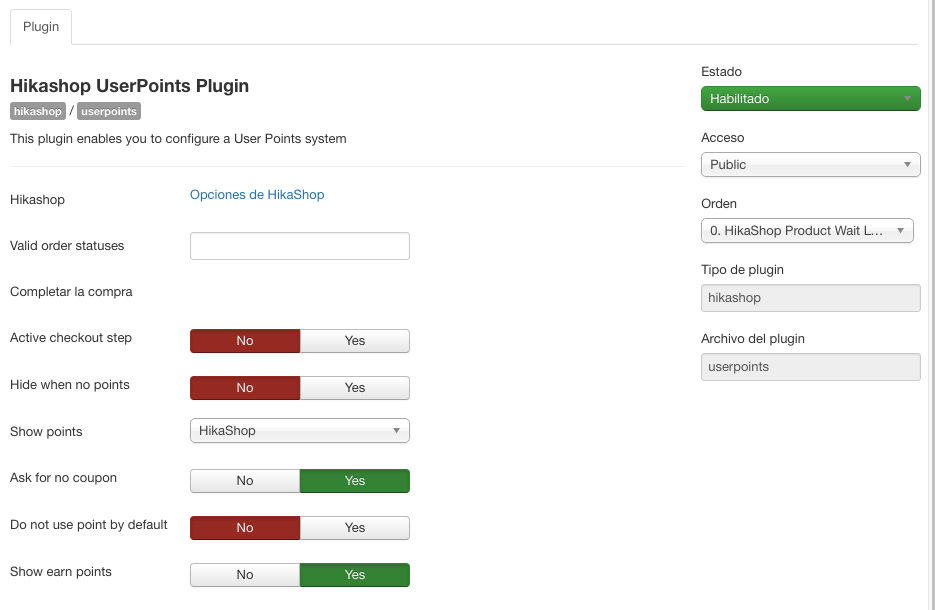
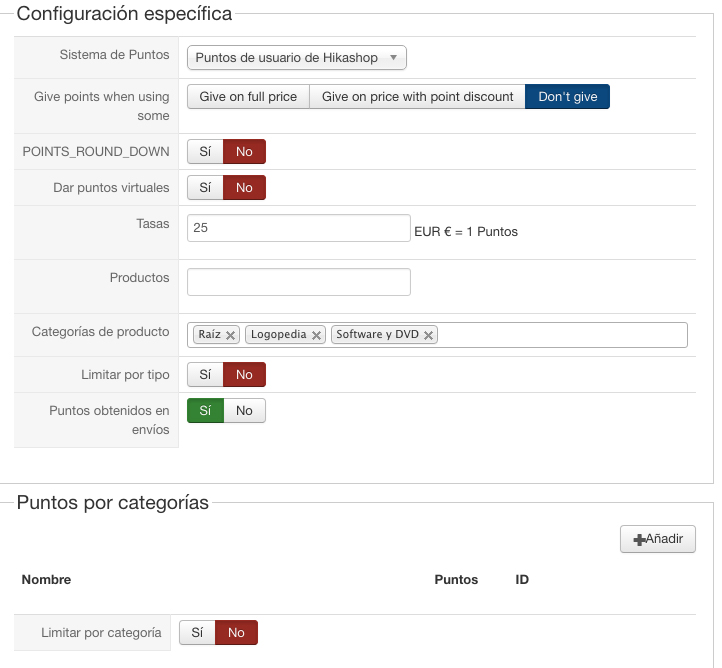
I leave pictures of the plugin settings and also see that I have discharged other categories that although they are in the root, just in case the I scored but there is no way it will work.
Any suggestions please?
Atte. ismael
Please Log in or Create an account to join the conversation.
9 years 11 months ago #253655
by nicolas
Hi,
I don't see any other reasons that the ones I talked about before.
Could you provide a backend access so that we could check on your settings ?
Please provide that with a link to this thread via our contact form:
www.hikashop.com/support/contact-us.html
I don't see any other reasons that the ones I talked about before.
Could you provide a backend access so that we could check on your settings ?
Please provide that with a link to this thread via our contact form:
www.hikashop.com/support/contact-us.html
Please Log in or Create an account to join the conversation.
9 years 11 months ago #253724
by nicolas
Hi,
So I checked the categories that you set in your user points plugin.
Here is a screenshot for the list of the products of each category:
- take.ms/x2mZWV
- take.ms/YivkO
- take.ms/gZJxp
So there is only one product which will give out points: "Curso en formato DVD sobre la Rehabilitación de la Voz".
But it seems that the test orders you created were for that product. So that looks good.
Maybe the problem is with the settings of the HikaShop configuration.
I wanted to check on them but the user account you provided didn't include the access to the HikaShop configuration.
Could you do something about that ?
So I checked the categories that you set in your user points plugin.
Here is a screenshot for the list of the products of each category:
- take.ms/x2mZWV
- take.ms/YivkO
- take.ms/gZJxp
So there is only one product which will give out points: "Curso en formato DVD sobre la Rehabilitación de la Voz".
But it seems that the test orders you created were for that product. So that looks good.
Maybe the problem is with the settings of the HikaShop configuration.
I wanted to check on them but the user account you provided didn't include the access to the HikaShop configuration.
Could you do something about that ?
Please Log in or Create an account to join the conversation.
9 years 11 months ago #253827
by nicolas
Hi,
Thank, I checked the HikaShop configuration and it was all good.
So, I did a test and placed an order and it worked fine. The points were added to my account when I confirmed the order.
I've just added the user points view in your checkout workflow to make sure that the points were calculated correctly and that was the case.
Thank, I checked the HikaShop configuration and it was all good.
So, I did a test and placed an order and it worked fine. The points were added to my account when I confirmed the order.
I've just added the user points view in your checkout workflow to make sure that the points were calculated correctly and that was the case.
Please Log in or Create an account to join the conversation.
9 years 11 months ago - 9 years 11 months ago #253858
by koryo
It has created a problem in hikashop menu items, I send image. Could you please access the site and fix it.
Thanks in advance.
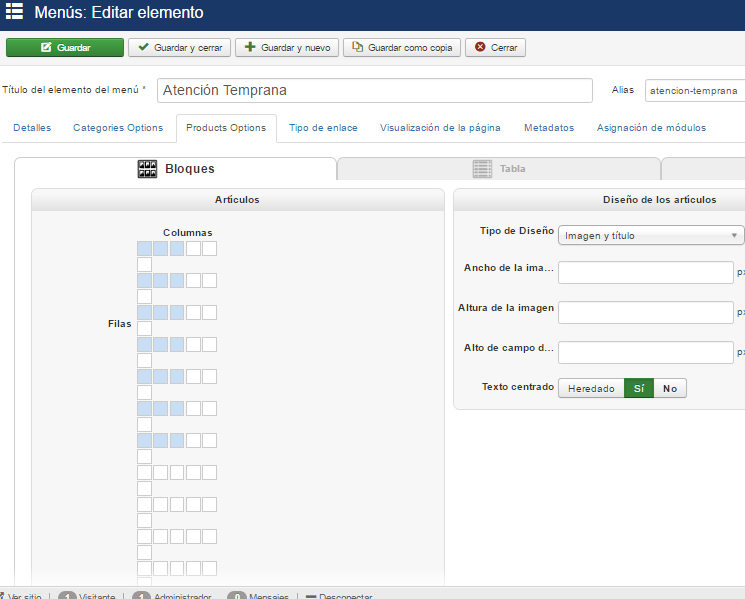
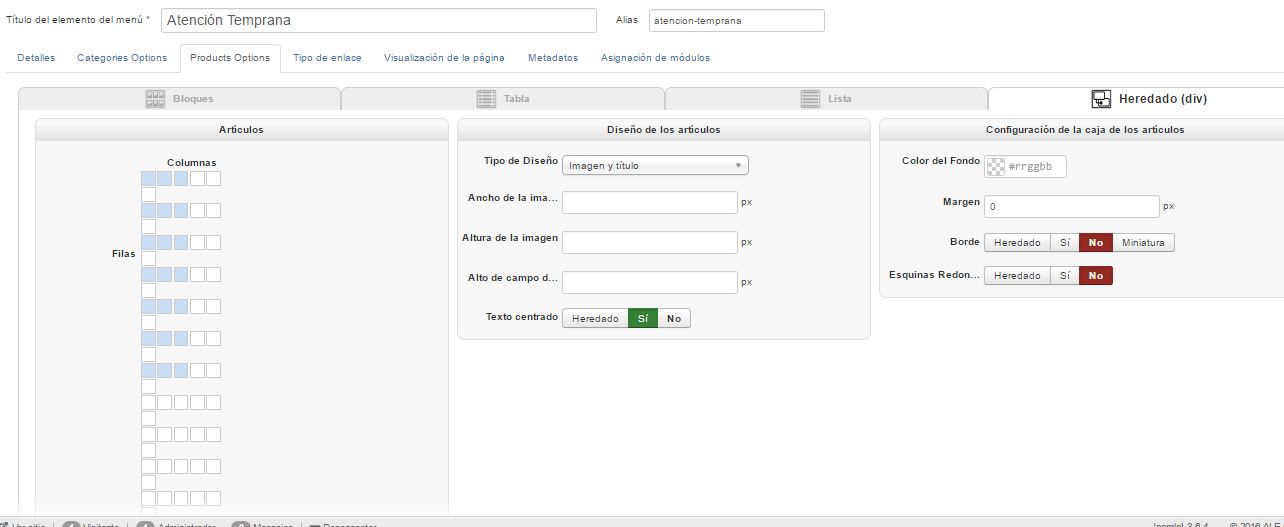
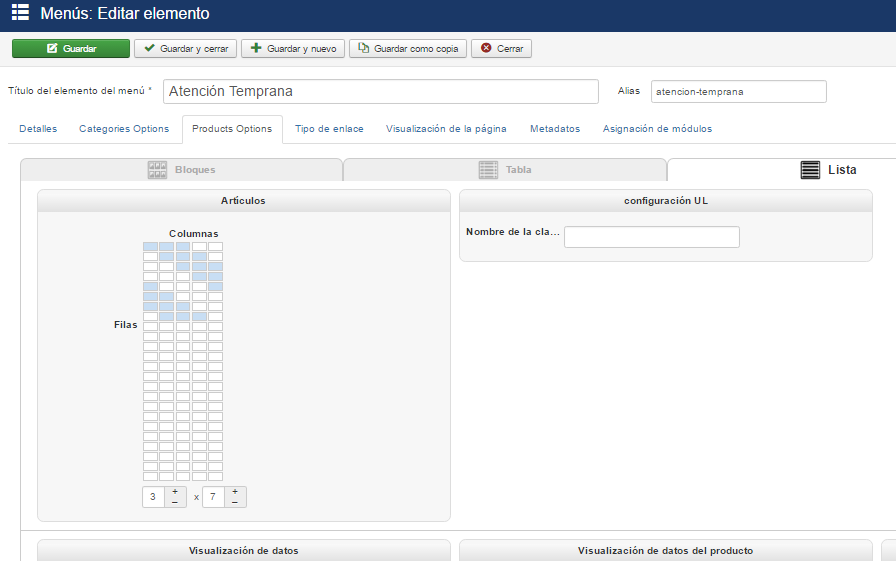
Thanks in advance.
Last edit: 9 years 11 months ago by koryo.
Please Log in or Create an account to join the conversation.
9 years 11 months ago #253860
by nicolas
Hi,
This has nothing to do with the points system. Please create new threads for new problems.
And I don't have that problem on your website: take.ms/cJqwX
So it's just a zoom issue with your browser. Nothing we can do in HikaShop.
This has nothing to do with the points system. Please create new threads for new problems.
And I don't have that problem on your website: take.ms/cJqwX
So it's just a zoom issue with your browser. Nothing we can do in HikaShop.
Please Log in or Create an account to join the conversation.
Time to create page: 0.677 seconds