

- Posts: 966
- Thank you received: 11
Increase Price On Specific Brand Products
5 years 2 months ago #333991
by MyWorld
Increase Price On Specific Brand Products was created by MyWorld
-- HikaShop version -- : 4.4.2
Hi,
I tried to create a mass action but not sure how to do it correctly.
I would like to increase the price on all products with the name COACH in it by 10%.
As you can see from the attached, the Product columns says "0 results", not sure why that is. Also I'm not sure if what I put in the Actions is correct.
Thank you!
Hi,
I tried to create a mass action but not sure how to do it correctly.
I would like to increase the price on all products with the name COACH in it by 10%.
As you can see from the attached, the Product columns says "0 results", not sure why that is. Also I'm not sure if what I put in the Actions is correct.
Thank you!
Please Log in or Create an account to join the conversation.

5 years 2 months ago #333994
by nicolas
Replied by nicolas on topic Increase Price On Specific Brand Products
Hi,
The filter is fine. Are you sure that you have the text "Coach" in the product name of your products ?
Could you provide a screenshot of the settings of a product like that ?
Regarding the action however you can't do it like that.
You need to use the "update the values" action, on the "price_value" column, with the mode "operation" and the value:
price.price_value*1.1
Note that an easier way is to go in your products listing, search for "coach" to get the products with that text, check their checkboxes, and click on the "actions" button of the listing. In the popup you'll get, you'll be able to setup the action as explained above and it will process it on all the selected products, without then need to create a mass action and setup filters.
The filter is fine. Are you sure that you have the text "Coach" in the product name of your products ?
Could you provide a screenshot of the settings of a product like that ?
Regarding the action however you can't do it like that.
You need to use the "update the values" action, on the "price_value" column, with the mode "operation" and the value:
price.price_value*1.1
Note that an easier way is to go in your products listing, search for "coach" to get the products with that text, check their checkboxes, and click on the "actions" button of the listing. In the popup you'll get, you'll be able to setup the action as explained above and it will process it on all the selected products, without then need to create a mass action and setup filters.
Please Log in or Create an account to join the conversation.
5 years 2 months ago #334029
by MyWorld
Replied by MyWorld on topic Increase Price On Specific Brand Products
My bad, regarding the product name. I forgot that the product brand name is not included in the product name. I was still able to get it to work though as per the attached.
1) Would you mind letting me know how to decrease the price by X%, example 10%?
2) And please explain this part *1.1 (so I can figure out how to enter the % for myself next time)
3) I am still interested in knowing how to do the easier version. For some reason I don't see an "actions" button, unless I went to the wrong place. I went to Hikashop > Products and did the search there, check the boxes, but I don't see an "actions" button. What did I miss?
Thanks!
1) Would you mind letting me know how to decrease the price by X%, example 10%?
2) And please explain this part *1.1 (so I can figure out how to enter the % for myself next time)
3) I am still interested in knowing how to do the easier version. For some reason I don't see an "actions" button, unless I went to the wrong place. I went to Hikashop > Products and did the search there, check the boxes, but I don't see an "actions" button. What did I miss?
Thanks!
Please Log in or Create an account to join the conversation.
5 years 2 months ago #334045
by nicolas
Replied by nicolas on topic Increase Price On Specific Brand Products
Hi,
1. Instead the same but instead of multiplying by 1.1 you can multiply by 0.9
2. It's [price]*1.1 = [price] * (100 + 10) / 100 = [price] + [price]*10%
For -10% it would be: [price] + [price]*-10% = [price] * (100 - 10) / 100 = [price]*0.9
3. Here is a blog article where we present that feature:
www.hikashop.com/home/blog/467-hikashop-4-4-2.html#action
1. Instead the same but instead of multiplying by 1.1 you can multiply by 0.9
2. It's [price]*1.1 = [price] * (100 + 10) / 100 = [price] + [price]*10%
For -10% it would be: [price] + [price]*-10% = [price] * (100 - 10) / 100 = [price]*0.9
3. Here is a blog article where we present that feature:
www.hikashop.com/home/blog/467-hikashop-4-4-2.html#action
Please Log in or Create an account to join the conversation.
5 years 2 months ago #334098
by MyWorld
Replied by MyWorld on topic Increase Price On Specific Brand Products
Ok thank you!
Please Log in or Create an account to join the conversation.
3 years 11 months ago #345353
by marto42
Replied by marto42 on topic Increase Price On Specific Brand Products
Hello,
would you help me to increase the price with 10% by a manufacterer.
Here what I tried, but notting`s gonna happend.
Thanks!
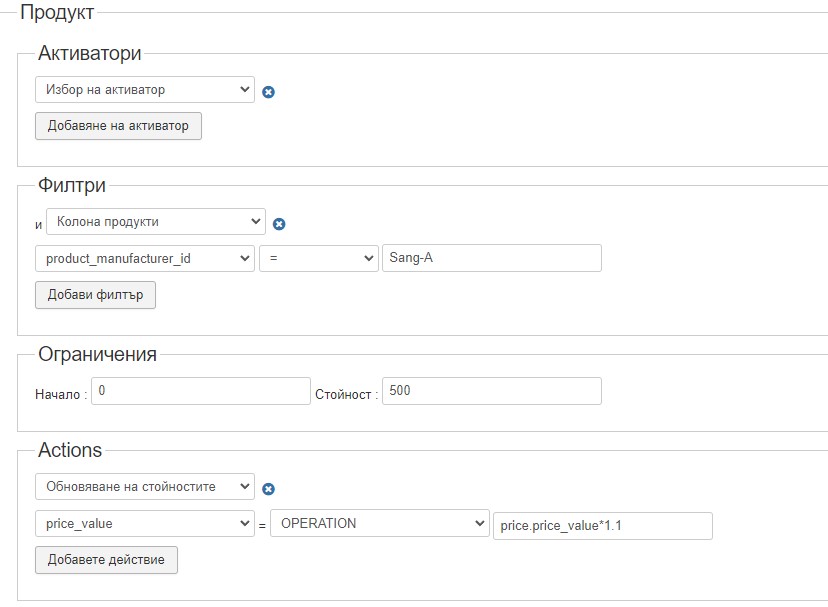
would you help me to increase the price with 10% by a manufacterer.
Here what I tried, but notting`s gonna happend.
Thanks!
Please Log in or Create an account to join the conversation.
3 years 11 months ago #345358
by nicolas
Replied by nicolas on topic Increase Price On Specific Brand Products
Hi,
The product_manufacturer_id should be the id of the brand, not its name.
The rest looks fine.
The product_manufacturer_id should be the id of the brand, not its name.
The rest looks fine.
The following user(s) said Thank You: marto42
Please Log in or Create an account to join the conversation.
3 years 11 months ago - 3 years 11 months ago #345378
by marto42
Replied by marto42 on topic Increase Price On Specific Brand Products
I put the real ID 75 and save it, but the prices not increased.
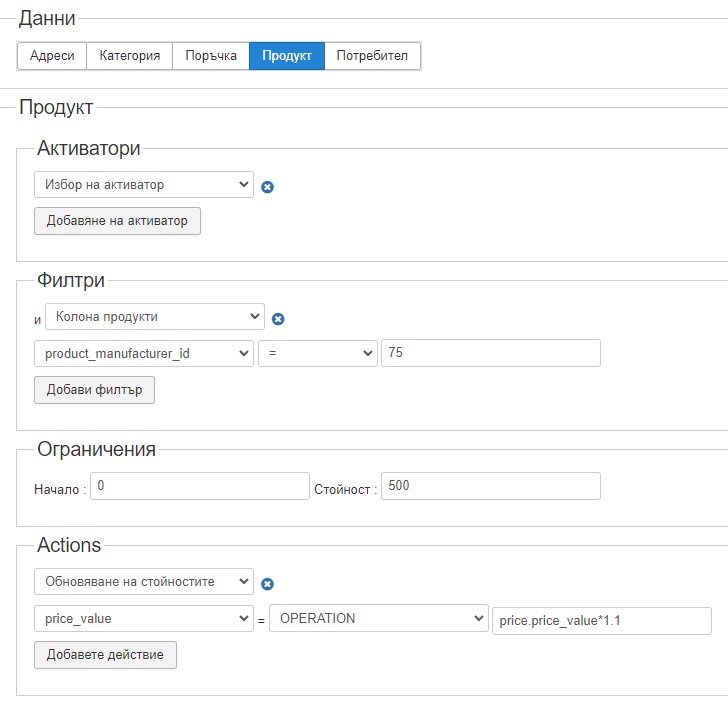
Probably because I`ve got a variables in my products.

Where I`ve made mistake?
Probably because I`ve got a variables in my products.
Where I`ve made mistake?
Last edit: 3 years 11 months ago by marto42.
Please Log in or Create an account to join the conversation.
3 years 11 months ago #345384
by nicolas
Replied by nicolas on topic Increase Price On Specific Brand Products
Hi,
Your filter is on a brand but your screenshot is of a variants listing. Variants don't have a brand linked to them.
So you can't do it like that.
You could use the product_parent_id to target all the variants of a product, but you would have to do it one product at a time.
So it might not be suitable.
In your case, I'm afraid the best is to directly run a MySQL query in your PHPMyAdmin like that:
where #__ is replaced by the table prefix of your Joomla configuration to match with the tables in the database.
Your filter is on a brand but your screenshot is of a variants listing. Variants don't have a brand linked to them.
So you can't do it like that.
You could use the product_parent_id to target all the variants of a product, but you would have to do it one product at a time.
So it might not be suitable.
In your case, I'm afraid the best is to directly run a MySQL query in your PHPMyAdmin like that:
Code:
UPDATE #__hikashop_price AS price SET price.price_value = price.price_value*1.1 WHERE price.price_product_id IN (SELECT product_id FROM #__hikashop_product WHERE product_manufacturer_id = 75);
Please Log in or Create an account to join the conversation.
3 years 11 months ago #345404
by marto42
Replied by marto42 on topic Increase Price On Specific Brand Products
Hello,
I`ve tested on my localhost but still notings gonna happend!
ixks1_ - that is my joomla localhost prefix.
Here are my MySQL query:
UPDATE ixks1_hikashop_price AS price SET price.price_value = price.price_value*1.1 WHERE price.price_product_id IN (SELECT product_id FROM ixks1_hikashop_product WHERE product_manufacturer_id = 75);
I`ve tested on my localhost but still notings gonna happend!
ixks1_ - that is my joomla localhost prefix.
Here are my MySQL query:
UPDATE ixks1_hikashop_price AS price SET price.price_value = price.price_value*1.1 WHERE price.price_product_id IN (SELECT product_id FROM ixks1_hikashop_product WHERE product_manufacturer_id = 75);
Please Log in or Create an account to join the conversation.
3 years 11 months ago #345406
by marto42
Replied by marto42 on topic Increase Price On Specific Brand Products
Maybe because there are no price at main tab, only in variables!
Please Log in or Create an account to join the conversation.
3 years 11 months ago #345415
by nicolas
Replied by nicolas on topic Increase Price On Specific Brand Products
Hi,
My bad, I forgot about the variant issue while writting the MySQL query !
My previous query will only work for main products.
For variants you need to use this query instead:
My bad, I forgot about the variant issue while writting the MySQL query !
My previous query will only work for main products.
For variants you need to use this query instead:
Code:
UPDATE #__hikashop_price AS price SET price.price_value = price.price_value*1.1 WHERE price.price_product_id IN (SELECT p1.product_id FROM #__hikashop_product AS p1 WHERE p1.product_parent_id IN (SELECT p2.product_id FROM #__hikashop_product AS p2 WHERE p2.product_manufacturer_id = 75));
Please Log in or Create an account to join the conversation.
3 years 11 months ago #345453
by marto42
Replied by marto42 on topic Increase Price On Specific Brand Products
Thanks, work great!
The following user(s) said Thank You: Philip
Please Log in or Create an account to join the conversation.
Time to create page: 0.306 seconds