

- Posts: 58
- Thank you received: 2
Generating report Categories, Subcategories and product
4 years 2 months ago #344193
by westernex
Generating report Categories, Subcategories and product was created by westernex
-- HikaShop version -- : 4.6.1
-- Joomla version -- : 3.10.10
-- PHP version -- : 8
To compare the products of the website to the ones in our internal system we would like to generate a report from Hikashop to replicate the report of the internal system:
Main Category | 1. Sub Category | 2. Sub Category | SKU | OEM | Product Name | Group | Type | Sales OEM
Using the PRODUCT TYPE filter on PRODUCTS does not seem to give me the categories and sub categories names. Is there another way to achieve this?
thank you Petra
-- Joomla version -- : 3.10.10
-- PHP version -- : 8
To compare the products of the website to the ones in our internal system we would like to generate a report from Hikashop to replicate the report of the internal system:
Main Category | 1. Sub Category | 2. Sub Category | SKU | OEM | Product Name | Group | Type | Sales OEM
Using the PRODUCT TYPE filter on PRODUCTS does not seem to give me the categories and sub categories names. Is there another way to achieve this?
thank you Petra
Please Log in or Create an account to join the conversation.

4 years 2 months ago #344200
by nicolas
Replied by nicolas on topic Generating report Categories, Subcategories and product
Hi,
If you click on the "export" button of the products listing, you will get a CSV file with the categories (the name of the category(ies) directly linked to the product), the parent_category (the name of the parent category of the first category in the categories column), the product_name, product_code, product_type, product_sales, etc columns.
That's the closest to what you want from what I understand.
But to get exactly what you want, I suppose the best would be to generate your own report with a PHP script custom made by a developer.
If you click on the "export" button of the products listing, you will get a CSV file with the categories (the name of the category(ies) directly linked to the product), the parent_category (the name of the parent category of the first category in the categories column), the product_name, product_code, product_type, product_sales, etc columns.
That's the closest to what you want from what I understand.
But to get exactly what you want, I suppose the best would be to generate your own report with a PHP script custom made by a developer.
Please Log in or Create an account to join the conversation.
4 years 2 months ago #344203
by westernex
Replied by westernex on topic Generating report Categories, Subcategories and product
Thank you Nicolas
I tried that before and it renders a 404 error page unfortunately. There are 1461 products and lots of variants of them so I guess the file to be generated is very big.
Any suggestions?
I tried that before and it renders a 404 error page unfortunately. There are 1461 products and lots of variants of them so I guess the file to be generated is very big.
Any suggestions?
Please Log in or Create an account to join the conversation.
4 years 2 months ago #344212
by nicolas
Replied by nicolas on topic Generating report Categories, Subcategories and product
Hi,
Increase the "memory_limit" and "max_execution_time" of your php.ini to avoid an error during the export process.
Increase the "memory_limit" and "max_execution_time" of your php.ini to avoid an error during the export process.
Please Log in or Create an account to join the conversation.
4 years 2 months ago #344240
by westernex
Replied by westernex on topic Generating report Categories, Subcategories and product
display_errors = Off
max_execution_time = 7200
max_input_time = 7200
max_input_vars = 10000
memory_limit = 4096M
post_max_size = 2048M
session.gc_maxlifetime = 1440
session.save_path = "/var/cpanel/php/sessions/ea-php73"
upload_max_filesize = 2048M
zlib.output_compression = Off
but still throwing the error 404
max_execution_time = 7200
max_input_time = 7200
max_input_vars = 10000
memory_limit = 4096M
post_max_size = 2048M
session.gc_maxlifetime = 1440
session.save_path = "/var/cpanel/php/sessions/ea-php73"
upload_max_filesize = 2048M
zlib.output_compression = Off
but still throwing the error 404
Please Log in or Create an account to join the conversation.
4 years 2 months ago #344243
by nicolas
Replied by nicolas on topic Generating report Categories, Subcategories and product
Hi,
Can you provide a screenshot of the whole page and provide the URL ?
Can you provide a screenshot of the whole page and provide the URL ?
Please Log in or Create an account to join the conversation.
4 years 2 months ago - 4 years 2 months ago #344248
by westernex
Replied by westernex on topic Generating report Categories, Subcategories and product
Hitting the button EXPORT on the products page:
domain.com/administrator/index.php?optio...ikashop&ctrl=product
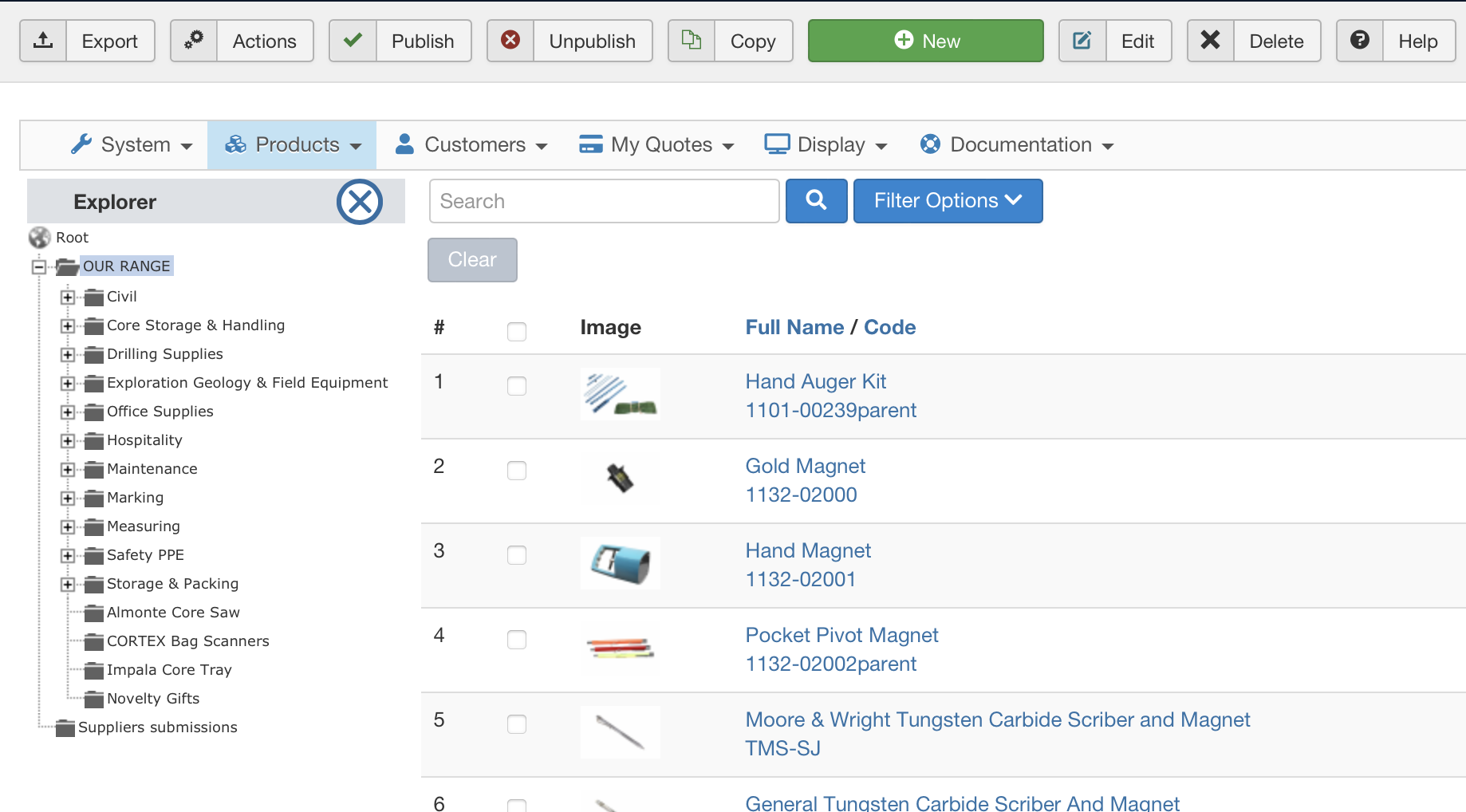
Last edit: 4 years 2 months ago by westernex.
Please Log in or Create an account to join the conversation.
4 years 2 months ago #344251
by nicolas
Replied by nicolas on topic Generating report Categories, Subcategories and product
Hi,
That's strange. A "Category not found" error is an error from the SEF system. And since it's a SEF error, it should only happen in the frontend, not the backend.
I was actually talking about the URL you get on your browser address bar after you click on the "export" button not the URL of the products listing. Or maybe it's the same on your end ?
Could you maybe provide a backend access so that we could check on the situation more in depth ?
If so, please use our contact form and include a link to this thread for reference:
www.hikashop.com/support/contact-us.html
That's strange. A "Category not found" error is an error from the SEF system. And since it's a SEF error, it should only happen in the frontend, not the backend.
I was actually talking about the URL you get on your browser address bar after you click on the "export" button not the URL of the products listing. Or maybe it's the same on your end ?
Could you maybe provide a backend access so that we could check on the situation more in depth ?
If so, please use our contact form and include a link to this thread for reference:
www.hikashop.com/support/contact-us.html
Please Log in or Create an account to join the conversation.
4 years 2 months ago #344337
by westernex
Replied by westernex on topic Generating report Categories, Subcategories and product
I have sent you the information requested, thank you. it seems that I do not receive your forum email notifications so I will just come back here to check every now and then.
Please Log in or Create an account to join the conversation.
4 years 2 months ago #344353
by nicolas
Replied by nicolas on topic Generating report Categories, Subcategories and product
Hi,
Thanks.
I checked your situation.
First, I was able to get a complete error with the callstack:
i.imgur.com/Yjd9u9F.png
Joomla doesn't even go through HikaShop if what Joomla says is correct. And even worst, it uses the frontend com_content to try to display the page.
So that doesn't help.
I also, cheated the pagination system to display all the products on the listing and selected them all with the main checkbox and then pressed the export button and I also got the CSV file with all the products data.
So I'm not sure what's going on.
I would need a FTP access to dig deeper into the situation.
Could you provide that too ?
Thanks.
I checked your situation.
First, I was able to get a complete error with the callstack:
i.imgur.com/Yjd9u9F.png
Joomla doesn't even go through HikaShop if what Joomla says is correct. And even worst, it uses the frontend com_content to try to display the page.
So that doesn't help.
I also, cheated the pagination system to display all the products on the listing and selected them all with the main checkbox and then pressed the export button and I also got the CSV file with all the products data.
So I'm not sure what's going on.
I would need a FTP access to dig deeper into the situation.
Could you provide that too ?
Please Log in or Create an account to join the conversation.
4 years 2 months ago #344462
by westernex
Replied by westernex on topic Generating report Categories, Subcategories and product
Please Log in or Create an account to join the conversation.
4 years 1 month ago #344504
by nicolas
Replied by nicolas on topic Generating report Categories, Subcategories and product
Hi,
So I did many tests today.
I didn't found the error message logged in the PHP log of your server (accessible with the FTP access).
I also made sure that the error happens during the loading of the product data from the database, not before the process reach HikaShop and not after.
Also, I timed the loading of the page before I get the "Category not found" error and it's precisely 30 seconds.
But I confirmed that the local value for the PHP max_execution_time is 7200 even though the master value is 30.
What I conclude is that there is still something blocking the process at 30 seconds and that it might not be PHP (otherwise you would get a fatal error message on screen and in the PHP log), but rather apache or something monitoring the PHP thread (something put in place by your hosting). The fact that the error message displayed comes from the frontend and not the backend of Joomla tends to confirm that it's something at the web server level and not at the PHP level because seeing the callstack of your "Category not found" error, it's impossible that PHP is involved as otherwise it would display an error from the backend (and thus HikaShop/Joomla/PHP are not involved in stopping the export to display the error) since the URL of the export button is for the Joomla backend.
Unfortunately, there is nothing we can do on our end in that case. I would recommend contacting your hosting support (or your server administrator) to check with them, telling them that the export process stops abruptly at 30 seconds even though you set the max_execution_time of PHP to 7200. They should normally be able to help.
So I did many tests today.
I didn't found the error message logged in the PHP log of your server (accessible with the FTP access).
I also made sure that the error happens during the loading of the product data from the database, not before the process reach HikaShop and not after.
Also, I timed the loading of the page before I get the "Category not found" error and it's precisely 30 seconds.
But I confirmed that the local value for the PHP max_execution_time is 7200 even though the master value is 30.
What I conclude is that there is still something blocking the process at 30 seconds and that it might not be PHP (otherwise you would get a fatal error message on screen and in the PHP log), but rather apache or something monitoring the PHP thread (something put in place by your hosting). The fact that the error message displayed comes from the frontend and not the backend of Joomla tends to confirm that it's something at the web server level and not at the PHP level because seeing the callstack of your "Category not found" error, it's impossible that PHP is involved as otherwise it would display an error from the backend (and thus HikaShop/Joomla/PHP are not involved in stopping the export to display the error) since the URL of the export button is for the Joomla backend.
Unfortunately, there is nothing we can do on our end in that case. I would recommend contacting your hosting support (or your server administrator) to check with them, telling them that the export process stops abruptly at 30 seconds even though you set the max_execution_time of PHP to 7200. They should normally be able to help.
Please Log in or Create an account to join the conversation.
Time to create page: 0.119 seconds