
- Posts: 48
- Thank you received: 5
massaction on predefined fields
- aromamassage
-
 Topic Author
- Offline
Less
More
1 year 11 months ago #364628
by aromamassage
massaction on predefined fields was created by aromamassage
-- url of the page with the problem -- :
www.aroma-massage.it
I created some default fields in the product management page to assign extra categories to the products to work with the filter.
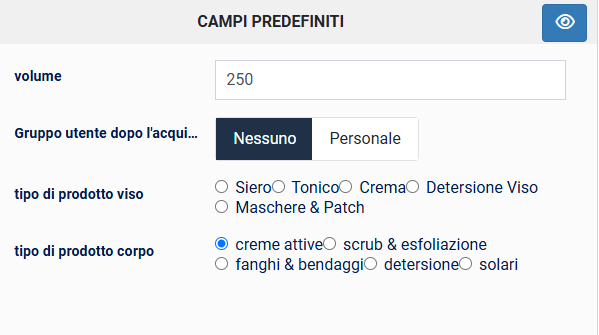
since I forgot to insert these default fields for some product categories, I wanted to understand if it is possible to perform a massaction to assign some of these default fields to the products.
I was trying to set the massaction as follows but I got stuck and I don't want to mess it up.
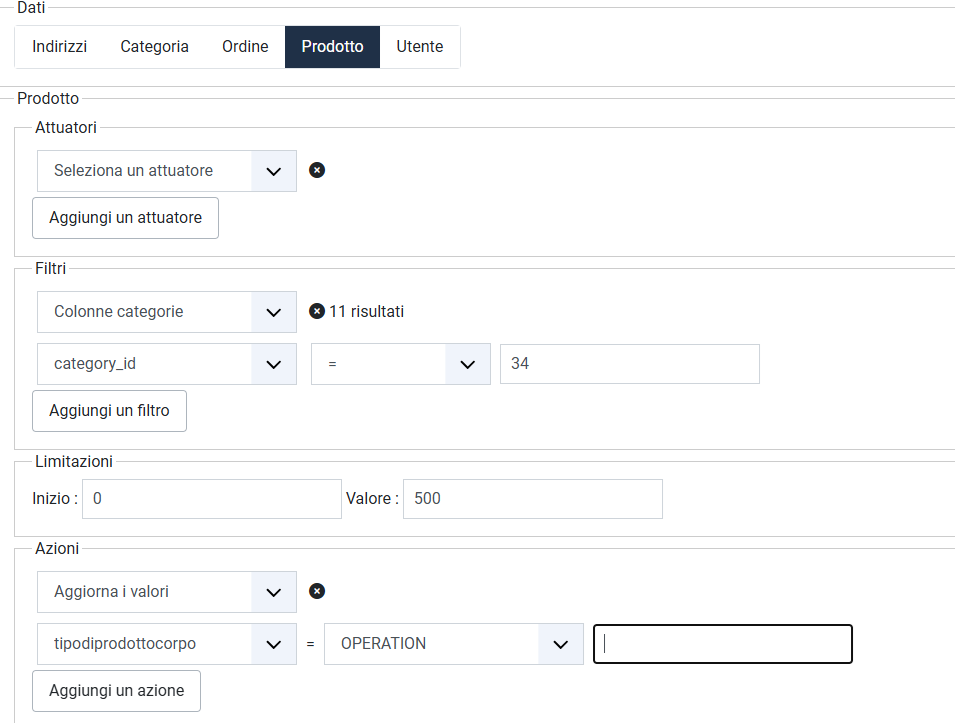
any suggestions please?
I created some default fields in the product management page to assign extra categories to the products to work with the filter.
since I forgot to insert these default fields for some product categories, I wanted to understand if it is possible to perform a massaction to assign some of these default fields to the products.
I was trying to set the massaction as follows but I got stuck and I don't want to mess it up.
any suggestions please?
Please Log in or Create an account to join the conversation.

1 year 11 months ago #364630
by nicolas
Replied by nicolas on topic massaction on predefined fields
Hi,
In your action, you want to use the "string" mode, not the "operation" mode.
And in the input field on the right, you want to copy / paste the value to be used for all the products filtered.
Note that in a custom field, you have two columns for values, the "value" and the "title". You need to provide the "value" in the input field, not the "title".
Also, I would recommend adding an extra filter on the custom field column with the mode "=" and the input field empty.
That way, it will only fill the custom field of the products where that field is empty.
In your action, you want to use the "string" mode, not the "operation" mode.
And in the input field on the right, you want to copy / paste the value to be used for all the products filtered.
Note that in a custom field, you have two columns for values, the "value" and the "title". You need to provide the "value" in the input field, not the "title".
Also, I would recommend adding an extra filter on the custom field column with the mode "=" and the input field empty.
That way, it will only fill the custom field of the products where that field is empty.
Please Log in or Create an account to join the conversation.
Time to create page: 0.056 seconds