

- Posts: 98
- Thank you received: 2
Merge the product_code filtering with product_name
13 years 3 months ago - 13 years 3 months ago #118775
by Shulha
Merge the product_code filtering with product_name was created by Shulha
Hi there! I wander if there's any way to merge (unite) the filtering by product_code and by product_name. In other words, so as I could have only one text-type filter, where you can make correct filtering both on product_code and product_name.
Is this hard to implement? Maybe you can tell me how to edit the file
?
Any help is appreciated.
Is this hard to implement? Maybe you can tell me how to edit the file
Code:
administrator/components/com_hikashop/classes/filter.php
Any help is appreciated.
Last edit: 13 years 3 months ago by Shulha.
Please Log in or Create an account to join the conversation.

13 years 3 months ago #118794
by Xavier
Replied by Xavier on topic Merge the product_code filtering with product_name
Hi,
Via the menu Display > Filters, you can create a new one filter with the type "text" and for the "apply on" option you can select many values, in your case "product_name" and "product_code".
No code is needed If you can't select many values, thanks to update your HikaShop version.
Via the menu Display > Filters, you can create a new one filter with the type "text" and for the "apply on" option you can select many values, in your case "product_name" and "product_code".
No code is needed
If you can't select many values, thanks to update your HikaShop version. Please Log in or Create an account to join the conversation.
13 years 3 months ago #118906
by Shulha
Thank you! I didn't know I could select multiply types:)
But I got a next question. Is there a way to make something like this? 365psd.com/wp-content/uploads/2011/05/search-field.jpg so as I could comment what is this field intended for?
Replied by Shulha on topic Merge the product_code filtering with product_name
Xavier wrote: Hi,
Via the menu Display > Filters, you can create a new one filter with the type "text" and for the "apply on" option you can select many values, in your case "product_name" and "product_code".
No code is needed
Thank you! I didn't know I could select multiply types:)
But I got a next question. Is there a way to make something like this? 365psd.com/wp-content/uploads/2011/05/search-field.jpg so as I could comment what is this field intended for?
Please Log in or Create an account to join the conversation.

13 years 3 months ago #118945
by Jerome
Jerome - Obsidev.com
HikaMarket & HikaSerial developer / HikaShop core dev team.
Replied by Jerome on topic Merge the product_code filtering with product_name
Hi,
Yes, with some CSS and some override you can customize the display of the filter.
Regards,
Yes, with some CSS and some override you can customize the display of the filter.
Regards,
Jerome - Obsidev.com
HikaMarket & HikaSerial developer / HikaShop core dev team.
Please Log in or Create an account to join the conversation.
13 years 3 months ago #118959
by Shulha
Thank you! Will dig it up!
Replied by Shulha on topic Merge the product_code filtering with product_name
Jerome wrote: Hi,
Yes, with some CSS and some override you can customize the display of the filter.
Regards,
Thank you! Will dig it up!
Please Log in or Create an account to join the conversation.
13 years 3 months ago - 13 years 3 months ago #118971
by Shulha
Hi there! I decided to do it via "<input type search placeholder="Some Text">
I edited line 1133 of the administrator/components/com_hikashop/classes/filter.php
And made this edition:
Everything seems to work. But due to the fact I am COMPLETELY new to the php (don't even realize how did I get this work) could you please check how valid my edition is? Big thank you in advance.
Replied by Shulha on topic Merge the product_code filtering with product_name
Jerome wrote: Hi,
Yes, with some CSS and some override you can customize the display of the filter.
Regards,
Hi there! I decided to do it via "<input type search placeholder="Some Text">
I edited line 1133 of the administrator/components/com_hikashop/classes/filter.php
And made this edition:
Code:
$html = '<input '.$style.' name="filter_'.$filter->filter_namekey.'" '.$onBlur.' type=search placeholder="Some text" '.$filter->filter_name.'" value="'.$name.'">';
Everything seems to work. But due to the fact I am COMPLETELY new to the php (don't even realize how did I get this work) could you please check how valid my edition is? Big thank you in advance.
Last edit: 13 years 3 months ago by Shulha.
Please Log in or Create an account to join the conversation.
13 years 3 months ago #119022
by Jerome
Jerome - Obsidev.com
HikaMarket & HikaSerial developer / HikaShop core dev team.
Replied by Jerome on topic Merge the product_code filtering with product_name
Hi,
Well, your modification should work, I recommend you to add quotes around "search".
After that, in order to have something more "clean", using options should be better.
But it will require some other modifications in order to add these options.
Modification of the filter type (javascript generated), modification of the view "filter | form_option" in the backend, in order to add the new options.
But your current code looks good.
Regards,
Well, your modification should work, I recommend you to add quotes around "search".
Code:
$html = '<input '.$style.' name="filter_'.$filter->filter_namekey.'" '.$onBlur.' type="search" placeholder="Some text" '.$filter->filter_name.'" value="'.$name.'">';
Code:
$style='';
if($filter->filter_options['textBoxSize']){
$style='style="width: 90%;"';
}
if(!empty($filter->filter_options['textBoxType'])){
$style .= ' type="'.$filter->filter_options['textBoxType'].'"';
}
if(!empty($filter->filter_options['textBoxPlaceholder'])){
$style .= ' placeholder="'.str_replace('"','"',$filter->filter_options['textBoxPlaceholder']).'"';
}
Modification of the filter type (javascript generated), modification of the view "filter | form_option" in the backend, in order to add the new options.
But your current code looks good.
Regards,
Jerome - Obsidev.com
HikaMarket & HikaSerial developer / HikaShop core dev team.
Please Log in or Create an account to join the conversation.

8 years 11 months ago #284764
by Lumiga
Kind regards,
Lumiga
Replied by Lumiga on topic Merge the product_code filtering with product_name
Hi Jerome,
Is there a more simple way 4 years later? Can I add something to the filter view?
Or can you please make a small improvement to the filter under Display>Filters (type text) to add an extra placeholder field?
So we could use that, because I think a lot of people would like to have a placeholder for the type text.
Hope to hear from you.
Kind regards,
Lumiga
Is there a more simple way 4 years later? Can I add something to the filter view?
Or can you please make a small improvement to the filter under Display>Filters (type text) to add an extra placeholder field?
So we could use that, because I think a lot of people would like to have a placeholder for the type text.
Hope to hear from you.
Kind regards,
Lumiga
Kind regards,
Lumiga
Please Log in or Create an account to join the conversation.

8 years 11 months ago #284767
by nicolas
Replied by nicolas on topic Merge the product_code filtering with product_name
Hi,
There is no option for that for now so you would have to edit the filter view.
However, that's a good idea. We'll look at adding an option for that in the next version of HikaShop which is to be released soon.
There is no option for that for now so you would have to edit the filter view.
However, that's a good idea. We'll look at adding an option for that in the next version of HikaShop which is to be released soon.
Please Log in or Create an account to join the conversation.
8 years 11 months ago #284780
by Lumiga
Kind regards,
Lumiga
Replied by Lumiga on topic Merge the product_code filtering with product_name
Oké perfect in that case I'll wait for the new release.
Kind regards,
Lumiga
Please Log in or Create an account to join the conversation.
8 years 10 months ago #284931
by Lumiga
Kind regards,
Lumiga
Replied by Lumiga on topic Merge the product_code filtering with product_name
Thanks Nicolas and the rest of the team!
This works great for me.
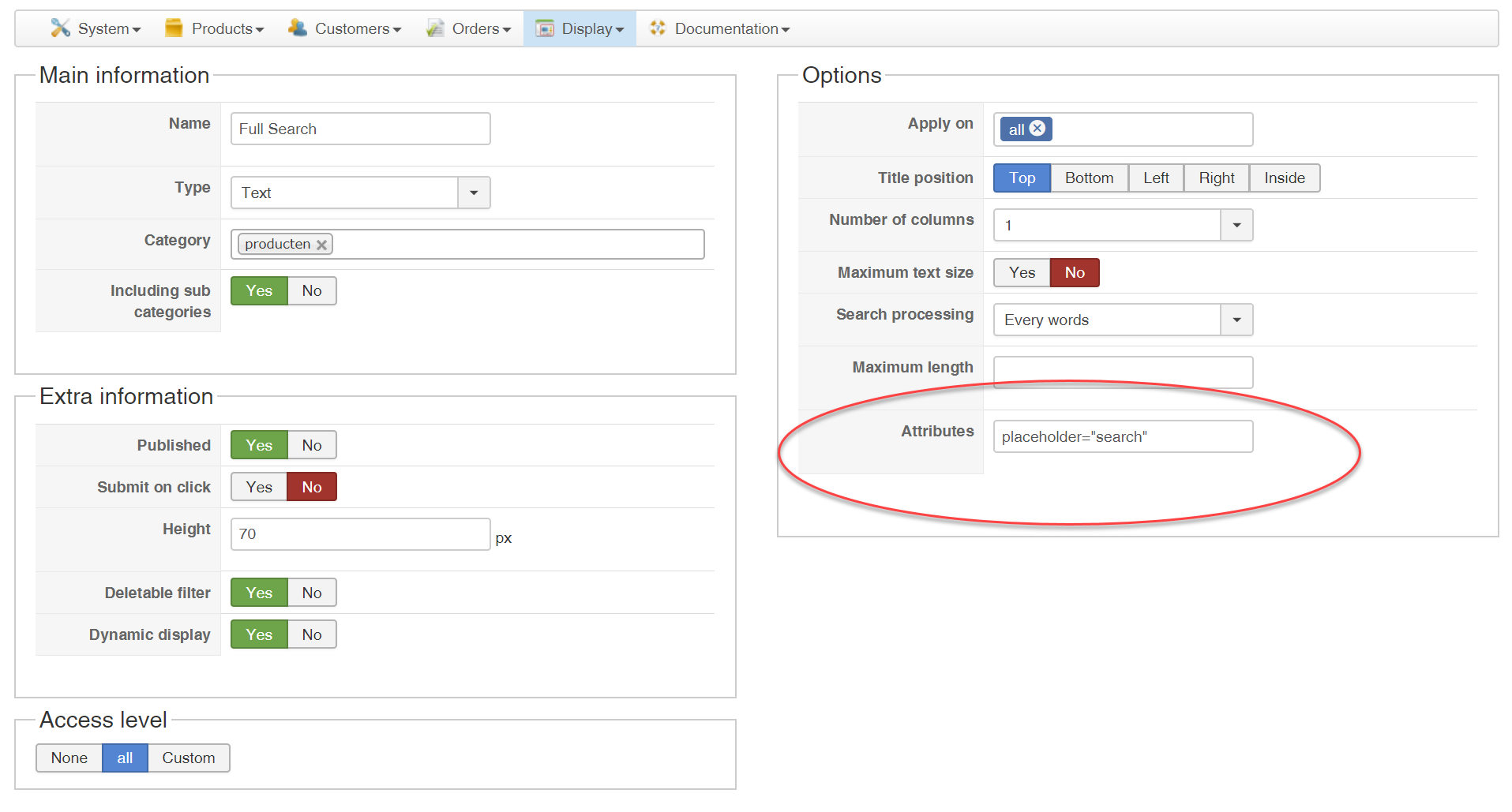
This works great for me.
Kind regards,
Lumiga
Please Log in or Create an account to join the conversation.
Time to create page: 0.103 seconds