

- Posts: 3
- Thank you received: 0
Product Filter Search - Link using URL variable
13 years 2 months ago #119112
by plaat
Product Filter Search - Link using URL variable was created by plaat
-- url of the page with the problem -- :
bestvaluepetsupplies.net/index.php?optio...k=listing&Itemid=663
-- HikaShop version -- : HikaShop Business: 2.2.0
-- Joomla version -- : Joomla! 2.5.14
-- PHP version -- : 5.3.21
-- Browser(s) name and version -- : Chrome / All
-- Error-message(debug-mod must be tuned on) -- : Need to link to search results by passing URL variable
Hi, i have implemented a search filter for product, it works well
My urgent problem is, I need to create links to search results. for example
index.php?searchword=KEYWORD_HERE
would then return search results for KEYWORD_HERE
please help
bestvaluepetsupplies.net/index.php?optio...k=listing&Itemid=663
how do I add &searchword=KEYWORD
-- HikaShop version -- : HikaShop Business: 2.2.0
-- Joomla version -- : Joomla! 2.5.14
-- PHP version -- : 5.3.21
-- Browser(s) name and version -- : Chrome / All
-- Error-message(debug-mod must be tuned on) -- : Need to link to search results by passing URL variable
Hi, i have implemented a search filter for product, it works well
My urgent problem is, I need to create links to search results. for example
index.php?searchword=KEYWORD_HERE
would then return search results for KEYWORD_HERE
please help
bestvaluepetsupplies.net/index.php?optio...k=listing&Itemid=663
how do I add &searchword=KEYWORD
Please Log in or Create an account to join the conversation.

13 years 2 months ago #119140
by Xavier
Replied by Xavier on topic Product Filter Search - Link using URL variable
Hi,
Can you explain with more details where you want to create these links ?
Can you explain with more details where you want to create these links ?
Please Log in or Create an account to join the conversation.
13 years 2 months ago #119178
by plaat
Replied by plaat on topic Product Filter Search - Link using URL variable
Thank you for the great product support, I got a reply from support:
How to link to a search URL
bestvaluepetsupplies.net/index.php?optio...ter_Search=frontline
How to link to a search URL
bestvaluepetsupplies.net/index.php?optio...ter_Search=frontline
Please Log in or Create an account to join the conversation.
11 years 10 months ago #182663
by ketsh
Replied by ketsh on topic Product Filter Search - Link using URL variable
Hi,
We have the same problem, can you share the solution with us?
Thanks
We have the same problem, can you share the solution with us?
Thanks
Please Log in or Create an account to join the conversation.

11 years 10 months ago #182705
by nicolas
Replied by nicolas on topic Product Filter Search - Link using URL variable
Hi,
The user @plaat gave the solution in his last message.
You can use such link :
where "Search" is the name of the filter and "frontline" the value you want to search for.
The user @plaat gave the solution in his last message.
You can use such link :
Code:
http://bestvaluepetsupplies.net/index.php?option=com_hikashop&ctrl=product&task=listing&Itemid=663&filter_Search=frontline
Please Log in or Create an account to join the conversation.
11 years 10 months ago #183016
by ketsh
Replied by ketsh on topic Product Filter Search - Link using URL variable
Is it possible to display something similar in the url bar after a regular search (trough search module)?
The solution @plaat gave is not user friendly (you have to manually create the link to the search result page).
The solution @plaat gave is not user friendly (you have to manually create the link to the search result page).
Please Log in or Create an account to join the conversation.
11 years 10 months ago #183184
by nicolas
Replied by nicolas on topic Product Filter Search - Link using URL variable
You could try to edit the file "filter" of the view "product" via the menu Display>Views and change the code:
method="post"
to:
method="get"
in order to get the parameters added to the URL when using the regular HikaShop filter module.
method="post"
to:
method="get"
in order to get the parameters added to the URL when using the regular HikaShop filter module.
Please Log in or Create an account to join the conversation.
Less
More
- Posts: 40
- Thank you received: 2
8 years 2 months ago - 8 years 2 months ago #296723
by thesilentman
Replied by thesilentman on topic Product Filter Search - Link using URL variable
Dear Hikashop team,
the proposed solution works until you turn on SEF Urls in Joomla. At least on my end.
Do you have any quick tip before I dive into the router to find out why this is happening?
Or has Hikashop any new feature to achieve the same result in a better way?
Thanks
the proposed solution works until you turn on SEF Urls in Joomla. At least on my end.
Do you have any quick tip before I dive into the router to find out why this is happening?
Or has Hikashop any new feature to achieve the same result in a better way?
Thanks
Last edit: 8 years 2 months ago by thesilentman.
Please Log in or Create an account to join the conversation.
8 years 2 months ago #296750
by nicolas
Replied by nicolas on topic Product Filter Search - Link using URL variable
Hi,
You don't need to change any code now. You can just activate the "redirect POST mode" setting of the Hikashop configuration. Then, use the filters and you'll see the parameters in the URL when you do, and it will work even with the SEF activated.
You don't need to change any code now. You can just activate the "redirect POST mode" setting of the Hikashop configuration. Then, use the filters and you'll see the parameters in the URL when you do, and it will work even with the SEF activated.
Please Log in or Create an account to join the conversation.
Less
More
- Posts: 14
- Thank you received: 0
8 years 3 weeks ago #298865
by Jimmy Business
Replied by Jimmy Business on topic Product Filter Search - Link using URL variable
@nicolas where to find this option: redirect post mode?
I would like to realise the same thing as the TS, namely: showing filters in the url when using the filter module.
I would like to realise the same thing as the TS, namely: showing filters in the url when using the filter module.
Please Log in or Create an account to join the conversation.

8 years 3 weeks ago #298867
by kyratn
Replied by kyratn on topic Product Filter Search - Link using URL variable
Hi,
It's in system->configuration under advanced tab.
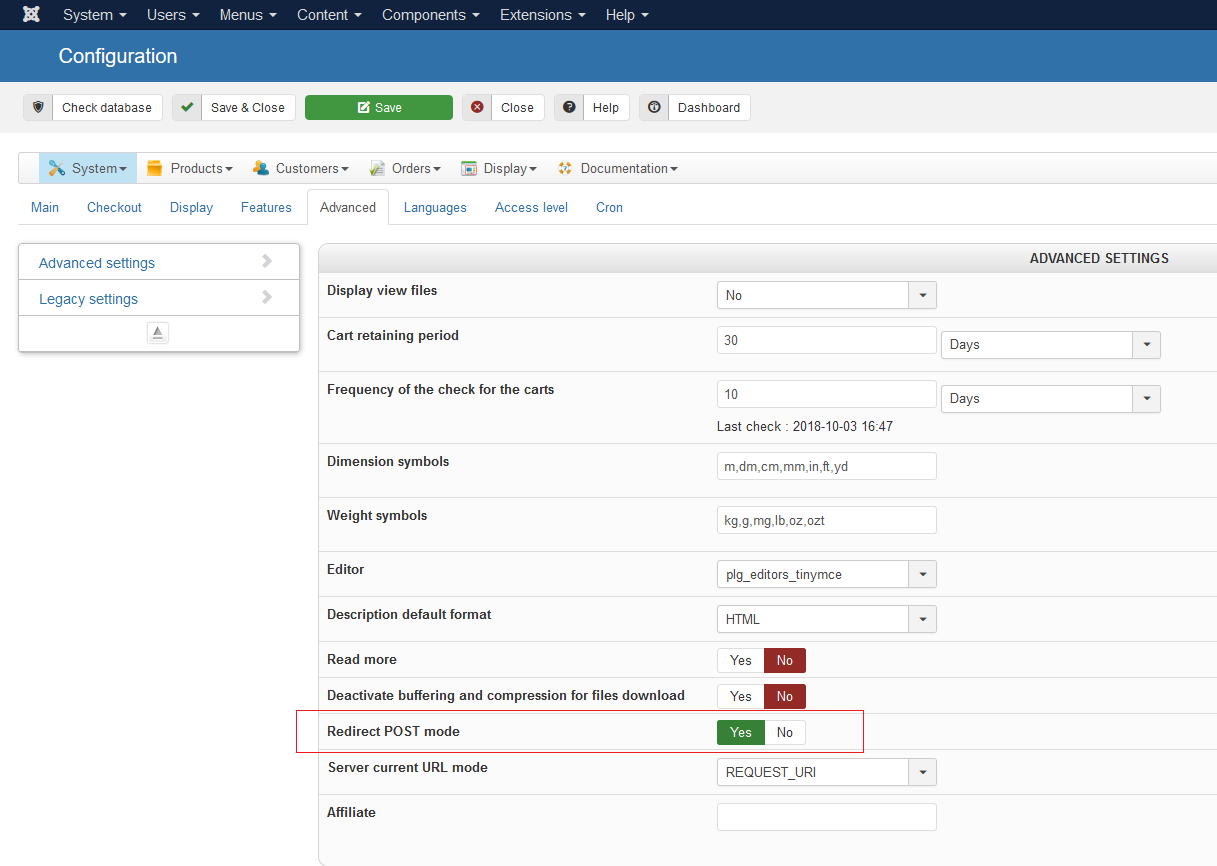
Thanks
It's in system->configuration under advanced tab.
Thanks
The following user(s) said Thank You: Philip, Jimmy Business
Please Log in or Create an account to join the conversation.
8 years 3 weeks ago #298870
by nicolas
Replied by nicolas on topic Product Filter Search - Link using URL variable
Hi,
It's in the HikaShop configuration, under the "advanced" tab.
It's in the HikaShop configuration, under the "advanced" tab.
The following user(s) said Thank You: Jimmy Business
Please Log in or Create an account to join the conversation.
Less
More
- Posts: 14
- Thank you received: 0
8 years 3 weeks ago #298907
by Jimmy Business
Replied by Jimmy Business on topic Product Filter Search - Link using URL variable
It generates links like: category?limitstart=0&filter_NAMEFILTER=FILTER&filter_category_3=+
Is it possible to show a clean url such like: /category/filter
Is it possible to show a clean url such like: /category/filter
Please Log in or Create an account to join the conversation.
8 years 3 weeks ago #298929
by nicolas
Replied by nicolas on topic Product Filter Search - Link using URL variable
Hi,
If you keep that option turned off, it won't add these parameters.
These parameters in the URL are what allow the system to not need to use POST parameters (which are hidden).
So either you have that option turned off, or you have the parameters in the URL, you can't have both.
If you keep that option turned off, it won't add these parameters.
These parameters in the URL are what allow the system to not need to use POST parameters (which are hidden).
So either you have that option turned off, or you have the parameters in the URL, you can't have both.
Please Log in or Create an account to join the conversation.
Time to create page: 0.099 seconds