

- Posts: 13
- Thank you received: 1
Again filters :-)
13 years 2 weeks ago #131135
by jota2000
Again filters :-) was created by jota2000
Sorry but after looking for some time i just give up. The problem is simple. search text on the products.
Made the change on the products plugin ID and put the categories module ID. But in the end i end up with a filter that will give me all the categories and none of the products and i only have one to test.
So in simple words , how can this be done?
Once again sorry to take your time for so simple but complicated situation .
Cheers.
Made the change on the products plugin ID and put the categories module ID. But in the end i end up with a filter that will give me all the categories and none of the products and i only have one to test.
So in simple words , how can this be done?
Once again sorry to take your time for so simple but complicated situation .
Cheers.
Please Log in or Create an account to join the conversation.

13 years 2 weeks ago #131187
by Xavier
Replied by Xavier on topic Again filters :-)
Hi,
You are talking about the search and not the filters, right ?
Thanks to post the screenshot of the product search plugin. You have to set the item id of a product listing menu.
And don't forget to set the "Fields" on which you want to make the search. Ex: product_name and/or product_code.
You are talking about the search and not the filters, right ?
Thanks to post the screenshot of the product search plugin. You have to set the item id of a product listing menu.
And don't forget to set the "Fields" on which you want to make the search. Ex: product_name and/or product_code.
Please Log in or Create an account to join the conversation.
13 years 2 weeks ago #131261
by jota2000
Replied by jota2000 on topic Again filters :-)
Sorry but you are answering to another person as i didn't sent any screen shoots.
The question still stands as i'm still stuck on the filters and after two hours on the forum i got no closer to find the solution.
The filter is done as on the book but the result is always the full categories directory and not the product that i'm searching for ,so far changing id's or using search from joomla (it finds it) but i want the picture and prices not just a link.
Can you write or make a small tutorial on utube or be screen shots so that there is no mistake or loosing or mind over it.
Thanks
The question still stands as i'm still stuck on the filters and after two hours on the forum i got no closer to find the solution.
The filter is done as on the book but the result is always the full categories directory and not the product that i'm searching for ,so far changing id's or using search from joomla (it finds it) but i want the picture and prices not just a link.
Can you write or make a small tutorial on utube or be screen shots so that there is no mistake or loosing or mind over it.
Thanks
Please Log in or Create an account to join the conversation.
13 years 2 weeks ago #131323
by Xavier
Replied by Xavier on topic Again filters :-)
Hi,
I was answering to you and asking for a screenshot
But it doesn't matter as you need a filter and not the Joomla search.
You have to configure your filter like that:
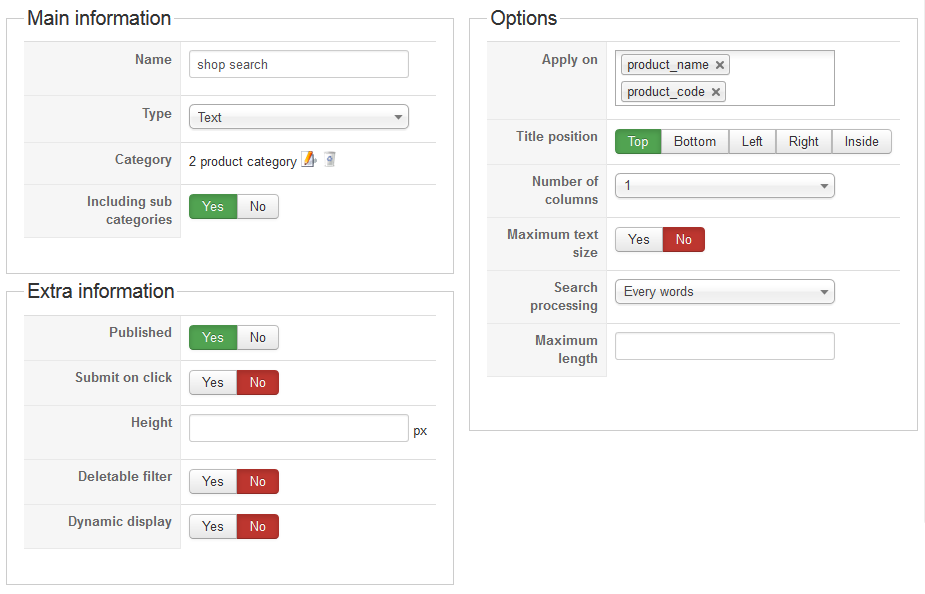
I was answering to you and asking for a screenshot
But it doesn't matter as you need a filter and not the Joomla search.
You have to configure your filter like that:
Please Log in or Create an account to join the conversation.
13 years 2 weeks ago #131402
by jota2000
Replied by jota2000 on topic Again filters :-)
Hi
That is what i have on my filter and it only sends out all the categories (top and lower ) and no product.
Any other adjustment i should do?
Cheers
That is what i have on my filter and it only sends out all the categories (top and lower ) and no product.
Any other adjustment i should do?
Cheers
Please Log in or Create an account to join the conversation.

13 years 1 week ago #131475
by nicolas
Replied by nicolas on topic Again filters :-)
The filter itself is ok. The issue is with the configuration of your hikashop filter module. In the options of the module, you should enter the id of a menu item of the type hikashop products listing which displays all the products if called directly (if you click on it on a menu module of the frontend). Then, when you use the filter in the module, the system will display that menu item and filter the products on it to only display the ones matching the text you entered in the filter.
Please Log in or Create an account to join the conversation.
13 years 1 week ago #131574
by jota2000
Replied by jota2000 on topic Again filters :-)
Hi tried some other options and still nothing.
please check the pictures still only gives me the categories even putting the correct id number.
Any further suggestion.
please check the pictures still only gives me the categories even putting the correct id number.
Any further suggestion.
Please Log in or Create an account to join the conversation.
13 years 1 week ago #131575
by jota2000
Replied by jota2000 on topic Again filters :-)
Hi tried some other options and still nothing.
please check the pictures still only gives me the categories even putting the correct id number.
Any further suggestion.
Sorry here are the pics.
please check the pictures still only gives me the categories even putting the correct id number.
Any further suggestion.
Sorry here are the pics.
Please Log in or Create an account to join the conversation.
13 years 1 week ago #131583
by nicolas
Replied by nicolas on topic Again filters :-)
As I said the issue was with the menu item that you set in the "menu" option of the filter module.
It was configured to display categories, not products.
I've changed it and it's working fine now.
It was configured to display categories, not products.
I've changed it and it's working fine now.
The following user(s) said Thank You: jota2000
Please Log in or Create an account to join the conversation.
13 years 1 week ago #131610
by jota2000
Replied by jota2000 on topic Again filters :-)
After the test it's working properly , i did try 586 menu but it just wouldn't go.
Any way thank you very much and now i can get online.

Cheers
Any way thank you very much
and now i can get online. Cheers
Please Log in or Create an account to join the conversation.
Time to create page: 0.073 seconds