

- Posts: 47
- Thank you received: 0
Search results list
12 years 7 months ago #152984
by nijan
Search results list was created by nijan
Hi,
I create a product listing menu with all my products.
I create a filter and it works fine BUT my search results list is displayed just bellow alle the products.
How can I just display the results list ?
Regards
I create a product listing menu with all my products.
I create a filter and it works fine BUT my search results list is displayed just bellow alle the products.
How can I just display the results list ?
Regards
Please Log in or Create an account to join the conversation.
12 years 7 months ago #152986
by nijan
Replied by nijan on topic Search results list
Hi,
In fact the seach results list is displayed 2 times.
Any idea why this occurs ?
Regards
In fact the seach results list is displayed 2 times.
Any idea why this occurs ?
Regards
Please Log in or Create an account to join the conversation.

12 years 6 months ago #152998
by nicolas
Replied by nicolas on topic Search results list
Hi,
It's probably a problem with the setup of your menu item.
Could you provide a link to the page and a screenshot of the HikaShop options of your products listing menu item ?
It's probably a problem with the setup of your menu item.
Could you provide a link to the page and a screenshot of the HikaShop options of your products listing menu item ?
Please Log in or Create an account to join the conversation.
12 years 6 months ago #153138
by nijan
Replied by nijan on topic Search results list
Hi,
Here is 1 screenshot of the frontend and 2 screenshots of the admin pannel (Filter Module and HikaShop menu options).
Hope that can help you ... to help me
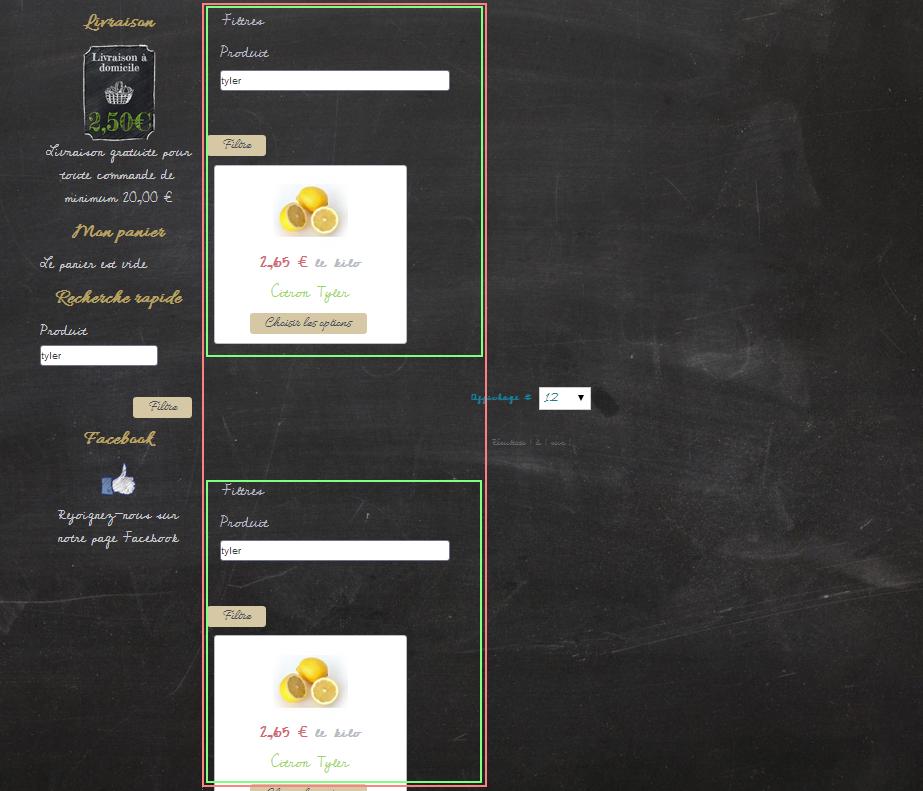
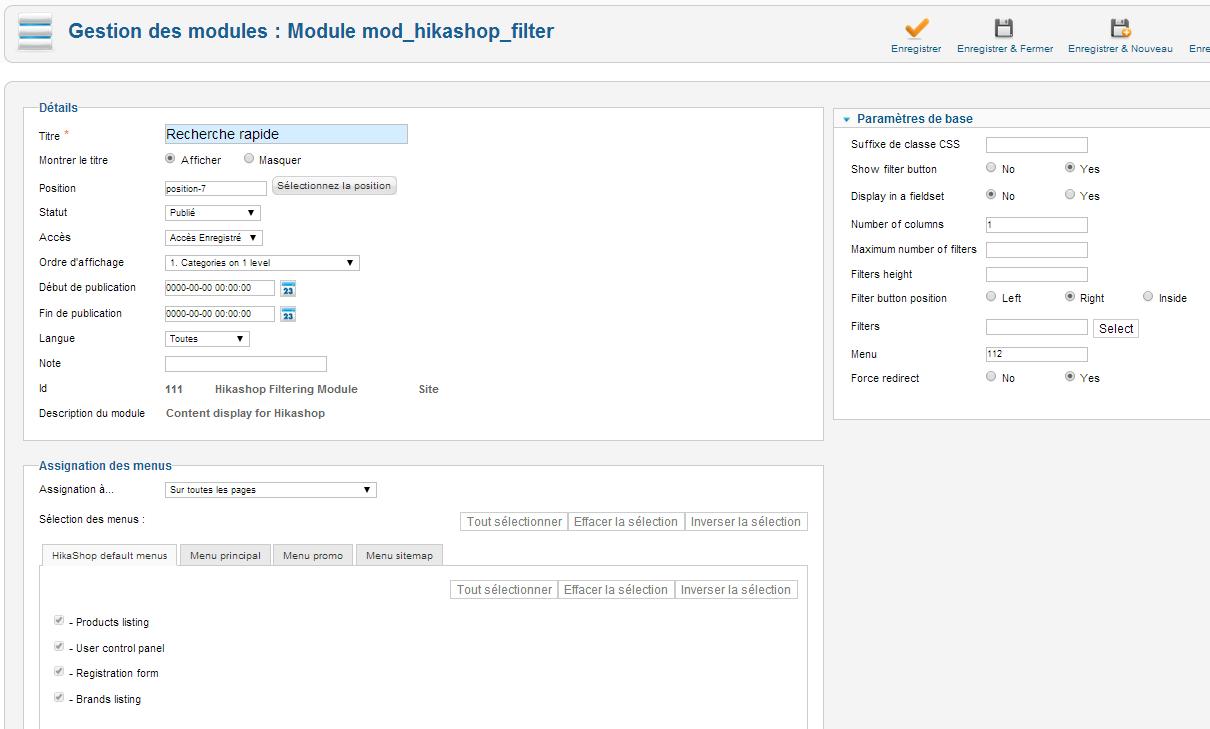
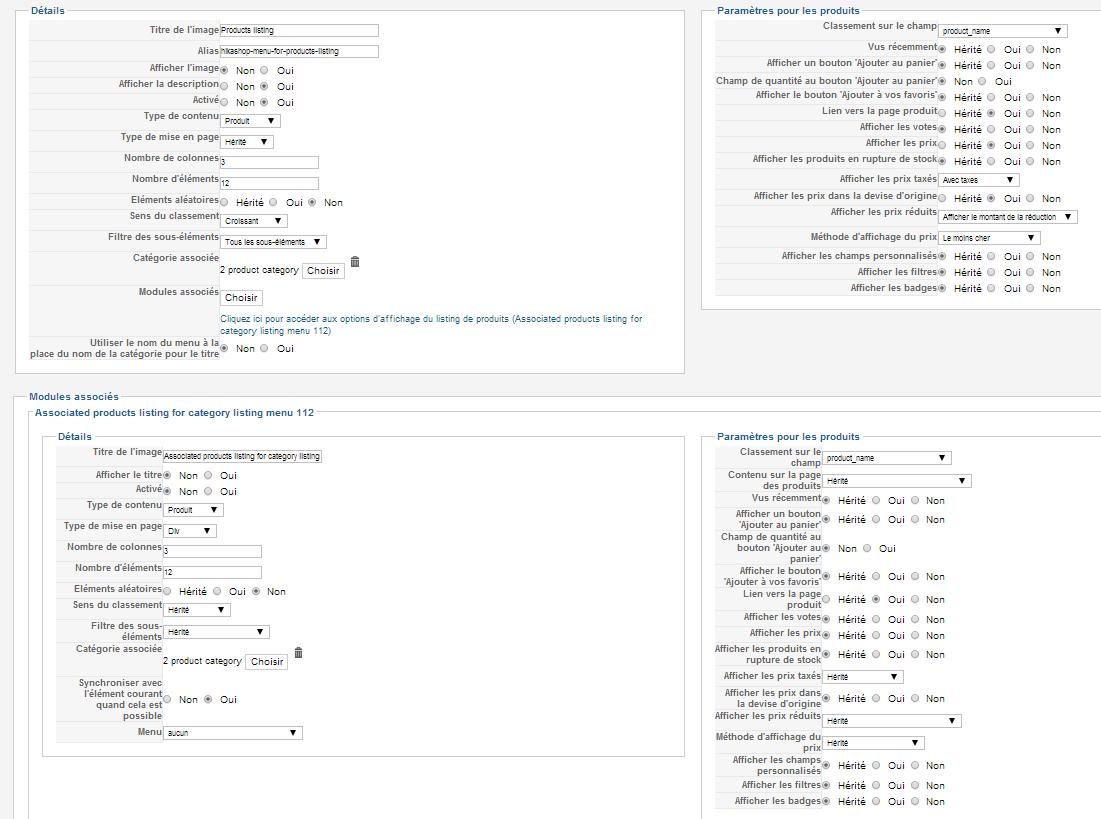
Here is 1 screenshot of the frontend and 2 screenshots of the admin pannel (Filter Module and HikaShop menu options).
Hope that can help you ... to help me
Please Log in or Create an account to join the conversation.
12 years 6 months ago #153160
by nicolas
Replied by nicolas on topic Search results list
Hi,
So as you can see in your second screenshot, you have a products listing module associated with your products listing menu item.
That's why you see two products listings on that page.
In that second screenshot, click on the select button of the associated modules option and disable the associated module that you have enabled. Then, save the options and you won't have that second listing anymore.
So as you can see in your second screenshot, you have a products listing module associated with your products listing menu item.
That's why you see two products listings on that page.
In that second screenshot, click on the select button of the associated modules option and disable the associated module that you have enabled. Then, save the options and you won't have that second listing anymore.
Please Log in or Create an account to join the conversation.
12 years 6 months ago #153312
by nijan
Replied by nijan on topic Search results list
Hi,
I'm sorry but I don't really see what you means.
You speak about which attached file ?
Cheers,
Johan
I'm sorry but I don't really see what you means.
You speak about which attached file ?
Cheers,
Johan
Please Log in or Create an account to join the conversation.
12 years 6 months ago #153326
by nicolas
Replied by nicolas on topic Search results list
I'm talking about this one:
www.hikashop.com/media/kunena/attachments/31562/h753f2e7.jpg
You can see an "associated modules" option there (or Modules Associés in your language).
You can see an "associated modules" option there (or Modules Associés in your language).
Please Log in or Create an account to join the conversation.
12 years 6 months ago #153469
by nijan
Replied by nijan on topic Search results list
Hi Nicolas,
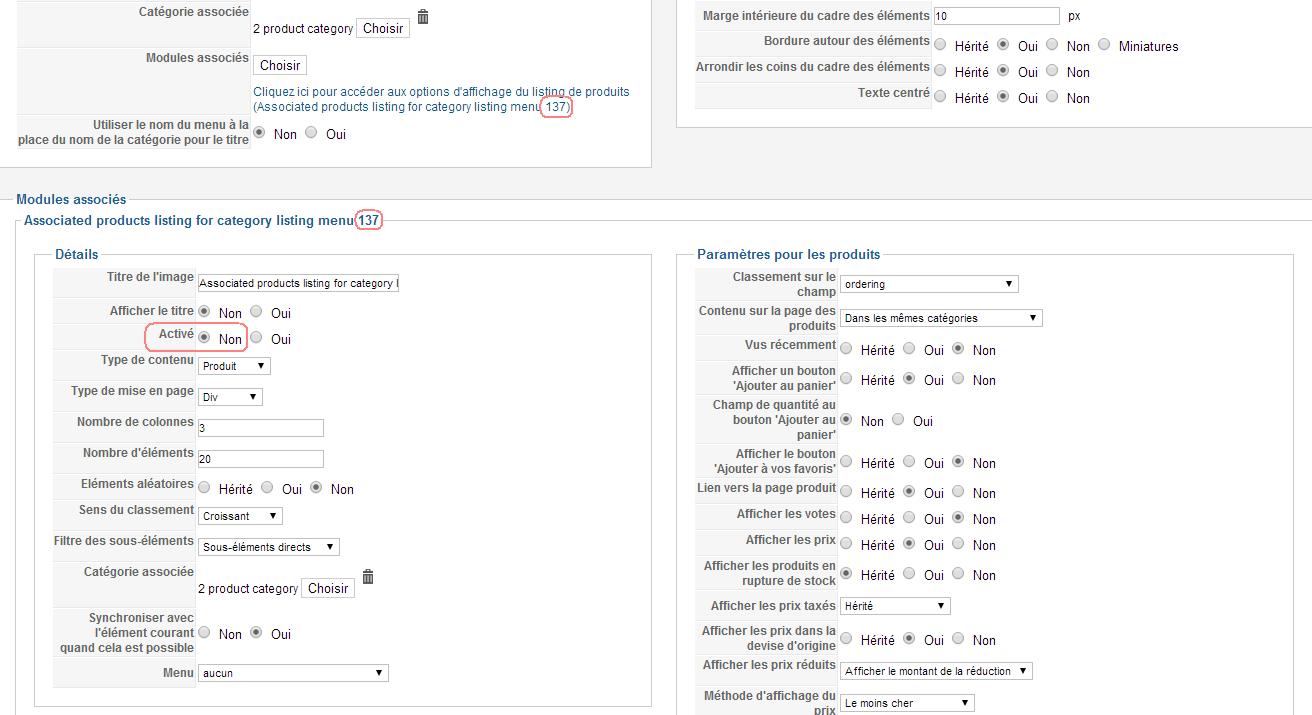
I think that the options you asked me to change are already set (see attach) ... but the problem is the same ...
The search module works perfectly but I have to times the results
Cheers
I think that the options you asked me to change are already set (see attach) ... but the problem is the same ...
The search module works perfectly but I have to times the results
Cheers
Please Log in or Create an account to join the conversation.
12 years 6 months ago #153567
by nicolas
Replied by nicolas on topic Search results list
No, that option is not set properly. As I said in my first message, you need to disable the module that is enabled in that option (when you click on the "select" button).
The following user(s) said Thank You: nijan
Please Log in or Create an account to join the conversation.
12 years 6 months ago #153684
by nijan
Replied by nijan on topic Search results list
Nice ! It works fine !
Another problem now but I'm sure you'll have an answer for me
I have 5 categories and sub categories for example
A - A1 (10 products) - published
A - A2 (25 products) - unpublished
B - B1 (50 products) - published
B - B2 (15 products) - published
In my shop categories A - A2 is not displayed BUT when I search a product that is only on the unpublished category ... that product is displayed on my search result list ? Can I avoid it ?
To be complete, some products in the unpublished category are published. Only those are "searchable".
I would like to avoid to unpublished all the products to do that.
Cheers !
Another problem now but I'm sure you'll have an answer for me
I have 5 categories and sub categories for example
A - A1 (10 products) - published
A - A2 (25 products) - unpublished
B - B1 (50 products) - published
B - B2 (15 products) - published
In my shop categories A - A2 is not displayed BUT when I search a product that is only on the unpublished category ... that product is displayed on my search result list ? Can I avoid it ?
To be complete, some products in the unpublished category are published. Only those are "searchable".
I would like to avoid to unpublished all the products to do that.
Cheers !
Please Log in or Create an account to join the conversation.

12 years 6 months ago #153826
by Xavier
Replied by Xavier on topic Search results list
Hi,
That can be done by editing the file "plugins/search/hikashop_products/hikashop_products.php".
Else you can unpublish all the products of that category thanks to the mass actions.
In one action, you change the status of all these products.
That can be done by editing the file "plugins/search/hikashop_products/hikashop_products.php".
Else you can unpublish all the products of that category thanks to the mass actions.
In one action, you change the status of all these products.
Please Log in or Create an account to join the conversation.
Time to create page: 0.071 seconds