

- Posts: 7
- Thank you received: 0
Filter doesn't show any product on Brand pages
12 years 3 months ago #164876
by mainili
Filter doesn't show any product on Brand pages was created by mainili
-- url of the page with the problem -- :
mainili.com
-- HikaShop version -- : bussiness 2.3.0
-- Joomla version -- : 2.5.17
-- PHP version -- : 5.2.17
-- Browser(s) name and version -- : Firefox, Chrome, Explorer
-- Error-message(debug-mod must be tuned on) -- : Hata: 500 - JDatabaseMySQL::query: 1054 - Unknown column 'a.product_id' in 'on clause' SQL=SELECT DISTINCT b.* FROM ll6dp_hikashop_product AS b INNER JOIN ll6dp_hikashop_product_category AS Filter_by_Design1 ON Filter_by_Design1.product_id=a.product_id AND Filter_by_Design1.category_id IN (20) WHERE b.product_published=1 AND b.product_type = 'main' AND b.product_manufacturer_id IN (52) AND (b.product_access = 'all' OR b.product_access LIKE '%,1,%') ORDER BY b.product_name ASC LIMIT 0, 100
I created two filters, one for product categories and one for brands. When I use "filter by brands" on product categories, it filters but when I use "filter by product" on brands it doesn't show any products.
Could you please help me ?
-- HikaShop version -- : bussiness 2.3.0
-- Joomla version -- : 2.5.17
-- PHP version -- : 5.2.17
-- Browser(s) name and version -- : Firefox, Chrome, Explorer
-- Error-message(debug-mod must be tuned on) -- : Hata: 500 - JDatabaseMySQL::query: 1054 - Unknown column 'a.product_id' in 'on clause' SQL=SELECT DISTINCT b.* FROM ll6dp_hikashop_product AS b INNER JOIN ll6dp_hikashop_product_category AS Filter_by_Design1 ON Filter_by_Design1.product_id=a.product_id AND Filter_by_Design1.category_id IN (20) WHERE b.product_published=1 AND b.product_type = 'main' AND b.product_manufacturer_id IN (52) AND (b.product_access = 'all' OR b.product_access LIKE '%,1,%') ORDER BY b.product_name ASC LIMIT 0, 100
I created two filters, one for product categories and one for brands. When I use "filter by brands" on product categories, it filters but when I use "filter by product" on brands it doesn't show any products.
Could you please help me ?
Please Log in or Create an account to join the conversation.

12 years 3 months ago #164882
by nicolas
Replied by nicolas on topic Filter doesn't show any product on Brand pages
Hi,
Please update to the latest version of HikaShop and it should fix the problem.
Please update to the latest version of HikaShop and it should fix the problem.
Please Log in or Create an account to join the conversation.
12 years 3 months ago #164917
by mainili
Replied by mainili on topic Filter doesn't show any product on Brand pages
Do I have to upload new version via extension manager or is there any way to update ? Because even I use Bussiness edition, Extension manager -> Update shows Hikashop Essential.
Please Log in or Create an account to join the conversation.

Less
More
- Posts: 12953
- Thank you received: 1778
12 years 3 months ago #164921
by Mohamed Thelji
Replied by Mohamed Thelji on topic Filter doesn't show any product on Brand pages
Hello,
You'll just have to download the last Hikashop version through our website, and install it through your extension manager.
You'll just have to download the last Hikashop version through our website, and install it through your extension manager.
Please Log in or Create an account to join the conversation.
Less
More
- Posts: 259
- Thank you received: 22
12 years 1 month ago #171231
by rodfarrell
Replied by rodfarrell on topic Filter doesn't show any product on Brand pages
I have the same issue. Brands were working on 3.2.0 but filters were not working in Chrome. I have upgraded to 2.3.2 and the Chrome issue is resolved but brands are now not coming up in filters and manufacturer name no longer exists in the list of fields we can filter on. Manufacturer ID is there but not name.
Please Log in or Create an account to join the conversation.
Less
More
- Posts: 12953
- Thank you received: 1778
12 years 1 month ago #171248
by Mohamed Thelji
Replied by Mohamed Thelji on topic Filter doesn't show any product on Brand pages
Hello,
Do you also have the " 500 - JDatabaseMySQL::query: 1054 .." error ? Can you show me some screeshots of how did you configured your filters ?
Do you also have the " 500 - JDatabaseMySQL::query: 1054 .." error ? Can you show me some screeshots of how did you configured your filters ?
Please Log in or Create an account to join the conversation.
Less
More
- Posts: 259
- Thank you received: 22
12 years 1 month ago - 12 years 1 month ago #171892
by rodfarrell
Replied by rodfarrell on topic Filter doesn't show any product on Brand pages
There is no error message, just empty search results. I will pm you the access as it is a development site and still offline
EDIT: Ok I think I have found the problem. The filter appears to start at the current page and search only that page and its subcategories. It appears to be ignoring the category specified in the filter parameters.
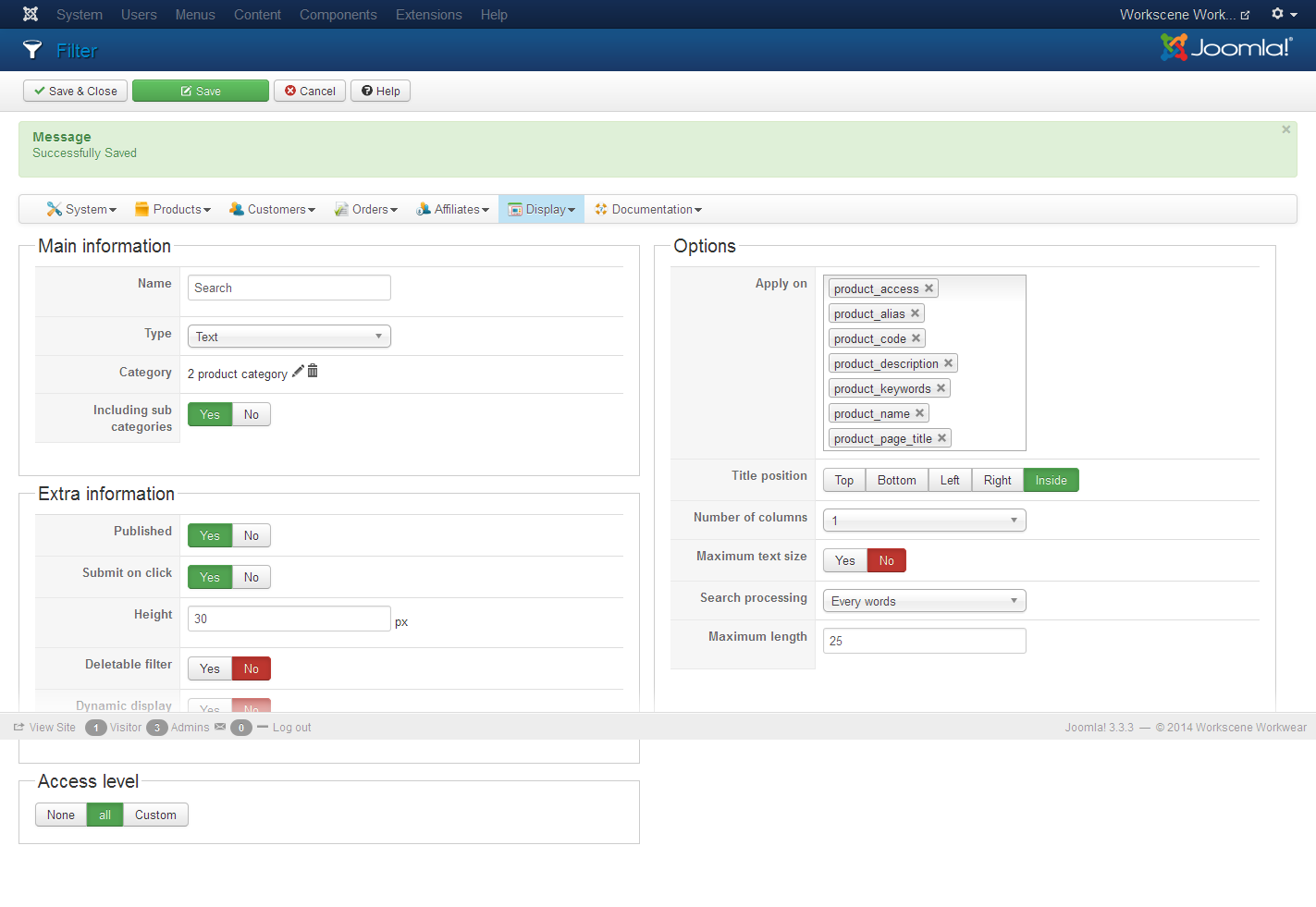
EDIT: Ok I think I have found the problem. The filter appears to start at the current page and search only that page and its subcategories. It appears to be ignoring the category specified in the filter parameters.
Last edit: 12 years 1 month ago by rodfarrell.
Please Log in or Create an account to join the conversation.
12 years 1 month ago #171898
by nicolas
Replied by nicolas on topic Filter doesn't show any product on Brand pages
Hi,
I guess that you want to remove the category that you selected in the category option of your filter so that the filter applies regardless of the category.
I guess that you want to remove the category that you selected in the category option of your filter so that the filter applies regardless of the category.
Please Log in or Create an account to join the conversation.
Less
More
- Posts: 259
- Thank you received: 22
12 years 1 month ago #172032
by rodfarrell
Replied by rodfarrell on topic Filter doesn't show any product on Brand pages
Whether I have no category, or the top level product category the result is the same. The filter only shows results from the currently viewed page so the category selected doesn't appear to do anything.
What I was trying to achieve was a sitewide search that would display product as thumbnails. Is this not possible?
What I was trying to achieve was a sitewide search that would display product as thumbnails. Is this not possible?
Please Log in or Create an account to join the conversation.
12 years 1 month ago #172162
by nicolas
Replied by nicolas on topic Filter doesn't show any product on Brand pages
Yes, it is definitely possible.
Please provide a backend access and we can check your settings.
The access that you had provided previously doesn't work anymore.
Please provide a backend access and we can check your settings.
The access that you had provided previously doesn't work anymore.
Please Log in or Create an account to join the conversation.
Less
More
- Posts: 259
- Thank you received: 22
12 years 1 month ago #172169
by rodfarrell
Replied by rodfarrell on topic Filter doesn't show any product on Brand pages
Sorry, I thought you were done. Its reactivated now.
Please Log in or Create an account to join the conversation.

12 years 1 month ago #172249
by Jerome
Jerome - Obsidev.com
HikaMarket & HikaSerial developer / HikaShop core dev team.
Replied by Jerome on topic Filter doesn't show any product on Brand pages
Hi,
In your filters, do you have filter on characteristics ?
If so, please edit the file "administrator/components/com_hikashop/classes/filter.php" and replace the line
By
Regards,
Sorry, the credentials we got are not working.Warning
Username and password do not match or you do not have an account yet.
In your filters, do you have filter on characteristics ?
If so, please edit the file "administrator/components/com_hikashop/classes/filter.php" and replace the line
Code:
if(!($infoGet[0]==$filter->filter_namekey && count($infoGet)==1)){
Code:
if(($infoGet[0] != $filter->filter_namekey && (int)$infoGet[0] != 0) || count($infoGet) > 1) {
Regards,
Jerome - Obsidev.com
HikaMarket & HikaSerial developer / HikaShop core dev team.
Please Log in or Create an account to join the conversation.
Less
More
- Posts: 259
- Thank you received: 22
12 years 1 month ago #172603
by rodfarrell
Replied by rodfarrell on topic Filter doesn't show any product on Brand pages
I've PM'd the access details again. I've made that change in the php but no change.
Please Log in or Create an account to join the conversation.
12 years 1 month ago #172661
by nicolas
Replied by nicolas on topic Filter doesn't show any product on Brand pages
Hi,
You don't have the same error as the other person who started this thread.
There is no error on your pages when you use the filters.
However, the display of the results are done based on the products already displayed because the "force redirect" option of your filter module is not turned on. I've turned it on for you (also the products listing menu item used for it was not configured properly so I've fixed its options).
I think that it's working like you want now.
You don't have the same error as the other person who started this thread.
There is no error on your pages when you use the filters.
However, the display of the results are done based on the products already displayed because the "force redirect" option of your filter module is not turned on. I've turned it on for you (also the products listing menu item used for it was not configured properly so I've fixed its options).
I think that it's working like you want now.
Please Log in or Create an account to join the conversation.
Time to create page: 0.154 seconds