

- Posts: 24
- Thank you received: 0
Filter not translated when "inside"
11 years 8 months ago - 11 years 8 months ago #191646
by dezajn
Filter not translated when "inside" was created by dezajn
-- HikaShop version -- : 2.3.5
-- Joomla version -- : 3.3.6
-- PHP version -- : 5.4.12
-- Browser(s) name and version -- : Firefox 35.0.1
Hello,
The title of the filters are not translated when they are displayed "inside" a text box (they are when displayed left, right, top, bottom) !
Can you correct this problem ?
Best regards
-- Joomla version -- : 3.3.6
-- PHP version -- : 5.4.12
-- Browser(s) name and version -- : Firefox 35.0.1
Hello,
The title of the filters are not translated when they are displayed "inside" a text box (they are when displayed left, right, top, bottom) !
Can you correct this problem ?
Best regards
Last edit: 11 years 8 months ago by dezajn. Reason: topic icon -> solved
Please Log in or Create an account to join the conversation.

11 years 8 months ago #191654
by nicolas
Replied by nicolas on topic Filter not translated when "inside"
Hi,
Thank you for your feedback.
Change the line:
$name=$filter->filter_name;
to:
$name=$this->trans($filter->filter_name);
in the file administrator/components/com_hikashop/classes/field.php and that will fix the problem.
Thank you for your feedback.
Change the line:
$name=$filter->filter_name;
to:
$name=$this->trans($filter->filter_name);
in the file administrator/components/com_hikashop/classes/field.php and that will fix the problem.
Please Log in or Create an account to join the conversation.
11 years 8 months ago #191684
by dezajn
Replied by dezajn on topic Filter not translated when "inside"
I changed the code in filter.php
The text is now translated but the results are incorrect (please see the captures images)
The text is now translated but the results are incorrect (please see the captures images)
Please Log in or Create an account to join the conversation.
11 years 8 months ago #191685
by nicolas
Replied by nicolas on topic Filter not translated when "inside"
Hi,
Ok. Then, change that same line to :
$name=strip_tags($this->trans($filter->filter_name));
Ok. Then, change that same line to :
$name=strip_tags($this->trans($filter->filter_name));
Please Log in or Create an account to join the conversation.
11 years 8 months ago #191710
by dezajn
Replied by dezajn on topic Filter not translated when "inside"
Hello,
I didn't solve the problem.
Did I broke something when I changed filter.php ?
I didn't solve the problem.
Did I broke something when I changed filter.php ?
Please Log in or Create an account to join the conversation.
11 years 8 months ago #191740
by nicolas
Replied by nicolas on topic Filter not translated when "inside"
Hi,
I don't see how that's possible with that modification.
Can you double check that you made it correctly ?
I don't see how that's possible with that modification.
Can you double check that you made it correctly ?
Please Log in or Create an account to join the conversation.
11 years 8 months ago #191855
by dezajn
Replied by dezajn on topic Filter not translated when "inside"
Hello,
I upadated filter.php with this one .
I deleted and recreated my filters and the translated titles are correctly displayed inside the filters.
But now there is a new problem : the (translated) titles inside the filter are used as search terms when there are multiple filters !
If I don't remove the titles, they get searched. Please see the enclosed picture.
Best regards.
I upadated filter.php with this one .
I deleted and recreated my filters and the translated titles are correctly displayed inside the filters.
But now there is a new problem : the (translated) titles inside the filter are used as search terms when there are multiple filters !
If I don't remove the titles, they get searched. Please see the enclosed picture.
Best regards.
Please Log in or Create an account to join the conversation.
11 years 8 months ago #191878
by nicolas
Replied by nicolas on topic Filter not translated when "inside"
Hi,
Ah, yes, I didn't think of that.
Change the code:
$name=strip_tags($this->trans($filter->filter_name));
$onClick=' onclick="this.value=\'\';"';
to:
$onClick=' placeholder="'.strip_tags($this->trans($filter->filter_name)).'"';
and that should work properly.
Ah, yes, I didn't think of that.
Change the code:
$name=strip_tags($this->trans($filter->filter_name));
$onClick=' onclick="this.value=\'\';"';
to:
$onClick=' placeholder="'.strip_tags($this->trans($filter->filter_name)).'"';
and that should work properly.
The following user(s) said Thank You: dezajn
Please Log in or Create an account to join the conversation.
11 years 8 months ago #191992
by dezajn
Replied by dezajn on topic Filter not translated when "inside"
Hello,
Now it works perfectly.
Merci beaucoup.
Now it works perfectly.
Merci beaucoup.
Please Log in or Create an account to join the conversation.
10 years 9 months ago - 10 years 9 months ago #226106
by dezajn
Replied by dezajn on topic Filter not translated when "inside"
Hello,
Since i have updated hikashop to 2.6.0 the translated names of some filters, when the name are "inside", don't work anymore.
In the picture :
- in red : simple list -> not translated
- in blue : multiple list -> not translated
- in green : radio button -> translated
Can you update filter.php ?
Since i have updated hikashop to 2.6.0 the translated names of some filters, when the name are "inside", don't work anymore.
In the picture :
- in red : simple list -> not translated
- in blue : multiple list -> not translated
- in green : radio button -> translated
Can you update filter.php ?
Last edit: 10 years 9 months ago by dezajn.
Please Log in or Create an account to join the conversation.

10 years 8 months ago #227666
by Jerome
Jerome - Obsidev.com
HikaMarket & HikaSerial developer / HikaShop core dev team.
Replied by Jerome on topic Filter not translated when "inside"
Hi,
The patch that Nicolas gave in the post "191878" is included in HikaShop packages.
So the translations in text filters should work properly.
Now I can see that the "dropdown" filters do not handle properly the translations, so you need to replace
By
Regards,
The patch that Nicolas gave in the post "191878" is included in HikaShop packages.
So the translations in text filters should work properly.
Now I can see that the "dropdown" filters do not handle properly the translations, so you need to replace
Code:
$html.='<OPTION VALUE="none">'.$filter->filter_name.'</OPTION>';
Code:
$html.='<OPTION VALUE="none">'.strip_tags($this->trans($filter->filter_name).'</OPTION>';
Regards,
Jerome - Obsidev.com
HikaMarket & HikaSerial developer / HikaShop core dev team.
Please Log in or Create an account to join the conversation.
10 years 8 months ago - 10 years 8 months ago #227840
by dezajn
Replied by dezajn on topic Filter not translated when "inside"
Hello,
1.
-> Now the filter name in the dropdown is translated, but the title inside the filter is still not translated.
2.
Just a note if someone else as this problem : hikashop 2.6.1 already as this code included.
3.
The titles inside the filters are still not translated (please see the enclosed picture).
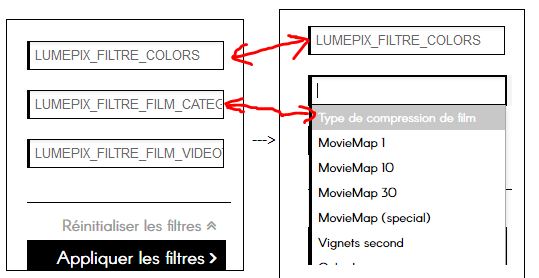
Can you update the code ?
Best regards.
1.
Code:
$html.='<OPTION VALUE="none">'.strip_tags($this->trans($filter->filter_name)).'</OPTION>';
2.
Just a note if someone else as this problem : hikashop 2.6.1 already as this code included.
3.
The titles inside the filters are still not translated (please see the enclosed picture).
Can you update the code ?
Best regards.
Last edit: 10 years 8 months ago by dezajn.
Please Log in or Create an account to join the conversation.
10 years 8 months ago #227943
by Jerome
Jerome - Obsidev.com
HikaMarket & HikaSerial developer / HikaShop core dev team.
Replied by Jerome on topic Filter not translated when "inside"
Hi,
I'm sorry but I cannot.
I don't understand what your screenshot is.
Regards,
I'm sorry but I cannot.
I don't understand what your screenshot is.
Regards,
Jerome - Obsidev.com
HikaMarket & HikaSerial developer / HikaShop core dev team.
Please Log in or Create an account to join the conversation.
10 years 8 months ago - 10 years 8 months ago #227999
by dezajn
Replied by dezajn on topic Filter not translated when "inside"
Sorry, i'll try to explain it in a simpler way.
I have MultipleDropdown filters (with custom fields)
When I clic on the filter the title is translated :
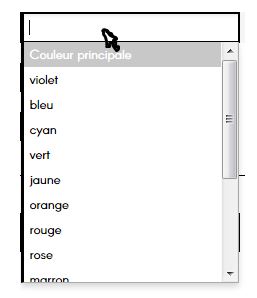
(Here : "Couleur principale")
But when I don't clic on the filter, the title is not translated when positionned inside.
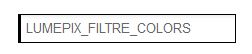
(Here : "LUMEPIX_FILTRE_COLORS")
I have MultipleDropdown filters (with custom fields)
When I clic on the filter the title is translated :
(Here : "Couleur principale")
But when I don't clic on the filter, the title is not translated when positionned inside.
(Here : "LUMEPIX_FILTRE_COLORS")
Last edit: 10 years 8 months ago by dezajn.
Please Log in or Create an account to join the conversation.

Less
More
- Posts: 12953
- Thank you received: 1778
10 years 8 months ago #228053
by Mohamed Thelji
Replied by Mohamed Thelji on topic Filter not translated when "inside"
Hello,
I just tested it on my end and it worked fine, can you give me a temporary back-end / FTP access to your shop so that we can directly test and debug it ?
Note that you can send it through our contact form by specifying the link of that thread :
www.hikashop.com/support/contact-us.html
Thank you.
I just tested it on my end and it worked fine, can you give me a temporary back-end / FTP access to your shop so that we can directly test and debug it ?
Note that you can send it through our contact form by specifying the link of that thread :
www.hikashop.com/support/contact-us.html
Thank you.
Please Log in or Create an account to join the conversation.
10 years 8 months ago #228428
by nicolas
Replied by nicolas on topic Filter not translated when "inside"
Hi,
We got the access.
So the issue comes from the data-placeholder that is added. I don't know how it's added as we don't have such code in HikaShop.
I'm thinking it must be added by something else on your website: take.ms/xJXZE
Also, if you turn off the "use chosen library" setting of the HikaShop configuration, it should hopefully avoid the problem, but I couldn't test as the user account you provided doesn't have access to the HikaShop configuration.
We got the access.
So the issue comes from the data-placeholder that is added. I don't know how it's added as we don't have such code in HikaShop.
I'm thinking it must be added by something else on your website: take.ms/xJXZE
Also, if you turn off the "use chosen library" setting of the HikaShop configuration, it should hopefully avoid the problem, but I couldn't test as the user account you provided doesn't have access to the HikaShop configuration.
Please Log in or Create an account to join the conversation.
10 years 8 months ago #228577
by dezajn
Replied by dezajn on topic Filter not translated when "inside"
Hello,
The account I made for you should give you full access to the joomla backend. Maybe you tried the login/pass for the ftp access instead of the joomla access ?
I forgot to tell you that the shop page can be accessed here : www.lumepix.com/boutique-film-fr
If I disable "chosen library" the titles are translated but the esthetic is bad and it also change all the dropdown from the website. So, we'd prefer another solution.
If I change the filter type from "Multiple Drop Down" to "Single Drop Down" the title is inside and translated !
Can you check your code for the Multiple Drop Down ?
Maybe I should re-install the last hikashop update ?
Best regards
The account I made for you should give you full access to the joomla backend. Maybe you tried the login/pass for the ftp access instead of the joomla access ?
I forgot to tell you that the shop page can be accessed here : www.lumepix.com/boutique-film-fr
If I disable "chosen library" the titles are translated but the esthetic is bad and it also change all the dropdown from the website. So, we'd prefer another solution.
If I change the filter type from "Multiple Drop Down" to "Single Drop Down" the title is inside and translated !
Can you check your code for the Multiple Drop Down ?
Maybe I should re-install the last hikashop update ?
Best regards
Please Log in or Create an account to join the conversation.
10 years 8 months ago #228580
by Jerome
Jerome - Obsidev.com
HikaMarket & HikaSerial developer / HikaShop core dev team.
Replied by Jerome on topic Filter not translated when "inside"
Hi,
The multiple dropdown !
That a very important and useful information.
So you can replace :
By
Regards,
The multiple dropdown !
That a very important and useful information.
So you can replace :
Code:
$multiple='multiple="multiple" size="5" data-placeholder="'.$filter->filter_name.'"';
Code:
$multiple='multiple="multiple" size="5" data-placeholder="'.strip_tags($this->trans($filter->filter_name)).'"';
Regards,
Jerome - Obsidev.com
HikaMarket & HikaSerial developer / HikaShop core dev team.
The following user(s) said Thank You: dezajn
Please Log in or Create an account to join the conversation.
10 years 8 months ago #228720
by dezajn
Replied by dezajn on topic Filter not translated when "inside"
Thank you.
Everything is ok with your modification.
Everything is ok with your modification.
Please Log in or Create an account to join the conversation.
Time to create page: 0.450 seconds