
- Posts: 38
- Thank you received: 0
Remove '>' from active filter
- teamtmedia
-
 Topic Author
- Offline
Less
More
11 years 1 week ago #220094
by teamtmedia
Remove '>' from active filter was created by teamtmedia
-- HikaShop version -- : 2.6.0
-- Joomla version -- : 3.4.5
-- PHP version -- : 5.6.8
-- Browser(s) name and version -- : FF42.0
It really is that simple. Problem is that > is the proverbial needle in the haystack for coding
When a filter is selected we have the "delete" option. This has a > which I would like to remove as I have styled my chosen selects to within an inch of their lives.
Where is this?
Thanks
-- Joomla version -- : 3.4.5
-- PHP version -- : 5.6.8
-- Browser(s) name and version -- : FF42.0
It really is that simple. Problem is that > is the proverbial needle in the haystack for coding
When a filter is selected we have the "delete" option. This has a > which I would like to remove as I have styled my chosen selects to within an inch of their lives.
Where is this?
Thanks
Please Log in or Create an account to join the conversation.

11 years 1 week ago #220101
by Xavier
Replied by Xavier on topic Remove '>' from active filter
Hi,
Please give us a link to a page with the issue, I don't really see which ">" you are talking about.
This is potentially present in the view "product / filter", or in the filter class directly.
Please give us a link to a page with the issue, I don't really see which ">" you are talking about.
This is potentially present in the view "product / filter", or in the filter class directly.
Please Log in or Create an account to join the conversation.
- teamtmedia
-
Topic Author
- Offline
Less
More
- Posts: 38
- Thank you received: 0
11 years 1 week ago #220200
by teamtmedia
Replied by teamtmedia on topic Remove '>' from active filter
Alas sadly I can't as it is localhost (until tomorrow when I'll be putting a version onto my demo server to communicate with my business partner.
In the meantime here is a screenshot of the
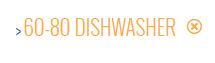
I have styled out a fair amount of the defacto styling but you will probably recognise it.
Thanks
In the meantime here is a screenshot of the
Code:
>
I have styled out a fair amount of the defacto styling but you will probably recognise it.
Thanks
Please Log in or Create an account to join the conversation.

11 years 1 week ago #220287
by nicolas
Replied by nicolas on topic Remove '>' from active filter
Hi,
Search for the text: $html.='> <a class="hikashop_filter_list_selected"
in the file administrator/components/com_hikashop/classes/filter.php and remove the first > in there for all the occurrences and that should do it.
Search for the text: $html.='> <a class="hikashop_filter_list_selected"
in the file administrator/components/com_hikashop/classes/filter.php and remove the first > in there for all the occurrences and that should do it.
The following user(s) said Thank You: teamtmedia
Please Log in or Create an account to join the conversation.
- teamtmedia
-
Topic Author
- Offline
Less
More
- Posts: 38
- Thank you received: 0
11 years 1 week ago #220295
by teamtmedia
Replied by teamtmedia on topic Remove '>' from active filter
Thankyou. It is hard to see a rendered > in php
Please Log in or Create an account to join the conversation.
Time to create page: 0.055 seconds