
- Posts: 14
- Thank you received: 0
Filter position within a module
- svjatoslavs.krasnikovs
-
 Topic Author
- Offline
Less
More
9 years 9 months ago #261210
by svjatoslavs.krasnikovs
Filter position within a module was created by svjatoslavs.krasnikovs
-- url of the page with the problem -- :
www.klimatkontrole.lv/index.php/lv/
-- HikaShop version -- : 2.6.4
-- Joomla version -- : 3.6.4
-- Browser(s) name and version -- : all
Hi, I have a problem. Basically I'm using a text filter as a search feature (works great BTW), so I have a text filter (called Meklēt produktu) within a Hika Shop filter module (called Meklēšana). It works. The problems thou occur when I try to style the module. I gave the module class suffix: "searchLV". The problem is that the filter itself is not included within this class - "moduletablesearchLV" when I inspect the page.
For me this means that I can not style (apply CSS) to the entire module (Meklēšana).
Also, there's a custom HTML module underneath the module I've just described, it's called: Kontaktinformācija, and it overlaps with the filter (hikashop_filter_module). Can you help me ?
-- HikaShop version -- : 2.6.4
-- Joomla version -- : 3.6.4
-- Browser(s) name and version -- : all
Hi, I have a problem. Basically I'm using a text filter as a search feature (works great BTW), so I have a text filter (called Meklēt produktu) within a Hika Shop filter module (called Meklēšana). It works. The problems thou occur when I try to style the module. I gave the module class suffix: "searchLV". The problem is that the filter itself is not included within this class - "moduletablesearchLV" when I inspect the page.
For me this means that I can not style (apply CSS) to the entire module (Meklēšana).
Also, there's a custom HTML module underneath the module I've just described, it's called: Kontaktinformācija, and it overlaps with the filter (hikashop_filter_module). Can you help me ?
Please Log in or Create an account to join the conversation.

9 years 9 months ago #261225
by nicolas
Replied by nicolas on topic Filter position within a module
Hi,
I'm sorry but I don't see what you're talking about.
I do see the class moduletablesearchLV around the whole filter module: monosnap.com/file/bWbgPHT3Nh37GUOFqpTPu6Lbs3g01i
And I don't see any overlap between the two modules:
monosnap.com/file/bv6aHszE5jowkDCRCWaJniDM2gbDCM
I'm sorry but I don't see what you're talking about.
I do see the class moduletablesearchLV around the whole filter module: monosnap.com/file/bWbgPHT3Nh37GUOFqpTPu6Lbs3g01i
And I don't see any overlap between the two modules:
monosnap.com/file/bv6aHszE5jowkDCRCWaJniDM2gbDCM
Please Log in or Create an account to join the conversation.
- svjatoslavs.krasnikovs
-
Topic Author
- Offline
Less
More
- Posts: 14
- Thank you received: 0
9 years 9 months ago #261253
by svjatoslavs.krasnikovs
Replied by svjatoslavs.krasnikovs on topic Filter position within a module
See the website I gave once again, I've highlighted the region of problem using custom.css file "attached to my template"
The CSS's following:
.moduletablesearchLV {
border: 1px solid black;
}
.moduletablekinfo {
border: 1px solid black;
}
Can you see the overlap now ?
The CSS's following:
.moduletablesearchLV {
border: 1px solid black;
}
.moduletablekinfo {
border: 1px solid black;
}
Can you see the overlap now ?
Please Log in or Create an account to join the conversation.

9 years 9 months ago - 9 years 9 months ago #261269
by Philip
Replied by Philip on topic Filter position within a module
Hello,
Sorry but we don't really understand what do you wait from us... Take you information step by step:
We didn't see overlap, see by yourself:
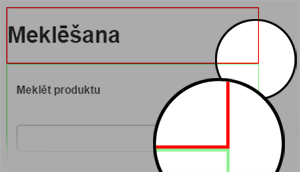
For me the 2 parts are side by side, no overlap.
Awaiting more information from you
Regards
Sorry but we don't really understand what do you wait from us... Take you information step by step:
=> You just do it, in your second message... with 2 Class, you can write like this:"For me this means that I can not style (apply CSS) to the entire module (Meklēšana)."
Code:
class1,
class2 {
css_command: parameter;
}
We didn't see overlap, see by yourself:
For me the 2 parts are side by side, no overlap.
Awaiting more information from you
Regards
Last edit: 9 years 9 months ago by Philip.
Please Log in or Create an account to join the conversation.
- svjatoslavs.krasnikovs
-
Topic Author
- Offline
Less
More
- Posts: 14
- Thank you received: 0
9 years 8 months ago #262004
by svjatoslavs.krasnikovs
Replied by svjatoslavs.krasnikovs on topic Filter position within a module
Emm, you see, "Meklēt produktu" should be in the same border region with "Meklēšana", as "Meklēt produktu" is a text filter displayed in the module "Meklēšana". Instead it's within the border with "Kontaktinformacija" which is a different module.
Please Log in or Create an account to join the conversation.
9 years 8 months ago #262027
by nicolas
Replied by nicolas on topic Filter position within a module
Hi,
Ok, I see what you mean but the problem is just a CSS problem between the two modules. It's not particularily linked to the filter module of HikaShop.
If you add a height to the filter module and a clear:both on the second module, it will display fine:
monosnap.com/file/HjT5ORPJnuFU1uB1BEFWuv36rZi7I9
Ok, I see what you mean but the problem is just a CSS problem between the two modules. It's not particularily linked to the filter module of HikaShop.
If you add a height to the filter module and a clear:both on the second module, it will display fine:
monosnap.com/file/HjT5ORPJnuFU1uB1BEFWuv36rZi7I9
Please Log in or Create an account to join the conversation.
Time to create page: 0.089 seconds