
- Posts: 98
- Thank you received: 7
Layout of the filter fields are broken
- Markus Schnier
-
 Topic Author
- Offline
Less
More
9 years 8 months ago #265131
by Markus Schnier
Layout of the filter fields are broken was created by Markus Schnier
Hi,
the size of the filter fields are not fits for my layout. The size of the multi value fields I was able to change via updating the chosen.css. For the Single Value fields that doesn't work.
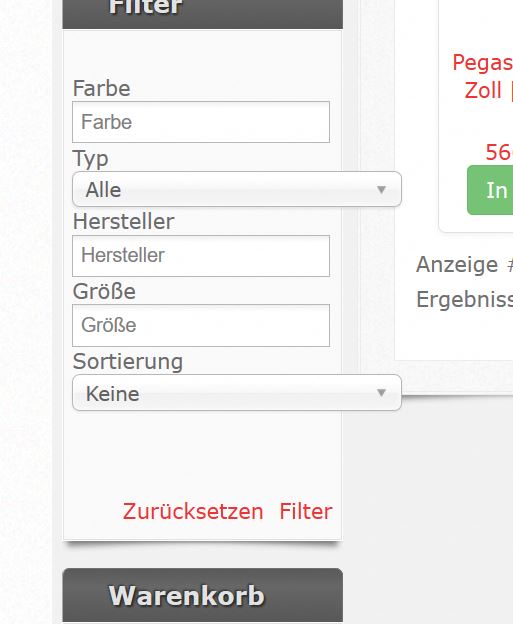
Thanks
Markus
the size of the filter fields are not fits for my layout. The size of the multi value fields I was able to change via updating the chosen.css. For the Single Value fields that doesn't work.
Thanks
Markus
Please Log in or Create an account to join the conversation.

9 years 8 months ago #265138
by nicolas
Replied by nicolas on topic Layout of the filter fields are broken
Hi,
Unfortunately, we can't do anything about that. Chosen is a dropdown styling library included in Joomla. HikaShop is just using it when you activate it.
It's because:
- Your template doesn't have enough width available on the position where you put your filter module
- The width of dropdowns created with chosen is fixed in the chosen CSS
- You've turned on the "use chosen library" of the HikaShop configuration, or your template adds chosen to the page
Either turn off that setting, or fix the CSS of chosen, or increase the width available in that position of your template.
Unfortunately, we can't do anything about that. Chosen is a dropdown styling library included in Joomla. HikaShop is just using it when you activate it.
It's because:
- Your template doesn't have enough width available on the position where you put your filter module
- The width of dropdowns created with chosen is fixed in the chosen CSS
- You've turned on the "use chosen library" of the HikaShop configuration, or your template adds chosen to the page
Either turn off that setting, or fix the CSS of chosen, or increase the width available in that position of your template.
Please Log in or Create an account to join the conversation.
- Markus Schnier
-
Topic Author
- Offline
Less
More
- Posts: 98
- Thank you received: 7
9 years 8 months ago #265314
by Markus Schnier
Replied by Markus Schnier on topic Layout of the filter fields are broken
Hi Nicolas,
thanks for your help. To solve the problem for the multi-values fields I edited the chosen.css as you recommend it. But for the Single-value fields it looks like the absolute “width: 220px” is set by the HikaShop? It would be great if you can check this. I don't want to miss the comfortability of the chosen and widen the template is also difficult to avoid handlings issues on iphone etc. Do you see any chance to override the parameter?
best regards
Markus

thanks for your help. To solve the problem for the multi-values fields I edited the chosen.css as you recommend it. But for the Single-value fields it looks like the absolute “width: 220px” is set by the HikaShop? It would be great if you can check this. I don't want to miss the comfortability of the chosen and widen the template is also difficult to avoid handlings issues on iphone etc. Do you see any chance to override the parameter?
best regards
Markus
Please Log in or Create an account to join the conversation.
9 years 8 months ago #265335
by nicolas
Replied by nicolas on topic Layout of the filter fields are broken
Hi,
This whole div is generated automatically by chosen. HikaShop only adds the select above it and it's chosen which hides the select and instead adds the DIV along with the width and everything else.
Looking a bit only, if you set a width on the select itself, chosen might use it:
davidwalsh.name/jquery-chosen
So try adding the CSS on the select and not the div.
This whole div is generated automatically by chosen. HikaShop only adds the select above it and it's chosen which hides the select and instead adds the DIV along with the width and everything else.
Looking a bit only, if you set a width on the select itself, chosen might use it:
davidwalsh.name/jquery-chosen
So try adding the CSS on the select and not the div.
The following user(s) said Thank You: Markus Schnier
Please Log in or Create an account to join the conversation.
- Markus Schnier
-
Topic Author
- Offline
Less
More
- Posts: 98
- Thank you received: 7
9 years 7 months ago #265663
by Markus Schnier
Replied by Markus Schnier on topic Layout of the filter fields are broken
Hi Nicolas,
thanks very much. That was the perfect hint. I changed the width of the select attribute in the chosen.css and now it looks perfect
Thanks for the great support
best regards
Markus
thanks very much. That was the perfect hint. I changed the width of the select attribute in the chosen.css and now it looks perfect
Thanks for the great support
best regards
Markus
Please Log in or Create an account to join the conversation.
Time to create page: 0.054 seconds