
- Posts: 55
- Thank you received: 0
Number 0 in the search field
- gioferrario@gmail.com
-
 Topic Author
- Offline
Less
More
9 years 3 months ago #275147
by gioferrario@gmail.com
Number 0 in the search field was created by gioferrario@gmail.com
-- HikaShop version -- : 3.1.1
-- Joomla version -- : 3.7.4
-- PHP version -- : 7.
-- Browser(s) name and version -- : crome
Hello
I have a problem with the search field for a filter, i load the images rated with the number 0 but when i put in the search number field 0 I will see all the images containing one 0. if i insert 104 works and only finds 104 but if i I put 0 i find all 0 but also 10, 104, 1000 etc.
It seems that number 0 does not recognize it as a numeric value
Regards
-- Joomla version -- : 3.7.4
-- PHP version -- : 7.
-- Browser(s) name and version -- : crome
Hello
I have a problem with the search field for a filter, i load the images rated with the number 0 but when i put in the search number field 0 I will see all the images containing one 0. if i insert 104 works and only finds 104 but if i I put 0 i find all 0 but also 10, 104, 1000 etc.
It seems that number 0 does not recognize it as a numeric value
Regards
Please Log in or Create an account to join the conversation.

9 years 3 months ago #275154
by nicolas
Replied by nicolas on topic Number 0 in the search field
Hi,
There is no issue with 0.
That's the number behavior.
The system returns all the products with what you enter in the field in their name regardless of whether there is something else.
So it's not only with 0. If you enter "10", you'll also get 10, 104, 1000, etc. And if you enter 104, you'll also get 1040, 1045, 2104, etc.
Now in the settings of your filter, you have the setting "Search processing" where you can configure how the search should be have.
If you set "exact", then if you enter 0 in the search field, the system will only return the product with the product name being exactly "0".
There is no issue with 0.
That's the number behavior.
The system returns all the products with what you enter in the field in their name regardless of whether there is something else.
So it's not only with 0. If you enter "10", you'll also get 10, 104, 1000, etc. And if you enter 104, you'll also get 1040, 1045, 2104, etc.
Now in the settings of your filter, you have the setting "Search processing" where you can configure how the search should be have.
If you set "exact", then if you enter 0 in the search field, the system will only return the product with the product name being exactly "0".
Please Log in or Create an account to join the conversation.
- gioferrario@gmail.com
-
Topic Author
- Offline
Less
More
- Posts: 55
- Thank you received: 0
9 years 3 months ago #275252
by gioferrario@gmail.com
Replied by gioferrario@gmail.com on topic Number 0 in the search field
Hello
The problem is exactly what is already set to exact, I have tried other parameters but the result does not change
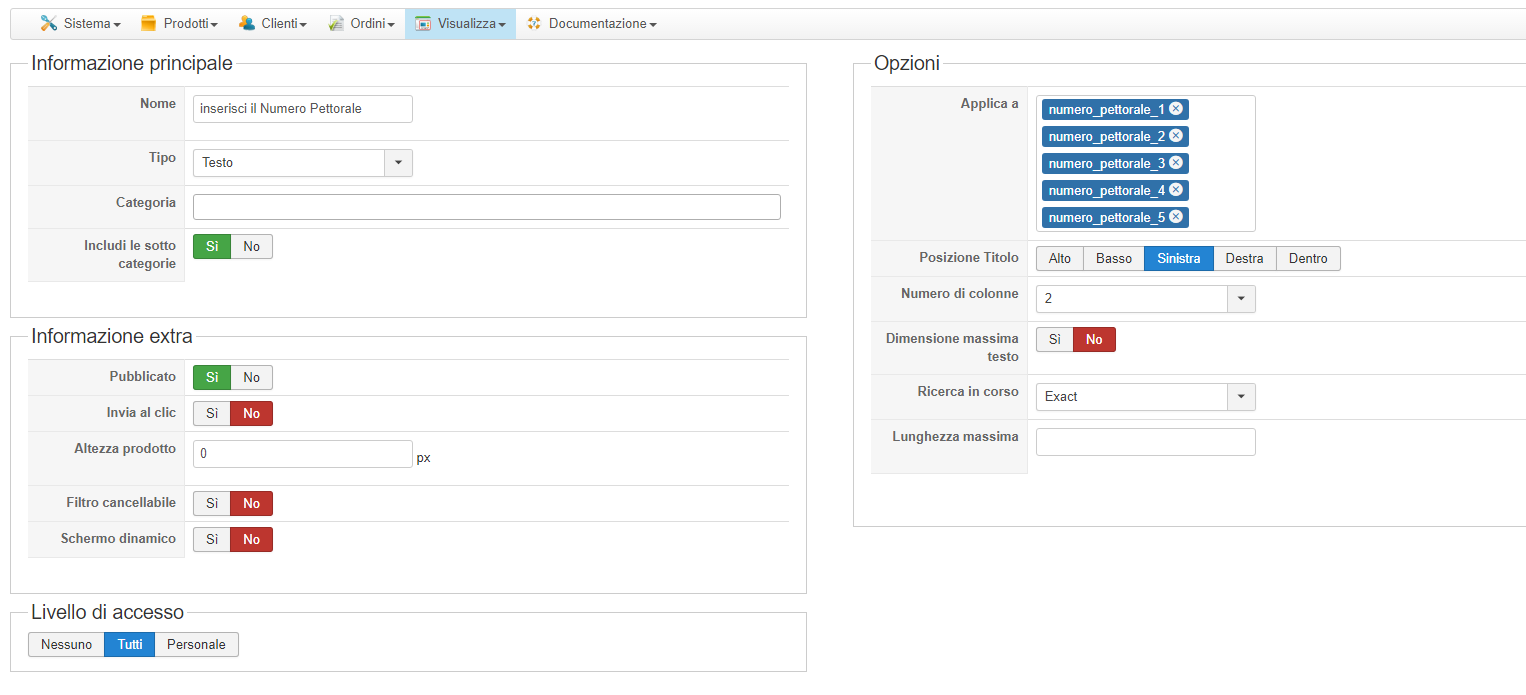
The problem is exactly what is already set to exact, I have tried other parameters but the result does not change
Please Log in or Create an account to join the conversation.
9 years 3 months ago #275292
by nicolas
Replied by nicolas on topic Number 0 in the search field
Hi,
Thanks for the screenshot and the additional details.
Change the code:
if(!empty($terms)){
to:
if(!empty($terms) || strlen($terms)){
in the file administrator/components/com_hikashop/classes/filter.php and that should fix the problem with 0 in exact mode.
Thanks for the screenshot and the additional details.
Change the code:
if(!empty($terms)){
to:
if(!empty($terms) || strlen($terms)){
in the file administrator/components/com_hikashop/classes/filter.php and that should fix the problem with 0 in exact mode.
Please Log in or Create an account to join the conversation.
- gioferrario@gmail.com
-
Topic Author
- Offline
Less
More
- Posts: 55
- Thank you received: 0
9 years 3 months ago #275329
by gioferrario@gmail.com
Replied by gioferrario@gmail.com on topic Number 0 in the search field
Hello
I made a paste copy of the string you sent me but nothing changed
I made a paste copy of the string you sent me but nothing changed
Please Log in or Create an account to join the conversation.
9 years 3 months ago - 9 years 3 months ago #275634
by nicolas
Replied by nicolas on topic Number 0 in the search field
Hi,
Also change the code:
to:
in that same file. I've tested it myself and it now works fine on my local test website.
Also change the code:
Code:
if(!empty($infoGet)&& !is_array($infoGet)){
$infoGet = array($infoGet);
}
if(isset($infoGet[0])){
$infoGet[0] = trim($infoGet[0]);
}
if(!isset($infoGet) || empty($infoGet[0]))
Code:
if(!is_array($infoGet)){
$infoGet = array($infoGet);
}
if(isset($infoGet[0])){
$infoGet[0] = trim($infoGet[0]);
}
if(!isset($infoGet) || (empty($infoGet[0]) && !strlen($infoGet[0])))
Last edit: 9 years 3 months ago by Jerome. Reason: code clean
Please Log in or Create an account to join the conversation.
- gioferrario@gmail.com
-
Topic Author
- Offline
Less
More
- Posts: 55
- Thank you received: 0
9 years 3 months ago #275755
by gioferrario@gmail.com
Replied by gioferrario@gmail.com on topic Number 0 in the search field
Thanks a lot, problem solved
Please Log in or Create an account to join the conversation.

9 years 2 months ago #277558
by fengel
Replied by fengel on topic Number 0 in the search field
Hi Nicolas,
Just wanted to quickly tell you that the code you posted above does not check for empty arrays. It produced unexpected results, such as filling in "Array" in the search input field upon refresh.
I changed:
to:
Just wanted to quickly tell you that the code you posted above does not check for empty arrays. It produced unexpected results, such as filling in "Array" in the search input field upon refresh.
I changed:
Code:
if(!isset($infoGet) || (empty($infoGet[0]) && !strlen($infoGet[0])))
to:
Code:
if(!isset($infoGet) || count($infoGet) == 0 || (empty($infoGet[0]) && !strlen($infoGet[0])))
The following user(s) said Thank You: nicolas
Please Log in or Create an account to join the conversation.
9 years 2 months ago #277560
by nicolas
Replied by nicolas on topic Number 0 in the search field
Hi,
Thank you for your feedback. We'll test and add the patch on our end.
Thank you for your feedback. We'll test and add the patch on our end.
Please Log in or Create an account to join the conversation.
- gioferrario@gmail.com
-
Topic Author
- Offline
Less
More
- Posts: 55
- Thank you received: 0
9 years 2 months ago #277607
by gioferrario@gmail.com
Replied by gioferrario@gmail.com on topic Number 0 in the search field
Thanks everything works well!
Please Log in or Create an account to join the conversation.
Time to create page: 0.091 seconds