

- Posts: 75
- Thank you received: 1
Category Filters not working
9 years 5 days ago #279100
by spotstv
Category Filters not working was created by spotstv
-- HikaShop version -- : 3.2.0
-- Joomla version -- : 3.8.0
-- PHP version -- : 7.0.23
-- Browser(s) name and version -- : Chrome 60.0.3112.113
-- Error-message(debug-mod must be tuned on) -- : None
Hi,
I am trying to make Filters work with categories, so, I can filter products based on the additional categories they are assigned to. However, the results are completely different to what I would expect. So, the first question is, am I thinking of Filters in wrong way? And if not can you help me make them work as I think they should?
Also do the filtered categories need to be below the current section in the category tree? Or can they be in a ‘side’ branch?
Below is an example of the problem I am seeing.
e.g. with the following categories
Categories:
- Products
--Plant
--- Mixers
--- Conveyers
--- Pumps
--- Transformers
--Power Type
--- 110v
--- 220v
--- Diesel
--- Petrol
and products:
Product 1: Categories (Mixers, 110v)
Product 2: Categories (Mixers, Diesel)
Product 3: Categories (Mixers, Petrol)
Product 4: Categories (Mixers, Petrol, Diesel)
Filter:
Power Type
Category: Products
Options Category: Power Type
Expected filter dropdown
Power Type
--- All
--- 110v
--- Diesel
--- Petrol
Actual filter dropdown
Power Type
--- All
--- Petrol
The results I am seeing is this Filter is only showing two options ‘All’ or ‘Petrol’ and selecting ‘Petrol’ gives zero results.
Regards
Tim
-- Joomla version -- : 3.8.0
-- PHP version -- : 7.0.23
-- Browser(s) name and version -- : Chrome 60.0.3112.113
-- Error-message(debug-mod must be tuned on) -- : None
Hi,
I am trying to make Filters work with categories, so, I can filter products based on the additional categories they are assigned to. However, the results are completely different to what I would expect. So, the first question is, am I thinking of Filters in wrong way? And if not can you help me make them work as I think they should?
Also do the filtered categories need to be below the current section in the category tree? Or can they be in a ‘side’ branch?
Below is an example of the problem I am seeing.
e.g. with the following categories
Categories:
- Products
--Plant
--- Mixers
--- Conveyers
--- Pumps
--- Transformers
--Power Type
--- 110v
--- 220v
--- Diesel
--- Petrol
and products:
Product 1: Categories (Mixers, 110v)
Product 2: Categories (Mixers, Diesel)
Product 3: Categories (Mixers, Petrol)
Product 4: Categories (Mixers, Petrol, Diesel)
Filter:
Power Type
Category: Products
Options Category: Power Type
Expected filter dropdown
Power Type
--- All
--- 110v
--- Diesel
--- Petrol
Actual filter dropdown
Power Type
--- All
--- Petrol
The results I am seeing is this Filter is only showing two options ‘All’ or ‘Petrol’ and selecting ‘Petrol’ gives zero results.
Regards
Tim
Please Log in or Create an account to join the conversation.

9 years 4 days ago - 9 years 4 days ago #279142
by Philip
Replied by Philip on topic Category Filters not working
Hello,
From what I see the result you get is strange... Can you screenshot your fully opened category tree and if possible provide an Url link with your filter please ?
From what we know I don't see where can be the root issue, awaiting news from you.
Regards
From what I see the result you get is strange... Can you screenshot your fully opened category tree and if possible provide an Url link with your filter please ?
From what we know I don't see where can be the root issue, awaiting news from you.
Regards
Last edit: 9 years 4 days ago by Philip.
Please Log in or Create an account to join the conversation.
9 years 4 days ago #279151
by spotstv
Replied by spotstv on topic Category Filters not working
Hi Phillip,
dev.ces-hire.com/shop/sales/mixers
In this section most of the Mixers are also in the '110v' Category and the first product is in both the '110v' and '220/240v' categories. Also in this section there are no products assigned to the 'Petrol' category.
Regards
Tim
dev.ces-hire.com/shop/sales/mixers
In this section most of the Mixers are also in the '110v' Category and the first product is in both the '110v' and '220/240v' categories. Also in this section there are no products assigned to the 'Petrol' category.
Regards
Tim
Please Log in or Create an account to join the conversation.

9 years 4 days ago #279162
by nicolas
Replied by nicolas on topic Category Filters not working
Hi,
The "dynamic display" setting of the filter makes it so that it will only display the categories of the products in the current listing. Turn off that option of your filter. So in your case, you might want to turn it off.
Also, for category filters, you're supposed to select ideally the same category in both category settings so that the filter display in the category you want with its sub categories as values of the filter.
So you'll have to create several filters if you want to have a category selection filter on different categories.
The "dynamic display" setting of the filter makes it so that it will only display the categories of the products in the current listing. Turn off that option of your filter. So in your case, you might want to turn it off.
Also, for category filters, you're supposed to select ideally the same category in both category settings so that the filter display in the category you want with its sub categories as values of the filter.
So you'll have to create several filters if you want to have a category selection filter on different categories.
Please Log in or Create an account to join the conversation.
7 years 7 months ago - 7 years 7 months ago #303794
by huwhuw
 Hi I don't understand how filters work
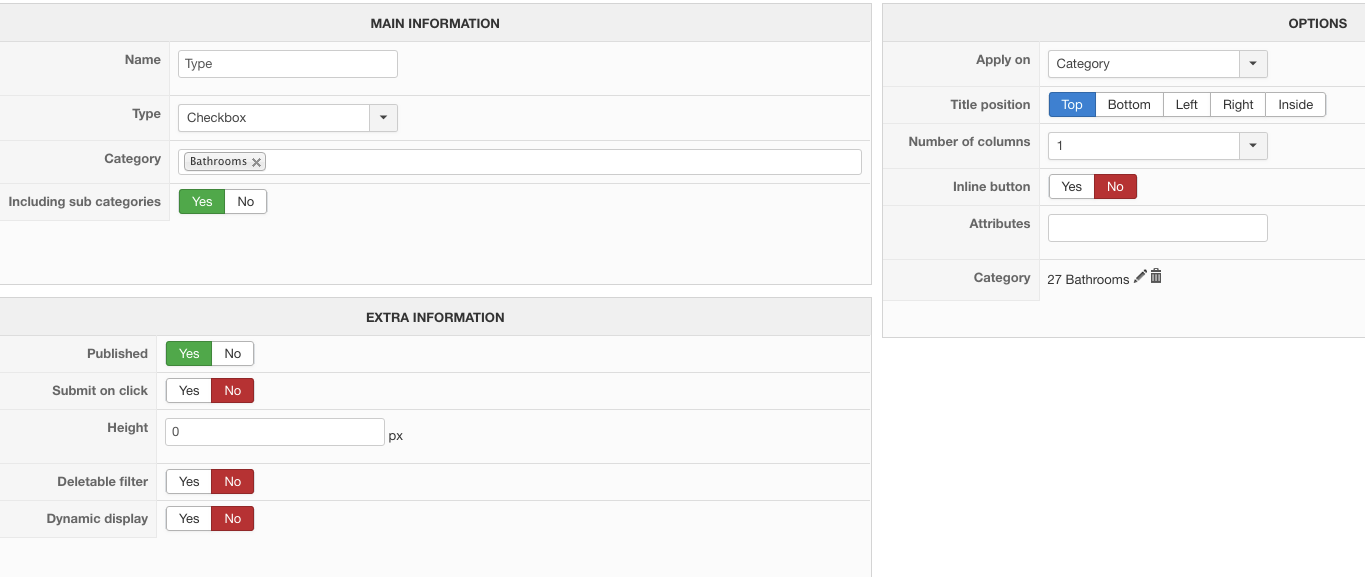
Joomla 3.9.4 and hikashop v4.02 business
I have setup a menu item called "all products" id = 452
I have setup a filter module with menu id = 452
I have setup a category filter on
MAIN INFORMATION > Category: Baths
OPTIONS > Apply on: Category
Category: Baths
The filter loads in a sidebar module
When i select an option from my filter it brings up "product category" then a bunch of random products (that are not in my bath category)
How is this supposed to work please?
Replied by huwhuw on topic Category Filters not working
Joomla 3.9.4 and hikashop v4.02 business
I have setup a menu item called "all products" id = 452
I have setup a filter module with menu id = 452
I have setup a category filter on
MAIN INFORMATION > Category: Baths
OPTIONS > Apply on: Category
Category: Baths
The filter loads in a sidebar module
When i select an option from my filter it brings up "product category" then a bunch of random products (that are not in my bath category)
How is this supposed to work please?
Last edit: 7 years 7 months ago by huwhuw.
Please Log in or Create an account to join the conversation.
7 years 7 months ago #303795
by nicolas
Replied by nicolas on topic Category Filters not working
Hi,
The filter will apply on the products displayed by the menu item, so first you need to make sure that the menu item used displays all the products by default.
In the filter module settings, you have the "menu" setting where you can enter the id of the menu item used.
So please check that setting and the options of the menu item corresponding to the id specified in that setting.
Also, could you provide a link to the page so that we could look a the behavior in order to better understand the situation ?
The filter will apply on the products displayed by the menu item, so first you need to make sure that the menu item used displays all the products by default.
In the filter module settings, you have the "menu" setting where you can enter the id of the menu item used.
So please check that setting and the options of the menu item corresponding to the id specified in that setting.
Also, could you provide a link to the page so that we could look a the behavior in order to better understand the situation ?
Please Log in or Create an account to join the conversation.

7 years 4 months ago #306956
by aminweb
Joomla Developer | am.ebrahimzadeh[at]gmail.com
Replied by aminweb on topic Category Filters not working
how set show category image in filter by category?
Joomla Developer | am.ebrahimzadeh[at]gmail.com
Please Log in or Create an account to join the conversation.
7 years 4 months ago - 7 years 4 months ago #306974
by Philip
Replied by Philip on topic Category Filters not working
Hello,
We are sorry but you will need to detail your needs because so far we aren't sure to understand your question.
Can you details with by example, concrete examples, context description and maybe an Url link.
Awaiting news from you to move forward.
Regards
We are sorry but you will need to detail your needs because so far we aren't sure to understand your question.
Can you details with by example, concrete examples, context description and maybe an Url link.
Awaiting news from you to move forward.
Regards
Last edit: 7 years 4 months ago by Philip.
Please Log in or Create an account to join the conversation.
7 years 4 months ago #307027
by aminweb
Joomla Developer | am.ebrahimzadeh[at]gmail.com
Replied by aminweb on topic Category Filters not working
hi,
I create a filter :
Type:list
apply on : Category
now I want show in filter module in frontend. display each category image in fiter.
please help me
so thanks
I create a filter :
Type:list
apply on : Category
now I want show in filter module in frontend. display each category image in fiter.
please help me
so thanks
Joomla Developer | am.ebrahimzadeh[at]gmail.com
Please Log in or Create an account to join the conversation.
7 years 4 months ago #307030
by nicolas
Replied by nicolas on topic Category Filters not working
Hi,
There is no option to do that.
You would have to modify the code :
in the file administrator/components/com_hikashop/classes/filter.php for that.
There is no option to do that.
You would have to modify the code :
Code:
if($filter->filter_data=='category'){
$categories_name=parent::getCategories($filter, $datas);
if(!empty($categories_name)){
foreach($categories_name as $cat){
if(!empty($selected) && (is_numeric($selected)&&$cat->category_id==$selected) ||(is_array($selected) && in_array($cat->category_id, $selected))){
$html.='<li><a class="hikashop_filter_list_selected" style="font-weight:bold">'.$cat->category_name.'</a>';
$html.='<a style="cursor:pointer; text-decoration:none" onclick="document.getElementById(\'filter_'.$filter->filter_namekey.'_'.$divName.'\').value=\'\'; document.forms[\'hikashop_filter_form_'.$divName.'\'].submit();" title="'.JText::_('REMOVE_THIS_SELECTION').'"> <i class="fa fa-times-circle"></i></a></li>';
}else{
$html.='<li><a class="hikashop_filter_list" onclick="document.getElementById(\'filter_'.$filter->filter_namekey.'_'.$divName.'\').value=\''.$cat->category_id.'\'; document.forms[\'hikashop_filter_form_'.$divName.'\'].submit();">'.$cat->category_name.'</a></li>';
}
}
}
}
Please Log in or Create an account to join the conversation.
7 years 4 months ago #307110
by aminweb
Joomla Developer | am.ebrahimzadeh[at]gmail.com
Replied by aminweb on topic Category Filters not working
so thanks.but please help me how do it? pleeeease
Joomla Developer | am.ebrahimzadeh[at]gmail.com
Please Log in or Create an account to join the conversation.
7 years 4 months ago #307114
by nicolas
Replied by nicolas on topic Category Filters not working
Hi,
Well, that would require some development.
It requires a MySQL query to load the images from hikashop_file using $cat->category_id and then you need to use helper.image to generate the thumbnail from that data using the getThumbnail function like it's done in the view category/listing_img_title.php
It requires you know PHP to be able to do that.
If you want us to work on that customization for you, you can use our contact form to request a quote :
www.hikashop.com/support/contact-us.html
Make sure you add a link to this thread in your message.
Well, that would require some development.
It requires a MySQL query to load the images from hikashop_file using $cat->category_id and then you need to use helper.image to generate the thumbnail from that data using the getThumbnail function like it's done in the view category/listing_img_title.php
It requires you know PHP to be able to do that.
If you want us to work on that customization for you, you can use our contact form to request a quote :
www.hikashop.com/support/contact-us.html
Make sure you add a link to this thread in your message.
Please Log in or Create an account to join the conversation.
Time to create page: 0.269 seconds