

- Posts: 13
- Thank you received: 0
Button "Compare product" doesn't show "Do not compare product" when click it
9 years 1 month ago - 9 years 1 month ago #280441
by anna3xara
 -- HikaShop version -- : 3.2.0 business
-- Joomla version -- : 3.8.1
-- PHP version -- : 7.0.24
-- Browser(s) name and version -- : chrome 61.0.3163.100
Hello,
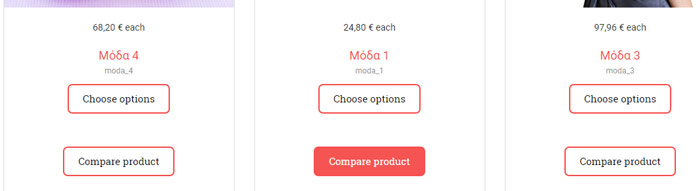
When you click a product on product list to compare, not change the button to "Do not compare product" to remove it from compare list.
It stays all the time with "Compare product", as you can see in the image
I use the default listing_img_title.php.
Can you help me plz?
Thank you
Button "Compare product" doesn't show "Do not compare product" when click it was created by anna3xara
-- Joomla version -- : 3.8.1
-- PHP version -- : 7.0.24
-- Browser(s) name and version -- : chrome 61.0.3163.100
Hello,
When you click a product on product list to compare, not change the button to "Do not compare product" to remove it from compare list.
It stays all the time with "Compare product", as you can see in the image
I use the default listing_img_title.php.
Can you help me plz?
Thank you
Last edit: 9 years 1 month ago by anna3xara.
Please Log in or Create an account to join the conversation.

9 years 1 month ago #280493
by Jerome
Jerome - Obsidev.com
HikaMarket & HikaSerial developer / HikaShop core dev team.
Replied by Jerome on topic Button "Compare product" doesn't show "Do not compare product" when click it
Hello,
I'm afraid that I don't understand what you're talking about.
In your screenshot we can see that one button has been selected ; the display is similar to a checkbox but instead of having a checkbox, the button is highlight to indicate the selection. So I don't see any problem or issue with that.
Please clarify.
Regards,
I'm afraid that I don't understand what you're talking about.
In your screenshot we can see that one button has been selected ; the display is similar to a checkbox but instead of having a checkbox, the button is highlight to indicate the selection. So I don't see any problem or issue with that.
Please clarify.
Regards,
Jerome - Obsidev.com
HikaMarket & HikaSerial developer / HikaShop core dev team.
Please Log in or Create an account to join the conversation.
9 years 1 month ago #280506
by anna3xara
Replied by anna3xara on topic Button "Compare product" doesn't show "Do not compare product" when click it
Hi Jerome,
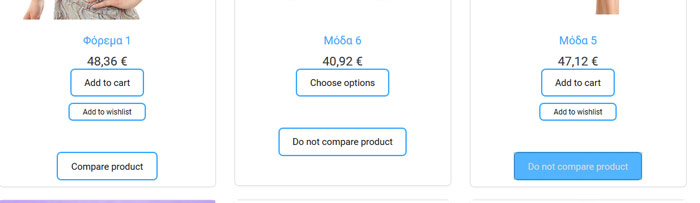
The button that is highlight is only the LAST button has been selected, i have been selected another one product but you cant see it, because
didn't change the COMPARE with DO NOT COMPARE PRODUCT like as it should.
Look the image 2, the buttons works well and you can see how many buttons have beeen selected.
The button that is highlight is only the LAST button has been selected, i have been selected another one product but you cant see it, because
didn't change the COMPARE with DO NOT COMPARE PRODUCT like as it should.
Look the image 2, the buttons works well and you can see how many buttons have beeen selected.
Please Log in or Create an account to join the conversation.

Less
More
- Posts: 12953
- Thank you received: 1778
9 years 1 month ago #280513
by Mohamed Thelji
Replied by Mohamed Thelji on topic Button "Compare product" doesn't show "Do not compare product" when click it
Hello,
Your issue is probably coming from your template which is overriding the CSS class "hika-compare", the solution will directly be to edit your template CSS code :
www.hikashop.com/support/documentation/1...-display.html#layout
Your issue is probably coming from your template which is overriding the CSS class "hika-compare", the solution will directly be to edit your template CSS code :
www.hikashop.com/support/documentation/1...-display.html#layout
Please Log in or Create an account to join the conversation.
Time to create page: 0.051 seconds