
- Posts: 41
- Thank you received: 1
Filters at each product page
- motocasionweb
-
 Topic Author
- Offline
Less
More
7 years 9 months ago #303297
by motocasionweb
Filters at each product page was created by motocasionweb
-- HikaShop version -- : 4.0.1
-- Joomla version -- : 3.4.8
-- PHP version -- : 5.3.29
Hi! I already have filters at my product list page and now I want them also at each product page. It's that possible?
Thank you.
Best regards.
Carol.
-- Joomla version -- : 3.4.8
-- PHP version -- : 5.3.29
Hi! I already have filters at my product list page and now I want them also at each product page. It's that possible?
Thank you.
Best regards.
Carol.
Please Log in or Create an account to join the conversation.

7 years 9 months ago #303302
by nicolas
Replied by nicolas on topic Filters at each product page
Hi,
If you configure the HikaShop filter module to display the filters via the Joomla modules manager, you can have them on any page of your website.
If you configure the HikaShop filter module to display the filters via the Joomla modules manager, you can have them on any page of your website.
Please Log in or Create an account to join the conversation.
- motocasionweb
-
Topic Author
- Offline
Less
More
- Posts: 41
- Thank you received: 1
7 years 9 months ago #303361
by motocasionweb
Replied by motocasionweb on topic Filters at each product page
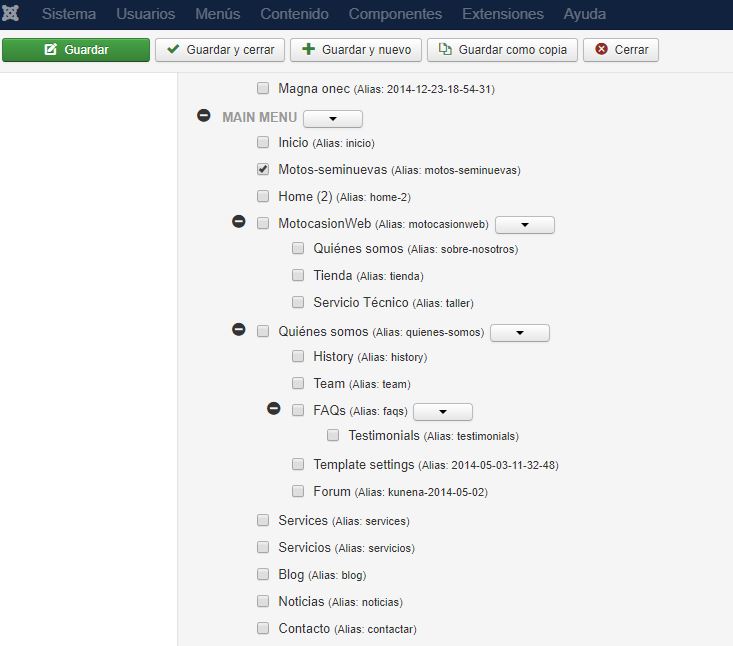
Hi! I only have the option to select the page of the products list at Joomla. Obviously the product pages are not shown.
I attach a capture of the menu assignment were you can see the prodcut list page "Motos seminuevas" selected.
Thanks,
best regards,
I attach a capture of the menu assignment were you can see the prodcut list page "Motos seminuevas" selected.
Thanks,
best regards,
Please Log in or Create an account to join the conversation.
7 years 9 months ago #303364
by nicolas
Replied by nicolas on topic Filters at each product page
Hi,
In the menu assignment tab, you can only select menu items, indeed.
However, in the main parameters of the module, you have display settings to select whether or not to display the module on the product pages of the menu items on which the module is assigned, and similar display options for other types of HikaShop pages (checkout, listings, etc).
In the menu assignment tab, you can only select menu items, indeed.
However, in the main parameters of the module, you have display settings to select whether or not to display the module on the product pages of the menu items on which the module is assigned, and similar display options for other types of HikaShop pages (checkout, listings, etc).
Please Log in or Create an account to join the conversation.
- motocasionweb
-
Topic Author
- Offline
Less
More
- Posts: 41
- Thank you received: 1
7 years 9 months ago #303449
by motocasionweb
Replied by motocasionweb on topic Filters at each product page
Hi! it's right. I have this option selected but doesn't work. Do you know why this happen?
I attach the capture of the selected option.
This is an example of a product page of my web:
Thanks.
Best regards.
Carol.
I attach the capture of the selected option.
This is an example of a product page of my web:
This message contains confidential information
Thanks.
Best regards.
Carol.
Please Log in or Create an account to join the conversation.
7 years 9 months ago #303451
by nicolas
Replied by nicolas on topic Filters at each product page
Hi,
Make sure that the module is assigned to the menu "motos-seminuevas" and to a valid position of your template and that its access is public.
Make also sure that the two filter that you selected in it are published in the Display>Filters menu.
Besides these I don't see anything else which could make the filter module not display on that page.
Make sure that the module is assigned to the menu "motos-seminuevas" and to a valid position of your template and that its access is public.
Make also sure that the two filter that you selected in it are published in the Display>Filters menu.
Besides these I don't see anything else which could make the filter module not display on that page.
Please Log in or Create an account to join the conversation.
Time to create page: 0.090 seconds