

- Posts: 152
- Thank you received: 11
Filter Single Dropdown -> Values ?
5 years 2 months ago #335642
by gerryna09
Filter Single Dropdown -> Values ? was created by gerryna09
-- url of the page with the problem -- : demo.hikashop.com
-- HikaShop version -- : 4.4.3
-- Joomla version -- : 3.10
-- PHP version -- : 7.4.14
-- Browser(s) name and version -- : Chrome
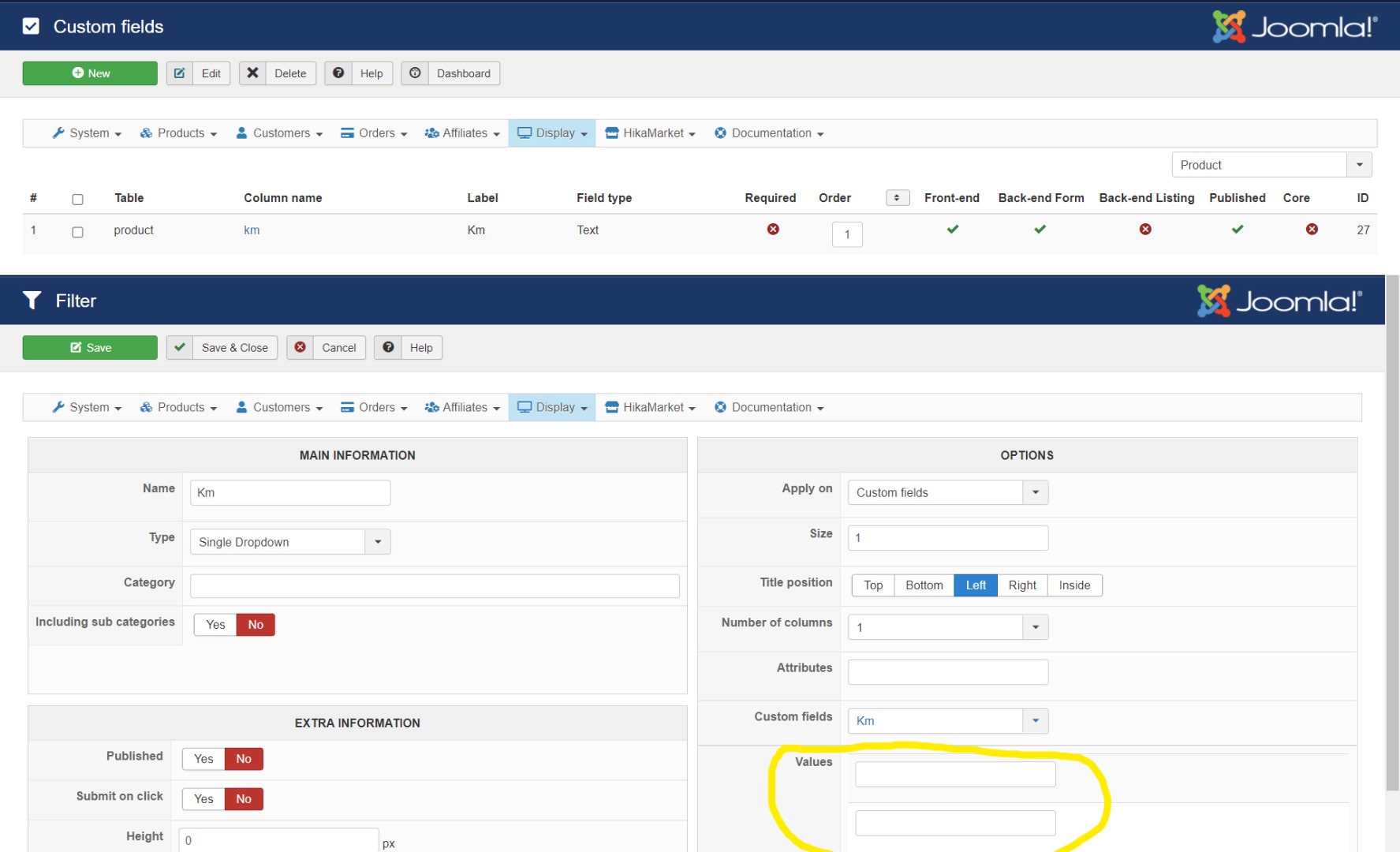
Custom Fields
Table->product Label->Km Field type->Text
Filter
Name->Km Type->Single Dropdown Apply on->Custom Fields->Km
Is there a way to automatically have the values present in the Custom Fiels Km ??
-- HikaShop version -- : 4.4.3
-- Joomla version -- : 3.10
-- PHP version -- : 7.4.14
-- Browser(s) name and version -- : Chrome
Custom Fields
Table->product Label->Km Field type->Text
Filter
Name->Km Type->Single Dropdown Apply on->Custom Fields->Km
Is there a way to automatically have the values present in the Custom Fiels Km ??
Please Log in or Create an account to join the conversation.
5 years 2 months ago - 5 years 2 months ago #335648
by Philip
Replied by Philip on topic Filter Single Dropdown -> Values ?
Hello,
Your question is relevant, so much so that we have planned to add a feature on this subject.
Quite soon, in a future release, it will be possible to populate your custom field value with a Query request.
This will allow to get dynamically value from Database to your custom field.
We think to release it before the end of September.
Regards
Your question is relevant, so much so that we have planned to add a feature on this subject.
Quite soon, in a future release, it will be possible to populate your custom field value with a Query request.
This will allow to get dynamically value from Database to your custom field.
We think to release it before the end of September.
Regards
Last edit: 5 years 2 months ago by Philip.
Please Log in or Create an account to join the conversation.
5 years 2 months ago #335671
by gerryna09
Replied by gerryna09 on topic Filter Single Dropdown -> Values ?
I am happy with this answer 
Please Log in or Create an account to join the conversation.

5 years 2 months ago #335680
by nicolas
Replied by nicolas on topic Filter Single Dropdown -> Values ?
Hi,
Philippe made a mistake here.
We did work on a feature to allow custom fields's values to be filled automatically with a MySQL query.
However, this won't help for your case since you're talking about filter getting the values of the fields, not filling the field values.
Actually, filters already automatically use the values of custom fields, but only it you have values entered in the custom field, and that's only possible with custom fields of the type "radio", "checkbox", "single dropdown" and "multiple dropdown".
So in your case, the solution would be the change the type of your custom field to "single dropdown" and enter in the "values" area of your custom field all the possible distances you want for your products so that you can then select among them when you edit the products in your backend. Then, if you leave the "values" of your filter empty, it will automatically use the values of your custom field.
Philippe made a mistake here.
We did work on a feature to allow custom fields's values to be filled automatically with a MySQL query.
However, this won't help for your case since you're talking about filter getting the values of the fields, not filling the field values.
Actually, filters already automatically use the values of custom fields, but only it you have values entered in the custom field, and that's only possible with custom fields of the type "radio", "checkbox", "single dropdown" and "multiple dropdown".
So in your case, the solution would be the change the type of your custom field to "single dropdown" and enter in the "values" area of your custom field all the possible distances you want for your products so that you can then select among them when you edit the products in your backend. Then, if you leave the "values" of your filter empty, it will automatically use the values of your custom field.
Please Log in or Create an account to join the conversation.
5 years 2 months ago #335686
by gerryna09
Replied by gerryna09 on topic Filter Single Dropdown -> Values ?
Hi Nicolas, it is clear to me that I have to use custom fields of the type "radio", "checkbox", "single dropdown" and "multiple dropdown".
But unfortunately I have a field in which I will have to enter the YEAR
But unfortunately I have a field in which I will have to enter the YEAR
Please Log in or Create an account to join the conversation.
5 years 2 months ago #335688
by nicolas
Replied by nicolas on topic Filter Single Dropdown -> Values ?
Hi,
Why is that a problem ? You could have a "single dropdown" custom field. Just enter the years that you need as values of the custom field. It should even let you type the year in the field to search for the value to select.
Why is that a problem ? You could have a "single dropdown" custom field. Just enter the years that you need as values of the custom field. It should even let you type the year in the field to search for the value to select.
Please Log in or Create an account to join the conversation.
5 years 2 months ago #335711
by gerryna09
Replied by gerryna09 on topic Filter Single Dropdown -> Values ?
The site needs to be updated by a publisher who will not have access to custom fields ;-(
Please Log in or Create an account to join the conversation.
5 years 2 months ago #335720
by nicolas
Replied by nicolas on topic Filter Single Dropdown -> Values ?
Hi,
But still, why can't you add all the reasonably possible years ?
For example, if you're selling cars or car parts, the possible years will be anything between 1950 and 2030. That's 80 values you can add in the custom field. If you're selling wine, it should be between 1900 and 2030 I guess, etc.
Or are your selling that you'll be selling anything older than that ? Why couldn't you enter all the values ?
But still, why can't you add all the reasonably possible years ?
For example, if you're selling cars or car parts, the possible years will be anything between 1950 and 2030. That's 80 values you can add in the custom field. If you're selling wine, it should be between 1900 and 2030 I guess, etc.
Or are your selling that you'll be selling anything older than that ? Why couldn't you enter all the values ?
Please Log in or Create an account to join the conversation.
5 years 2 months ago - 5 years 2 months ago #335729
by gerryna09
Replied by gerryna09 on topic Filter Single Dropdown -> Values ?
The solution is clear.
But I am lazy. I should enter a lot of dates
Thanks
But I am lazy. I should enter a lot of dates
Thanks
Last edit: 5 years 2 months ago by gerryna09.
The following user(s) said Thank You: Philip
Please Log in or Create an account to join the conversation.
Time to create page: 0.074 seconds