

- Posts: 136
- Thank you received: 2
Coupon calculation with floating taxes
10 years 11 months ago - 10 years 11 months ago #221333
by earmaster
Coupon calculation with floating taxes was created by earmaster
-- url of the page with the problem -- : Closed dev server
-- HikaShop version -- : 2.6.0
-- Joomla version -- : 3.3.6
Hi,
We are using the floating tax feature with multiple VAT rates (we sell products with electronic delivery).
When applying a coupon with a flat amount, it seems that Hikashop is calculating the VAT for both the coupon and the price incl VAT.
In my screenshot, the VAT amount (20%) should have been 381.18€, but it's displayed as 380.18€. Hikashop takes off 1€ from the VAT amount regardless of the quantity/total amount of the order, which led me to conclude that the missing 1€ is a VAT calculated from the coupon amount. Could it be so? What I would expect is that the Including VAT amount displayed is calculated based on the Total.
I have attached a screenshot of the checkout, as well as our Taxes settings.
Can you reproduce that problem on your end, or is there something that can be configured differently?
-- HikaShop version -- : 2.6.0
-- Joomla version -- : 3.3.6
Hi,
We are using the floating tax feature with multiple VAT rates (we sell products with electronic delivery).
When applying a coupon with a flat amount, it seems that Hikashop is calculating the VAT for both the coupon and the price incl VAT.
In my screenshot, the VAT amount (20%) should have been 381.18€, but it's displayed as 380.18€. Hikashop takes off 1€ from the VAT amount regardless of the quantity/total amount of the order, which led me to conclude that the missing 1€ is a VAT calculated from the coupon amount. Could it be so? What I would expect is that the Including VAT amount displayed is calculated based on the Total.
I have attached a screenshot of the checkout, as well as our Taxes settings.
Can you reproduce that problem on your end, or is there something that can be configured differently?
Last edit: 10 years 11 months ago by earmaster. Reason: typos
Please Log in or Create an account to join the conversation.

10 years 11 months ago #221340
by nicolas
Replied by nicolas on topic Coupon calculation with floating taxes
Hi,
You have the "apply discount" setting that you can change in order to change the behavior of the coupon tax calculation but you also have the "product tax category" setting of the coupon itself.
So I would recommend to try the different combinations so that it works like you want.
You have the "apply discount" setting that you can change in order to change the behavior of the coupon tax calculation but you also have the "product tax category" setting of the coupon itself.
So I would recommend to try the different combinations so that it works like you want.
Please Log in or Create an account to join the conversation.
10 years 11 months ago - 10 years 11 months ago #221587
by earmaster
Replied by earmaster on topic Coupon calculation with floating taxes
Turning on the "Show detailed taxes" taxes seems to have solved it for flat discounts somehow.
However, I noticed that the "Apply discount before/after taxes" has no effect whatsoever on the VAT amount though. So right now the shown calculations are correct, but it seems that something is not working as exepcted with floating taxes and discounts.
If the coupon is set to percentage, I can't get it to calculate the correct anounts. Changing the "Tax" option for the coupon has no effect.
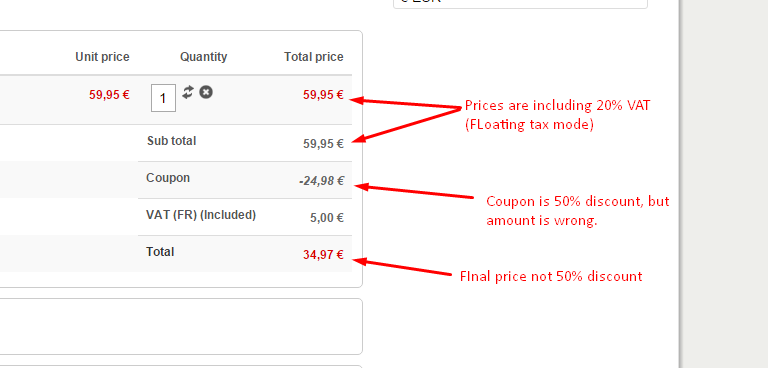
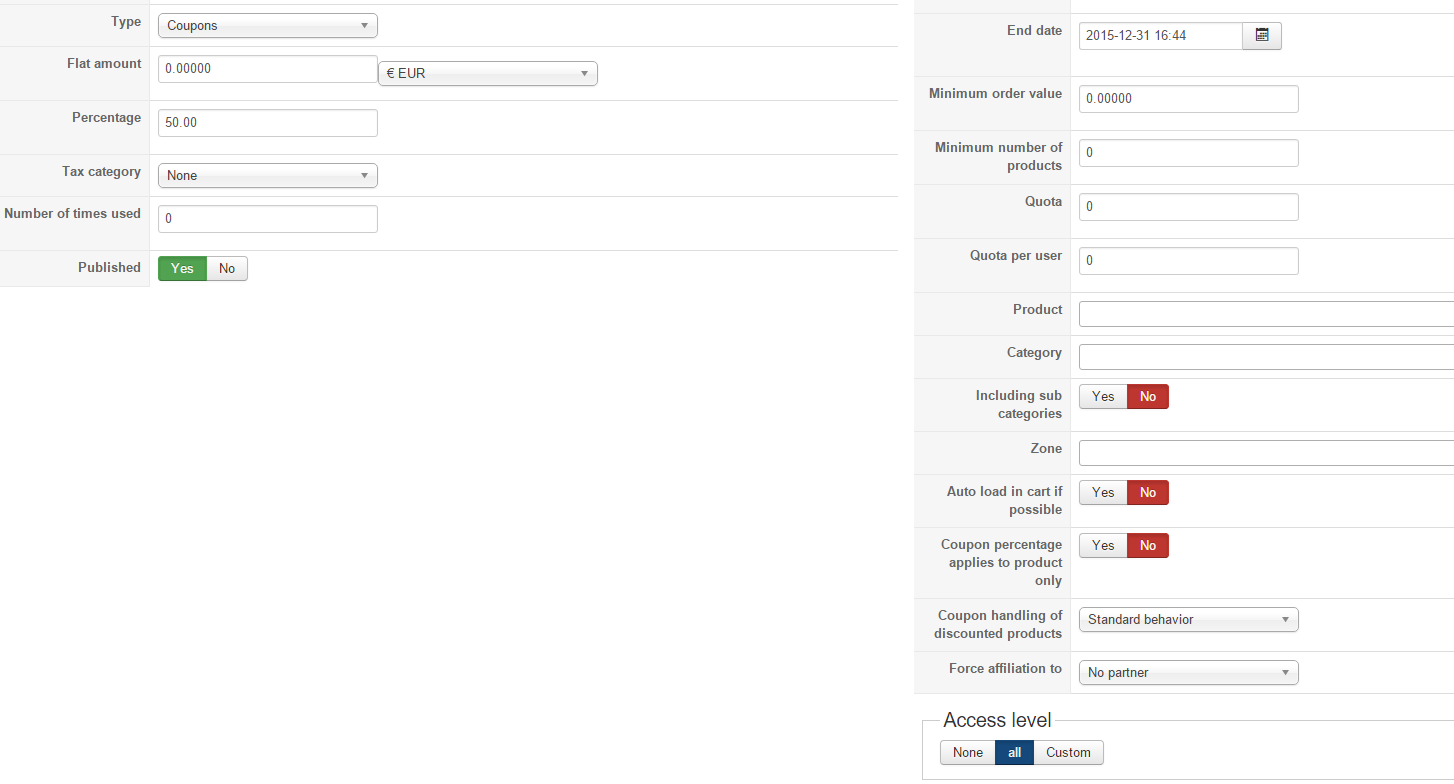
Is this something you (or other users) can reproduce? We get the same results both on our developer install and on the production site.
However, I noticed that the "Apply discount before/after taxes" has no effect whatsoever on the VAT amount though. So right now the shown calculations are correct, but it seems that something is not working as exepcted with floating taxes and discounts.
If the coupon is set to percentage, I can't get it to calculate the correct anounts. Changing the "Tax" option for the coupon has no effect.
Is this something you (or other users) can reproduce? We get the same results both on our developer install and on the production site.
Last edit: 10 years 11 months ago by earmaster.
Please Log in or Create an account to join the conversation.
10 years 8 months ago #229560
by earmaster
Replied by earmaster on topic Coupon calculation with floating taxes
Hi again,
We're still not able to make a coupon that does what it says, so the feature is pretty useless for us (and our customers) at the moment. We have tried all combinations of options possible, Hikashop always calculates a wrong discount. I am a bit afraid that coupons don't work correctly with floating taxes. Have you had the possibility to test this out at all?
We're still not able to make a coupon that does what it says, so the feature is pretty useless for us (and our customers) at the moment. We have tried all combinations of options possible, Hikashop always calculates a wrong discount. I am a bit afraid that coupons don't work correctly with floating taxes. Have you had the possibility to test this out at all?
Please Log in or Create an account to join the conversation.
9 years 7 months ago #264286
by earmaster
Replied by earmaster on topic Coupon calculation with floating taxes
We still cannot use coupon codes at all! - customers get angry when a 50% coupon only gives them 40% discount - they think we try to cheat.
It is really frustrating that after 15 months you have still not solved this problem. We just upgraded to Hikashop 3.0.1 with the hope that you had solved the problem - unfortunately not.
Example: a €8 product with 25% tax is €10. When I apply a 50% discount (after tax) the final price becomes €6, which is NOT 50% off €10. (looks like it calculated the discount before tax even when I specify it to be after tax).
The central point in this problem is that the advertised price is €10, which is the one the customer cares about. With a 50% coupon in hand, he expect the final price to be €5, but instead it become €6 and he thinks we are cheating.
Please take this problem serious and solve it!
It is really frustrating that after 15 months you have still not solved this problem. We just upgraded to Hikashop 3.0.1 with the hope that you had solved the problem - unfortunately not.
Example: a €8 product with 25% tax is €10. When I apply a 50% discount (after tax) the final price becomes €6, which is NOT 50% off €10. (looks like it calculated the discount before tax even when I specify it to be after tax).
The central point in this problem is that the advertised price is €10, which is the one the customer cares about. With a 50% coupon in hand, he expect the final price to be €5, but instead it become €6 and he thinks we are cheating.
Please take this problem serious and solve it!
Please Log in or Create an account to join the conversation.

9 years 7 months ago - 9 years 7 months ago #264348
by Philip
Replied by Philip on topic Coupon calculation with floating taxes
Hello,
Can you provide your coupon & tax config screenshot ?
Provide an Url link with user references (if needed) to process some tests, in order to better understand what's going on.
Note : Use our Contact us form to provide important references, and don't forget to add an Url link to this topic in your message.
Awaiting news from you.
Regards
Can you provide your coupon & tax config screenshot ?
Provide an Url link with user references (if needed) to process some tests, in order to better understand what's going on.
Note : Use our Contact us form to provide important references, and don't forget to add an Url link to this topic in your message.
Awaiting news from you.
Regards
Last edit: 9 years 7 months ago by Philip.
Please Log in or Create an account to join the conversation.
9 years 7 months ago #264360
by earmaster
Replied by earmaster on topic Coupon calculation with floating taxes
Thank you. We have made an example of the error with a 50% coupon in Hikashop 3.0.1
Product settings:
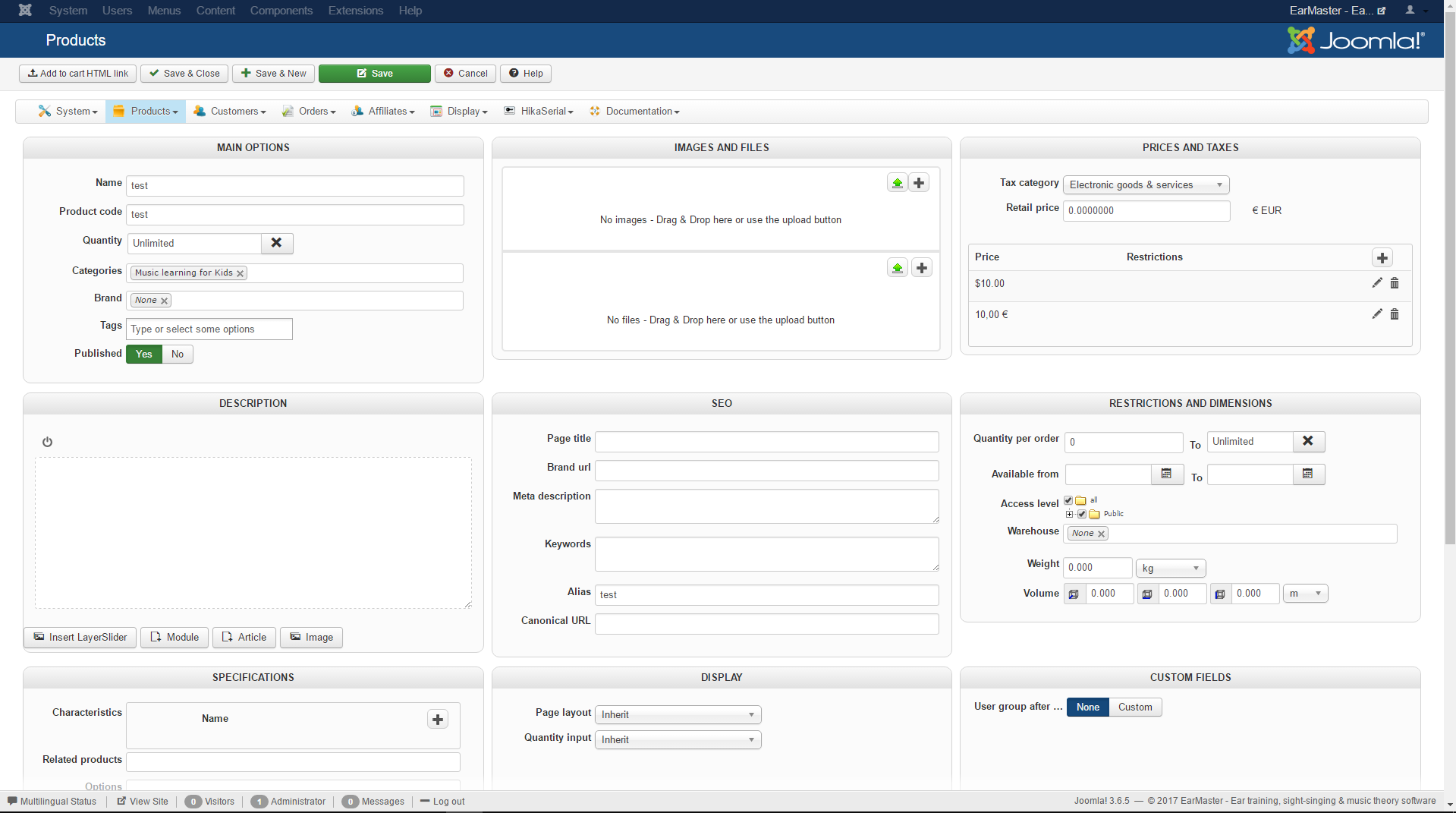
VAT config:
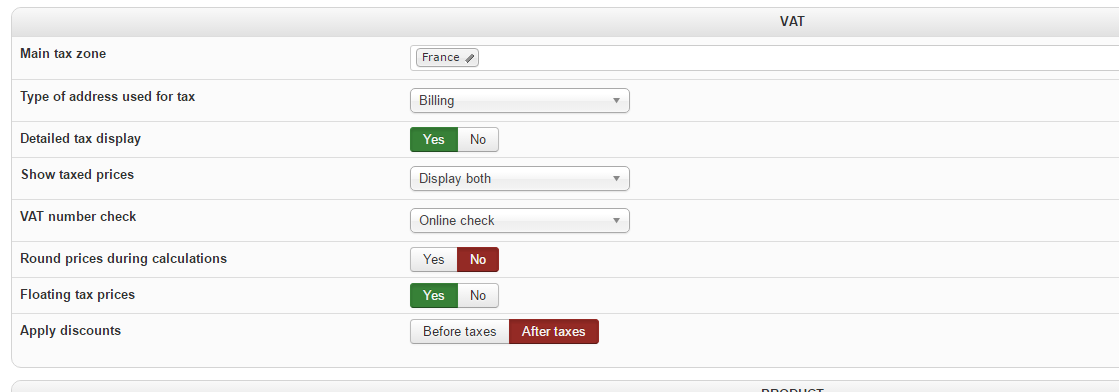
Cart without coupon:
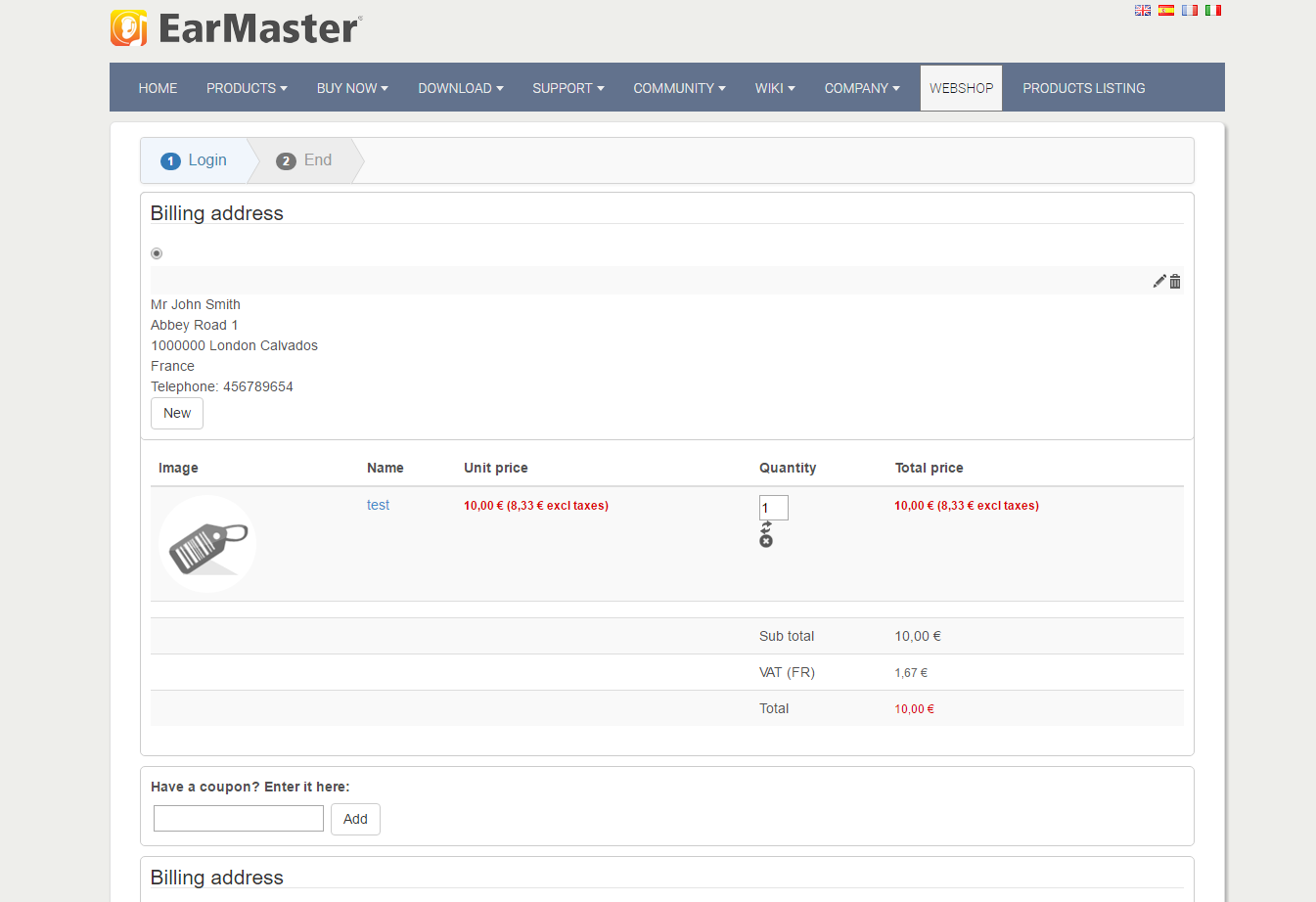
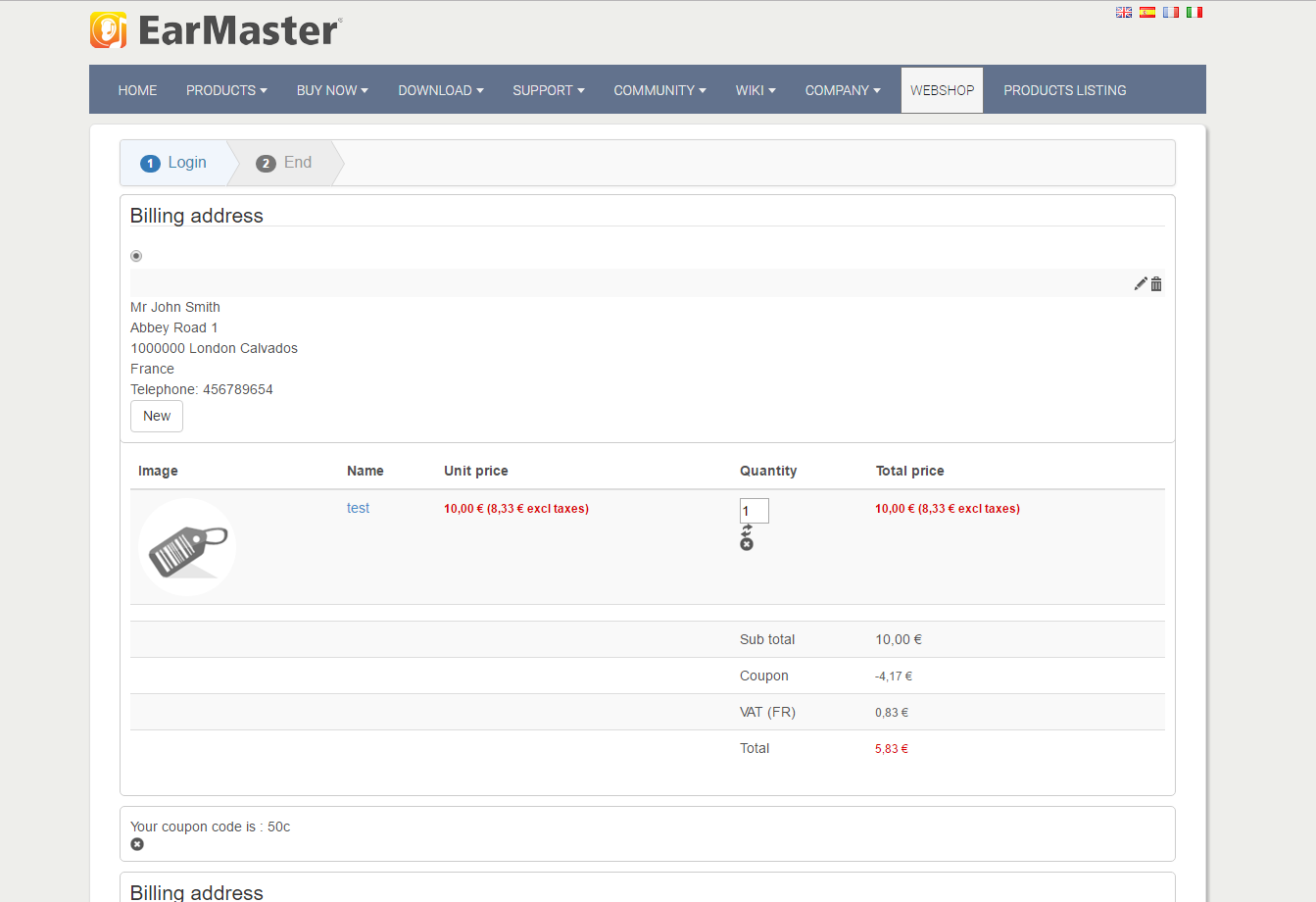
Cart with 50% coupon:
50% coupon settings:
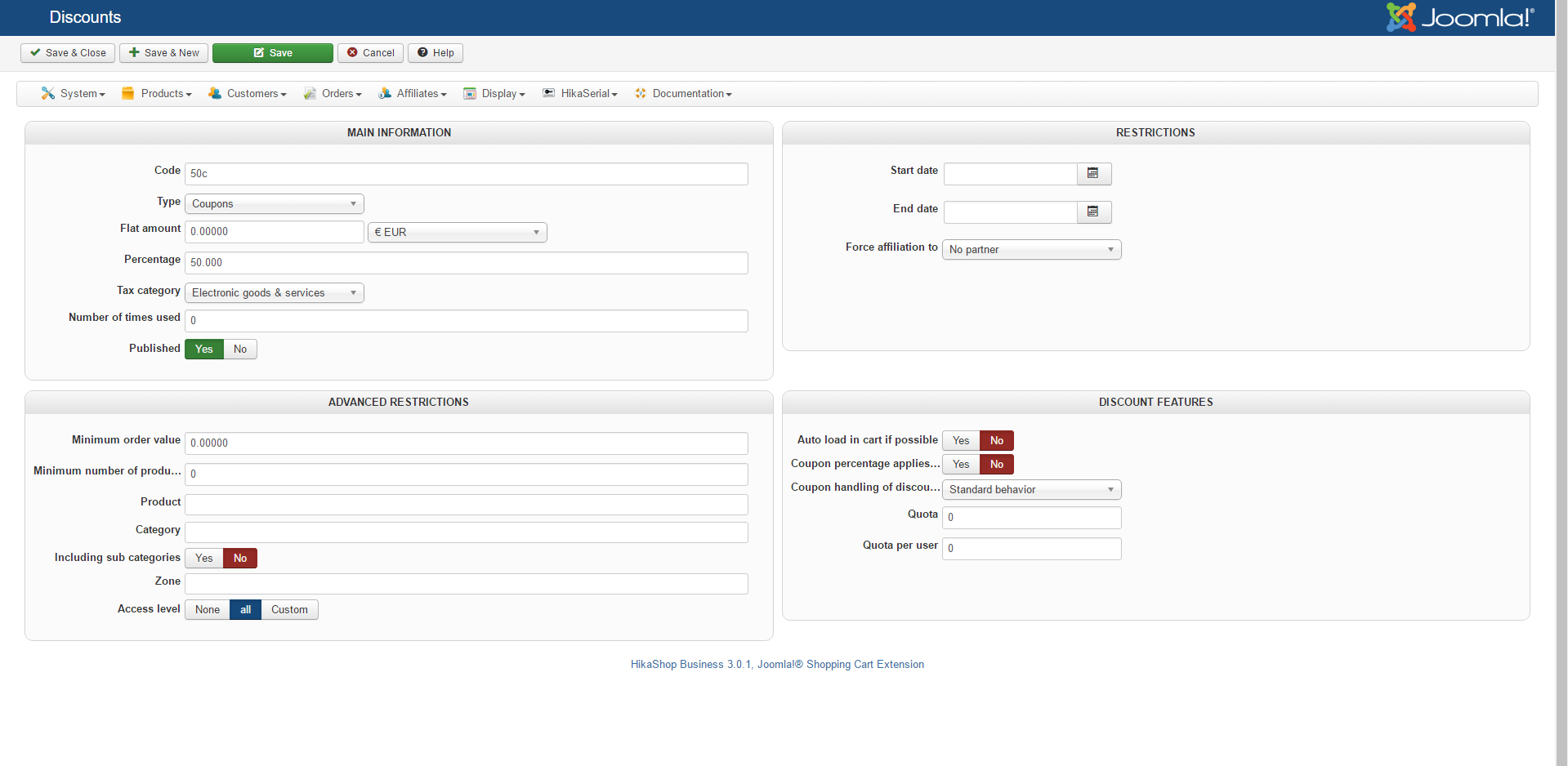
The coupon value should be 5€ (50% of 10€), not 4,17€. Also the total price should be 5€, not 5,83€.
Somehow, the 20% VAT result (0.83€) seems to be correct, and corresponds to the VAT for the correct values that should have been displayed.
I will contact you via the contact form about URL.
Product settings:
VAT config:
Cart without coupon:
Cart with 50% coupon:
50% coupon settings:
The coupon value should be 5€ (50% of 10€), not 4,17€. Also the total price should be 5€, not 5,83€.
Somehow, the 20% VAT result (0.83€) seems to be correct, and corresponds to the VAT for the correct values that should have been displayed.
I will contact you via the contact form about URL.
Please Log in or Create an account to join the conversation.
9 years 7 months ago - 9 years 7 months ago #264392
by Philip
Replied by Philip on topic Coupon calculation with floating taxes
Hello,
For a reason or another I'm not sure your're not on an HikaShop 3.0.1... Plus, you have to know that the latest build have some fix around this tax subject.
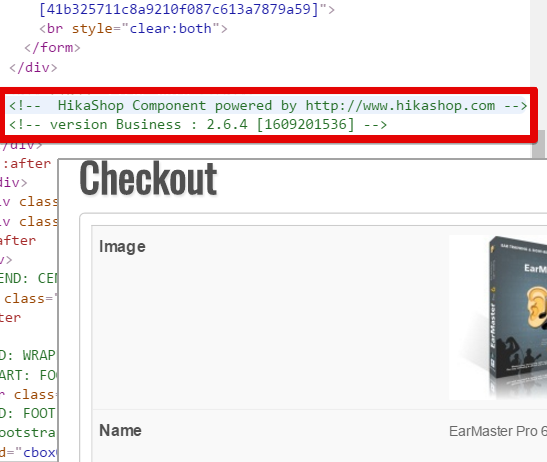
Can you try to update again and check in Components => HikaSHop => Configuration, and in Main tab and in Main part check the version and if needed reinstall from zip file and in Extensions => Manage => Install :
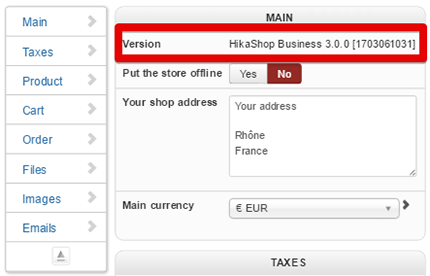
Awaiting news from you.
Regards
For a reason or another I'm not sure your're not on an HikaShop 3.0.1... Plus, you have to know that the latest build have some fix around this tax subject.
Can you try to update again and check in Components => HikaSHop => Configuration, and in Main tab and in Main part check the version and if needed reinstall from zip file and in Extensions => Manage => Install :
Awaiting news from you.
Regards
Last edit: 9 years 7 months ago by Philip.
Please Log in or Create an account to join the conversation.
9 years 7 months ago - 9 years 7 months ago #264439
by earmaster
Replied by earmaster on topic Coupon calculation with floating taxes
Sorry, forget about the link you got by email, it was a mistake. It's our production site, and yes, it runs 2.6.4.
The problem is in 3.0.1. The screenshots we posted are from our internal developer site, and it runs 3.0.1.
Check the last screenshot, it has the version number at the bottom. The problem is identical in both versions.
Our developer server is not accessible from outside at the moment. Would it be possible for you to reproduce the problem on your end by selecting the same VAT and coupon options as those in our screenshots?
The problem is in 3.0.1. The screenshots we posted are from our internal developer site, and it runs 3.0.1.
Check the last screenshot, it has the version number at the bottom. The problem is identical in both versions.
Our developer server is not accessible from outside at the moment. Would it be possible for you to reproduce the problem on your end by selecting the same VAT and coupon options as those in our screenshots?
Last edit: 9 years 7 months ago by earmaster.
Please Log in or Create an account to join the conversation.
9 years 7 months ago - 9 years 7 months ago #264469
by Philip
Replied by Philip on topic Coupon calculation with floating taxes
Hello,
I reproduce and don't haven't same results, as you can see :
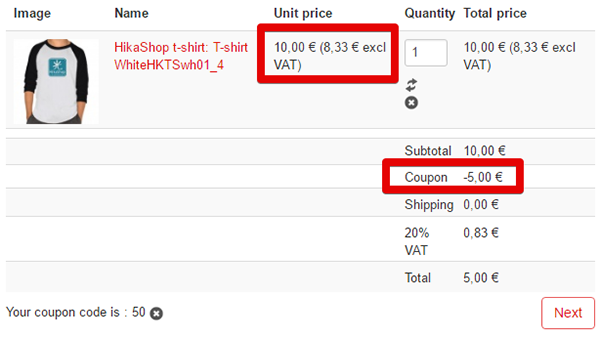
That may be a good news, I test it with last build of HikaShop, and so can you try to re-updated again to see if that solve your issue, please ?
Awaiting news from you.
Regards
I reproduce and don't haven't same results, as you can see :
That may be a good news, I test it with last build of HikaShop, and so can you try to re-updated again to see if that solve your issue, please ?
Awaiting news from you.
Regards
Last edit: 9 years 7 months ago by Philip.
Please Log in or Create an account to join the conversation.
9 years 7 months ago #264537
by earmaster
Replied by earmaster on topic Coupon calculation with floating taxes
Thank you for testing this. We already have 3.0.1, it's the newest build.
Coupons do work with floating taxes turned OFF. The problem is only with floating taxes turned ON.
In your screenshot, have you turned "Floating Tax" ON in the configuration?
Coupons do work with floating taxes turned OFF. The problem is only with floating taxes turned ON.
In your screenshot, have you turned "Floating Tax" ON in the configuration?
Please Log in or Create an account to join the conversation.
9 years 7 months ago - 9 years 7 months ago #264575
by Philip
Replied by Philip on topic Coupon calculation with floating taxes
Hello,
Strange, maybe there is someting we can do that can solve your issue and will work with your specific configuration...
Can you try to modify your currency.php (in file YourWebsite\administrator\components\com_hikashop\classes)
Go around line 2315, find this part :
And replace it by this :
Note that I'd just add '//' in order to comment (or switch off) some php orders on 3 line.
See modification with color :
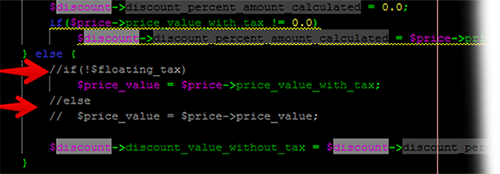
Awaiting news from you to see if that fit your needs.
Regards
Strange, maybe there is someting we can do that can solve your issue and will work with your specific configuration...
Can you try to modify your currency.php (in file YourWebsite\administrator\components\com_hikashop\classes)
Go around line 2315, find this part :
Code:
...
$discount->discount_percent_amount_calculated = $price->price_value_with_tax * $discount->discount_percent_amount_calculated_without_tax / $price->price_value_with_tax;
} else {
if(!$floating_tax)
$price_value = $price->price_value_with_tax;
else
$price_value = $price->price_value;
$discount->discount_value_without_tax =
...
Code:
...
$discount->discount_percent_amount_calculated = $price->price_value_with_tax * $discount->discount_percent_amount_calculated_without_tax / $price->price_value_with_tax;
} else {
//if(!$floating_tax)
$price_value = $price->price_value_with_tax;
//else
// $price_value = $price->price_value;
$discount->discount_value_without_tax =
...
Note that I'd just add '//' in order to comment (or switch off) some php orders on 3 line.
See modification with color :
Awaiting news from you to see if that fit your needs.
Regards
Last edit: 9 years 7 months ago by Philip.
Please Log in or Create an account to join the conversation.
9 years 7 months ago #264636
by earmaster
Replied by earmaster on topic Coupon calculation with floating taxes
Thank you for the suggestion, we will try that and let you know the results asap.
You imply that we have a special configuration and special needs? - but we only turned floating tax on, and then coupons doesn't work.
Did it work for you with floating tax turned ON?
You imply that we have a special configuration and special needs? - but we only turned floating tax on, and then coupons doesn't work.
Did it work for you with floating tax turned ON?
Please Log in or Create an account to join the conversation.
9 years 7 months ago - 9 years 7 months ago #264646
by Philip
Replied by Philip on topic Coupon calculation with floating taxes
Hello,
You haven't just Tax float, you add discount after taxes this plus the fact that you want have that a real 50% discount that impact total price WITH tax.
I understand that can be needed, but all this parameters leads together to a very specific case.
Awaiting news from you when you have proceed some tests.
Regards
You haven't just Tax float, you add discount after taxes this plus the fact that you want have that a real 50% discount that impact total price WITH tax.
I understand that can be needed, but all this parameters leads together to a very specific case.
Awaiting news from you when you have proceed some tests.
Regards
Last edit: 9 years 7 months ago by Philip.
Please Log in or Create an account to join the conversation.
9 years 7 months ago #264988
by earmaster
Replied by earmaster on topic Coupon calculation with floating taxes
Thank you for your answer.
Your previous quickfix hack works and it looks like it will make us running for now.
But please solve this bug in a permanent way so we don't need to make hacks every time we update hikashop and so that others can use the floating tax option too.
Our setup is not so special as you claim. There is no setting that will make coupons work with floating tax!
It doesn't matter if we use discounts before or after tax. The calculation is wrong in both situations.
Example: If we have an item at €8 + €2 tax = €10 including tax. (25% tax)
This is how it should be:
With "discount before tax": 50% * €8 = €4, and after adding 25% tax the final price should be €5, but not in Hikashop
With "discount after tax": 50% * €10 = €5 including tax, but not in Hikashop
The reason to turn on floating tax is that user should see and think prices "including tax".
With a 50% discount coupon the user expects to get 50% off the price he see.
Please solve this bug.
Your previous quickfix hack works and it looks like it will make us running for now.
But please solve this bug in a permanent way so we don't need to make hacks every time we update hikashop and so that others can use the floating tax option too.
Our setup is not so special as you claim. There is no setting that will make coupons work with floating tax!
It doesn't matter if we use discounts before or after tax. The calculation is wrong in both situations.
Example: If we have an item at €8 + €2 tax = €10 including tax. (25% tax)
This is how it should be:
With "discount before tax": 50% * €8 = €4, and after adding 25% tax the final price should be €5, but not in Hikashop
With "discount after tax": 50% * €10 = €5 including tax, but not in Hikashop
The reason to turn on floating tax is that user should see and think prices "including tax".
With a 50% discount coupon the user expects to get 50% off the price he see.
Please solve this bug.
Please Log in or Create an account to join the conversation.

7 years 6 months ago #305594
by carniel
There are no kangaroos in Austria!
Replied by carniel on topic Coupon calculation with floating taxes
Hello,
any update on this issue?
It's still the same with Hikashop 3.5.1
I use: floating tax prices = yes
Apply coupons : before taxes
But it still calculates the tax with the original price, then uses the discount and the customer sees the wrong tax.
Example:
185,-
includes 20% tax: 30,83
net : 154,16
With discount:
185,- full price
-37,- discount
148,- price
tax: should be 24,66 now- but is still 30,83 like before.
any update on this issue?
It's still the same with Hikashop 3.5.1
I use: floating tax prices = yes
Apply coupons : before taxes
But it still calculates the tax with the original price, then uses the discount and the customer sees the wrong tax.
Example:
185,-
includes 20% tax: 30,83
net : 154,16
With discount:
185,- full price
-37,- discount
148,- price
tax: should be 24,66 now- but is still 30,83 like before.
There are no kangaroos in Austria!
Please Log in or Create an account to join the conversation.
7 years 6 months ago #305611
by nicolas
Replied by nicolas on topic Coupon calculation with floating taxes
Hi,
We added patchs to the tax calculations with the "floating tax prices" setting activated in HikaShop 4.0.0:
www.hikashop.com/support/documentation/5...ashop-changelog.html
We added patchs to the tax calculations with the "floating tax prices" setting activated in HikaShop 4.0.0:
www.hikashop.com/support/documentation/5...ashop-changelog.html
So I would first recommend you to update to the latest version of HikaShop. It should work much better.We've fixed taxes calculations with coupons using the "Floating tax prices" option.
Please Log in or Create an account to join the conversation.
7 years 6 months ago #305930
by carniel
There are no kangaroos in Austria!
Replied by carniel on topic Coupon calculation with floating taxes
Hello,
we upgraded to Hikashop 4.0.3
but it still behaves the same ...
attached a screenshot of the cart with discount
but the tax always calculates from full price
Options are: calculate discounts BEFORE taxes
Please advise ... !
Kind Regards, Eva
we upgraded to Hikashop 4.0.3
but it still behaves the same ...
attached a screenshot of the cart with discount
but the tax always calculates from full price
Options are: calculate discounts BEFORE taxes
Please advise ... !
Kind Regards, Eva
There are no kangaroos in Austria!
Please Log in or Create an account to join the conversation.
7 years 6 months ago - 7 years 6 months ago #305971
by Philip
Replied by Philip on topic Coupon calculation with floating taxes
Hello,
Can you provide via our Contact us form some frontend/backend access and the product Url and coupon code to process some tests by ourself, and don't forget to add to your message an Url link to this topic.
Awaiting news from you
Regards
Can you provide via our Contact us form some frontend/backend access and the product Url and coupon code to process some tests by ourself, and don't forget to add to your message an Url link to this topic.
Awaiting news from you
Regards
Last edit: 7 years 6 months ago by Philip.
Please Log in or Create an account to join the conversation.
7 years 6 months ago #306025
by carniel
There are no kangaroos in Austria!
Replied by carniel on topic Coupon calculation with floating taxes
already sent the login information !
There are no kangaroos in Austria!
Please Log in or Create an account to join the conversation.
Time to create page: 0.255 seconds