
- Posts: 116
- Thank you received: 7
Coupon and Tax calculation on Order Total wrong
- stratacorps
-
 Topic Author
- Offline
Less
More
10 years 10 months ago - 10 years 10 months ago #223264
by stratacorps
Coupon and Tax calculation on Order Total wrong was created by stratacorps
-- HikaShop version -- : 2.6.0
-- Joomla version -- : 3.4.5
-- PHP version -- : 5.6.14
-- Browser(s) name and version -- : any
-- Error-message(debug-mod must be tuned on) -- : no errors displayed
We are only using the native Hikashop components (coupon/discount codes. No 3rd party (e.g. AWO) installed.
We have a coupon code for a 100% percentage off a specific product.
When the shopper adds the correct item, and applies the coupon code, the shopping cart total is incorrect:
Subtotal $25.00
Coupon $-25.00
Shipping $0.00
MO Sales Tax $0.00
Total $1.87
The total should be $0.00
Testing a 50% coupon...
Subtotal $25.00
Coupon $-12.50
MO Sales Tax $0.93
Total $14.37
The .93 would be the correct tax calculation, but obviously the order Total included Tax on the $25.00
So Cart totals Before coupon...
Subtotal $25.00
MO Sales Tax $1.87
Total $26.87
50% coupon applied...
Subtotal $25.00
Coupon $-12.50
MO Sales Tax $0.93
Total $14.37
I have also tried using a Flat amount coupon with the same results. The Tax Line is CORRECT, but the order total is not using this value, its using the total tax before discount.
Our tax settings are:
EDIT: The coupons have the field "Product tax category" set to None. So I went in and changed the coupon field setting to Taxable and I think it works. In reading the documentation, we should be able to leave this as the default "None" ??? But this does work around the issue if it doesn't affect shipments to non-taxable zones.
-- Joomla version -- : 3.4.5
-- PHP version -- : 5.6.14
-- Browser(s) name and version -- : any
-- Error-message(debug-mod must be tuned on) -- : no errors displayed
We are only using the native Hikashop components (coupon/discount codes. No 3rd party (e.g. AWO) installed.
We have a coupon code for a 100% percentage off a specific product.
When the shopper adds the correct item, and applies the coupon code, the shopping cart total is incorrect:
Subtotal $25.00
Coupon $-25.00
Shipping $0.00
MO Sales Tax $0.00
Total $1.87
The total should be $0.00
Testing a 50% coupon...
Subtotal $25.00
Coupon $-12.50
MO Sales Tax $0.93
Total $14.37
The .93 would be the correct tax calculation, but obviously the order Total included Tax on the $25.00
So Cart totals Before coupon...
Subtotal $25.00
MO Sales Tax $1.87
Total $26.87
50% coupon applied...
Subtotal $25.00
Coupon $-12.50
MO Sales Tax $0.93
Total $14.37
I have also tried using a Flat amount coupon with the same results. The Tax Line is CORRECT, but the order total is not using this value, its using the total tax before discount.
Our tax settings are:
- Detailed tax display: Yes
- Type of address...: Billing
- Main tax zone: Missouri (7.475%)
- VAT number check: no check
- Show taxed prices: no tax
- Round prices during calculations: NO (it doesn't do it right if we enable this)
- Floating tax prices: NO
- Apply discounts: Before taxes
EDIT: The coupons have the field "Product tax category" set to None. So I went in and changed the coupon field setting to Taxable and I think it works. In reading the documentation, we should be able to leave this as the default "None" ??? But this does work around the issue if it doesn't affect shipments to non-taxable zones.
Last edit: 10 years 10 months ago by stratacorps.
Please Log in or Create an account to join the conversation.

10 years 10 months ago #223278
by nicolas
Replied by nicolas on topic Coupon and Tax calculation on Order Total wrong
Hi,
You have two things to control how taxes are calculated for the coupons:
- the "apply discount" setting of the HikaShop configuration
- the "product tax category" setting of the coupon
So you need to try the different combinations to get the one you want and that's it.
You have two things to control how taxes are calculated for the coupons:
- the "apply discount" setting of the HikaShop configuration
- the "product tax category" setting of the coupon
So you need to try the different combinations to get the one you want and that's it.
Please Log in or Create an account to join the conversation.
- stratacorps
-
Topic Author
- Offline
Less
More
- Posts: 116
- Thank you received: 7
10 years 10 months ago #223344
by stratacorps
Replied by stratacorps on topic Coupon and Tax calculation on Order Total wrong
I am well aware of the tax options available at the product and system level… Please read the other post that's related to the same matter which also creates a problem for the authorize.net payment gateway… I may not fully understand the wording in the documentation with regard to the tax field and the coupon itself but again changing the coupon to taxable seems to take care of this, however as noted here:
www.hikashop.com/forum/payment-methods/8...-invalid.html#223268
...there is something wrong with the way the taxes are being calculated with regard to the total of the order.
www.hikashop.com/forum/payment-methods/8...-invalid.html#223268
...there is something wrong with the way the taxes are being calculated with regard to the total of the order.
Please Log in or Create an account to join the conversation.
10 years 10 months ago #223346
by nicolas
Replied by nicolas on topic Coupon and Tax calculation on Order Total wrong
Let's continue on only one thread for the same issue please.
Please Log in or Create an account to join the conversation.
- stratacorps
-
Topic Author
- Offline
Less
More
- Posts: 116
- Thank you received: 7
10 years 10 months ago #223422
by stratacorps
Replied by stratacorps on topic Coupon and Tax calculation on Order Total wrong
Then pick which one. There is an issue on both fronts. If you use a coupon it causes authorize.net to fail. Otherwise the order total is wrong. So tell me, where should I be to get this problem fixed!
Please Log in or Create an account to join the conversation.

10 years 10 months ago #223774
by Jerome
Jerome - Obsidev.com
HikaMarket & HikaSerial developer / HikaShop core dev team.
Replied by Jerome on topic Coupon and Tax calculation on Order Total wrong
Hi,
We already replied to the authorize.net coupon issue and we also provided the patch.
Like Nicolas wrote ; please do not mix your messages in several threads for the same subject.
You created a thread for your coupon/tax issue ; that's good.
Lets' authorize.net issue in the authorize.net thread and the coupon issue in the coupon thread. Ok ?
So, please provide details about your HikaShop configuration for the coupon and also some details about your coupon code configuration.
Regards,
We already replied to the authorize.net coupon issue and we also provided the patch.
Like Nicolas wrote ; please do not mix your messages in several threads for the same subject.
You created a thread for your coupon/tax issue ; that's good.
Lets' authorize.net issue in the authorize.net thread and the coupon issue in the coupon thread. Ok ?
So, please provide details about your HikaShop configuration for the coupon and also some details about your coupon code configuration.
You have two things to control how taxes are calculated for the coupons:
- the "apply discount" setting of the HikaShop configuration
- the "product tax category" setting of the coupon
So you need to try the different combinations to get the one you want and that's it.
Regards,
Jerome - Obsidev.com
HikaMarket & HikaSerial developer / HikaShop core dev team.
Please Log in or Create an account to join the conversation.
- stratacorps
-
Topic Author
- Offline
Less
More
- Posts: 116
- Thank you received: 7
10 years 10 months ago - 10 years 10 months ago #223784
by stratacorps
Replied by stratacorps on topic Coupon and Tax calculation on Order Total wrong
I am sorry that I did not follow protocol, however I was told to open a new thread on an issue that is tied to this one. I first addressed the symptom--where the Authorize.net payment plugin fails to properly sanitize the data submitted to authorize.net and then this thread to address one of the causes I encountered.
1. The authorize.net line 270 issue is not fixed. The authorize.net gateway plugin is not submitting the correct information resulting in the error. One of the issues that help to expose this bug is the use of the coupon which I was then told to open a new thread on.
The only way I could "fix" the payment plugin was to change the setting in the plugin to not send the order details to Authorize. Which is NOT the desired choice, but we have to keep the shopping cart going.
2. The coupon issue helps to break the authorize.net payment gateway plugin. But as noted you can see it has issues on its own, no matter what payment plugin is used to settle the order.
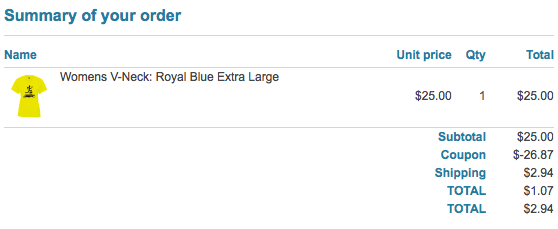
As noted in this (the "coupon thread") if I make the coupon Taxable, it will calculate the product tax correctly (for an unknown reason) but it miscalculates the total of the order.
Also as noted earlier in this thread the tax settings are repeated here for your convenience:
Coupon: Percentage discount, Product tax category None.
We have one tax jurisdiction for our State that should calculate 7.475% on taxable goods for billing in the state of Missouri.
All of our products are taxable.
As shown in the data in both threads, when the percentage coupon is applied, the order total is incorrect.
1. The authorize.net line 270 issue is not fixed. The authorize.net gateway plugin is not submitting the correct information resulting in the error. One of the issues that help to expose this bug is the use of the coupon which I was then told to open a new thread on.
The only way I could "fix" the payment plugin was to change the setting in the plugin to not send the order details to Authorize. Which is NOT the desired choice, but we have to keep the shopping cart going.
2. The coupon issue helps to break the authorize.net payment gateway plugin. But as noted you can see it has issues on its own, no matter what payment plugin is used to settle the order.
As noted in this (the "coupon thread") if I make the coupon Taxable, it will calculate the product tax correctly (for an unknown reason) but it miscalculates the total of the order.
Also as noted earlier in this thread the tax settings are repeated here for your convenience:
Coupon: Percentage discount, Product tax category None.
Detailed tax display: Yes
Type of address...: Billing
Main tax zone: Missouri (7.475%)
VAT number check: no check
Show taxed prices: no tax
Round prices during calculations: NO (it doesn't do it right if we enable this)
Floating tax prices: NO
We have one tax jurisdiction for our State that should calculate 7.475% on taxable goods for billing in the state of Missouri.
All of our products are taxable.
As shown in the data in both threads, when the percentage coupon is applied, the order total is incorrect.
Last edit: 10 years 10 months ago by stratacorps.
Please Log in or Create an account to join the conversation.
- stratacorps
-
Topic Author
- Offline
Less
More
- Posts: 116
- Thank you received: 7
10 years 10 months ago - 10 years 10 months ago #224430
by stratacorps
Replied by stratacorps on topic Coupon and Tax calculation on Order Total wrong
Any hope of at least acknowledging there is a problem here with the order totals and an eta? Christmas shoppers totaly confused with the bizarre order totals they're getting. Will using a 3rd party coupon system like AWO bypass this issue in Hikashop??
Last edit: 10 years 10 months ago by stratacorps.
Please Log in or Create an account to join the conversation.
10 years 10 months ago #224790
by DinaLou
Replied by DinaLou on topic Coupon and Tax calculation on Order Total wrong
I'm having a similar problem. Only I use TaxCloud. Without a coupon applied all of the numbers are correct. After a coupon is added the numbers don't add up. I did some calculating and it looks like it is applying the tax amount BEFORE the discount instead of using the new adjusted tax amount.
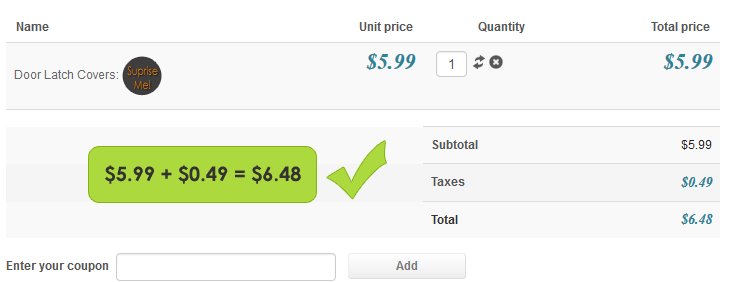
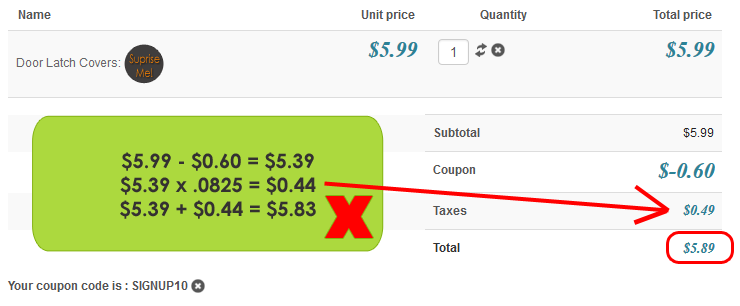
The following user(s) said Thank You: stratacorps
Please Log in or Create an account to join the conversation.

10 years 10 months ago #224942
by TaxCloud
TaxCloud is the internet's only free sales tax service.
Learn more at taxcloud.com
Support available via service.taxcloud.net or by email to service@taxcloud.net
Replied by TaxCloud on topic Coupon and Tax calculation on Order Total wrong
This issue is correctly identified - any discounts or adjustments to the sales price MUST be applied BEFORE sales tax calculation. TaxCloud documentation on this point is explicit, and our last review of the HikaShop implementation adhered to the requirement. Did something change (question for team HikaShop)?
TaxCloud is the internet's only free sales tax service.
Learn more at taxcloud.com
Support available via service.taxcloud.net or by email to service@taxcloud.net
Please Log in or Create an account to join the conversation.
10 years 10 months ago #224963
by Jerome
Jerome - Obsidev.com
HikaMarket & HikaSerial developer / HikaShop core dev team.
Replied by Jerome on topic Coupon and Tax calculation on Order Total wrong
Hi,
Nothing changed ; we always have a setting to let the shop owner decide if he want to applied the discount before or after the taxes.
Because in some other countries, things could be different !
www.hikashop.com/support/support/documen...nfig.html#main_taxes
Regards,
Nothing changed ; we always have a setting to let the shop owner decide if he want to applied the discount before or after the taxes.
Because in some other countries, things could be different !
www.hikashop.com/support/support/documen...nfig.html#main_taxes
Regards,
Jerome - Obsidev.com
HikaMarket & HikaSerial developer / HikaShop core dev team.
Please Log in or Create an account to join the conversation.
- stratacorps
-
Topic Author
- Offline
Less
More
- Posts: 116
- Thank you received: 7
10 years 10 months ago - 10 years 10 months ago #224995
by stratacorps
Replied by stratacorps on topic Coupon and Tax calculation on Order Total wrong
The order totals and how they are presented on the checkout page and the order/invoice are still incorrect as documented earlier.
Last edit: 10 years 10 months ago by stratacorps.
Please Log in or Create an account to join the conversation.
10 years 9 months ago #225215
by DinaLou
Replied by DinaLou on topic Coupon and Tax calculation on Order Total wrong
I already have the coupon setting set to the BEFORE option. I don't know what to do!
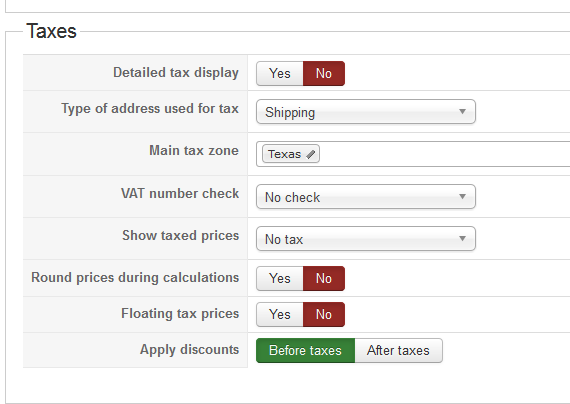
Please Log in or Create an account to join the conversation.
Time to create page: 0.407 seconds