
- Posts: 158
- Thank you received: 5
Non valid coupon code not showing error message
- serbofleconcepts
-
 Topic Author
- Offline
Less
More
9 years 3 months ago - 9 years 3 months ago #271368
by serbofleconcepts
Non valid coupon code not showing error message was created by serbofleconcepts
-- HikaShop version -- : 3.0.1
-- Joomla version -- : 3.7.1
-- PHP version -- : 5.6.26
-- Browser(s) name and version -- : firefox
-- Error-message(debug-mod must be tuned on) -- : none!
My coupon works OK but if I enter an incorrect code the page just moves onto the next cart stage without any error displayed? I'm sure this can't be correct? Maybe I've missed setting somewhere. I can see the error messages OK in the Hikashop language file.
My test domain is here
Thank you
-- Joomla version -- : 3.7.1
-- PHP version -- : 5.6.26
-- Browser(s) name and version -- : firefox
-- Error-message(debug-mod must be tuned on) -- : none!
My coupon works OK but if I enter an incorrect code the page just moves onto the next cart stage without any error displayed? I'm sure this can't be correct? Maybe I've missed setting somewhere. I can see the error messages OK in the Hikashop language file.
My test domain is here
Thank you
Last edit: 9 years 3 months ago by serbofleconcepts.
Please Log in or Create an account to join the conversation.

9 years 3 months ago #271378
by nicolas
Replied by nicolas on topic Non valid coupon code not showing error message
Hi,
Please update to HikaShop 3.1.1 and try again. We've already fixed that.
Please update to HikaShop 3.1.1 and try again. We've already fixed that.
Please Log in or Create an account to join the conversation.
- serbofleconcepts
-
Topic Author
- Offline
Less
More
- Posts: 158
- Thank you received: 5
9 years 3 months ago #271534
by serbofleconcepts
Replied by serbofleconcepts on topic Non valid coupon code not showing error message
Just updated but I still have the same problem. I am using the legacy checkout due to issues with Hikashop and my template (GK Storefront).
Please Log in or Create an account to join the conversation.
9 years 3 months ago #271539
by nicolas
Replied by nicolas on topic Non valid coupon code not showing error message
Hi,
Are you using standard HikaShop coupons or coupons of AWOCoupon ?
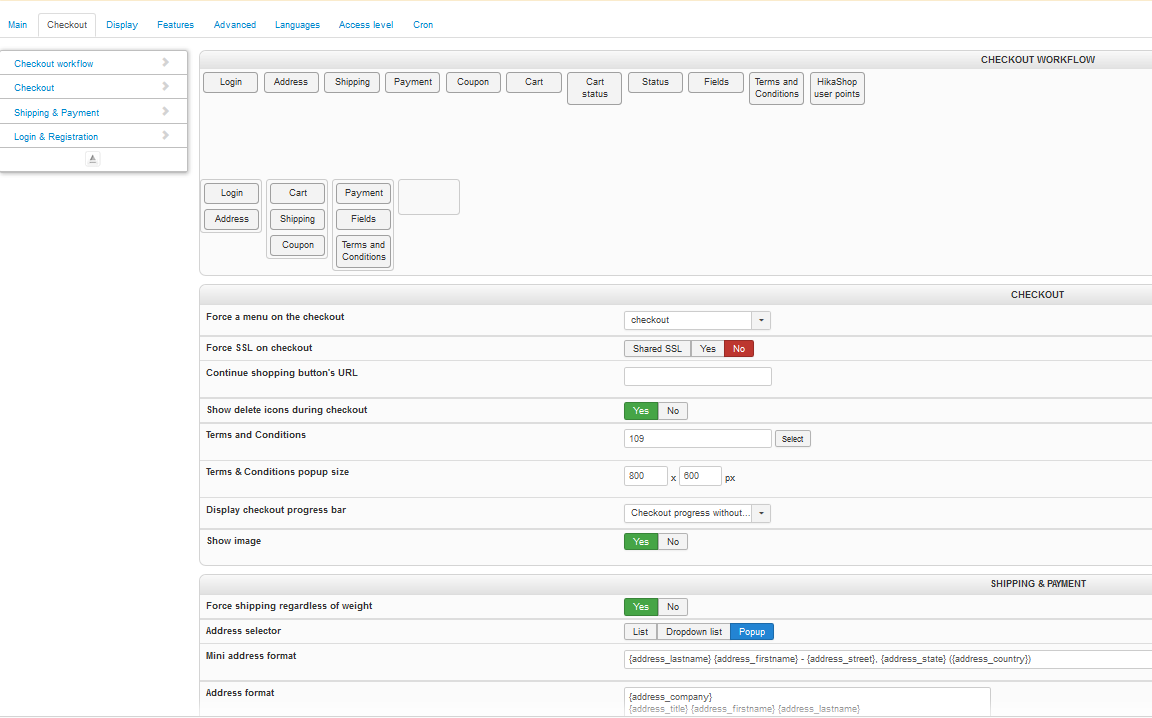
Could you provide a screenshot of the settings under the "checkout" tab of the HikaShop configuration ?
If you try with the default template, do you have the same issue ?
Are you using standard HikaShop coupons or coupons of AWOCoupon ?
Could you provide a screenshot of the settings under the "checkout" tab of the HikaShop configuration ?
If you try with the default template, do you have the same issue ?
Please Log in or Create an account to join the conversation.
- serbofleconcepts
-
Topic Author
- Offline
Less
More
- Posts: 158
- Thank you received: 5
9 years 3 months ago #271587
by serbofleconcepts
Replied by serbofleconcepts on topic Non valid coupon code not showing error message
I'm using the std HikaShop coupon functionality.
Admin screenshot attached below;
I'm afraid I don't have the Beez template installed anymore.
Admin screenshot attached below;
I'm afraid I don't have the Beez template installed anymore.
Please Log in or Create an account to join the conversation.

9 years 3 months ago #271592
by Jerome
Jerome - Obsidev.com
HikaMarket & HikaSerial developer / HikaShop core dev team.
Also helping the HikaShop support team when having some time or couldn't sleep.
By the way, do not send me private message, use the "contact us" form instead.
Replied by Jerome on topic Non valid coupon code not showing error message
Hello,
You're using the legacy "add to cart" and the legacy "checkout".
We would highly recommend to use the new checkout system in order to get updates and improvements.
The legacy checkout is not maintained anymore and because you're using a special template ; it is possible that your template override some parts of the checkout and generate that side effect.
Regards,
You're using the legacy "add to cart" and the legacy "checkout".
We would highly recommend to use the new checkout system in order to get updates and improvements.
The legacy checkout is not maintained anymore and because you're using a special template ; it is possible that your template override some parts of the checkout and generate that side effect.
Regards,
Jerome - Obsidev.com
HikaMarket & HikaSerial developer / HikaShop core dev team.
Also helping the HikaShop support team when having some time or couldn't sleep.
By the way, do not send me private message, use the "contact us" form instead.
Please Log in or Create an account to join the conversation.
- serbofleconcepts
-
Topic Author
- Offline
Less
More
- Posts: 158
- Thank you received: 5
9 years 3 months ago #271634
by serbofleconcepts
Replied by serbofleconcepts on topic Non valid coupon code not showing error message
I am unable to use the new checkout or cart functionality - see my post
here.
I need to get it working on the legacy checkout I'm afraid.
I need to get it working on the legacy checkout I'm afraid.
Please Log in or Create an account to join the conversation.
9 years 3 months ago #271638
by nicolas
Replied by nicolas on topic Non valid coupon code not showing error message
Hi,
I've tested the legacy checkout on my end and I properly get the error message when I enter an invalid coupon code.
So I too think that the issue might be linked to the template.
I would recommend also to switch to the default template to check that.
If you don't have beez, you can use protostar, it's also a default template of Joomla in order to check on that.
Regarding the add to cart popup not working with the new checkout, it's probably because you didn't enable the HikaShop cart notify plugin, or you have some view overrides on the add to cart button itself.
But regardless, you can still activate the new checkout and keep the legacy add to cart system. That's why we have two different settings for that. So using the new checkout shouldn't be problematic in your case.
I've tested the legacy checkout on my end and I properly get the error message when I enter an invalid coupon code.
So I too think that the issue might be linked to the template.
I would recommend also to switch to the default template to check that.
If you don't have beez, you can use protostar, it's also a default template of Joomla in order to check on that.
Regarding the add to cart popup not working with the new checkout, it's probably because you didn't enable the HikaShop cart notify plugin, or you have some view overrides on the add to cart button itself.
But regardless, you can still activate the new checkout and keep the legacy add to cart system. That's why we have two different settings for that. So using the new checkout shouldn't be problematic in your case.
Please Log in or Create an account to join the conversation.
- serbofleconcepts
-
Topic Author
- Offline
Less
More
- Posts: 158
- Thank you received: 5
9 years 3 months ago #272159
by serbofleconcepts
Replied by serbofleconcepts on topic Non valid coupon code not showing error message
I reinstalled the Beez template and made it default, but it didn't show anything I could use to checkout?
Anyway, I can use the new checkout, but my client has complained that the layout is all messed up (I've read other forum posts about this also).
I've attached a screen grab showing what the issues are on just one of the checkout stages;
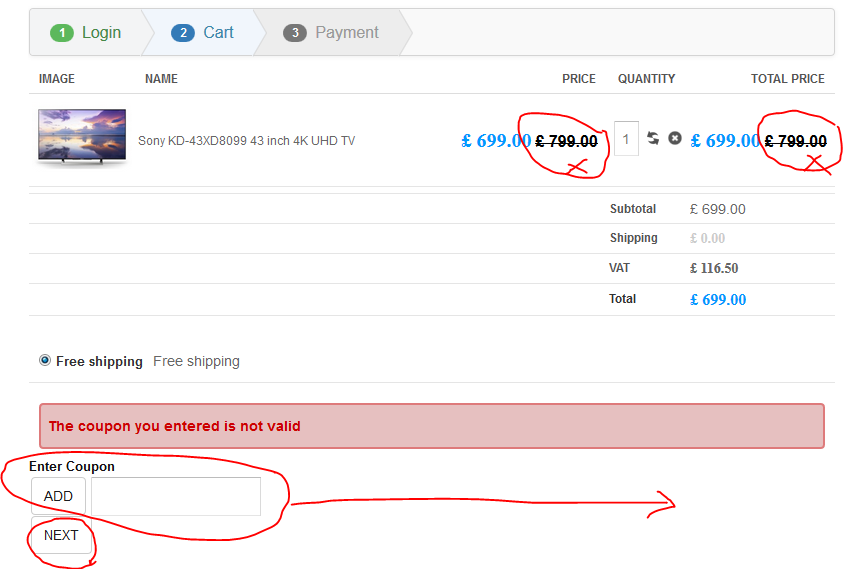
1. The legacy checkout does not show the original price
2. The add coupon is right aligned to keep it away from the next button
3. The buttons on the legacy checkout change to blue not grey (not important I know)
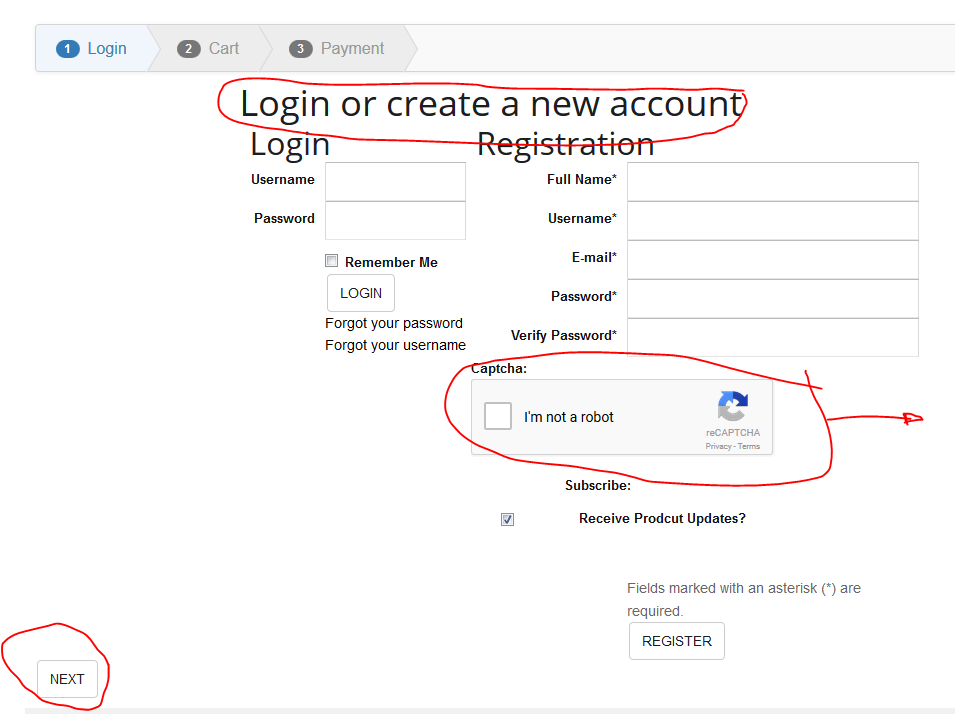
I know these are all small css changes but I've already spent hours getting the checkout looking perfect on the legacy view. In addition, the login view for the new checkout is also very messy;
Can you suggest a quick fix for these layout issues?
Thank you for your help.
Anyway, I can use the new checkout, but my client has complained that the layout is all messed up (I've read other forum posts about this also).
I've attached a screen grab showing what the issues are on just one of the checkout stages;
1. The legacy checkout does not show the original price
2. The add coupon is right aligned to keep it away from the next button
3. The buttons on the legacy checkout change to blue not grey (not important I know)
I know these are all small css changes but I've already spent hours getting the checkout looking perfect on the legacy view. In addition, the login view for the new checkout is also very messy;
Can you suggest a quick fix for these layout issues?
Thank you for your help.
Please Log in or Create an account to join the conversation.

9 years 3 months ago - 9 years 3 months ago #272228
by Philip
Replied by Philip on topic Non valid coupon code not showing error message
Hello,
Switch to default template (like Beez) able us to understand why you don't have your error message when you entered wrong discount code.
If, it work with default template like I see it by myself on your website and on your screenshot, means that your error message issue is linked to your template, that's was the start of this topic.
From this 2 solutions :
- You contact your template provider support in order to solve the message display issue, and you keep your work AND your checkout configuration, even if move to new checkout is good point for the future...
OR
- You keep as you do now your default template or another AND you add some Css command in order to correct your display issues.
Note that your double price displaying is link to your configuration in Main Configuration, Display tab and in DEFAULT PARAMETERS FOR PRODUCTS part, and change the "Show discounted price" option for "Display the discount amount".
Hope this will help to go forward on this subject.
Regards
Switch to default template (like Beez) able us to understand why you don't have your error message when you entered wrong discount code.
If, it work with default template like I see it by myself on your website and on your screenshot, means that your error message issue is linked to your template, that's was the start of this topic.
From this 2 solutions :
- You contact your template provider support in order to solve the message display issue, and you keep your work AND your checkout configuration, even if move to new checkout is good point for the future...
OR
- You keep as you do now your default template or another AND you add some Css command in order to correct your display issues.
Note that your double price displaying is link to your configuration in Main Configuration, Display tab and in DEFAULT PARAMETERS FOR PRODUCTS part, and change the "Show discounted price" option for "Display the discount amount".
Hope this will help to go forward on this subject.
Regards
Last edit: 9 years 3 months ago by Philip.
Please Log in or Create an account to join the conversation.
- serbofleconcepts
-
Topic Author
- Offline
Less
More
- Posts: 158
- Thank you received: 5
9 years 3 months ago #272613
by serbofleconcepts
Replied by serbofleconcepts on topic Non valid coupon code not showing error message
Thank you Phillipe, so I am going to stick with the new checkout and fix these formatting issues.
I have tried to removed the discounted price as you suggest but it messes up my product page too. All I need is to remove this from the cart view. I went into the display>views>checkout>cart.php file but I can't seem to figure out what I have to change to remove the discounted price from showing. Firstly, is this to correct file for checkout 2.0?
Thank you
I have tried to removed the discounted price as you suggest but it messes up my product page too. All I need is to remove this from the cart view. I went into the display>views>checkout>cart.php file but I can't seem to figure out what I have to change to remove the discounted price from showing. Firstly, is this to correct file for checkout 2.0?
Thank you
Please Log in or Create an account to join the conversation.
9 years 3 months ago #272618
by nicolas
Replied by nicolas on topic Non valid coupon code not showing error message
Hi,
No, it's show_block_cart that you want to edit.
Check the "Display view files" setting of the HikaShop configuration. That way, you can easily see which view file is used for what.
No, it's show_block_cart that you want to edit.
Check the "Display view files" setting of the HikaShop configuration. That way, you can easily see which view file is used for what.
Please Log in or Create an account to join the conversation.
- serbofleconcepts
-
Topic Author
- Offline
Less
More
- Posts: 158
- Thank you received: 5
8 years 11 months ago #279312
by serbofleconcepts
Replied by serbofleconcepts on topic Non valid coupon code not showing error message
OK, I have swapped my template to Beez template and I still have no error message when adding an invalid coupon?
I have set error reporting to maximum too.
My test domain is in a post above.
Thanks
I have set error reporting to maximum too.
My test domain is in a post above.
Thanks
Please Log in or Create an account to join the conversation.
8 years 11 months ago #279321
by Jerome
Jerome - Obsidev.com
HikaMarket & HikaSerial developer / HikaShop core dev team.
Also helping the HikaShop support team when having some time or couldn't sleep.
By the way, do not send me private message, use the "contact us" form instead.
Replied by Jerome on topic Non valid coupon code not showing error message
Hello,
I'm afraid it will be difficult to give you an answer since it's been 3 months and we do not you anything of your current status.
In your post #272159 we can see that the error message is displayed fine when using the new checkout system.
In the post #271638 Nicolas told that he performed tests with the legacy checkout and the messages were displayed.
Regards,
I'm afraid it will be difficult to give you an answer since it's been 3 months and we do not you anything of your current status.
In your post #272159 we can see that the error message is displayed fine when using the new checkout system.
In the post #271638 Nicolas told that he performed tests with the legacy checkout and the messages were displayed.
Regards,
Jerome - Obsidev.com
HikaMarket & HikaSerial developer / HikaShop core dev team.
Also helping the HikaShop support team when having some time or couldn't sleep.
By the way, do not send me private message, use the "contact us" form instead.
Please Log in or Create an account to join the conversation.
- serbofleconcepts
-
Topic Author
- Offline
Less
More
- Posts: 158
- Thank you received: 5
8 years 11 months ago #279411
by serbofleconcepts
Replied by serbofleconcepts on topic Non valid coupon code not showing error message
OK, so my client was hoping that Hikashop 3.2.0 would fix the layout issues we were experiencing but as it didn't they have asked to revert back to legacy cart and checkout. This means that we still have the no error message on entering an invalid coupon code. You can try it by going to the test domain above and adding the /checkout option which will allow you to add products to the cart. This is with the Beez template and I don't get the correct error message so I'm thinking it's a conflict with something other then my template, but really need your help to solve this.
Thank you.
Thank you.
Please Log in or Create an account to join the conversation.
8 years 11 months ago #279440
by nicolas
Replied by nicolas on topic Non valid coupon code not showing error message
Hi,
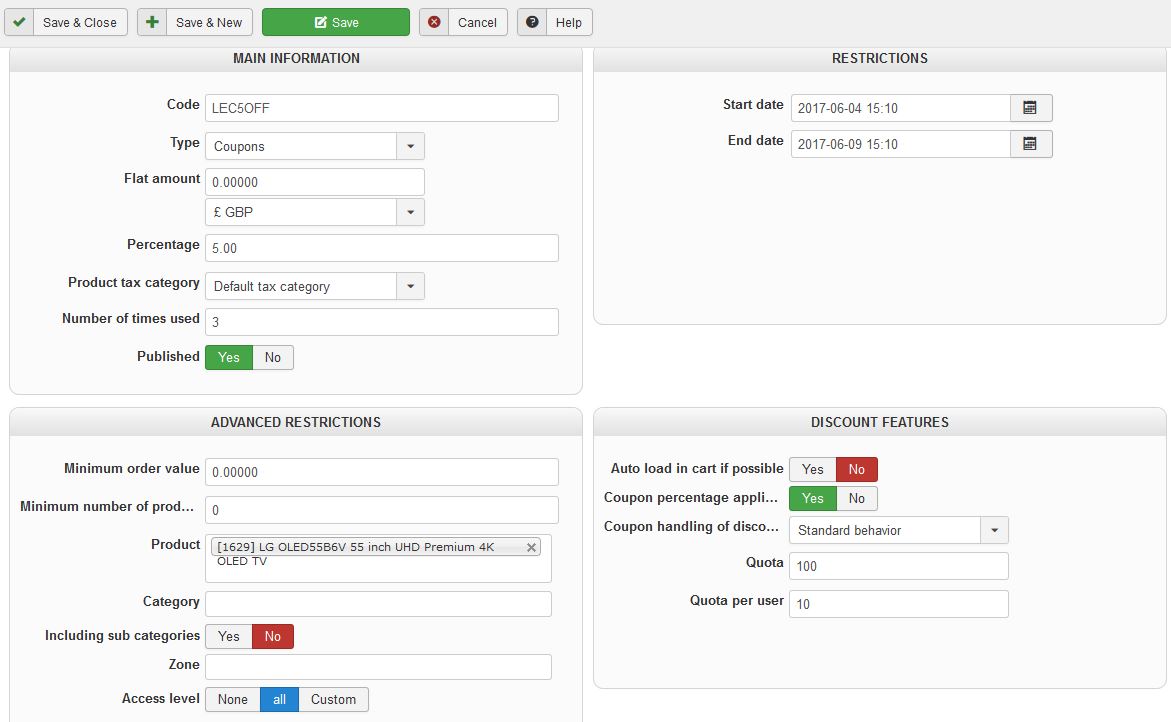
So how dod you configure your coupon ? Could you provide a screenshot of the settings of the coupon ?
Are you using custom hikashop plugins, or plugins that interact with the cart on your website ?
So how dod you configure your coupon ? Could you provide a screenshot of the settings of the coupon ?
Are you using custom hikashop plugins, or plugins that interact with the cart on your website ?
Please Log in or Create an account to join the conversation.
- serbofleconcepts
-
Topic Author
- Offline
Less
More
- Posts: 158
- Thank you received: 5
8 years 11 months ago #279553
by serbofleconcepts
Replied by serbofleconcepts on topic Non valid coupon code not showing error message
Here is my config.
Coupon errors work fine in non-legacy mode. Not using any custom plugins or carts as far as I'm aware.
Thanks
Coupon errors work fine in non-legacy mode. Not using any custom plugins or carts as far as I'm aware.
Thanks
Please Log in or Create an account to join the conversation.
8 years 11 months ago - 8 years 11 months ago #279576
by Philip
Replied by Philip on topic Non valid coupon code not showing error message
Hello,
Sorry but when I go to your test domain url, I only have this :

And so, we can't progress on the subject or proceed some tests.
Regards
Sorry but when I go to your test domain url, I only have this :
And so, we can't progress on the subject or proceed some tests.
Regards
Last edit: 8 years 11 months ago by Philip.
Please Log in or Create an account to join the conversation.
- serbofleconcepts
-
Topic Author
- Offline
Less
More
- Posts: 158
- Thank you received: 5
8 years 11 months ago #279618
by serbofleconcepts
Replied by serbofleconcepts on topic Non valid coupon code not showing error message
Ok, but you asked me to swap to the beez template to eliminate a template issue. I provided a way to add products to the cart in an earlier post. But, I have swapped back to the original template now.
Thank you.
Thank you.
Please Log in or Create an account to join the conversation.
- serbofleconcepts
-
Topic Author
- Offline
Less
More
- Posts: 158
- Thank you received: 5
8 years 11 months ago #280164
by serbofleconcepts
Replied by serbofleconcepts on topic Non valid coupon code not showing error message
Is there any update on this issue please? I can't be the only person suffering from this?
Please Log in or Create an account to join the conversation.
Time to create page: 0.265 seconds