

- Posts: 48
- Thank you received: 4
Coupons: Auto load in cart if possible not working
4 years 11 months ago - 4 years 11 months ago #337142
by pat01
Coupons: Auto load in cart if possible not working was created by pat01
-- HikaShop version -- : 4.4.4
-- Joomla version -- : 3.10.3
-- PHP version -- : 7.4
-- Browser(s) name and version -- : any
Hello
Since update to 4.4.4 the coupons are not applied automatically anymore.
I have set coupons as precentage to be applied to products. And I have set "Auto load in cart if possible" to yes. So far this did work all the time: In cart the coupon got applied automatically.
Now this is not working anymore, no coupon gets applied.
Coupons still are set up same so they should work. I did open and save them again but this did not help.
How can I solve this?
Thanks.
-- Joomla version -- : 3.10.3
-- PHP version -- : 7.4
-- Browser(s) name and version -- : any
Hello
Since update to 4.4.4 the coupons are not applied automatically anymore.
I have set coupons as precentage to be applied to products. And I have set "Auto load in cart if possible" to yes. So far this did work all the time: In cart the coupon got applied automatically.
Now this is not working anymore, no coupon gets applied.
Coupons still are set up same so they should work. I did open and save them again but this did not help.
How can I solve this?
Thanks.
Last edit: 4 years 11 months ago by pat01.
Please Log in or Create an account to join the conversation.

4 years 11 months ago #337153
by nicolas
Replied by nicolas on topic Coupons: Auto load in cart if possible not working
Hi,
Could you provide a screenshot of the settings of a coupon which doesn't work so that we could try to reproduce the issue on our end ?
Also, do you use the extension AWOCoupon ?
Could you provide a screenshot of the settings of a coupon which doesn't work so that we could try to reproduce the issue on our end ?
Also, do you use the extension AWOCoupon ?
Please Log in or Create an account to join the conversation.
4 years 11 months ago #337161
by pat01
Replied by pat01 on topic Coupons: Auto load in cart if possible not working
Hi Nicolas
I don't use AWOcoupons.
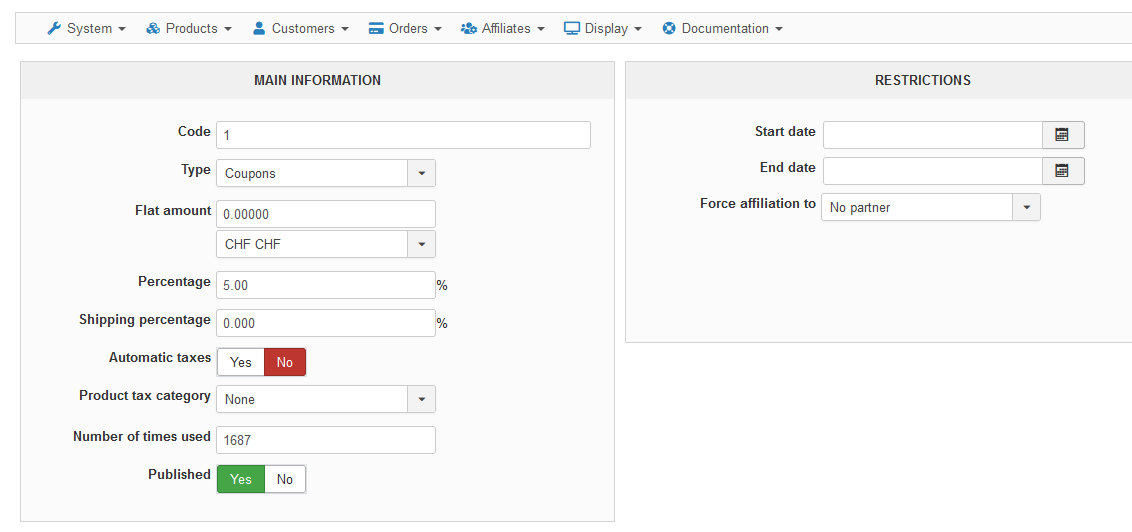
I go Orders > Coupons.
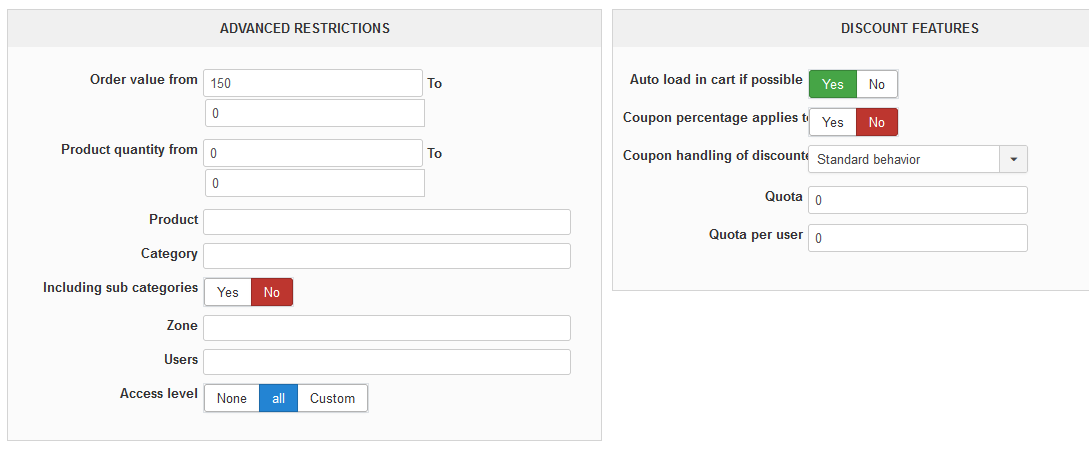
Here are the screenshots:
Thanks.
I don't use AWOcoupons.
I go Orders > Coupons.
Here are the screenshots:
Thanks.
Please Log in or Create an account to join the conversation.
4 years 11 months ago #337164
by nicolas
Replied by nicolas on topic Coupons: Auto load in cart if possible not working
Hi,
Thank you. I was able to reproduce the problem and found the issue in the code. I've added a patch on our end.
Download again the install package of HikaShop on our website and install it on yours and it will fix the problem.
Thank you. I was able to reproduce the problem and found the issue in the code. I've added a patch on our end.
Download again the install package of HikaShop on our website and install it on yours and it will fix the problem.
Please Log in or Create an account to join the conversation.
4 years 11 months ago - 4 years 11 months ago #337198
by pat01
Replied by pat01 on topic Coupons: Auto load in cart if possible not working
Hi
I installed the package and now the issue is solved.
Thanks a lot for your help.
I installed the package and now the issue is solved.
Thanks a lot for your help.
Last edit: 4 years 11 months ago by pat01.
Please Log in or Create an account to join the conversation.
4 years 3 weeks ago - 4 years 3 weeks ago #345713
by speru
Replied by speru on topic Coupons: Auto load in cart if possible not working
Hi Nicolas,
This appears to be not working again even after after updating to HikaShop Business: 4.6.2
Update: the coupon is loaded in the cart and applied as long as there is no value in the 'Product quantity from' field.
This appears to be not working again even after after updating to HikaShop Business: 4.6.2
Update: the coupon is loaded in the cart and applied as long as there is no value in the 'Product quantity from' field.
Last edit: 4 years 3 weeks ago by speru.
Please Log in or Create an account to join the conversation.
4 years 3 weeks ago #345721
by nicolas
Replied by nicolas on topic Coupons: Auto load in cart if possible not working
Hi,
Thank you for the details.
I've made a patch for that. Please download again the install package on our website and install it on yours and it should then work properly.
Note that when you want to use an auto loaded coupon, I would first recommend to turn of the auto load setting and make sure you're able to use the coupon code in the cart when the coupon should be auto loaded. And if that doesn't work, you should get an error message explaining which restriction is the problem. That way, you can check that it works like you want before activating the auto load on it.
Thank you for the details.
I've made a patch for that. Please download again the install package on our website and install it on yours and it should then work properly.
Note that when you want to use an auto loaded coupon, I would first recommend to turn of the auto load setting and make sure you're able to use the coupon code in the cart when the coupon should be auto loaded. And if that doesn't work, you should get an error message explaining which restriction is the problem. That way, you can check that it works like you want before activating the auto load on it.
Please Log in or Create an account to join the conversation.
Time to create page: 0.108 seconds