

- Posts: 44
- Thank you received: 5
Plugins: HikaShop - Discount Coutdown
2 years 9 months ago #358577
by decor
Plugins: HikaShop - Discount Coutdown was created by decor
-- HikaShop version -- : 5.0.3
-- Joomla version -- : 5.0.2
-- PHP version -- : 8.1
-- Browser(s) name and version -- : chrome
-- Error-message(debug-mod must be tuned on) -- : hi
i want edit or display : none
Limited time discount
hi
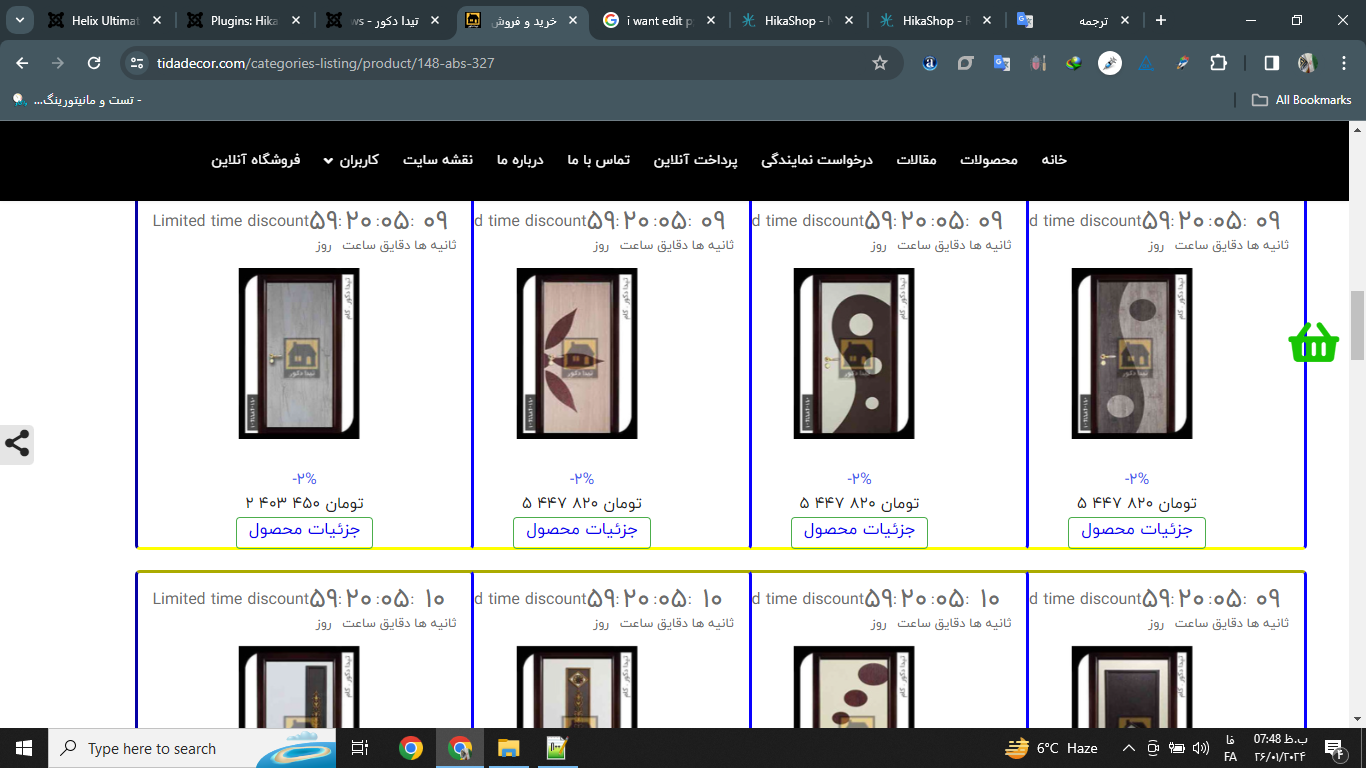
1 - When I use the plugin Plugins: HikaShop - Discount Coutdown
We want to change or delete the Limited time discount text
2 - When I use the plugin Plugins: HikaShop - Discount Coutdown
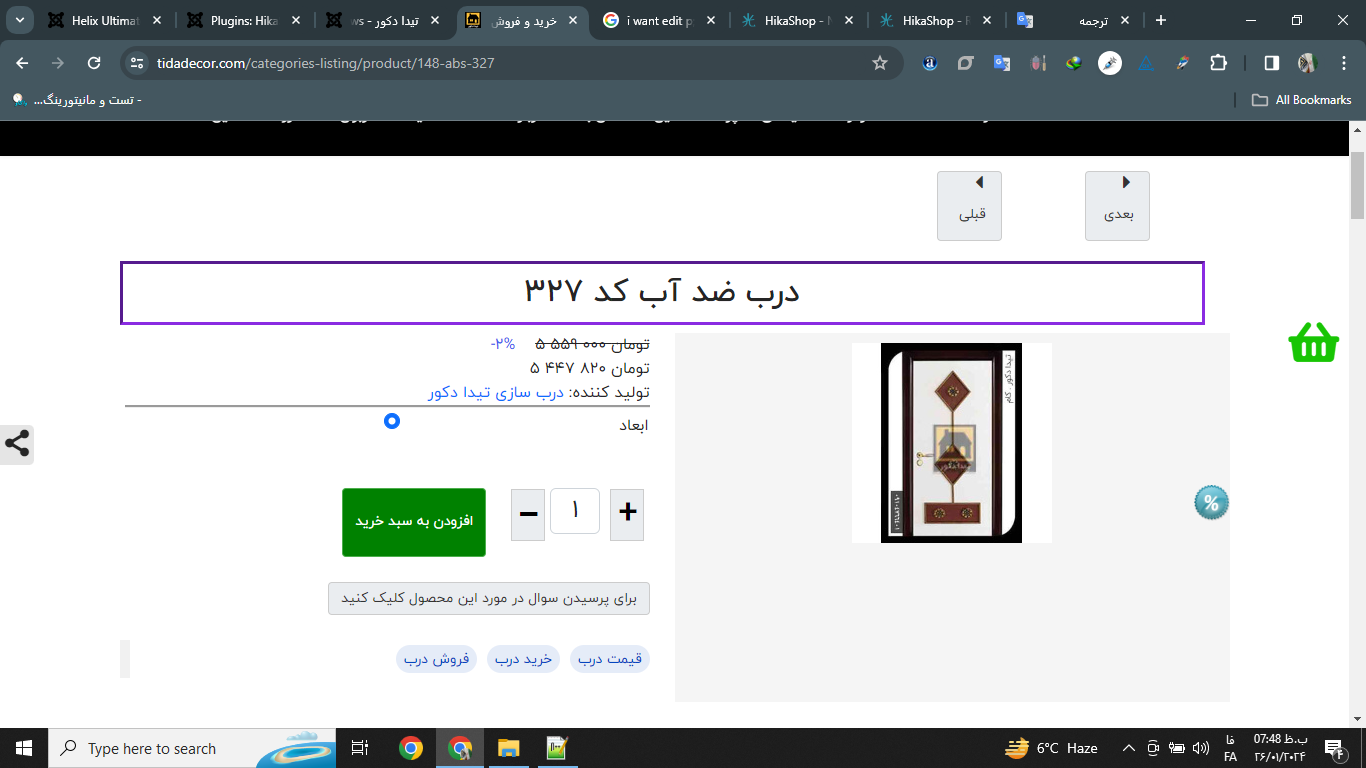
I can't display the time for the product itself, it only shows the time for the modules.
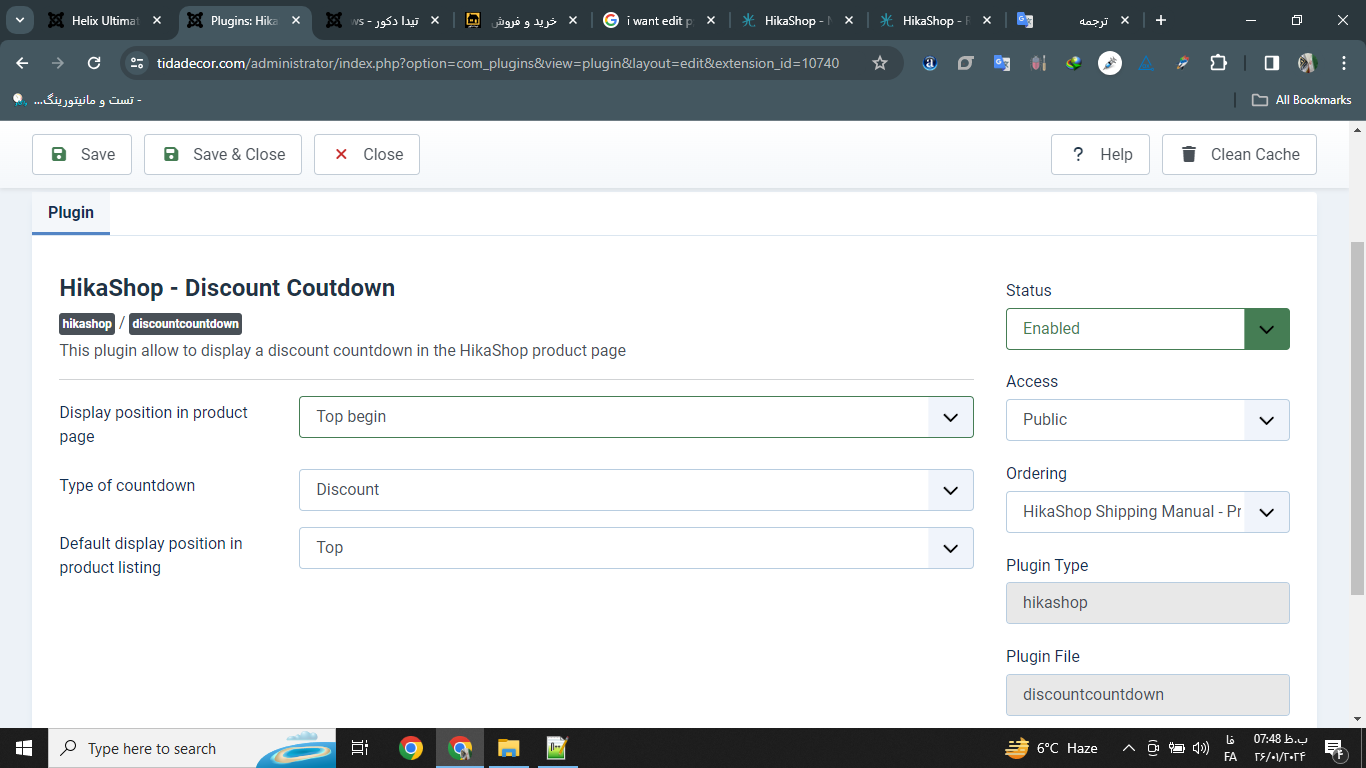
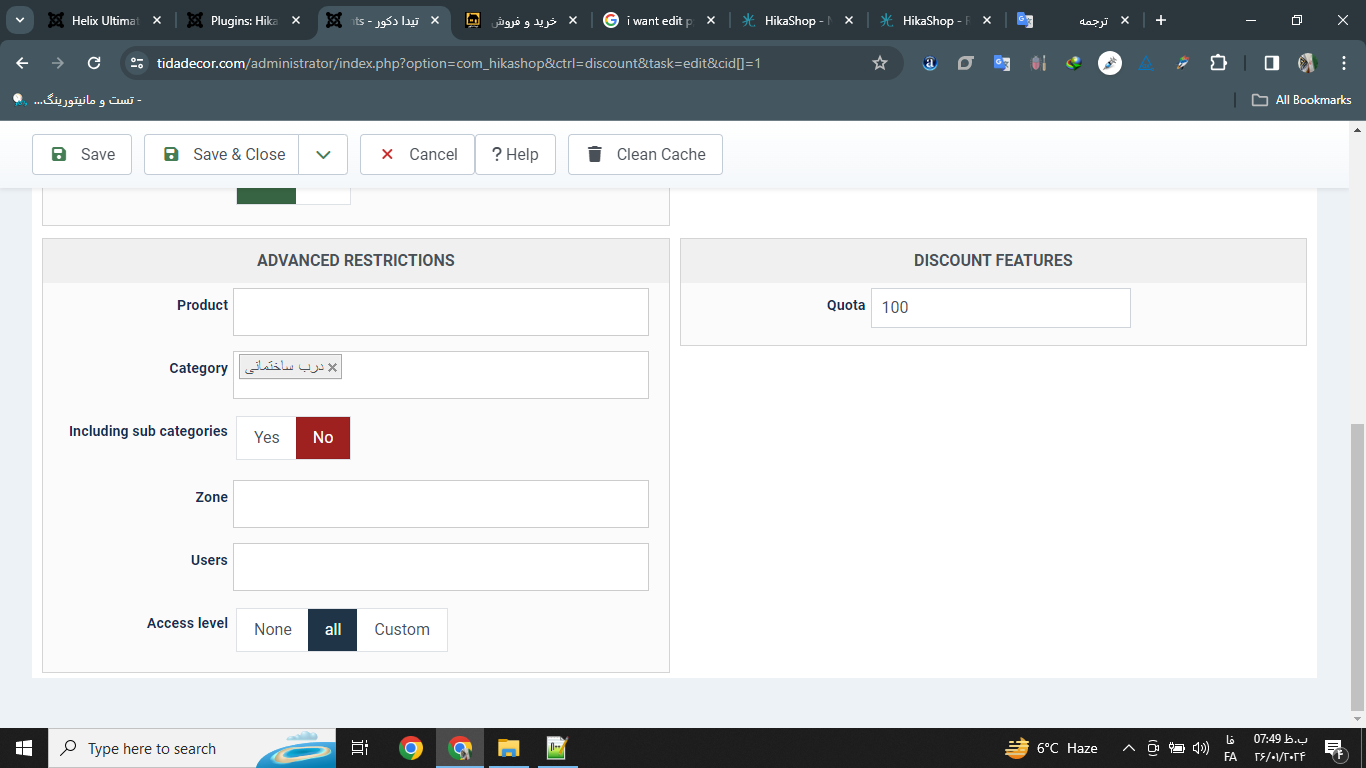
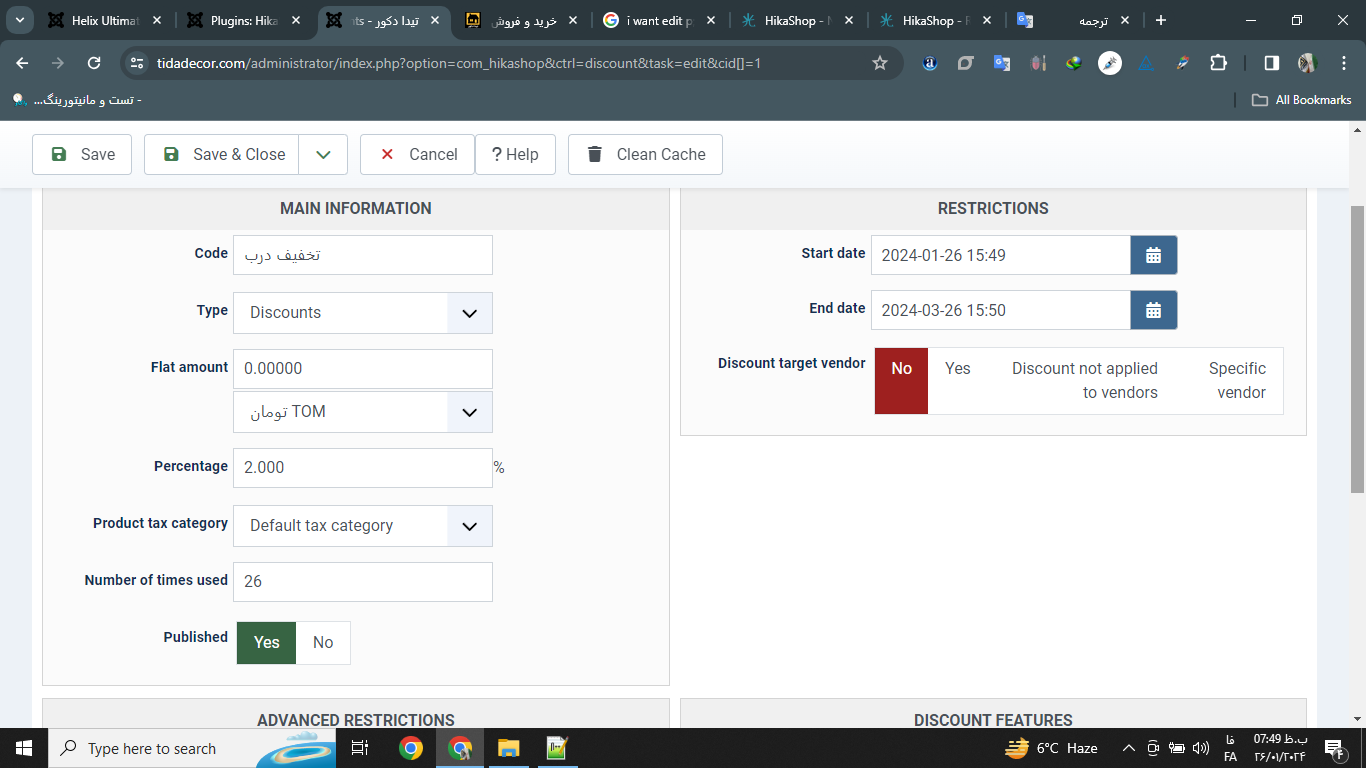
-- Joomla version -- : 5.0.2
-- PHP version -- : 8.1
-- Browser(s) name and version -- : chrome
-- Error-message(debug-mod must be tuned on) -- : hi
i want edit or display : none
Limited time discount
hi
1 - When I use the plugin Plugins: HikaShop - Discount Coutdown
We want to change or delete the Limited time discount text
2 - When I use the plugin Plugins: HikaShop - Discount Coutdown
I can't display the time for the product itself, it only shows the time for the modules.
Please Log in or Create an account to join the conversation.
2 years 9 months ago #358578
by decor
Replied by decor on topic Plugins: HikaShop - Discount Coutdown
hi nicolas
please help me !
please help me !
Please Log in or Create an account to join the conversation.
2 years 9 months ago #358579
by decor
Replied by decor on topic Plugins: HikaShop - Discount Coutdown
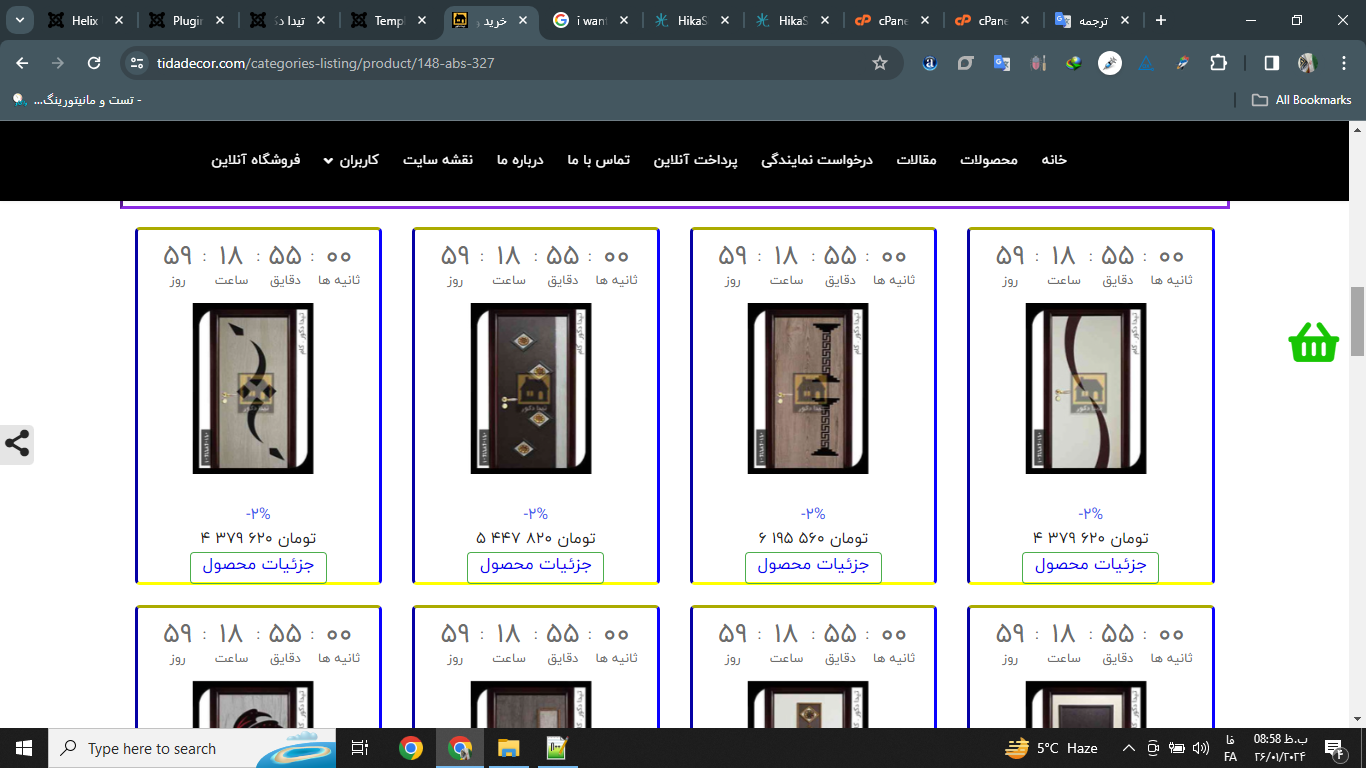
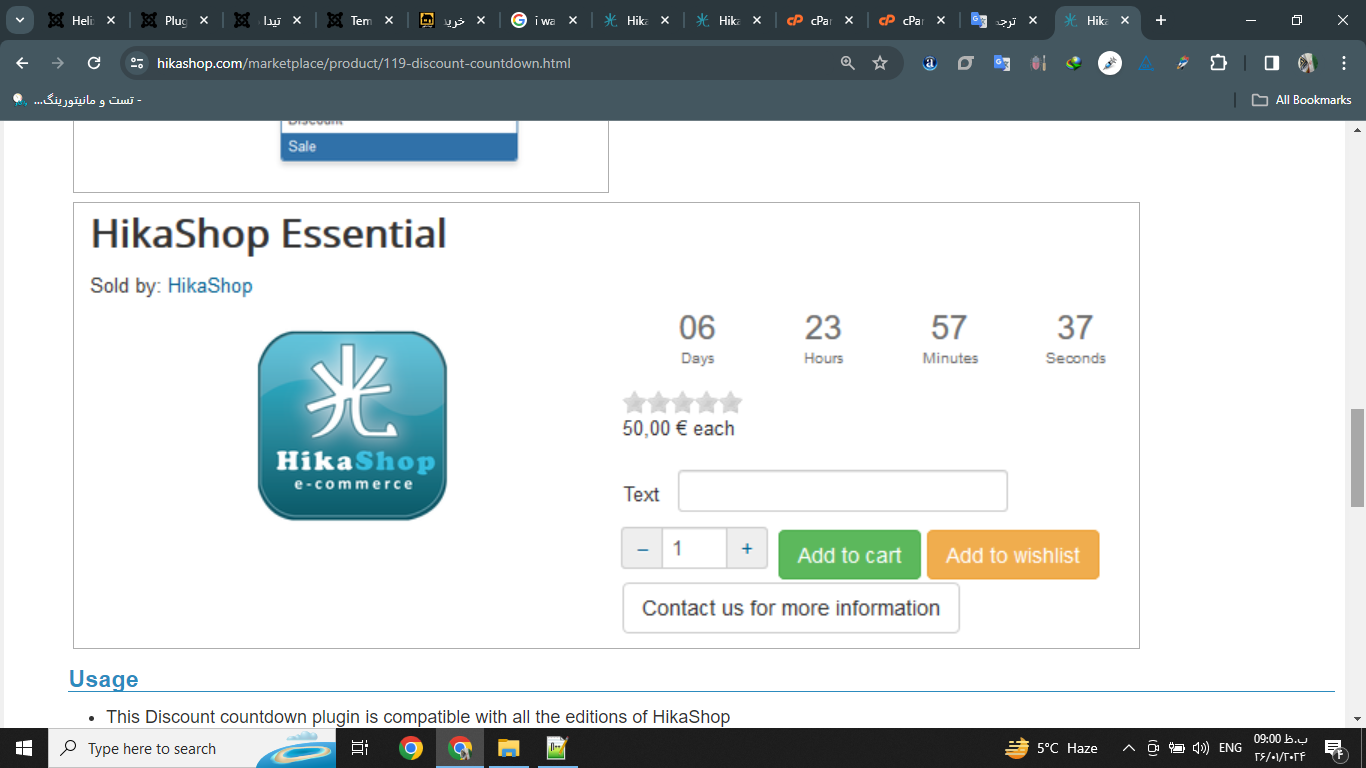
The first problem was solved
By clearing the browser memory
But it still does not display the timer product in its section
I want it to be displayed in the product description
By clearing the browser memory
But it still does not display the timer product in its section
I want it to be displayed in the product description
Please Log in or Create an account to join the conversation.

2 years 9 months ago #358588
by Jerome
Jerome - Obsidev.com
HikaMarket & HikaSerial developer / HikaShop core dev team.
Replied by Jerome on topic Plugins: HikaShop - Discount Coutdown
Hello,
Do you have some cache via a plugin or your template ?
Looking at the page source code, we can see the "top begin" section but there is no code in it.
So, it can be an issue related to cache or a page customization which affected the code for the discount countdown.
Regards,
Do you have some cache via a plugin or your template ?
Looking at the page source code, we can see the "top begin" section but there is no code in it.
So, it can be an issue related to cache or a page customization which affected the code for the discount countdown.
Regards,
Jerome - Obsidev.com
HikaMarket & HikaSerial developer / HikaShop core dev team.
Please Log in or Create an account to join the conversation.
2 years 9 months ago - 2 years 9 months ago #358600
by decor
Replied by decor on topic Plugins: HikaShop - Discount Coutdown
Hello
I cleared the browser cache for the site and administration, as well as the cPanel cache
I display any other module on the right or left side. Only this time plugin is not displayed.
Right and left position is enabled in my template
I cleared the browser cache for the site and administration, as well as the cPanel cache
I display any other module on the right or left side. Only this time plugin is not displayed.
Right and left position is enabled in my template
Last edit: 2 years 9 months ago by Jerome.
Please Log in or Create an account to join the conversation.
2 years 9 months ago #358604
by Jerome
Jerome - Obsidev.com
HikaMarket & HikaSerial developer / HikaShop core dev team.
Replied by Jerome on topic Plugins: HikaShop - Discount Coutdown
Hello,
Your issue is not related to "modules" in your Joomla template ; it's entirely in the HikaShop views.
The product page includes "sections" where some content can be added by plugins ; we need to be sure that these section are right available in your current views, check that you don't have a view override.
And of course your template or other plugins can provide caching system which will store the entire webpage HTML into the cache thus any modification of it won't change the final result ; such kind of issue can be tested by modifying the product description or the product name.
You can also test to use different "sections" in the countdown plugin ; but first you need to be sure that your HikaShop product page view right includes the code to display it for the targeted section.
Regards,
Your issue is not related to "modules" in your Joomla template ; it's entirely in the HikaShop views.
The product page includes "sections" where some content can be added by plugins ; we need to be sure that these section are right available in your current views, check that you don't have a view override.
And of course your template or other plugins can provide caching system which will store the entire webpage HTML into the cache thus any modification of it won't change the final result ; such kind of issue can be tested by modifying the product description or the product name.
You can also test to use different "sections" in the countdown plugin ; but first you need to be sure that your HikaShop product page view right includes the code to display it for the targeted section.
Regards,
Jerome - Obsidev.com
HikaMarket & HikaSerial developer / HikaShop core dev team.
Please Log in or Create an account to join the conversation.
2 years 9 months ago #358634
by decor
Replied by decor on topic Plugins: HikaShop - Discount Coutdown
Hello
The system cache has been cleared
I changed the name of the page and it changed
Which code should I check in which part of the products?
I just made changes to the show block login
exampel
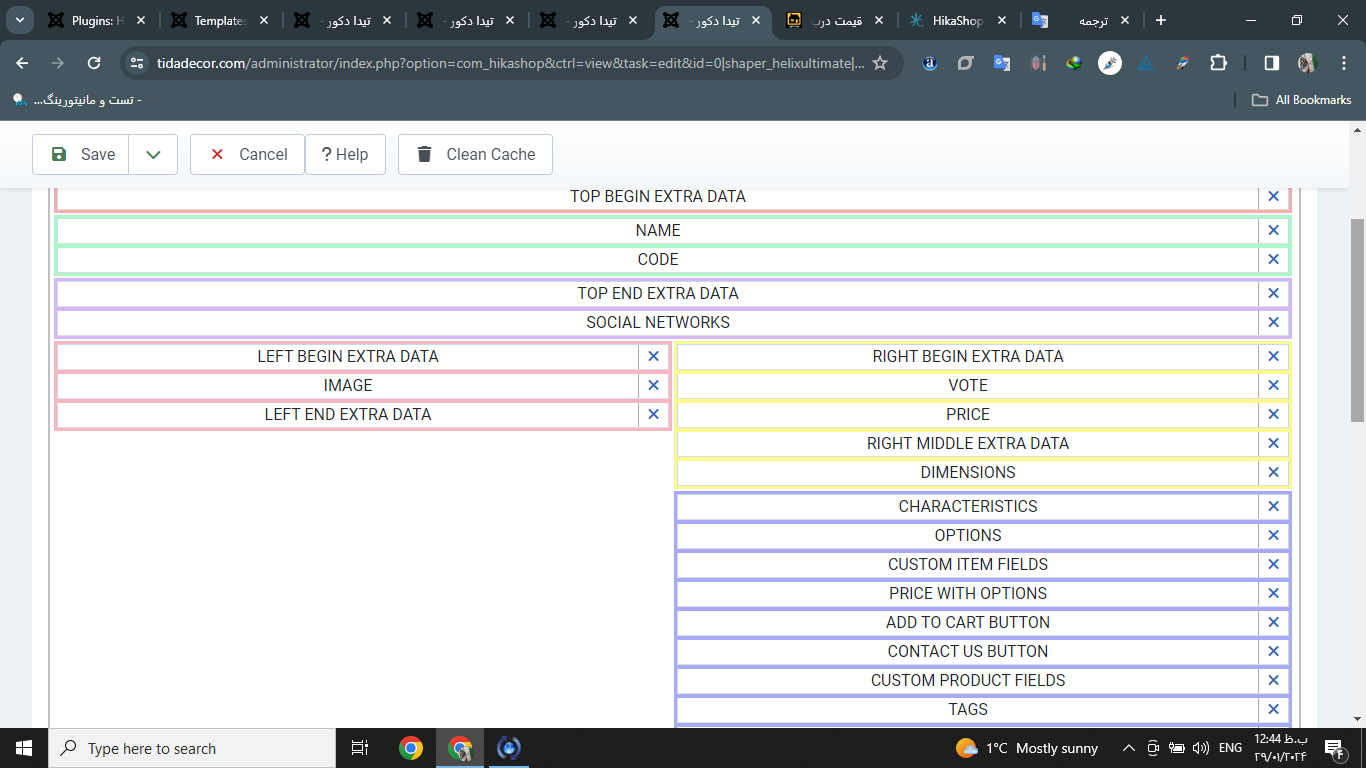
<!-- LEFT BEGIN EXTRA DATA -->
<?php if(!empty($this->element->extraData->leftBegin)) { echo implode("\r\n",$this->element->extraData->leftBegin); } ?>
<!-- EO LEFT BEGIN EXTRA DATA -->
The system cache has been cleared
I changed the name of the page and it changed
Which code should I check in which part of the products?
I just made changes to the show block login
exampel
<!-- LEFT BEGIN EXTRA DATA -->
<?php if(!empty($this->element->extraData->leftBegin)) { echo implode("\r\n",$this->element->extraData->leftBegin); } ?>
<!-- EO LEFT BEGIN EXTRA DATA -->
Please Log in or Create an account to join the conversation.
2 years 9 months ago #358650
by Jerome
Jerome - Obsidev.com
HikaMarket & HikaSerial developer / HikaShop core dev team.
Replied by Jerome on topic Plugins: HikaShop - Discount Coutdown
Hello,
Yes, that the right code for the view.
The code you copy/paste should display the discount countdown if configured to "left begin".
The plugin use the same code for the product page and the product listing ; so it is complicated to understand why it's working for the listing and not the product page.
Regards,
Yes, that the right code for the view.
The code you copy/paste should display the discount countdown if configured to "left begin".
The plugin use the same code for the product page and the product listing ; so it is complicated to understand why it's working for the listing and not the product page.
Regards,
Jerome - Obsidev.com
HikaMarket & HikaSerial developer / HikaShop core dev team.
Please Log in or Create an account to join the conversation.
2 years 9 months ago #358669
by decor
Replied by decor on topic Plugins: HikaShop - Discount Coutdown
hi
Is the plugin compatible with Joomla 5?
Or is there another way that we can display the countdown on the product page.
I really don't know where this problem comes from?
This error is on my dashboard page, is it possible that it is from it?
How many times have I checked the list of all active plugins, but I could not find this plugin and disable it?
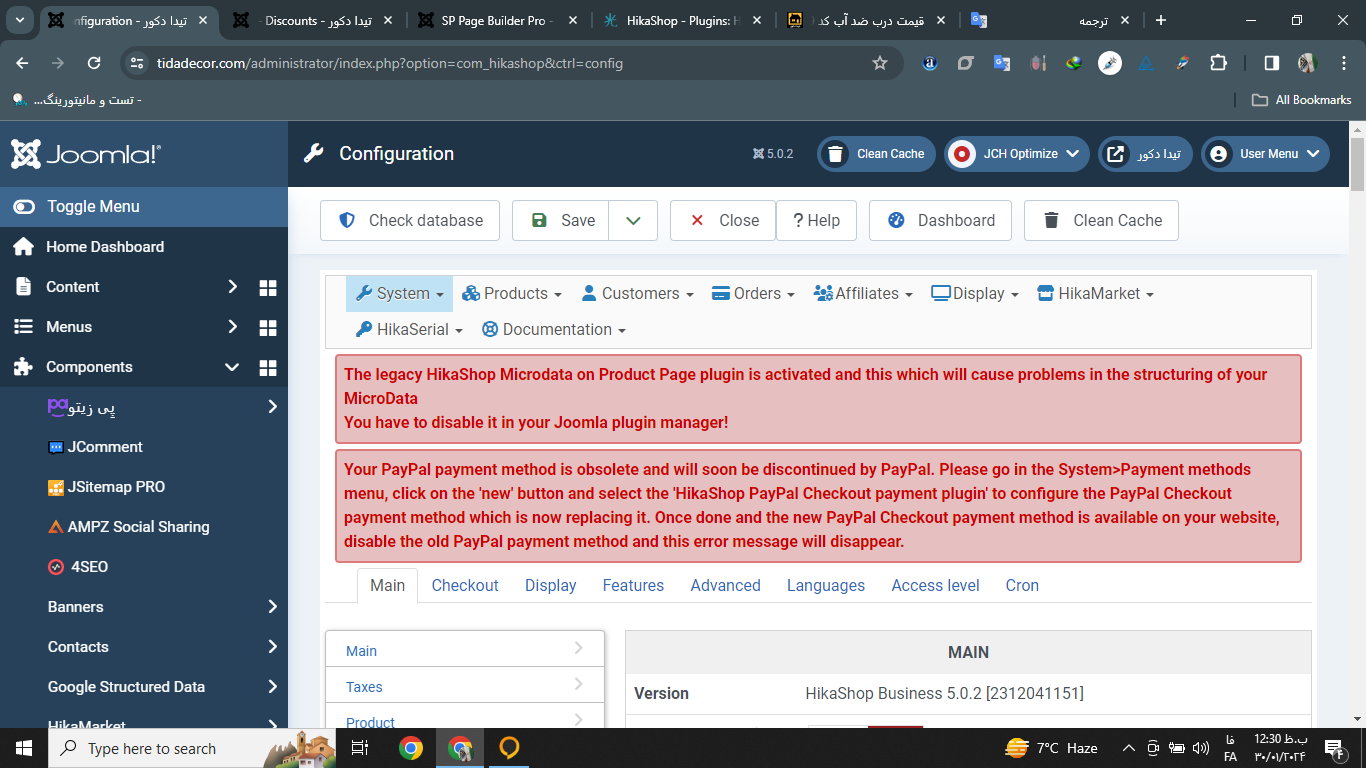
Is the plugin compatible with Joomla 5?
Or is there another way that we can display the countdown on the product page.
I really don't know where this problem comes from?
This error is on my dashboard page, is it possible that it is from it?
How many times have I checked the list of all active plugins, but I could not find this plugin and disable it?
Please Log in or Create an account to join the conversation.

2 years 9 months ago #358700
by nicolas
Replied by nicolas on topic Plugins: HikaShop - Discount Coutdown
Hi,
www.hikashop.com/support/contact-us.html
Yes, this plugin is compatible with Joomla 5.Is the plugin compatible with Joomla 5?
We're not sure either. It works on our end, and many other users, so there is definitely something on your website. Could you provide a website backend access in order to check the details ? If so, please go through our contact form to provide this:I really don't know where this problem comes from?
www.hikashop.com/support/contact-us.html
No, these error messages are not linked to the plugin not displaying on the product page.This error is on my dashboard page, is it possible that it is from it?
It should be a plugin of the group "system". Please provide screenshots of the listing pages of plugins in that group in your Joomla plugins manager and we should be able to help. Maybe the name is a bit different.How many times have I checked the list of all active plugins, but I could not find this plugin and disable it?
Please Log in or Create an account to join the conversation.
2 years 9 months ago #358714
by decor
Replied by decor on topic Plugins: HikaShop - Discount Coutdown
Hello
Yes, I will definitely give you access
thank you
Yes, I will definitely give you access
thank you
Please Log in or Create an account to join the conversation.
2 years 9 months ago #358718
by nicolas
Replied by nicolas on topic Plugins: HikaShop - Discount Coutdown
Hi,
Thanks for the access. I've checked your settings and I don't see why the countdown plugin doesn't display the countdown on the product details page. Could you provide a FTP access via our contact form so that we can check the situation deeper and do some debugging ?
Thanks for the access. I've checked your settings and I don't see why the countdown plugin doesn't display the countdown on the product details page. Could you provide a FTP access via our contact form so that we can check the situation deeper and do some debugging ?
Please Log in or Create an account to join the conversation.
2 years 9 months ago #358744
by decor
Replied by decor on topic Plugins: HikaShop - Discount Coutdown
Hello
I will definitely email you
alot thanks
I will definitely email you
alot thanks
Please Log in or Create an account to join the conversation.
2 years 9 months ago #358745
by decor
Replied by decor on topic Plugins: HikaShop - Discount Coutdown
Dear Nicholas, the FTP access has been emailed to you
Please Log in or Create an account to join the conversation.
2 years 9 months ago - 2 years 9 months ago #358812
by nicolas
Replied by nicolas on topic Plugins: HikaShop - Discount Coutdown
Hi,
Thanks for the access.
I looked into it and found the issue. It comes from the way you've configured your products.
You didn't set any price in the main product, and instead, you set the price in the variant.
Because of this, on the product page, the main product data doesn't have prices, and thus no discount, but the variant has the price and the discount.
Usually, merchants would set that in reverse to you and set the price in the main product, which would then be passed to the variant along with the discount.
And thus, the plugin only checks on the discount on the main product, ignoring the variant.
On listings, since we are only loading the products, when HikaShop doesn't find any price in a product, it will load the prices of the variants and then their discounts as its own ones and that's why it was working on the listings.
I've made a patch to the discount countdown plugin.
I basically changed the code:
to:
so that it can handle this situation too.
The plugin is now working on your website and we'll look at releasing a new version of the plugin soon.
Thanks for the access.
I looked into it and found the issue. It comes from the way you've configured your products.
You didn't set any price in the main product, and instead, you set the price in the variant.
Because of this, on the product page, the main product data doesn't have prices, and thus no discount, but the variant has the price and the discount.
Usually, merchants would set that in reverse to you and set the price in the main product, which would then be passed to the variant along with the discount.
And thus, the plugin only checks on the discount on the main product, ignoring the variant.
On listings, since we are only loading the products, when HikaShop doesn't find any price in a product, it will load the prices of the variants and then their discounts as its own ones and that's why it was working on the listings.
I've made a patch to the discount countdown plugin.
I basically changed the code:
Code:
if($display_type == 'discount' && empty($product->discount))
return;
Code:
if($display_type == 'discount' && empty($product->discount)) {
if(!empty($view->element->discount)) {
$product = $view->element;
} else {
return;
}
}
The plugin is now working on your website and we'll look at releasing a new version of the plugin soon.
Last edit: 2 years 9 months ago by Jerome. Reason: code indent
Please Log in or Create an account to join the conversation.
2 years 9 months ago #358820
by decor
Replied by decor on topic Plugins: HikaShop - Discount Coutdown
Hello
I am very happy to use the good Hikashop app
Thank you for your good support
Please put the deactivation option for Default display position in product listing in the plugin update
so that there is no need to hide it with CSS.
I will definitely help the Hikashop team with the translations (hika serial and hika vendor ) to thank you
I am very happy to use the good Hikashop app
Thank you for your good support
Please put the deactivation option for Default display position in product listing in the plugin update
so that there is no need to hide it with CSS.
I will definitely help the Hikashop team with the translations (hika serial and hika vendor ) to thank you
The following user(s) said Thank You: Jerome
Please Log in or Create an account to join the conversation.
2 years 8 months ago #359027
by decor
Replied by decor on topic Plugins: HikaShop - Discount Coutdown
hello
Hello, I want the countdown timer not to be displayed in the module section
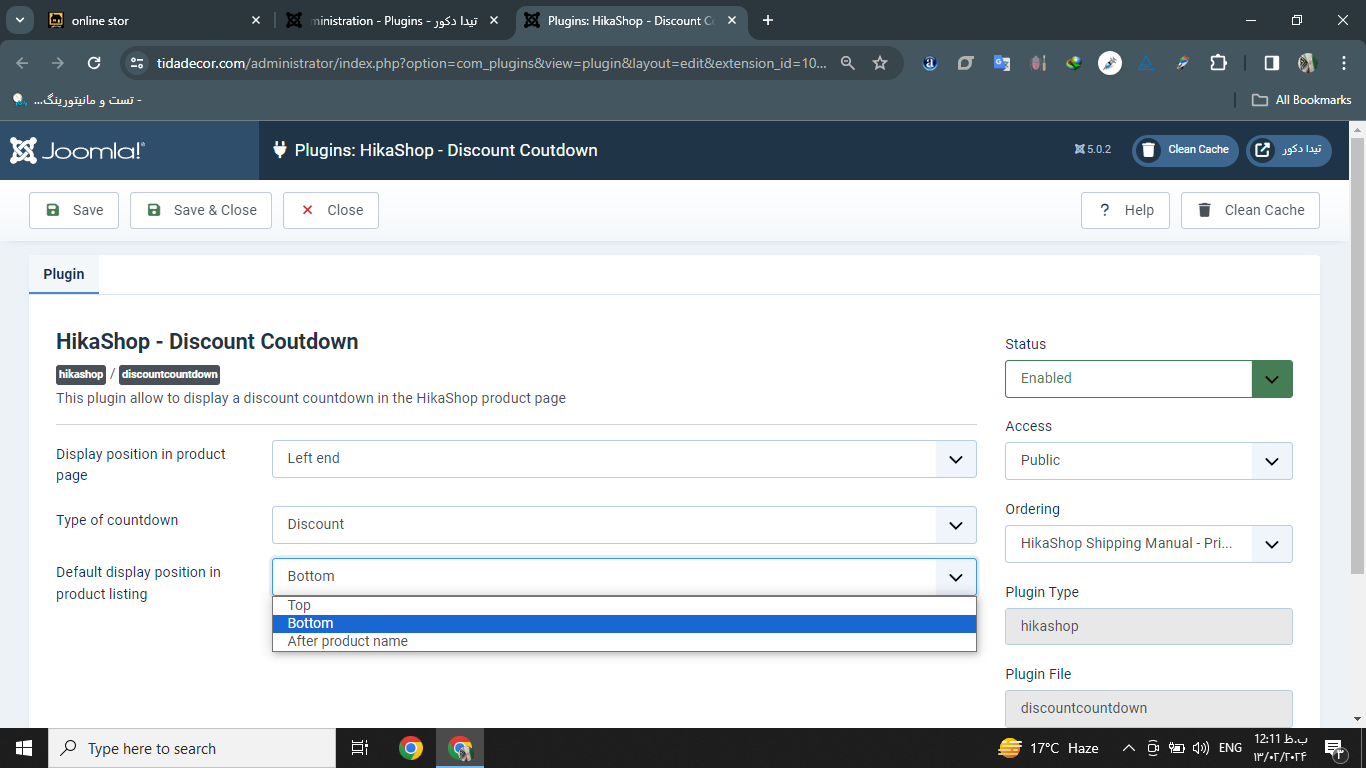
Hello, I want the countdown timer not to be displayed in the module section
Please Log in or Create an account to join the conversation.
2 years 8 months ago #359046
by Jerome
Jerome - Obsidev.com
HikaMarket & HikaSerial developer / HikaShop core dev team.
Replied by Jerome on topic Plugins: HikaShop - Discount Coutdown
Hello,
Please re-download the discount countdown plugin.
The feature was already in the plugin but the value was not available in the XML (for Joomla).
Regards,
Please re-download the discount countdown plugin.
The feature was already in the plugin but the value was not available in the XML (for Joomla).
Regards,
Jerome - Obsidev.com
HikaMarket & HikaSerial developer / HikaShop core dev team.
Please Log in or Create an account to join the conversation.
Time to create page: 0.114 seconds