

- Posts: 22
- Thank you received: 1
bouton retour dans le panier
14 years 6 months ago #47452
by fredpunch
bouton retour dans le panier was created by fredpunch
comment on fait lors du passage en caisse pour avoir un bouton retour en arrière
car si j'utilise la fonction retour de mon navigateur j'ai droit à une page blanche
merci d'avance.
car si j'utilise la fonction retour de mon navigateur j'ai droit à une page blanche
merci d'avance.
Please Log in or Create an account to join the conversation.

14 years 5 months ago #47592
by Xavier
Replied by Xavier on topic Re: bouton retour dans le panier
Bonjour fredpunch,
Vous pouvez ajouter un lien tel que celui-ci:
Avant:
Dans la vue: HikaShop > Display > Views, "checkout / step.php".
Vous pouvez ajouter un lien tel que celui-ci:
Code:
<input class="button" type="button" value="<?php echo JText::_('JERROR_LAYOUT_HOME_PAGE'); ?>" onClick="document.location='index.php';"/>
Code:
<?php
if($this->nextButton){
echo $this->cart->displayButton(JText::_('HIKA_NEXT'),'next',$this->params,hikashop_completeLink('checkout&task=step&step='.($this->step+1)),'if(hikashopCheckChangeForm(\'order\',\'hikashop_checkout_form\')){ if(hikashopCheckMethods()){ document.getElementById(\'hikashop_validate\').value=1; document.forms[\'hikashop_checkout_form\'].submit();}} return false;','id="hikashop_checkout_next_button"');
}
?>
Please Log in or Create an account to join the conversation.
14 years 5 months ago - 14 years 5 months ago #47834
by fredpunch
c'est presque ça mais j'aurai voulu que le un bouton soit marqué retour au lieux de page d'accueil ça fait bizarre
j'arrive pas à trouver dans la traduction où le changer.
merci d'avance.
merci d'avance.
Replied by fredpunch on topic Re: bouton retour dans le panier
Xavier wrote: Bonjour fredpunch,
Vous pouvez ajouter un lien tel que celui-ci:Avant:Code:<input class="button" type="button" value="<?php echo JText::_('JERROR_LAYOUT_HOME_PAGE'); ?>" onClick="document.location='index.php';"/>Dans la vue: HikaShop > Display > Views, "checkout / step.php".Code:<?php if($this->nextButton){ echo $this->cart->displayButton(JText::_('HIKA_NEXT'),'next',$this->params,hikashop_completeLink('checkout&task=step&step='.($this->step+1)),'if(hikashopCheckChangeForm(\'order\',\'hikashop_checkout_form\')){ if(hikashopCheckMethods()){ document.getElementById(\'hikashop_validate\').value=1; document.forms[\'hikashop_checkout_form\'].submit();}} return false;','id="hikashop_checkout_next_button"'); } ?>
c'est presque ça mais j'aurai voulu que le un bouton soit marqué retour au lieux de page d'accueil ça fait bizarre
j'arrive pas à trouver dans la traduction où le changer.
merci d'avance.
merci d'avance.
Last edit: 14 years 5 months ago by fredpunch.
Please Log in or Create an account to join the conversation.

14 years 5 months ago #47837
by nicolas
Replied by nicolas on topic Re: bouton retour dans le panier
Il suffit de changer :
JText::_('HIKA_NEXT')
par:
'Retour'
JText::_('HIKA_NEXT')
par:
'Retour'
The following user(s) said Thank You: fredpunch
Please Log in or Create an account to join the conversation.
14 years 5 months ago #47842
by fredpunch
dans <input class="button" type="button" value="<?php echo JText::_('JERROR_LAYOUT_HOME_PAGE'); ?>" onClick="document.location='index.php';"/>
car c'est cette ligne qui me faut le bouton retour
Replied by fredpunch on topic Re: bouton retour dans le panier
je vois pas oùnicolas wrote: Il suffit de changer :
JText::_('HIKA_NEXT')
par:
'Retour'
dans <input class="button" type="button" value="<?php echo JText::_('JERROR_LAYOUT_HOME_PAGE'); ?>" onClick="document.location='index.php';"/>
car c'est cette ligne qui me faut le bouton retour
Please Log in or Create an account to join the conversation.
14 years 5 months ago #47843
by nicolas
Replied by nicolas on topic Re: bouton retour dans le panier
Dans le code posté par Xavier.
The following user(s) said Thank You: fredpunch
Please Log in or Create an account to join the conversation.
14 years 5 months ago - 14 years 5 months ago #47846
by fredpunch
Replied by fredpunch on topic Re: bouton retour dans le panier
je me demande si j'arrive à me faire comprendre j'aimerai remplacer le titre du nouveau bouton créé par xavier
regarder la capture :
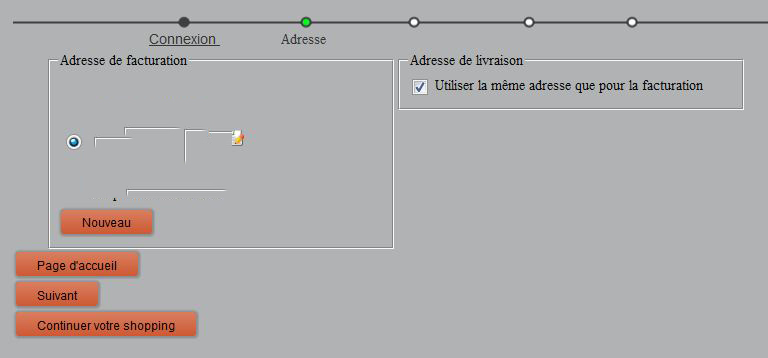
merci d'avance.
car pour le moment il me marque pour l'instant page d'accueil et non retourVous pouvez ajouter un lien tel que celui-ci:
<input class="button" type="button" value="<?php echo JText::_('JERROR_LAYOUT_HOME_PAGE'); ?>" onClick="document.location='index.php';"/>
regarder la capture :
merci d'avance.
Last edit: 14 years 5 months ago by fredpunch.
Please Log in or Create an account to join the conversation.
14 years 5 months ago #47876
by fredpunch
Replied by fredpunch on topic Re: bouton retour dans le panier
ok merci je viens de comprendre
je suis dur de la feuille en ce moment
merci pour tout
je suis dur de la feuille en ce moment
merci pour tout
Please Log in or Create an account to join the conversation.
Time to create page: 0.151 seconds