
- Posts: 162
- Thank you received: 0
Option to delete images for Ajax image custom field
- info@vesica.org
-
 Topic Author
- Offline
Less
More
8 years 5 months ago - 8 years 5 months ago #293170
by info@vesica.org
Hi,
We use the Ajax image custom field and I've noticed that once I upload the image to the "safe" folder and I want to replace it, the old image is remaining on the server inside the folder.
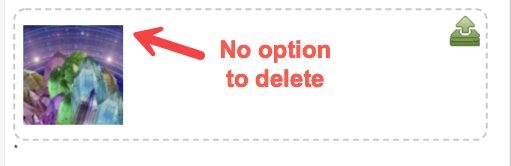
Without a delete option this folder can become huge in time, especially when there are hundred or thousands of images.
Deletion of old images on the server level is OK for techie people, but for regular users this is hard and confusing.
Please consider adding a small delete icon like on products pages or deletion when uploading a new image.
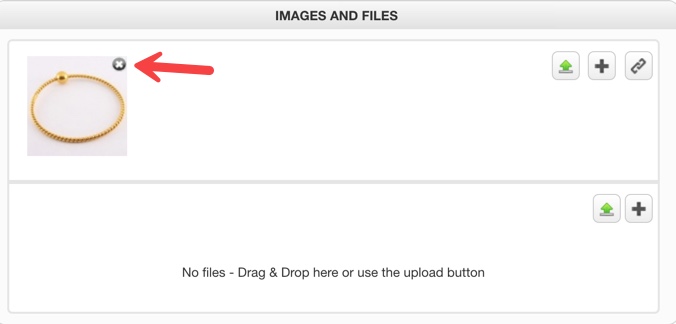
thanks!
We use the Ajax image custom field and I've noticed that once I upload the image to the "safe" folder and I want to replace it, the old image is remaining on the server inside the folder.
Without a delete option this folder can become huge in time, especially when there are hundred or thousands of images.
Deletion of old images on the server level is OK for techie people, but for regular users this is hard and confusing.
Please consider adding a small delete icon like on products pages or deletion when uploading a new image.
thanks!
Last edit: 8 years 5 months ago by info@vesica.org.
Please Log in or Create an account to join the conversation.

8 years 5 months ago #293175
by nicolas
Replied by nicolas on topic Option to delete images for Ajax image custom field
Hi,
In some cases, it doesn't make sense to be able to delete the image. And in some cases, it's not possible. And even if we do, that won't solve the problem of the upload folder growing.
For custom fields of the tables item, order, entry or contact, I would say that it makes more sense to delete the files after a certain time.
So in that case, a setting to select the number of days to keep the files in the custom field would be more appropriate in my opinion.
What kind of custom field are you talking about ?
In some cases, it doesn't make sense to be able to delete the image. And in some cases, it's not possible. And even if we do, that won't solve the problem of the upload folder growing.
For custom fields of the tables item, order, entry or contact, I would say that it makes more sense to delete the files after a certain time.
So in that case, a setting to select the number of days to keep the files in the custom field would be more appropriate in my opinion.
What kind of custom field are you talking about ?
Please Log in or Create an account to join the conversation.
- info@vesica.org
-
Topic Author
- Offline
Less
More
- Posts: 162
- Thank you received: 0
8 years 5 months ago - 8 years 5 months ago #293315
by info@vesica.org
Replied by info@vesica.org on topic Option to delete images for Ajax image custom field
Hi Nicolas,
I use the Ajax Image custom field.
I think probably I didn't made myself clear enough. Let me explain:
1. For example I decide that I want to replace the image file with a smaller or a better optimized one because I've changed the layout, I want the old image gone and replaced by the new one. There is no point in keeping the old image at the server level and wasting server space for a file that it will no longer be used.
2. Sometimes people make mistakes when uploading an image and they need it replaced, or decide that the older image doesn't look good and they need a new one in place, captured from another angle.
I recommend adding this option to all custom fields that upload files to server.
For our team this option is a must since we change products images frequently.
Many users probably are not developers and are not aware that files are retained on the server level and maybe this is why you probably don't get requests for this feature.
Please let me know if it makes sense now?
thanks!
I use the Ajax Image custom field.
I think probably I didn't made myself clear enough. Let me explain:
1. For example I decide that I want to replace the image file with a smaller or a better optimized one because I've changed the layout, I want the old image gone and replaced by the new one. There is no point in keeping the old image at the server level and wasting server space for a file that it will no longer be used.
2. Sometimes people make mistakes when uploading an image and they need it replaced, or decide that the older image doesn't look good and they need a new one in place, captured from another angle.
I recommend adding this option to all custom fields that upload files to server.
For our team this option is a must since we change products images frequently.
Many users probably are not developers and are not aware that files are retained on the server level and maybe this is why you probably don't get requests for this feature.
Please let me know if it makes sense now?
thanks!
Last edit: 8 years 5 months ago by info@vesica.org.
Please Log in or Create an account to join the conversation.
8 years 5 months ago #293341
by nicolas
Replied by nicolas on topic Option to delete images for Ajax image custom field
Hi,
Ok. So you actually don't want a delete icon for the image on the custom fields. What you want is that the old image is deleted automatically when a new one is uploaded in the field. That indeed makes sense.
There is actually no need for an option for that. It could be done all the time.
It's just an optimization we didn't make so far.
Ok. So you actually don't want a delete icon for the image on the custom fields. What you want is that the old image is deleted automatically when a new one is uploaded in the field. That indeed makes sense.
There is actually no need for an option for that. It could be done all the time.
It's just an optimization we didn't make so far.
Please Log in or Create an account to join the conversation.
- info@vesica.org
-
Topic Author
- Offline
Less
More
- Posts: 162
- Thank you received: 0
8 years 5 months ago #293349
by info@vesica.org
thanks!
Replied by info@vesica.org on topic Option to delete images for Ajax image custom field
An icon will be good, but not necessary.nicolas wrote: So you actually don't want a delete icon for the image on the custom fields.
Yes, this is what I mean.nicolas wrote: What you want is that the old image is deleted automatically when a new one is uploaded in the field. That indeed makes sense.
Sorry, I do not undertstand? The code is in Hikashop but not yet supported on custom fields?nicolas wrote: There is actually no need for an option for that. It could be done all the time.
Please let me know do you plan on making the optimization? If yes, when do you think it will be available?nicolas wrote: It's just an optimization we didn't make so far.
thanks!
Please Log in or Create an account to join the conversation.
8 years 5 months ago #293358
by nicolas
Replied by nicolas on topic Option to delete images for Ajax image custom field
Hi,
No, the code is not in HikaShop. What I mean is that when we add the code to handle that, we won't need to add an option as it should always be on.
It would be great to add that optimization.
However, I've had a look at the code and what we can do, and I discussed the issue with Jerome, and it's really hard to handle that properly. With a relatively simple code change, we could add it, but then it would be possible for an attacker to delete any other uploaded file in the upload folder, not only the ones he already uploaded. So it would require adding some kind of information to know which file is from who. With for example, sub folders, or session data. That will require rewritting a lot of code of the uploader, so it's not that easy to add.
We'll add it on the todo list but I don't think we'll tackle that soon.
I'd rather we work on the RGPD with Joomla 3.9 and prepare for Joomla 4.
No, the code is not in HikaShop. What I mean is that when we add the code to handle that, we won't need to add an option as it should always be on.
It would be great to add that optimization.
However, I've had a look at the code and what we can do, and I discussed the issue with Jerome, and it's really hard to handle that properly. With a relatively simple code change, we could add it, but then it would be possible for an attacker to delete any other uploaded file in the upload folder, not only the ones he already uploaded. So it would require adding some kind of information to know which file is from who. With for example, sub folders, or session data. That will require rewritting a lot of code of the uploader, so it's not that easy to add.
We'll add it on the todo list but I don't think we'll tackle that soon.
I'd rather we work on the RGPD with Joomla 3.9 and prepare for Joomla 4.
Please Log in or Create an account to join the conversation.
- info@vesica.org
-
Topic Author
- Offline
Less
More
- Posts: 162
- Thank you received: 0
8 years 5 months ago #293417
by info@vesica.org
Replied by info@vesica.org on topic Option to delete images for Ajax image custom field
Hi Nicolas,
OK. I understand.
Yeah, better to handle GDPR and Joomla 4. Maybe when upgrading the new version to Joomla 4 you can add this feature also.
thanks!
OK. I understand.
Yeah, better to handle GDPR and Joomla 4. Maybe when upgrading the new version to Joomla 4 you can add this feature also.
thanks!
Please Log in or Create an account to join the conversation.
Time to create page: 0.071 seconds