
- Posts: 42
- Thank you received: 1
Bidding email notifications
- info@flashpoint.net.au
-
 Topic Author
- Offline
Less
More
7 years 6 months ago #305719
by info@flashpoint.net.au
Bidding email notifications was created by info@flashpoint.net.au
-- url of the page with the problem -- :
www.roady4roadies.com/online-auction/red...hilli-peppers-guitar
-- HikaShop version -- : 4.0.3
-- HikaAuction version -- : 3.0.0
-- Joomla version -- : 3.9.4.
-- PHP version -- : 7.2
How do I set up email notifications whenever a bid is made?
-- HikaShop version -- : 4.0.3
-- HikaAuction version -- : 3.0.0
-- Joomla version -- : 3.9.4.
-- PHP version -- : 7.2
How do I set up email notifications whenever a bid is made?
Please Log in or Create an account to join the conversation.

Less
More
- Posts: 12953
- Thank you received: 1778
7 years 6 months ago #305725
by Mohamed Thelji
Replied by Mohamed Thelji on topic Bidding email notifications
Hello,
Making sure the "HikaAuction : Auction outbid notification" email is published via "Hikashop->System->Configuration->Emails" should do the job.
Kind regards,
Mohamed Thelji.
Making sure the "HikaAuction : Auction outbid notification" email is published via "Hikashop->System->Configuration->Emails" should do the job.
Kind regards,
Mohamed Thelji.
Please Log in or Create an account to join the conversation.
- info@flashpoint.net.au
-
Topic Author
- Offline
Less
More
- Posts: 42
- Thank you received: 1
7 years 6 months ago #305744
by info@flashpoint.net.au
Replied by info@flashpoint.net.au on topic Bidding email notifications
Hi Mohamed,
I don't appear to have that option!
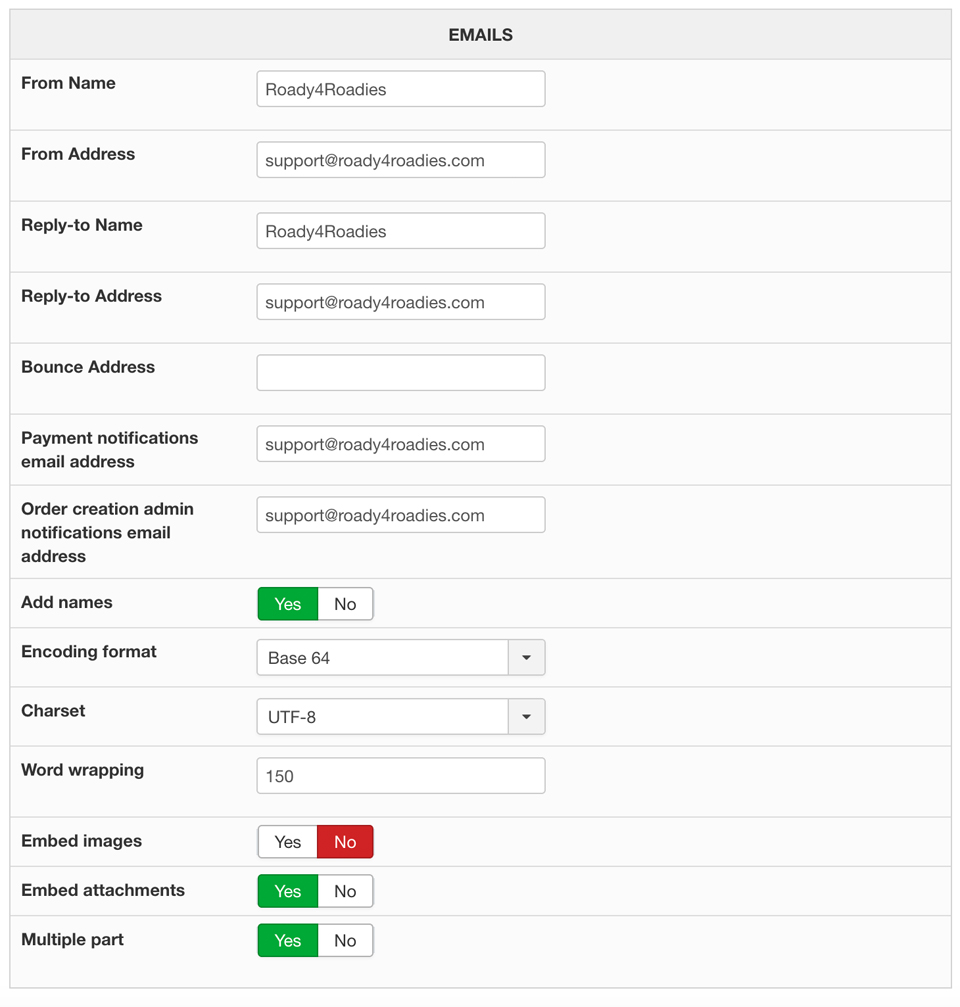
I don't appear to have that option!
Please Log in or Create an account to join the conversation.
Less
More
- Posts: 12953
- Thank you received: 1778
7 years 6 months ago #305755
by Mohamed Thelji
Replied by Mohamed Thelji on topic Bidding email notifications
Hello,
You checked the wrong page, you went through the "Hikashop->System->Configuration->Main" page. For more information about Hikashop emails : www.hikashop.com/support/26global-informations.html
Kind regards,
Mohamed Thelji.
You checked the wrong page, you went through the "Hikashop->System->Configuration->Main" page. For more information about Hikashop emails : www.hikashop.com/support/26global-informations.html
Kind regards,
Mohamed Thelji.
Please Log in or Create an account to join the conversation.
- info@flashpoint.net.au
-
Topic Author
- Offline
Less
More
- Posts: 42
- Thank you received: 1
7 years 6 months ago #305771
by info@flashpoint.net.au
Replied by info@flashpoint.net.au on topic Bidding email notifications
Hi Mohamed,
Your instructions clearly stated: Making sure the "HikaAuction : Auction outbid notification" email is published via "Hikashop->System->Configuration->Emails" should do the job.
I have since gone to Hikashop->System->Emails and enabled all HikaAuction email notifications, however I am not receiving them. I have tried placing a bid, changing the auction item price and cancelling an auction and have not received notifications for any of them!
Thank you.
Your instructions clearly stated: Making sure the "HikaAuction : Auction outbid notification" email is published via "Hikashop->System->Configuration->Emails" should do the job.
I have since gone to Hikashop->System->Emails and enabled all HikaAuction email notifications, however I am not receiving them. I have tried placing a bid, changing the auction item price and cancelling an auction and have not received notifications for any of them!
Thank you.
Please Log in or Create an account to join the conversation.
Less
More
- Posts: 12953
- Thank you received: 1778
7 years 6 months ago #305786
by Mohamed Thelji
Replied by Mohamed Thelji on topic Bidding email notifications
Hello,
In that case we'll directly test it on our testing environment, and find out from where that issue is coming.
Kind regards,
Mohamed Thelji
Your instructions clearly stated: Making sure the "HikaAuction : Auction outbid notification" email is published via "Hikashop->System->Configuration->Emails" should do the job.
I have since gone to Hikashop->System->Emails and enabled all HikaAuction email notifications, however I am not receiving them. I have tried placing a bid, changing the auction item price and cancelling an auction and have not received notifications for any of them!
In that case we'll directly test it on our testing environment, and find out from where that issue is coming.
Kind regards,
Mohamed Thelji
Please Log in or Create an account to join the conversation.
- info@flashpoint.net.au
-
Topic Author
- Offline
Less
More
- Posts: 42
- Thank you received: 1
7 years 6 months ago #305794
by info@flashpoint.net.au
Replied by info@flashpoint.net.au on topic Bidding email notifications
Thanks Mohamed,
I shall wait for your reply.
Regards,
Tony
I shall wait for your reply.
Regards,
Tony
Please Log in or Create an account to join the conversation.
Less
More
- Posts: 12953
- Thank you received: 1778
7 years 6 months ago #305816
by Mohamed Thelji
Replied by Mohamed Thelji on topic Bidding email notifications
Hello Tony,
We just tested it on our end and it worked fine, I think your issue is coming from the fact that your cron wasn't triggered as HikaAuction emails are sent every time HikaShop's cron is triggered.
You can configured and trigger it via "Hikashop->System->Configuration->Cron".
Kind regards,
Mohamed Thelji.
We just tested it on our end and it worked fine, I think your issue is coming from the fact that your cron wasn't triggered as HikaAuction emails are sent every time HikaShop's cron is triggered.
You can configured and trigger it via "Hikashop->System->Configuration->Cron".
Kind regards,
Mohamed Thelji.
Please Log in or Create an account to join the conversation.
- info@flashpoint.net.au
-
Topic Author
- Offline
Less
More
- Posts: 42
- Thank you received: 1
7 years 6 months ago - 7 years 6 months ago #305860
by info@flashpoint.net.au
Replied by info@flashpoint.net.au on topic Bidding email notifications
Hi Mohamed,
I cannot find any reference to a Cron under "Hikashop->System->Configuration->Cron". I have searched under every option:
Main
Checkout
Display
Features
Advanced
Languages
Are you are referring to creating a "Mass Action"?
Can you please advise how I can create a cron and trigger an email to be sent to me every time a new bid is placed with HikaAuction.
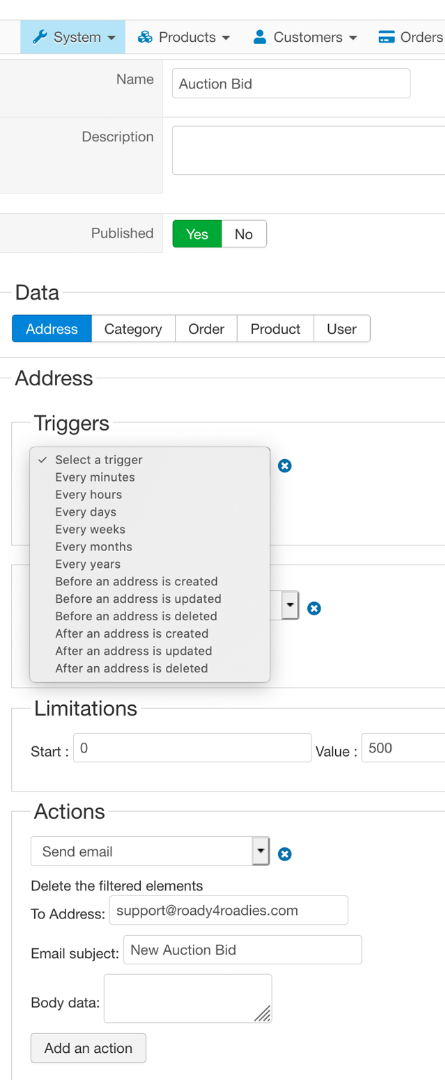
I cannot find any reference to a Cron under "Hikashop->System->Configuration->Cron". I have searched under every option:
Main
Checkout
Display
Features
Advanced
Languages
Are you are referring to creating a "Mass Action"?
Can you please advise how I can create a cron and trigger an email to be sent to me every time a new bid is placed with HikaAuction.
Last edit: 7 years 6 months ago by info@flashpoint.net.au.
Please Log in or Create an account to join the conversation.
Less
More
- Posts: 12953
- Thank you received: 1778
7 years 6 months ago #305875
by Mohamed Thelji
Replied by Mohamed Thelji on topic Bidding email notifications
Hello,
No I'm referring to Hikashop's cron.
HikaAuction emails are "stacked" and sent every time Hikashop's cron is triggered. If you have issues with your cron, then checking that page will probably help you :
www.hikashop.com/support/documentation/5...cron-task.html#check
If your cron is correctly working, then your issue can be coming from your email server, can you check if these emails are sent via "Hikashop->Customers->Emails" ? Thank you.
Kind regards,
Mohamed Thelji.
Are you are referring to creating a "Mass Action"?
No I'm referring to Hikashop's cron.
Can you please advise how I can create a cron and trigger an email to be sent to me every time a new bid is placed with HikaAuction.
HikaAuction emails are "stacked" and sent every time Hikashop's cron is triggered. If you have issues with your cron, then checking that page will probably help you :
www.hikashop.com/support/documentation/5...cron-task.html#check
If your cron is correctly working, then your issue can be coming from your email server, can you check if these emails are sent via "Hikashop->Customers->Emails" ? Thank you.
Kind regards,
Mohamed Thelji.
Please Log in or Create an account to join the conversation.
- info@flashpoint.net.au
-
Topic Author
- Offline
Less
More
- Posts: 42
- Thank you received: 1
7 years 6 months ago - 7 years 6 months ago #305908
by info@flashpoint.net.au
Replied by info@flashpoint.net.au on topic Bidding email notifications
I am using the free version of HikaShop. I paid for HikaAuction believing it would be fully functional as described in you documentation. Is this not the case? I can see no other reason why I cannot get email notifications sent when an item is sold or a new bid is made!
I just "won" a (test) auction and have not received any notification that I am the winner???
I would have also expected to be directed to my HikaShop shopping cart to make payment! Does HikaAuction allow you to pay for an item won using the HikaShop cart and payment plugin?
I just "won" a (test) auction and have not received any notification that I am the winner???
I would have also expected to be directed to my HikaShop shopping cart to make payment! Does HikaAuction allow you to pay for an item won using the HikaShop cart and payment plugin?
Last edit: 7 years 6 months ago by info@flashpoint.net.au.
Please Log in or Create an account to join the conversation.
Less
More
- Posts: 12953
- Thank you received: 1778
7 years 6 months ago #305913
by Mohamed Thelji
Replied by Mohamed Thelji on topic Bidding email notifications
Hello,
It's coming from the fact that HikaAuction depends on Hikashop's cron which isn't triggered as you're using a Free version of HikaAuction.
We're actually working on the development of an HikaAuction cron for the next HikaAuction version, so that it won't depends on the Hikashop Cron.
If you can wait for the next HikaAuction version it will be a good solution, else using a commercial version of HikaShop will do the job.
Sure, a link will be sent to the winner so that he can be redirected to Hikashop's checkout with the auction's product and with the correct winning price.
But emails actually can't be sent without HikaShop's cron, that's why we're working on an HikaAuction cron.
We're sorry for the inconvenience it may have caused, so we'll try to develop that feature as soon as possible.
Kind regards,
Mohamed Thelji.
I just "won" a (test) auction and have not received any notification that I am the winner???
It's coming from the fact that HikaAuction depends on Hikashop's cron which isn't triggered as you're using a Free version of HikaAuction.
We're actually working on the development of an HikaAuction cron for the next HikaAuction version, so that it won't depends on the Hikashop Cron.
If you can wait for the next HikaAuction version it will be a good solution, else using a commercial version of HikaShop will do the job.
I would have also expected to be directed to my HikaShop shopping cart to make payment! Does HikaAuction allow you to pay for an item won using the HikaShop cart and payment plugin?
Sure, a link will be sent to the winner so that he can be redirected to Hikashop's checkout with the auction's product and with the correct winning price.
But emails actually can't be sent without HikaShop's cron, that's why we're working on an HikaAuction cron.
We're sorry for the inconvenience it may have caused, so we'll try to develop that feature as soon as possible.
Kind regards,
Mohamed Thelji.
Please Log in or Create an account to join the conversation.
- info@flashpoint.net.au
-
Topic Author
- Offline
Less
More
- Posts: 42
- Thank you received: 1
7 years 5 months ago #305992
by info@flashpoint.net.au
Replied by info@flashpoint.net.au on topic Bidding email notifications
Hi Mohamed,
The auction is due to end in 6 days and I must have the email notifications set up to be sent to the winners and allow them to make payment. I doubt the new version of HikaAuction will be ready before then?? If I have to purchase a commercial version of HikShop simply to be able to achieve this, perhaps you might be able to offer some discount in light of the fact your website stated HikaAuction is fully functional with all versions of HikShop. I am doing this voluntarily on behalf of a charity...
www.roady4roadies.com
The auction is due to end in 6 days and I must have the email notifications set up to be sent to the winners and allow them to make payment. I doubt the new version of HikaAuction will be ready before then?? If I have to purchase a commercial version of HikShop simply to be able to achieve this, perhaps you might be able to offer some discount in light of the fact your website stated HikaAuction is fully functional with all versions of HikShop. I am doing this voluntarily on behalf of a charity...
www.roady4roadies.com
Please Log in or Create an account to join the conversation.
Less
More
- Posts: 12953
- Thank you received: 1778
7 years 5 months ago #306002
by Mohamed Thelji
Replied by Mohamed Thelji on topic Bidding email notifications
Hello,
The new version is actually ready with an HikaAuction Cron system.
You'll just have to download the last HikaAuction version through our website, and set up a CRON like it's explained in Hikashop's documentation, but with the HikaAuction's Cron URL that you can find via "HikaAuction->Configuratinon" :
www.hikashop.com/support/documentation/5...-cron-task.html#cron
Kind regards,
Mohamed Thelji
The auction is due to end in 6 days and I must have the email notifications set up to be sent to the winners and allow them to make payment. I doubt the new version of HikaAuction will be ready before then??
The new version is actually ready with an HikaAuction Cron system.
You'll just have to download the last HikaAuction version through our website, and set up a CRON like it's explained in Hikashop's documentation, but with the HikaAuction's Cron URL that you can find via "HikaAuction->Configuratinon" :
www.hikashop.com/support/documentation/5...-cron-task.html#cron
Kind regards,
Mohamed Thelji
Please Log in or Create an account to join the conversation.
- info@flashpoint.net.au
-
Topic Author
- Offline
Less
More
- Posts: 42
- Thank you received: 1
7 years 5 months ago #306055
by info@flashpoint.net.au
Replied by info@flashpoint.net.au on topic Bidding email notifications
Hi Mohamed,
I have installed the new version of HikaAuction, and can see the link to the cron task:
www.roady4roadies.com/index.php?option=c...ron&task=executeCron
The link simply goes to a blank page of my template.!
Do I still need a commercial version of HikaShop to set the cron parameters as explained in the documentation? There is no cron tab under HikaAuction > Configuration.
I have installed the new version of HikaAuction, and can see the link to the cron task:
www.roady4roadies.com/index.php?option=c...ron&task=executeCron
The link simply goes to a blank page of my template.!
Do I still need a commercial version of HikaShop to set the cron parameters as explained in the documentation? There is no cron tab under HikaAuction > Configuration.
Please Log in or Create an account to join the conversation.
Less
More
- Posts: 12953
- Thank you received: 1778
7 years 5 months ago - 7 years 5 months ago #306060
by Mohamed Thelji
Replied by Mohamed Thelji on topic Bidding email notifications
Hello,
That page isn't supposed to display anything but Cron system messages as it's only supposed to be called repeatedly by your server and not your customers.
As you can see through the screenshot I attached, the "Auction Roady4roadies 2019..." was validated and emails were sent. you can now check the last emails that were sent via "Hikashop->Customers->Emails".
Kind regards,
Mohamed.
That page isn't supposed to display anything but Cron system messages as it's only supposed to be called repeatedly by your server and not your customers.
As you can see through the screenshot I attached, the "Auction Roady4roadies 2019..." was validated and emails were sent. you can now check the last emails that were sent via "Hikashop->Customers->Emails".
Kind regards,
Mohamed.
Last edit: 7 years 5 months ago by Mohamed Thelji.
Please Log in or Create an account to join the conversation.
Moderators: Mohamed Thelji
Time to create page: 0.288 seconds