

- Posts: 46
- Thank you received: 2
cancel_auction view
6 years 4 months ago #320791
by jenbain
cancel_auction view was created by jenbain
-- HikaShop version -- : 4.3.0
-- HikaAuction version -- : 3.0.1 Business
-- Joomla version -- : 3.9.8 Stable
-- PHP version -- : 7.2.1
-- Browser(s) name and version -- : Chrome 83.0.4103.97
Hi sorry to pester you, but I am going around in circles and hope you can please help.
The functions of the HikaAuction is all working as expected.
The issue I have at present is when you click on the 'Give up bid' button it opens up the cancel_auction view which is fine; however mine is opening to a page with all modules showing on it.
I have gone through the modules and made sure they were not available to auction menu pages, but this is having no effect on the cancel_auction view, all the modules are still showing.
I am sure this is something simple and I have missed a step somewhere, but the where is alluding me at present. Any help would be greatly appreciated.
Kind regards
Jennifer
-- HikaAuction version -- : 3.0.1 Business
-- Joomla version -- : 3.9.8 Stable
-- PHP version -- : 7.2.1
-- Browser(s) name and version -- : Chrome 83.0.4103.97
Hi sorry to pester you, but I am going around in circles and hope you can please help.
The functions of the HikaAuction is all working as expected.
The issue I have at present is when you click on the 'Give up bid' button it opens up the cancel_auction view which is fine; however mine is opening to a page with all modules showing on it.
I have gone through the modules and made sure they were not available to auction menu pages, but this is having no effect on the cancel_auction view, all the modules are still showing.
I am sure this is something simple and I have missed a step somewhere, but the where is alluding me at present. Any help would be greatly appreciated.
Kind regards
Jennifer
Please Log in or Create an account to join the conversation.

Less
More
- Posts: 12953
- Thank you received: 1778
6 years 4 months ago #320805
by Mohamed Thelji
Replied by Mohamed Thelji on topic cancel_auction view
Hello Jennifer,
Can you give us more information about the issue you are having through some screenshots for example and the link in which you are having it so that we can properly reproduce it on our end ? Thank you
Kind regards,
Mohamed.
Can you give us more information about the issue you are having through some screenshots for example and the link in which you are having it so that we can properly reproduce it on our end ? Thank you
Kind regards,
Mohamed.
Please Log in or Create an account to join the conversation.
6 years 4 months ago - 6 years 4 months ago #321390
by jenbain
Replied by jenbain on topic cancel_auction view
Hi Mohamed,
I am currently working offline. Sorry I didn't explain this very well. I will try again.
User >wins bid>receives email>clicks to go to checkout > so far this is all good
User clicks on Give up Bid button > This goes to the page that gives the following response:
"You correctly cancelled your bid regarding the product : Testing Auction 5."
It is that page that comes up but doesn't seem to be using Menu for Auctions settings as instead of the Module Assignments that shouldn't be there they are all showing. The link on that page is:
index.php/component/hikaauction/?ctrl=auction&task=cancel_auction&product_id I didn't add the product code here
So what I am after, is where or what menu would be handling this page so I can change it to use the Auction Menu.
Hope that makes sense, thanks Mohamed
Kind regards
Jennifer
I am currently working offline. Sorry I didn't explain this very well. I will try again.
User >wins bid>receives email>clicks to go to checkout > so far this is all good
User clicks on Give up Bid button > This goes to the page that gives the following response:
"You correctly cancelled your bid regarding the product : Testing Auction 5."
It is that page that comes up but doesn't seem to be using Menu for Auctions settings as instead of the Module Assignments that shouldn't be there they are all showing. The link on that page is:
index.php/component/hikaauction/?ctrl=auction&task=cancel_auction&product_id I didn't add the product code here
So what I am after, is where or what menu would be handling this page so I can change it to use the Auction Menu.
Hope that makes sense, thanks Mohamed
Kind regards
Jennifer
Last edit: 6 years 4 months ago by jenbain.
Please Log in or Create an account to join the conversation.
Less
More
- Posts: 12953
- Thank you received: 1778
6 years 4 months ago #321452
by Mohamed Thelji
Replied by Mohamed Thelji on topic cancel_auction view
Hello Jennifer,
Can you send us a temporary access to your back-end so that I can directly test it on your website, and understand how to adapt these HikaAuction views ? Thank you.
You can send it through our contact form by specifying a link to that page in your message :
www.hikashop.com/support/contact-us.html
Kind regards,
Mohamed.
Can you send us a temporary access to your back-end so that I can directly test it on your website, and understand how to adapt these HikaAuction views ? Thank you.
You can send it through our contact form by specifying a link to that page in your message :
www.hikashop.com/support/contact-us.html
Kind regards,
Mohamed.
Please Log in or Create an account to join the conversation.
6 years 3 months ago #321748
by jenbain
Replied by jenbain on topic cancel_auction view
Hi Mohamed,
The site is offline with the auction in it so I can't give you access.
I will try to give you as much as I can here to help:
The Auction Menu that I am using is:
* Hikashop default Menu that is generated called Auction.
I added the CSS for the page called auctions.
So far, as I said in my email below, every thing is working as expected and the auction page is working as well with the expected styles, but when you click on the button in the Checkout page to Give Up Bid it brings you to the page:
index.php/component/hikaauction/?ctrl=auction&task=cancel_auction&product_id=[i didn't copy the product id section here]
When that page comes back it doesn't pick up the auctions style, so all of the Modules that I have used are all showing on the page.
I just want to know how I get that ' cancel_auction' page above to attach to the Hikashop Default Auctions menu so it fixes the module and style problem.
Hope that is enough for you to help. I have added the Hikashop Default Menu screenshot
Thanks for your time.
Kind regards
Jennifer
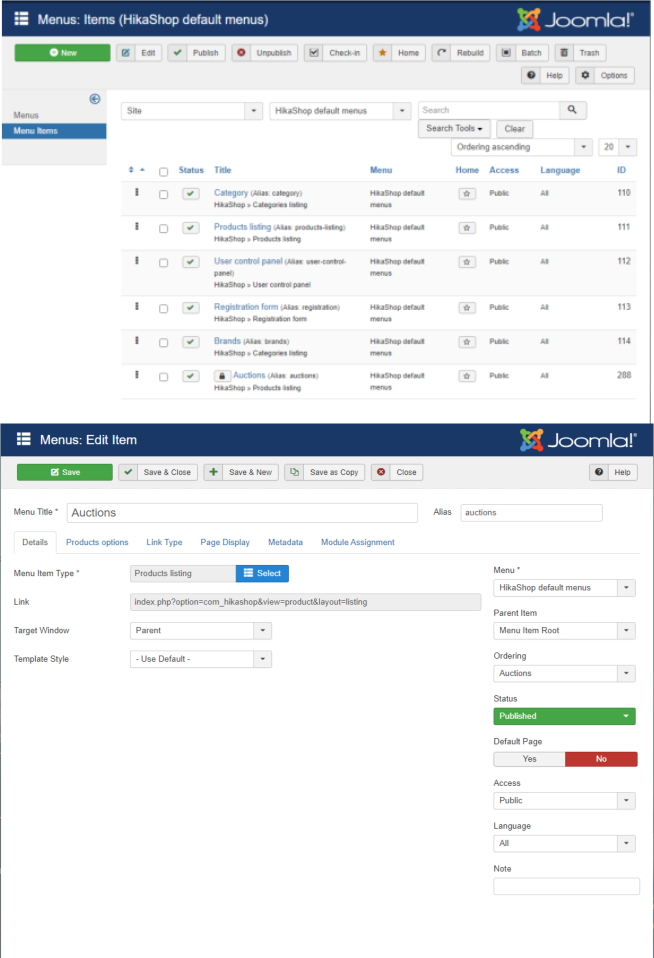
The site is offline with the auction in it so I can't give you access.
I will try to give you as much as I can here to help:
The Auction Menu that I am using is:
* Hikashop default Menu that is generated called Auction.
I added the CSS for the page called auctions.
So far, as I said in my email below, every thing is working as expected and the auction page is working as well with the expected styles, but when you click on the button in the Checkout page to Give Up Bid it brings you to the page:
index.php/component/hikaauction/?ctrl=auction&task=cancel_auction&product_id=[i didn't copy the product id section here]
When that page comes back it doesn't pick up the auctions style, so all of the Modules that I have used are all showing on the page.
I just want to know how I get that ' cancel_auction' page above to attach to the Hikashop Default Auctions menu so it fixes the module and style problem.
Hope that is enough for you to help. I have added the Hikashop Default Menu screenshot
Thanks for your time.
Kind regards
Jennifer
Please Log in or Create an account to join the conversation.
Less
More
- Posts: 12953
- Thank you received: 1778
6 years 3 months ago #321773
by Mohamed Thelji
Replied by Mohamed Thelji on topic cancel_auction view
Hello Jennifer,
You're right there is no HikaAuction menu to properly control the displaying of modules, so we'll create HikaAuction menus as soon as possible to prevent that.
A quick solution can also be to use that kind of module :
www.regularlabs.com/extensions/modulesanywhere
Kind regards,
Mohamed.
You're right there is no HikaAuction menu to properly control the displaying of modules, so we'll create HikaAuction menus as soon as possible to prevent that.
A quick solution can also be to use that kind of module :
www.regularlabs.com/extensions/modulesanywhere
Kind regards,
Mohamed.
Please Log in or Create an account to join the conversation.
6 years 3 months ago - 6 years 3 months ago #321793
by jenbain
Replied by jenbain on topic cancel_auction view
Hi Mohamed,
Thanks for getting back to me, glad that you have found it is an issue.
Thanks for the link, but I don't have a problem with Module placement and everything works great in Hikashop and HikaAuction except for this current problem
Do you know how long before this issue might be fixed?
Thanks for your help
Kind regards
Jennifer
Thanks for getting back to me, glad that you have found it is an issue.
Thanks for the link, but I don't have a problem with Module placement and everything works great in Hikashop and HikaAuction except for this current problem
Do you know how long before this issue might be fixed?
Thanks for your help
Kind regards
Jennifer
Last edit: 6 years 3 months ago by jenbain.
Please Log in or Create an account to join the conversation.
Less
More
- Posts: 12953
- Thank you received: 1778
6 years 3 months ago #321799
by Mohamed Thelji
Replied by Mohamed Thelji on topic cancel_auction view
Hello Jennifer,
Of course, and that was thanks to your useful feedback !
Kind regards,
Mohamed.
Thanks for getting back to me, glad that you have found it is an issue.
Of course, and that was thanks to your useful feedback !
We are currently working on several other points so we won't be able to give you a fix ETA but we'll do our best to make it quick !Do you know how long before this issue might be fixed?
Kind regards,
Mohamed.
Please Log in or Create an account to join the conversation.
6 years 3 months ago #321833
by jenbain
Replied by jenbain on topic cancel_auction view
Hi Mohamed,
Thank you, I look forward to the fix
Kind regards
Jennifer
Thank you, I look forward to the fix
Kind regards
Jennifer
Please Log in or Create an account to join the conversation.
6 years 3 months ago #321909
by jenbain
Replied by jenbain on topic cancel_auction view
Hi again Mohamed,
Sorry to pester, but is their any way I can add CSS directly to the cancel_auction View page?
Just temporary, until you have the fix made for the Menu
Thanks again for your time
Kind regards
Jennifer
Sorry to pester, but is their any way I can add CSS directly to the cancel_auction View page?
Just temporary, until you have the fix made for the Menu
Thanks again for your time
Kind regards
Jennifer
Please Log in or Create an account to join the conversation.
Less
More
- Posts: 12953
- Thank you received: 1778
6 years 3 months ago #321942
by Mohamed Thelji
Replied by Mohamed Thelji on topic cancel_auction view
Hello Jennifer,
Of course, you can directly do it via "Hikashop->Display->Views" by editing the file "cancel_auction" of the "auctionauction" view of your front-end template.
Kind regards,
Mohamed
Of course, you can directly do it via "Hikashop->Display->Views" by editing the file "cancel_auction" of the "auctionauction" view of your front-end template.
Kind regards,
Mohamed
Please Log in or Create an account to join the conversation.
6 years 3 months ago - 6 years 3 months ago #322022
by jenbain
Replied by jenbain on topic cancel_auction view
Hi Mohamed,
While I have been testing, I have come across another page that gets the same result as the cancel_auction page we talked about above. . Will try to explain clearly.
After doing the above and getting to the cancel_auction page, if the user clicks the link in the email for a second time after cancelling the bid, they are bought to this page:
/index.php/component/hikashop/order
With an error warning that says:
Error
HikaAuction Payment error : You don't have access to that page
which again, has all the modules showing and is not picking up on the Auction default menu settings.
I gather this must be coming from the same place as the cancel_auction is so that is why the result is the same.
Anyway, this was just for your info, for the eventual fix.
Thanks
Kind regards
Jennifer
While I have been testing, I have come across another page that gets the same result as the cancel_auction page we talked about above. . Will try to explain clearly.
After doing the above and getting to the cancel_auction page, if the user clicks the link in the email for a second time after cancelling the bid, they are bought to this page:
/index.php/component/hikashop/order
With an error warning that says:
Error
HikaAuction Payment error : You don't have access to that page
which again, has all the modules showing and is not picking up on the Auction default menu settings.
I gather this must be coming from the same place as the cancel_auction is so that is why the result is the same.
Anyway, this was just for your info, for the eventual fix.
Thanks
Kind regards
Jennifer
Last edit: 6 years 3 months ago by jenbain.
Please Log in or Create an account to join the conversation.
Less
More
- Posts: 12953
- Thank you received: 1778
6 years 3 months ago #322033
by Mohamed Thelji
Replied by Mohamed Thelji on topic cancel_auction view
Hello Jennifer,
Thank you for your feedback !
Note that you can also set the "Use hikashop checkout" option to YES through "HikaAuction->System->Configuration" and configure your Auction checkout workflow which should fix all of your issue.
Kind regards,
Mohamed.
Thank you for your feedback !
Note that you can also set the "Use hikashop checkout" option to YES through "HikaAuction->System->Configuration" and configure your Auction checkout workflow which should fix all of your issue.
Kind regards,
Mohamed.
Please Log in or Create an account to join the conversation.
6 years 3 months ago #322058
by jenbain
Replied by jenbain on topic cancel_auction view
Hi Mohamed
That has always been checked during this problem.
Kind regards
Jennifer
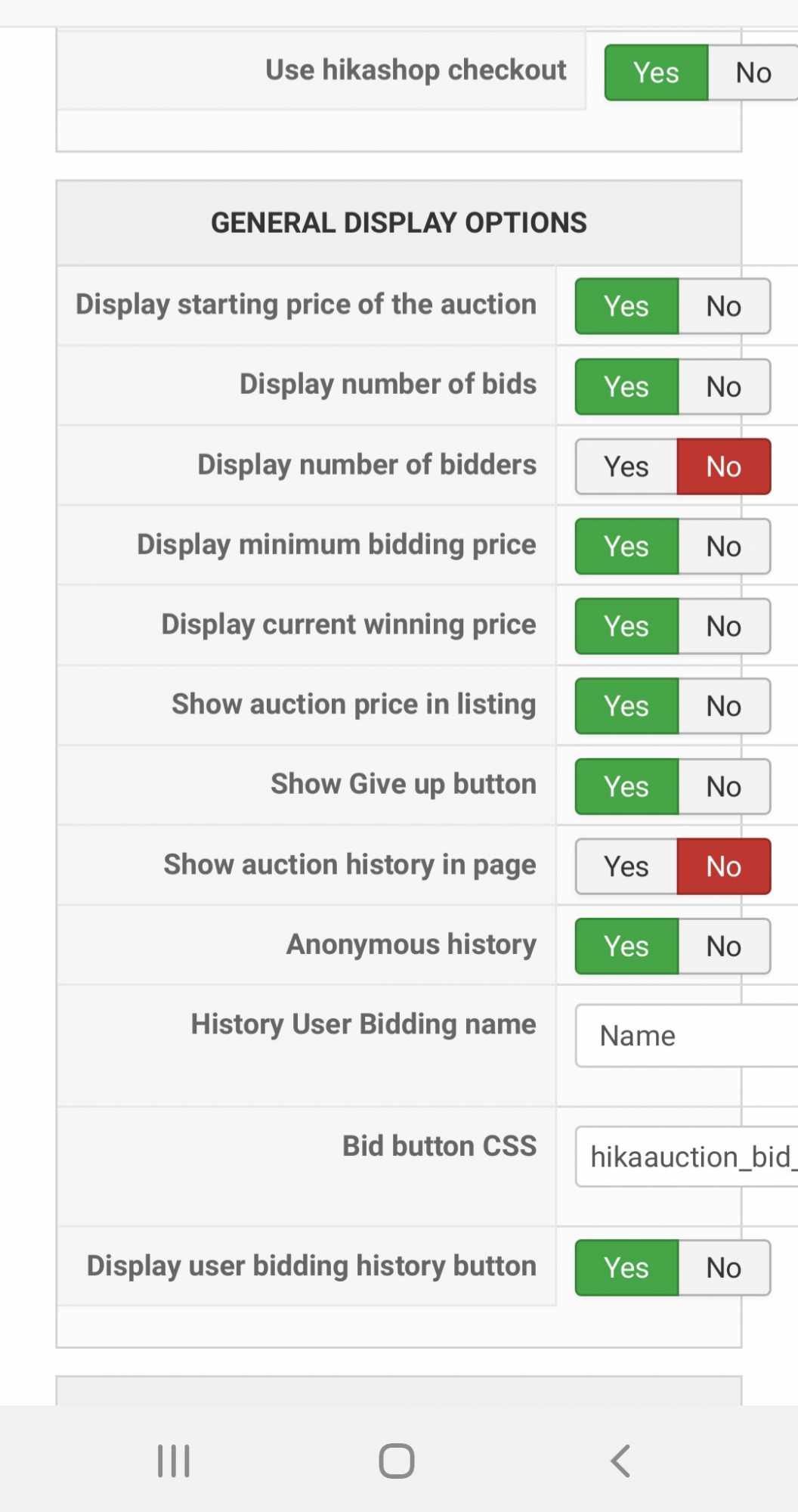
That has always been checked during this problem.
Kind regards
Jennifer
Please Log in or Create an account to join the conversation.
Less
More
- Posts: 12953
- Thank you received: 1778
6 years 3 months ago #322063
by Mohamed Thelji
Replied by Mohamed Thelji on topic cancel_auction view
Hello Jennifer,
That's weird, your website should use the new checkout system in that case, can you send us a temporary back-end access to your website so that we can directly test it ? Thank you.
You can send it using our contact form by specifying a link to that tread in your message :
www.hikashop.com/support/contact-us.html
Kind regards,
Mohamed.
That's weird, your website should use the new checkout system in that case, can you send us a temporary back-end access to your website so that we can directly test it ? Thank you.
You can send it using our contact form by specifying a link to that tread in your message :
www.hikashop.com/support/contact-us.html
Kind regards,
Mohamed.
Please Log in or Create an account to join the conversation.
Moderators: Mohamed Thelji
Time to create page: 0.120 seconds