

- Posts: 34
- Thank you received: 1
Display larger images in Auction Listing
5 years 9 months ago #329035
by ddevine
Display larger images in Auction Listing was created by ddevine
-- HikaShop version -- : 4.4.0
-- HikaAuction version -- : 3.0.1
-- Joomla version -- : 3.9.4
-- PHP version -- : 7.4.14
-- Browser(s) name and version -- : Chrome Version 88.0.4324.104
How do I Display larger images in Auction Listing?
Can you use any of the other image slideshows extensions with HikaAUction
like Simple Image Gallery, Phoco Callery, etc?
-- HikaAuction version -- : 3.0.1
-- Joomla version -- : 3.9.4
-- PHP version -- : 7.4.14
-- Browser(s) name and version -- : Chrome Version 88.0.4324.104
How do I Display larger images in Auction Listing?
Can you use any of the other image slideshows extensions with HikaAUction
like Simple Image Gallery, Phoco Callery, etc?
Please Log in or Create an account to join the conversation.

Less
More
- Posts: 12953
- Thank you received: 1778
5 years 9 months ago #329042
by Mohamed Thelji
Replied by Mohamed Thelji on topic Display larger images in Auction Listing
Hello,
for more information :
www.hikashop.com/support/documentation/1...the-display.html#css
Kind regards,
Mohamed.
Using that kind of CSS code will probably do the job :How do I Display larger images in Auction Listing?
Code:
.hikashop_product_page #hikashop_main_image_div #hikashop_main_image {
width: 400px;
}
HikaAuction display images the same way HikaShop display images so it should work if it's integrated with Hikashop. The best solution would be to directly ask the developer of these extensions if they are integrated with HikaShop/Auction.Can you use any of the other image slideshows extensions with HikaAUction
like Simple Image Gallery, Phoco Callery, etc?
Kind regards,
Mohamed.
The following user(s) said Thank You: ddevine
Please Log in or Create an account to join the conversation.
5 years 9 months ago #329079
by ddevine
Replied by ddevine on topic Display larger images in Auction Listing
Thank you, I also found a way to make larger images under Configuration and under
Product page image (width x height)
I would love to have it have the option to move the next or previous item on this page.
Product page image (width x height)
I would love to have it have the option to move the next or previous item on this page.
Please Log in or Create an account to join the conversation.
Less
More
- Posts: 12953
- Thank you received: 1778
5 years 9 months ago #329122
by Mohamed Thelji
Replied by Mohamed Thelji on topic Display larger images in Auction Listing
Hello,
What do you mean by "the option to move the next or previous item" ? Can you give us more information about it through some screenshots for example ? Thank you.
Kind regards,
Mohamed.
What do you mean by "the option to move the next or previous item" ? Can you give us more information about it through some screenshots for example ? Thank you.
Kind regards,
Mohamed.
Please Log in or Create an account to join the conversation.
5 years 9 months ago #329157
by ddevine
Replied by ddevine on topic Display larger images in Auction Listing
I would like to move from this view to the next, or previous,t is a much better viewing
experience and there are not navigation options available.
www.onepasco.com/index.php/auction/product/2-2-
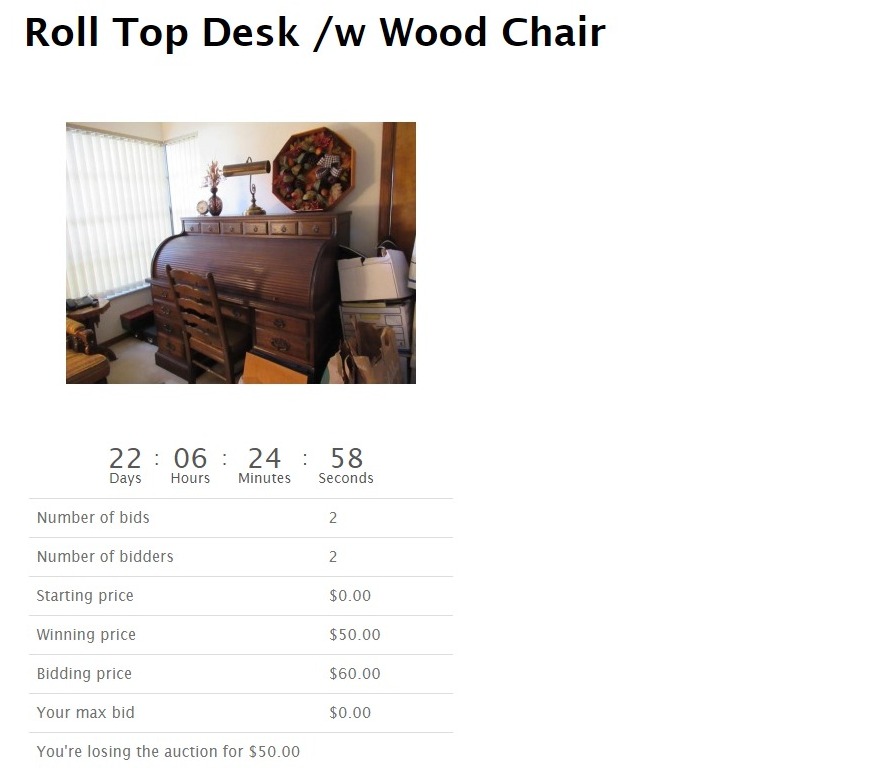 i
experience and there are not navigation options available.
www.onepasco.com/index.php/auction/product/2-2-
Please Log in or Create an account to join the conversation.
Less
More
- Posts: 12953
- Thank you received: 1778
5 years 8 months ago #329252
by Mohamed Thelji
Replied by Mohamed Thelji on topic Display larger images in Auction Listing
Hello,
Good, I think you succeed to do it by using the " www.hikashop.com/forum/hikaauction/90182...previous.html#329251 " option as advised through that thread :
www.hikashop.com/forum/hikaauction/90182...previous.html#329251
Kind regards,
Mohamed.
Good, I think you succeed to do it by using the " www.hikashop.com/forum/hikaauction/90182...previous.html#329251 " option as advised through that thread :
www.hikashop.com/forum/hikaauction/90182...previous.html#329251
Kind regards,
Mohamed.
Please Log in or Create an account to join the conversation.
5 years 8 months ago #329476
by ddevine
Replied by ddevine on topic Display larger images in Auction Listing
I want to center the Photo AND the navigation buttons, also make them larger.
See attachment.
Thank you,
Dennis D
See attachment.
Thank you,
Dennis D
Please Log in or Create an account to join the conversation.
Less
More
- Posts: 12953
- Thank you received: 1778
5 years 8 months ago #329510
by Mohamed Thelji
Replied by Mohamed Thelji on topic Display larger images in Auction Listing
Hello,
Using that kind of CSS code will probably do the job in your case :
Kind regards,
Mohamed.
Using that kind of CSS code will probably do the job in your case :
Code:
.hikashop_product_page .hikashop_next_product {
float: right;
}
Kind regards,
Mohamed.
Please Log in or Create an account to join the conversation.
5 years 8 months ago #329553
by ddevine
Replied by ddevine on topic Display larger images in Auction Listing
Is this in the php code or a css sheet somewhere?
Please Log in or Create an account to join the conversation.
Less
More
- Posts: 12953
- Thank you received: 1778
5 years 8 months ago #329572
by Mohamed Thelji
Replied by Mohamed Thelji on topic Display larger images in Auction Listing
Hello,
You can do it by editing your Hikashop CSS file, you'll find more information about it through our documentation :
www.hikashop.com/support/documentation/1...the-display.html#css
Kind regards,
Mohamed.
You can do it by editing your Hikashop CSS file, you'll find more information about it through our documentation :
www.hikashop.com/support/documentation/1...the-display.html#css
Kind regards,
Mohamed.
Please Log in or Create an account to join the conversation.
Moderators: Mohamed Thelji
Time to create page: 0.079 seconds