

- Posts: 281
- Thank you received: 3
no buttons after updating
9 years 10 months ago #258035
by francota
no buttons after updating was created by francota
-- HikaShop version -- : 3.0.0
-- Joomla version -- : 3.6.4
Hello
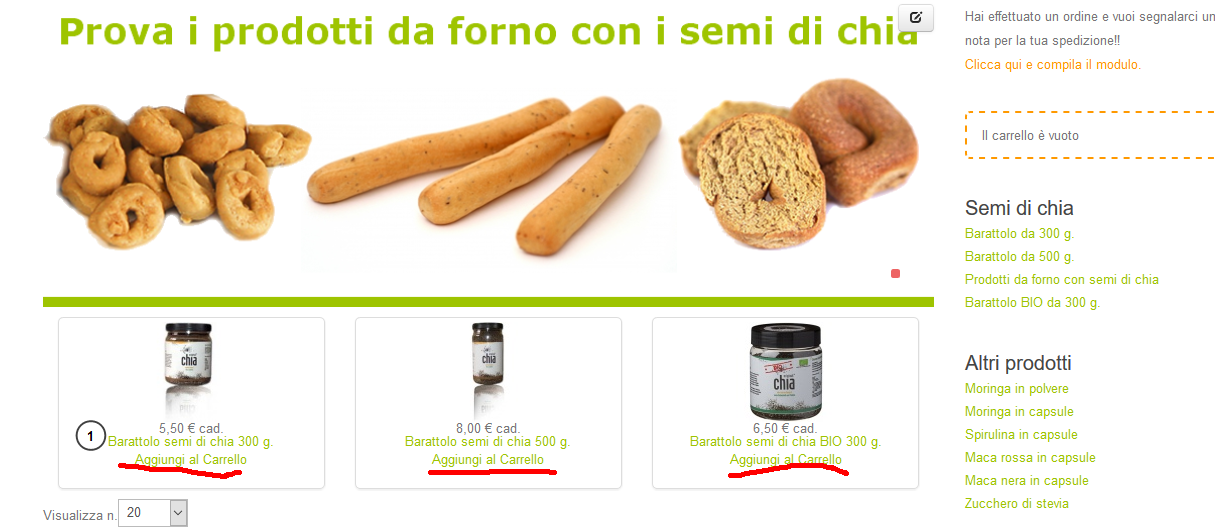
I was testing the version 3.0 on a web site where was installed hika 2.6.4, after updating I saw that the buttons are not displayed but just the text.
Where is the problem?
Thank
Frank
-- Joomla version -- : 3.6.4
Hello
I was testing the version 3.0 on a web site where was installed hika 2.6.4, after updating I saw that the buttons are not displayed but just the text.
Where is the problem?
Thank
Frank
Please Log in or Create an account to join the conversation.

9 years 10 months ago #258038
by Jerome
Jerome - Obsidev.com
HikaMarket & HikaSerial developer / HikaShop core dev team.
Replied by Jerome on topic no buttons after updating
Hi,
I'm afraid that without any details about your configuration ; we are not able to know where is the problem.
Please provide details about your website, his configuration and depending the context, some links.
The beta is an unstable version and that program is made to perform test and report issues.
But to record an issue ; we first need to reproduce it.
Regards,
I'm afraid that without any details about your configuration ; we are not able to know where is the problem.
Please provide details about your website, his configuration and depending the context, some links.
The beta is an unstable version and that program is made to perform test and report issues.
But to record an issue ; we first need to reproduce it.
Regards,
Jerome - Obsidev.com
HikaMarket & HikaSerial developer / HikaShop core dev team.
Please Log in or Create an account to join the conversation.
9 years 10 months ago #258067
by francota
Replied by francota on topic no buttons after updating
Hello jerome Yes i know that is beta versione infact i am using that just in a copy of the web site 
However i solved the problem about buttons changing the setting in configuration>display Style of web site from NO to default
Now i see the buttons, but after that now the product in the list are displayed in one column and not 3 as before.
You can see here :
bachecaviaggi.altervista.org/
What do you think about that?
Thanks
FRank
However i solved the problem about buttons changing the setting in configuration>display Style of web site from NO to default
Now i see the buttons, but after that now the product in the list are displayed in one column and not 3 as before.
You can see here :
bachecaviaggi.altervista.org/
What do you think about that?
Thanks
FRank
Please Log in or Create an account to join the conversation.

Less
More
- Posts: 12953
- Thank you received: 1778
9 years 10 months ago #258072
by Mohamed Thelji
Replied by Mohamed Thelji on topic no buttons after updating
Hello Frank,
The solution will probably be to directly go to the configuration page of the menu which have the ID number 101, and then use the "Rows" option through the "Product options" tab.
Best regards,
Mohamed Thelji.
The solution will probably be to directly go to the configuration page of the menu which have the ID number 101, and then use the "Rows" option through the "Product options" tab.
Best regards,
Mohamed Thelji.
Please Log in or Create an account to join the conversation.
9 years 10 months ago #258107
by francota
Replied by francota on topic no buttons after updating
Hello
Yes it is already setted in that way you can see in the screen shot.
But it is strange couse if I change again the style of website from default to NO, the products are displayed in the correct way on 3 column.
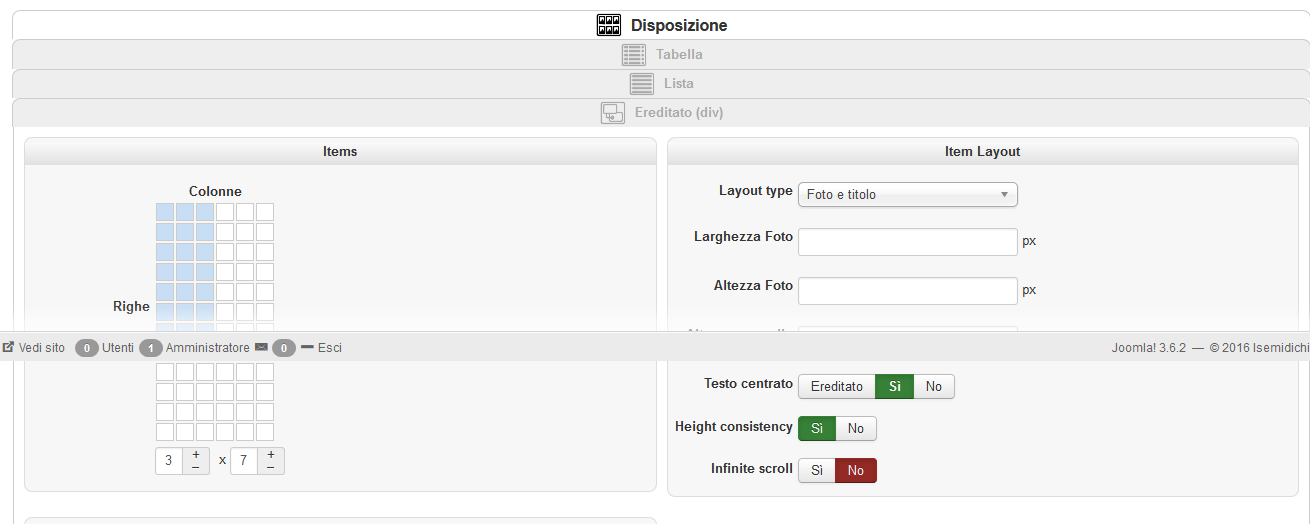
Yes it is already setted in that way you can see in the screen shot.
But it is strange couse if I change again the style of website from default to NO, the products are displayed in the correct way on 3 column.
Please Log in or Create an account to join the conversation.
Less
More
- Posts: 12953
- Thank you received: 1778
9 years 10 months ago #258122
by Mohamed Thelji
Replied by Mohamed Thelji on topic no buttons after updating
Hello,
That's weird, I didn't succeed to reproduce that issue.
Thank you.
That's weird, I didn't succeed to reproduce that issue.
In that case, can you also try it with one of Joomla's default template ?if I change again the style of website from default to NO, the products are displayed in the correct way on 3 column
Thank you.
Please Log in or Create an account to join the conversation.
9 years 10 months ago #258213
by francota
Replied by francota on topic no buttons after updating
I followed your suggest it is the same also with standard templateof joomla 
any other suggestions??
Thanks
Frank
any other suggestions??
Thanks
Frank
Please Log in or Create an account to join the conversation.
9 years 10 months ago #258220
by Jerome
Jerome - Obsidev.com
HikaMarket & HikaSerial developer / HikaShop core dev team.
Replied by Jerome on topic no buttons after updating
Hi,
You can :
1 - Deactivate the "add to cart legacy" setting to use the new "add to cart" system.
OR
2 - Set the style "style_old" in your configuration.
The first solution will use the new buttons (and their CSS).
The second solution will give you the old css so the old buttons will be displayed as buttons.
Otherwise, I think that you can restore your template.
Regards,
You can :
1 - Deactivate the "add to cart legacy" setting to use the new "add to cart" system.
OR
2 - Set the style "style_old" in your configuration.
The first solution will use the new buttons (and their CSS).
The second solution will give you the old css so the old buttons will be displayed as buttons.
Otherwise, I think that you can restore your template.
Regards,
Jerome - Obsidev.com
HikaMarket & HikaSerial developer / HikaShop core dev team.
Please Log in or Create an account to join the conversation.
9 years 10 months ago - 9 years 10 months ago #258425
by francota
Replied by francota on topic no buttons after updating
Hello
Following the first point of jerome now the buttons "add to cart" are dis displayed.
The only one that is still not visible is "go to checkout" in the cart module:
You can check same url here:
bachecaviaggi.altervista.org/
If I chose No in "Checkout legacy" when i try to delete or increase the number of product in the checkout I receive an error page:
You asked for bachecaviaggi.altervista.org/pagamento/c...85a26767-1/tmpl-ajax
Thank
Frank
Following the first point of jerome now the buttons "add to cart" are dis displayed.
The only one that is still not visible is "go to checkout" in the cart module:
You can check same url here:
bachecaviaggi.altervista.org/
If I chose No in "Checkout legacy" when i try to delete or increase the number of product in the checkout I receive an error page:
You asked for bachecaviaggi.altervista.org/pagamento/c...85a26767-1/tmpl-ajax
Thank
Frank
Last edit: 9 years 10 months ago by francota.
Please Log in or Create an account to join the conversation.
9 years 10 months ago #258443
by Jerome
Jerome - Obsidev.com
HikaMarket & HikaSerial developer / HikaShop core dev team.
Replied by Jerome on topic no buttons after updating
Hi,
That's right, the improvements in the "cart" module are not yet available in the beta (but I have almost finished it) ; so you still have a "a" link with the class "hikashop_cart_button" but with no CSS to display that element as a (nice) button.
For your checkout 404 ; Are you using a SEF component ?
Regards,
That's right, the improvements in the "cart" module are not yet available in the beta (but I have almost finished it) ; so you still have a "a" link with the class "hikashop_cart_button" but with no CSS to display that element as a (nice) button.
For your checkout 404 ; Are you using a SEF component ?
Regards,
Jerome - Obsidev.com
HikaMarket & HikaSerial developer / HikaShop core dev team.
Please Log in or Create an account to join the conversation.
9 years 10 months ago #258479
by francota
Replied by francota on topic no buttons after updating
hello
No, just joomla standard SEF component
Thanks
Frank
No, just joomla standard SEF component
Thanks
Frank
Please Log in or Create an account to join the conversation.
9 years 10 months ago #258486
by Jerome
Jerome - Obsidev.com
HikaMarket & HikaSerial developer / HikaShop core dev team.
Replied by Jerome on topic no buttons after updating
Hi,
I'm afraid that I can't reproduce your issue with the internal Joomla SEF system.
There is no "standard SEF component" but there is the Joomla router.
And regarding the 404 page you have where you can see the list of other URL (before Javascript modification), I really think that you're using a special component.
Now I started to perform some modifications to not use dynamic url rewriting using JavaScript ; but it will be best for us and or test to be handle to know and understand your configuration so we could reproduce it.
Regards,
I'm afraid that I can't reproduce your issue with the internal Joomla SEF system.
There is no "standard SEF component" but there is the Joomla router.
And regarding the 404 page you have where you can see the list of other URL (before Javascript modification), I really think that you're using a special component.
Now I started to perform some modifications to not use dynamic url rewriting using JavaScript ; but it will be best for us and or test to be handle to know and understand your configuration so we could reproduce it.
Regards,
Jerome - Obsidev.com
HikaMarket & HikaSerial developer / HikaShop core dev team.
Please Log in or Create an account to join the conversation.
9 years 10 months ago #258546
by francota
Replied by francota on topic no buttons after updating
Hello
OMG soo sorry I was sure that I didn't have any component, so after reading your message I checked again and Yes there is :blush: , it is sh404sef.
So now what can I do? disable it or tell me
Soooo sorry
Thanks
Frank
OMG soo sorry I was sure that I didn't have any component, so after reading your message I checked again and Yes there is :blush: , it is sh404sef.
So now what can I do? disable it or tell me
Soooo sorry
Thanks
Frank
Please Log in or Create an account to join the conversation.
9 years 10 months ago #258551
by Jerome
Jerome - Obsidev.com
HikaMarket & HikaSerial developer / HikaShop core dev team.
Replied by Jerome on topic no buttons after updating
Hi,
Please keep it ; it is good to have such kind of test for the beta !
I have update the packages with the modifications on the checkout system.
It should work better with SH404
Regards,
Please keep it ; it is good to have such kind of test for the beta !
I have update the packages with the modifications on the checkout system.
It should work better with SH404
Regards,
Jerome - Obsidev.com
HikaMarket & HikaSerial developer / HikaShop core dev team.
Please Log in or Create an account to join the conversation.
9 years 10 months ago #258593
by francota
Replied by francota on topic no buttons after updating
Hello
Well with your new package the problem about delete and update the quantity in the checkout loook solved
I see that you are working on cart too, I just want make you know that when you update or delete the quantity in the checkuot it doesn't update the cart
Frank
Well with your new package the problem about delete and update the quantity in the checkout loook solved
I see that you are working on cart too, I just want make you know that when you update or delete the quantity in the checkuot it doesn't update the cart
Frank
Please Log in or Create an account to join the conversation.
9 years 10 months ago #258596
by Jerome
Jerome - Obsidev.com
HikaMarket & HikaSerial developer / HikaShop core dev team.
Replied by Jerome on topic no buttons after updating
Hi,
I am sorry but I can't reproduce your issue.
Can you please provide more details about what you're doing exactly and which element (module) is not updating ?
Maybe you have some Ajax call in error in your browser console (or javascript errors).
Regards,
I am sorry but I can't reproduce your issue.
Can you please provide more details about what you're doing exactly and which element (module) is not updating ?
Maybe you have some Ajax call in error in your browser console (or javascript errors).
Regards,
Jerome - Obsidev.com
HikaMarket & HikaSerial developer / HikaShop core dev team.
Please Log in or Create an account to join the conversation.
9 years 10 months ago #258618
by francota
Replied by francota on topic no buttons after updating
I just noted that the cart is changed so I was thinking that you worked on that.
However I wanted just allert you about this:
you add a product on cart;
go to checkout;
If you change quantity of a product in the checkout section, the quantity of the same product updates in the cart;
if you change quantity of a product in cart section, the checkout doesn't update by itself;
Maybe you know already that
Frank
However I wanted just allert you about this:
you add a product on cart;
go to checkout;
If you change quantity of a product in the checkout section, the quantity of the same product updates in the cart;
if you change quantity of a product in cart section, the checkout doesn't update by itself;
Maybe you know already that
Frank
Please Log in or Create an account to join the conversation.
9 years 10 months ago #258627
by Jerome
Jerome - Obsidev.com
HikaMarket & HikaSerial developer / HikaShop core dev team.
Replied by Jerome on topic no buttons after updating
Hi,
Now I'm following you !
Thank you for that report
Regards,
Now I'm following you !
Thank you for that report
Regards,
Jerome - Obsidev.com
HikaMarket & HikaSerial developer / HikaShop core dev team.
Please Log in or Create an account to join the conversation.
Time to create page: 0.104 seconds