

- Posts: 17
- Thank you received: 5
Lists of my works with Hikashop
14 years 1 month ago #65953
by huiyun
Lists of my works with Hikashop was created by huiyun
1. Living Calendars Pte Ltd
livingcalendars.com.sg/
This is a product catalog rather than a shopping cart. I modified the add to cart function to allow visitors to add a list of products to their enquiry form.
2. Value4u Online
value4uonline.com/
A small shopping cart that has been handed over to my client to do his own maintenance.
livingcalendars.com.sg/
This is a product catalog rather than a shopping cart. I modified the add to cart function to allow visitors to add a list of products to their enquiry form.
2. Value4u Online
value4uonline.com/
A small shopping cart that has been handed over to my client to do his own maintenance.
The following user(s) said Thank You: balbooa
Please Log in or Create an account to join the conversation.

13 years 11 months ago #75131
by sammyboy1
Replied by sammyboy1 on topic Re: Lists of my works with Hikashop
Hi
The website you have designed look great please can you tell me how you have put the word 'Details' on each products above add to cart or choose options which then clicks through to all the info about the product. I think it is very clever and would like to use it on the site I am designing
I hope you can tell me how you did it
Thanks
The website you have designed look great please can you tell me how you have put the word 'Details' on each products above add to cart or choose options which then clicks through to all the info about the product. I think it is very clever and would like to use it on the site I am designing
I hope you can tell me how you did it
Thanks
Please Log in or Create an account to join the conversation.
13 years 11 months ago #75150
by huiyun
Thank you.
First of all, this was done using "image and title view".
I include this code in the following file:
Display > Views
product / listing_image_title
The button code is
Basically you add it to the place where you want the button to appear.
Below is an example used in my website:
Note that this only work on a single language (English) site.
Replied by huiyun on topic Re: Lists of my works with Hikashop
sammyboy1 wrote: Hi
The website you have designed look great please can you tell me how you have put the word 'Details' on each products above add to cart or choose options which then clicks through to all the info about the product. I think it is very clever and would like to use it on the site I am designing
I hope you can tell me how you did it
Thanks
Thank you.
First of all, this was done using "image and title view".
I include this code in the following file:
Display > Views
product / listing_image_title
The button code is
Code:
<a href="<?php echo $link;?>" class="hikashop_cart_button">Details</a>
Basically you add it to the place where you want the button to appear.
Below is an example used in my website:
Code:
<!-- PRODUCT NAME -->
<span class="hikashop_product_name">
<?php if($this->params->get('link_to_product_page',1)){ ?>
<a href="<?php echo $link;?>">
<?php }
echo $this->row->product_name;
if($this->params->get('link_to_product_page',1)){ ?>
</a>
<?php } ?>
</span>
<div style="margin-bottom: 5px;"><a href="<?php echo $link;?>" class="hikashop_cart_button">Details</a></div>
<!-- EO PRODUCT NAME -->
Note that this only work on a single language (English) site.
The following user(s) said Thank You: Batas
Please Log in or Create an account to join the conversation.
13 years 11 months ago #75224
by sammyboy1
Replied by sammyboy1 on topic Re: Lists of my works with Hikashop
Hi huiyun
Thank yo so much for your help your websites look great

Thank yo so much for your help your websites look great
Please Log in or Create an account to join the conversation.
- mariussport
-

- Offline
- Test fase
13 years 9 months ago #85711
by mariussport
Replied by mariussport on topic Lists of my works with Hikashop
hi,
nice websites, Question: how did you get the code number in the "product rigt part". In hikashop it's in the top part.
regards,
Marius
nice websites, Question: how did you get the code number in the "product rigt part". In hikashop it's in the top part.
regards,
Marius
Please Log in or Create an account to join the conversation.
13 years 9 months ago #85727
by huiyun
Replied by huiyun on topic Lists of my works with Hikashop
To display product code on a product page (show_default.php, show_tabular.php, etc...),
the code is as follows:
If you need a label such as "Product Code: " or "SKU: " :
or
To place the product code in "right part", nest those code inside
The end result looks something like this:
the code is as follows:
Code:
<?php echo $this->element->product_code; ?>
If you need a label such as "Product Code: " or "SKU: " :
Code:
<?php echo 'Product Code: '.$this->element->product_code; ?>
Code:
<?php echo 'SKU: '.$this->element->product_code; ?>
To place the product code in "right part", nest those code inside
Code:
<div id="hikashop_product_right_part" class="hikashop_product_right_part"> ... </div>
The end result looks something like this:
Code:
<div id="hikashop_product_right_part" class="hikashop_product_right_part">
<?php echo 'Product Code: '.$this->element->product_code; ?>
<br/>
// ...more codes
</div>
The following user(s) said Thank You: mariussport
Please Log in or Create an account to join the conversation.
- mariussport
-
- Offline
- Test fase
13 years 9 months ago #85807
by mariussport
Replied by mariussport on topic Lists of my works with Hikashop
hi,
thank you, your info is perfect! now i have a nice product number in the product page, right part.
regards,
Marius
thank you, your info is perfect! now i have a nice product number in the product page, right part.
regards,
Marius
Please Log in or Create an account to join the conversation.
13 years 6 months ago #100321
by mancer
Replied by mancer on topic Lists of my works with Hikashop
hello huiyun
I am noew to Hikashop and Joomla... am looking for a quicker start by using a template to use and I like your calendars style.... was that based on a temnplate at all? I am finding it difficult to find any decent HShop templates and it looks like there is only about 4 or 5 out there!!
I hope I can find one.
I am noew to Hikashop and Joomla... am looking for a quicker start by using a template to use and I like your calendars style.... was that based on a temnplate at all? I am finding it difficult to find any decent HShop templates and it looks like there is only about 4 or 5 out there!!
I hope I can find one.
Please Log in or Create an account to join the conversation.
13 years 6 months ago #100440
by huiyun
Replied by huiyun on topic Lists of my works with Hikashop
I did use a template downloaded (FOC) from this Joomlart.
www.joomlart.com/forums/downloads.php?do=cat&id=361
As the name suggests, it is a blank template meaning it provides only a skeleton for you to fill in your design using CSS.
www.joomlart.com/forums/downloads.php?do=cat&id=361
As the name suggests, it is a blank template meaning it provides only a skeleton for you to fill in your design using CSS.
Please Log in or Create an account to join the conversation.

13 years 6 months ago #101803
by twhcreations
Replied by twhcreations on topic Lists of my works with Hikashop
livingcalendars.com.sg
Love how you have set it up for quotes, have you got quick process your using for this i have been searching for a couple of days for this feature in hika shop and cannot figure it out yet
Love how you have set it up for quotes, have you got quick process your using for this i have been searching for a couple of days for this feature in hika shop and cannot figure it out yet
Please Log in or Create an account to join the conversation.
13 years 6 months ago #101881
by mancer
Replied by mancer on topic Lists of my works with Hikashop
would you be interested in quoting on providing similar site for us? I went to your caveman International website but it is off-line at the moment. How can I discuss this with you?
Please Log in or Create an account to join the conversation.
13 years 6 months ago #101887
by huiyun
Not really. It involves a lot of tweaking. The basic idea behind it is not to fill in the price, hence everything item is "free". The shopping cart system would treat them as free items so that it skip the payment stage. However a lot of tweaking is needed especially in the layout and email so that the end result looks proper.
Replied by huiyun on topic Lists of my works with Hikashop
twhcreations wrote: livingcalendars.com.sg
Love how you have set it up for quotes, have you got quick process your using for this i have been searching for a couple of days for this feature in hika shop and cannot figure it out yet
Not really. It involves a lot of tweaking. The basic idea behind it is not to fill in the price, hence everything item is "free". The shopping cart system would treat them as free items so that it skip the payment stage. However a lot of tweaking is needed especially in the layout and email so that the end result looks proper.
Please Log in or Create an account to join the conversation.
13 years 6 months ago #101888
by huiyun
Thank you for showing interest. I think it is better for you to discuss with my boss. I shall email you her details shortly.
Replied by huiyun on topic Lists of my works with Hikashop
mancer wrote: would you be interested in quoting on providing similar site for us? I went to your caveman International website but it is off-line at the moment. How can I discuss this with you?
Thank you for showing interest. I think it is better for you to discuss with my boss. I shall email you her details shortly.
The following user(s) said Thank You: mancer
Please Log in or Create an account to join the conversation.
13 years 3 months ago #117379
by rdalfred
Replied by rdalfred on topic Lists of my works with Hikashop
hello huiyun,
I like your sites, especially the site livingcalendars.com.sg
Could you please let me know how did you get the characteristics options to chhose from the product listing?
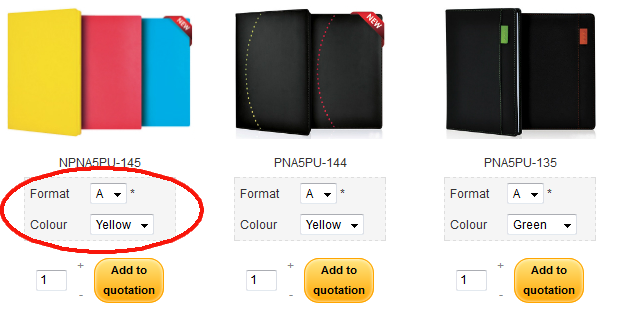
thanx in advance
I like your sites, especially the site livingcalendars.com.sg
Could you please let me know how did you get the characteristics options to chhose from the product listing?
thanx in advance
Please Log in or Create an account to join the conversation.
13 years 3 months ago #117400
by huiyun
Replied by huiyun on topic Lists of my works with Hikashop
First of all you need to create the fields you need under "Custom Field" under type "item". In the module (mod_hikashop_content) / or configuration, depending on which one controls your product listing, make sure that "yes" is selected for "Display Custom Item Fields".
The following user(s) said Thank You: rdalfred
Please Log in or Create an account to join the conversation.
13 years 3 months ago #117412
by rdalfred
Replied by rdalfred on topic Lists of my works with Hikashop
ok got it, thank you a lot!!!
Please Log in or Create an account to join the conversation.
13 years 3 weeks ago #127719
by josonet
Replied by josonet on topic view product options table
Hello,
I could help.
I can not find where to configure the screen article view tables (items with options) attached image.
I have proven in
system / settings / products / features selection method (tables)
can be done by changing some other option? or must be programmed?
thank you very much
I could help.
I can not find where to configure the screen article view tables (items with options) attached image.
I have proven in
system / settings / products / features selection method (tables)
can be done by changing some other option? or must be programmed?
thank you very much
Please Log in or Create an account to join the conversation.
Less
More
- Posts: 159
- Thank you received: 0
13 years 3 weeks ago - 13 years 3 weeks ago #128017
by Shafan Hameed
Replied by Shafan Hameed on topic Re: Lists of my works with Hikashop
Hi both of your websites are so nice
i have a question here
i have added the product Details code in the product / listing_img_title.php and the button is showing itself but how to change its styling ?
It is showing in as Css styling button how to make it show as normal button ?
Also kindly tell me how to add the other code to show SKU. i mean in which file or where ?
i have a question here
i have added the product Details code in the product / listing_img_title.php and the button is showing itself but how to change its styling ?
It is showing in as Css styling button how to make it show as normal button ?
Also kindly tell me how to add the other code to show SKU. i mean in which file or where ?
Last edit: 13 years 3 weeks ago by Shafan Hameed.
Please Log in or Create an account to join the conversation.
Less
More
- Posts: 2
- Thank you received: 0
12 years 7 months ago #148472
by jamescondren
Replied by jamescondren on topic Lists of my works with Hikashop
Looks very nice.
Please Log in or Create an account to join the conversation.
Time to create page: 0.164 seconds