

- Posts: 15
- Thank you received: 0
Add to wishlist function for coming soon products
14 years 2 weeks ago #65128
by shiva
Add to wishlist function for coming soon products was created by shiva
We have a products group called "coming soon"
All products from this group are without selling price.
We like to have "add to wishlist" function for these products but without "add to cart" function.
All products from this group are without selling price.
We like to have "add to wishlist" function for these products but without "add to cart" function.
Please Log in or Create an account to join the conversation.

14 years 1 week ago #65776
by Xavier
Replied by Xavier on topic Re: Add to wishlist function for coming soon products
Hi shiva,
I think that you can edit the view "product / quantity" and add a control for the "add to cart" display conditions, like:
Example:
You can replace the number "13" by the id of your category.
Hope this will help you.
I think that you can edit the view "product / quantity" and add a control for the "add to cart" display conditions, like:
Code:
$this->element->category_id != 13
Code:
if($this->params->get('add_to_cart') && $this->element->category_id != 13){
echo $this->cart->displayButton(JText::_('ADD_TO_CART'),'add',$this->params,$url,$this->ajax,'',$max,$min);
$btnType = 'wish';
}
You can replace the number "13" by the id of your category.
Hope this will help you.
Please Log in or Create an account to join the conversation.
14 years 1 week ago #65813
by shiva
Replied by shiva on topic Re: Add to wishlist function for coming soon products
Yes, after I edit codes, It's display "Add to Wishlist" button.
But, when click "Show the wishlist" still display price "0.00" and still can process "Add to cart" function.
Of course, we don't allow showing "zero" price and we don't allow process "add to cart" function for this product group.
We only allow users can add products to their wishlist.
When product and price ready, we will move this product to selling products group, then users can process add to cart function.
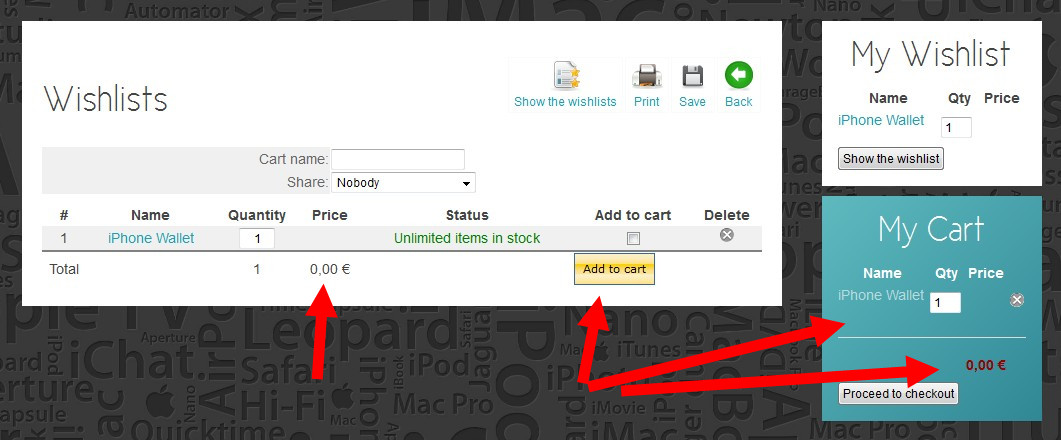
But, when click "Show the wishlist" still display price "0.00" and still can process "Add to cart" function.
Of course, we don't allow showing "zero" price and we don't allow process "add to cart" function for this product group.
We only allow users can add products to their wishlist.
When product and price ready, we will move this product to selling products group, then users can process add to cart function.
Please Log in or Create an account to join the conversation.
14 years 1 week ago #65825
by Xavier
Replied by Xavier on topic Re: Add to wishlist function for coming soon products
Hi again,
Maybe you can add a if/else in the "cart / showcart" view to hide the checkboxes when the price value is "0" ?
You can replace the line:
By:
Maybe you can add a if/else in the "cart / showcart" view to hide the checkboxes when the price value is "0" ?
You can replace the line:
Code:
<input type="checkbox" name="data[products][<?php echo $cart->product_id;?>][checked]" value="1"/>
Code:
<?php if((int)$cart->prices[0]->price_value != 0){ ?>
<input type="checkbox" name="data[products][<?php echo $cart->product_id;?>][checked]" value="1"/>
<?php } ?>
The following user(s) said Thank You: shiva
Please Log in or Create an account to join the conversation.
Time to create page: 0.203 seconds