
how to show the Tax after the total at the checkou

-- Joomla version -- : 3.3.6
-- PHP version -- : 5.4.35
Hello,
How to add the TAX line after the total? only at the checkout time!, thanks
Please Log in or Create an account to join the conversation.

You can configure your tax rules via the menu System>Taxes.
If you don't want to display prices with taxes and only have the tax line above the total on the chekcout, make sure that the "show taxed prices" option of the HikaShop configuration is turned off and that the same option is also turned off when you edit your products listing menus/modules via the menu Display>Content menus/modules of HikaShop.
Please Log in or Create an account to join the conversation.
here you go a link
cudahyfood.com/index.php/hikashop-menu-f...ory/15-fried-chicken
please add product then check out and see
Please Log in or Create an account to join the conversation.
I don't see taxes on your checkout. This indicates that there is no tax rule configured which matches the current situation (zone encompass the "main tax zone" of the configuration, product tax category similar to the product tax category of the product, enabled tax rule, no zip code restriction, type of client properly configured).
Basically, you should check all the points that we list in our FAQ regarding the taxes not displaying :
www.hikashop.com/support/support/documen...ion-listing.html#faq
One of the points there must not be correctly setup on your website.
If you can't find it, then please provide a screenshot of the options page of your tax rule (edit it in the menu System>Taxes).
Please Log in or Create an account to join the conversation.
I could not figure it out, I did watch video on YouTube, that did not add anything , i sent you the tax rules and the tax configurations from main menu
Please Log in or Create an account to join the conversation.
take.ms/pZmBi
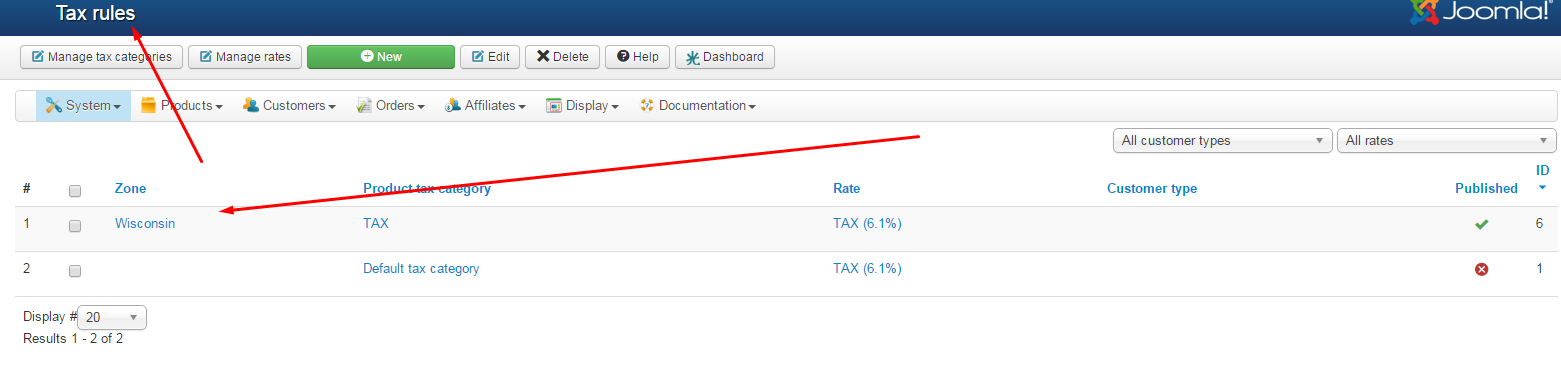
The tax rules listing doesn't contain all the settings of the tax rule and thus we cannot assess your current situation completely with the screenshot you provided.
Please Log in or Create an account to join the conversation.
Please Log in or Create an account to join the conversation.
The tax rule is properly configured so it must come from something else.
I'm guessing that the problem is that you selected a different "tax category" in the product edition page of your products.
Can you make sure that this is the not case ?
Please Log in or Create an account to join the conversation.
Please Log in or Create an account to join the conversation.
If you still need more details or screenshot please let me know
Thanks for all your help and Support
Please Log in or Create an account to join the conversation.
Thank you for the details.
Two things:
1. You don't need a wisconsin tax zone. You can directly select the wisconsin state zone in your tax rule.
2. You selected a tax category called "TAX" in your tax rule, so the tax will only apply to the products of that "TAX" tax category. Edit your products and check their "product tax category" setting. It needs to be set to the same tax category as your tax rule or the tax won't apply to them.
Please Log in or Create an account to join the conversation.
where i have to do this (((Edit your products and check their "product tax category" setting. It needs to be set to the same tax category as your tax rule or the tax won't apply to them.)))
Im not sure what else i have to do, everyone asked me to read the Documentations, I did several times, I did post my question, i did follow instructions and still not there
do you guys have a clear video i can follow it, to fix this issue,
Im raising the White flag,
Thanks
Please Log in or Create an account to join the conversation.
Please Log in or Create an account to join the conversation.
Please Log in or Create an account to join the conversation.
www.hikashop.com/support/support/documen...ion-listing.html#faq
If you can't find it, provide a backend access along with a link to this thread via our contact form and we'll have a look at your settings for you:
www.hikashop.com/support/contact-us.html
Please Log in or Create an account to join the conversation.
please let me know is this correct, thanks
Please Log in or Create an account to join the conversation.
On this screenshot www.hikashop.com/media/kunena/attachment.../seq3_2015-02-05.png you configured your tax rule to only apply to the products of the tax category "TAX", so if you want the tax to apply to your product, yes, you need to select that same tax category in the tax category option of the product. That's what I explained in a previous message:
www.hikashop.com/forum/checkout/874690-h...-checkou.html#189762
Please Log in or Create an account to join the conversation.
first when you create a product you should apply the appropriate TAX, and its very interested feature that put it this way because in many places some times there is more than one kind of tax based on product itself like food ( here in this state Tax for milk different than other kind of food, tax for baby food also different, so thank you so much for helping in this matter
the second element was related to a plugin that has also an effect the way how the tax looks like,
so thank you all,
Please Log in or Create an account to join the conversation.