

- Posts: 637
- Thank you received: 26
Cart display on mobile not displayed properly
8 years 9 months ago - 8 years 9 months ago #285368
by Lumiga
Kind regards,
Lumiga
Cart display on mobile not displayed properly was created by Lumiga
-- HikaShop version -- : 3.2.2.
-- Joomla version -- : 3.8
-- PHP version -- : 7
Hi,
Just to let you know.
When you go create menu-item cart display, and look it on mobile it is not displayed properly. See screeshot
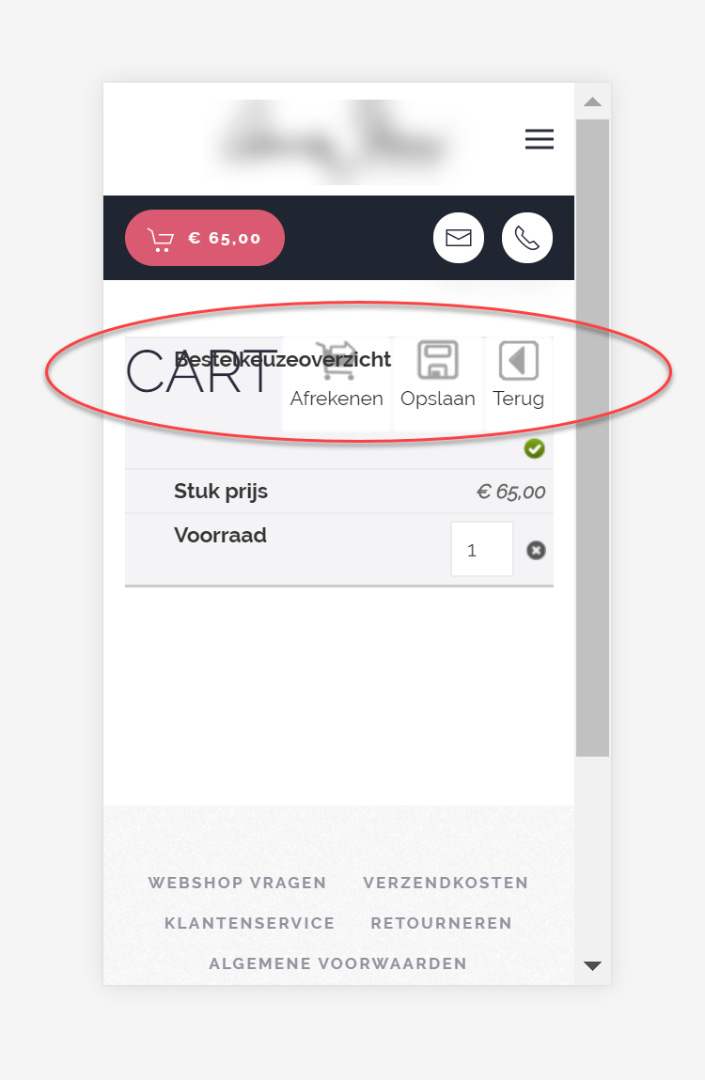
I don't know if this has something to do with my template.
But also without all my custom CSS it looks the same.
I fixed it with this custom CSS code:
But also the tabled layout doesn't look good in a specific pixel rance between 790 and 769 pixels.
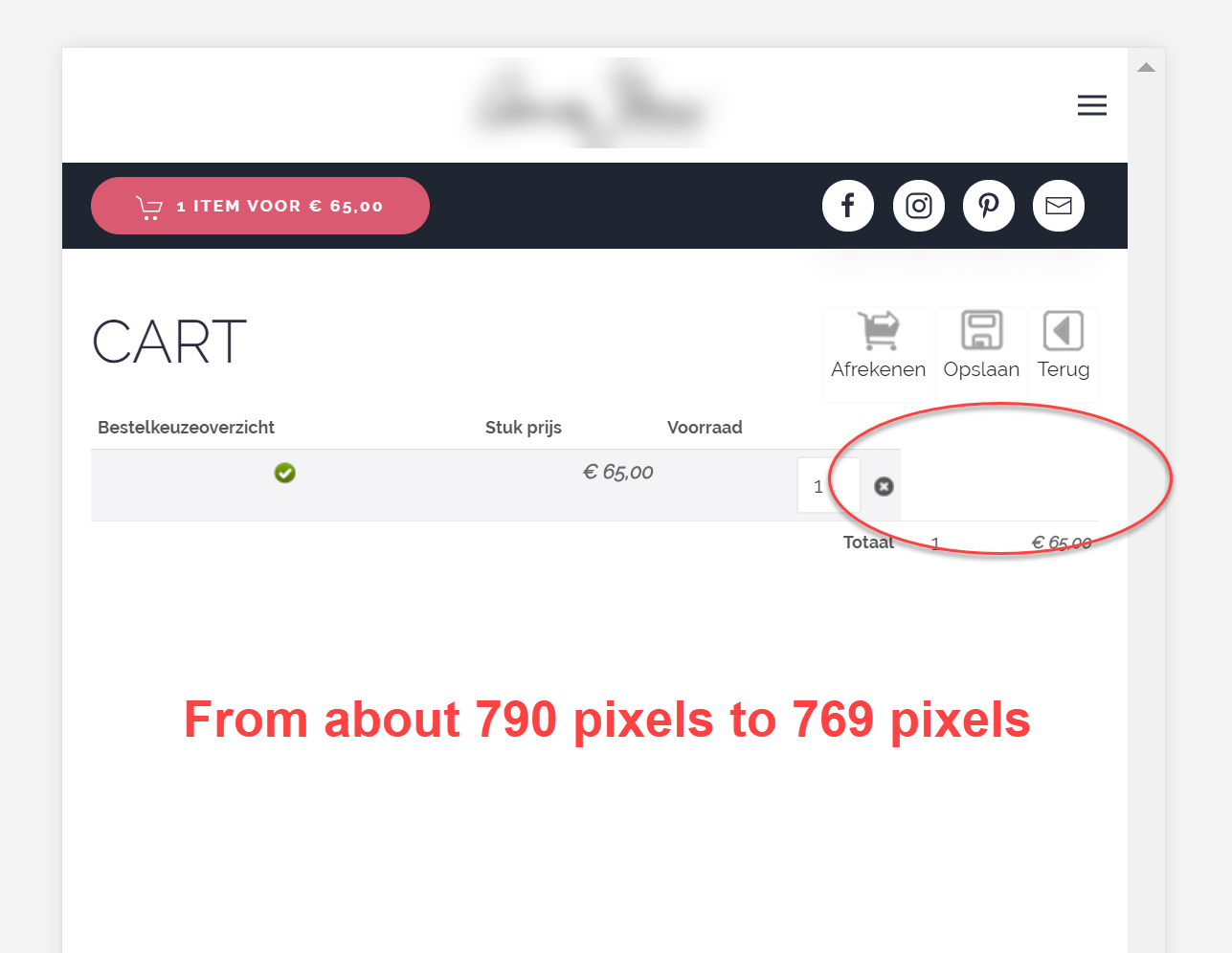
So maby it's worth to take a look at this part of the code if you see the same issues on your hand.
Kind regards,
Lumiga
-- Joomla version -- : 3.8
-- PHP version -- : 7
Hi,
Just to let you know.
When you go create menu-item cart display, and look it on mobile it is not displayed properly. See screeshot
I don't know if this has something to do with my template.
But also without all my custom CSS it looks the same.
I fixed it with this custom CSS code:
Code:
@media (max-width: 461px) {
#hikashop_cart_product_listing {
padding-top: 70px;
}}
But also the tabled layout doesn't look good in a specific pixel rance between 790 and 769 pixels.
So maby it's worth to take a look at this part of the code if you see the same issues on your hand.
Kind regards,
Lumiga
Kind regards,
Lumiga
Last edit: 8 years 9 months ago by Lumiga.
The following user(s) said Thank You: Philip
Please Log in or Create an account to join the conversation.

8 years 9 months ago #285394
by Philip
Replied by Philip on topic Cart display on mobile not displayed properly
Hello,
Thanks for your return, I process some test and see by myself some point to correct, but that wasn't same display issue than you.
Is it possible to see your page with this issue ? That will allow me to investigate and maybe find the root issue.
Awaiting news from you.
Thanks !
Regards
Thanks for your return, I process some test and see by myself some point to correct, but that wasn't same display issue than you.
Is it possible to see your page with this issue ? That will allow me to investigate and maybe find the root issue.
Awaiting news from you.
Thanks !
Regards
Please Log in or Create an account to join the conversation.
8 years 9 months ago - 8 years 9 months ago #285414
by Lumiga
Kind regards,
Lumiga
Replied by Lumiga on topic Cart display on mobile not displayed properly
Hi Philip,
I have delete my custom code, so now you can see the issue on this page:
But first put some products to you cart.
Kind regards,
Lumiga
I have delete my custom code, so now you can see the issue on this page:
This message contains confidential information
But first put some products to you cart.
Kind regards,
Lumiga
Kind regards,
Lumiga
Last edit: 8 years 9 months ago by Lumiga.
The following user(s) said Thank You: Philip
Please Log in or Create an account to join the conversation.
8 years 9 months ago - 8 years 9 months ago #285435
by Philip
Replied by Philip on topic Cart display on mobile not displayed properly
Hello,
There is a specific responsive css command which is missing... Quite strange...
Add to your default_frontend.css this css command :
Note : You will see in this tutorial , how to add css command in your frontend file.
That may correct, your display issue.
Best regards
There is a specific responsive css command which is missing... Quite strange...
Add to your default_frontend.css this css command :
Code:
@media only screen and (max-width: 760px), (max-device-width: 1024px) and (min-device-width: 768px) {
.hika_toolbar.toolbar {
float: none;
}
}
Note : You will see in this tutorial , how to add css command in your frontend file.
That may correct, your display issue.
Best regards
Last edit: 8 years 9 months ago by Jerome. Reason: fix CSS code which came from a ctrl+c/ctrl+v of the browser inspector tools with some extra content
The following user(s) said Thank You: trevsmiff
Please Log in or Create an account to join the conversation.
8 years 9 months ago #285563
by Lumiga
Kind regards,
Lumiga
Replied by Lumiga on topic Cart display on mobile not displayed properly
Hi Philip,
Your code doesn't work. (I have delete this line frontend_defaul…1515086459:933, but still it didn't worked)
So I use this code to fix the issue.
I have put in my own custom CSS.
Kind regards,
Lumiga
Your code doesn't work. (I have delete this line frontend_defaul…1515086459:933, but still it didn't worked)
So I use this code to fix the issue.
I have put in my own custom CSS.
Code:
@media (max-width: 768px) {
.hika_toolbar.toolbar {
float: none;
}}
Kind regards,
Lumiga
Kind regards,
Lumiga
Please Log in or Create an account to join the conversation.

8 years 9 months ago #285565
by Jerome
Jerome - Obsidev.com
HikaMarket & HikaSerial developer / HikaShop core dev team.
Replied by Jerome on topic Cart display on mobile not displayed properly
Hello,
Yes you can adjust the media query depending your needs.
More than the extra content "frontend_default.." there was also missing brackets for the @media ; it's a side effect of the browser inspector tools when you perform a copy/paste.
Regards,
Yes you can adjust the media query depending your needs.
More than the extra content "frontend_default.." there was also missing brackets for the @media ; it's a side effect of the browser inspector tools when you perform a copy/paste.
Regards,
Jerome - Obsidev.com
HikaMarket & HikaSerial developer / HikaShop core dev team.
The following user(s) said Thank You: Lumiga
Please Log in or Create an account to join the conversation.
Time to create page: 1.239 seconds